Shifting Tides in Kubernetes Management: The Strategic Migration from Dashboard to Headlamp

Redmond, WA – July 13, 2026 – The Kubernetes ecosystem is witnessing a significant evolution in its operational tooling, with a growing emphasis on enhanced security, multi-cluster management, and streamlined developer experience. A recent comprehensive guide, authored by Vincent T. of Microsoft, outlines a strategic migration path for organizations currently utilizing Kubernetes Dashboard, advocating for a transition to Headlamp, a modern, client-centric Kubernetes UI. This shift reflects the maturing landscape of container orchestration, where robust, flexible, and security-conscious management interfaces are becoming paramount.
The Evolution of Kubernetes Management UIs
For many years, Kubernetes Dashboard served as the de facto web-based interface for managing Kubernetes clusters, offering a visual overview of resources and basic operational capabilities. Running as an in-cluster application, Dashboard provided a convenient entry point for many users to interact with their clusters, often relying on service account tokens for authentication. However, as Kubernetes deployments have scaled in complexity, number of clusters, and security requirements, the limitations of this model have become increasingly apparent.
Headlamp emerges as a powerful alternative, designed from the ground up to address these modern challenges. Unlike Dashboard, Headlamp operates with a dual-mode approach: it can run as a desktop application, leveraging a user’s existing kubeconfig for secure, identity-aware access across multiple clusters, or it can be deployed in-cluster, integrating with enterprise-grade OpenID Connect (OIDC) providers for shared, managed access. This architectural flexibility is a cornerstone of its appeal, aligning more closely with contemporary security best practices and the demands of multi-tenant, multi-cloud environments.
Understanding the Core Architectural Differences
The fundamental distinction between Kubernetes Dashboard and Headlamp lies in their operational paradigms. Kubernetes Dashboard is intrinsically tied to the cluster it monitors, existing as a web application within the cluster itself. Its reliance on service account tokens, while functional, has raised concerns regarding granular access control and the potential for privilege escalation if not meticulously configured. This "UI lives with the cluster" model often necessitates unique deployments and access configurations for each cluster an organization manages, leading to operational overhead in multi-cluster scenarios.
Headlamp, in contrast, adopts a "UI follows your identity" philosophy, particularly in its desktop incarnation. When run on a user’s machine, it functions as a sophisticated Kubernetes client with a graphical interface, inheriting the user’s kubeconfig and, by extension, their existing RBAC (Role-Based Access Control) permissions. This means that if a user can execute kubectl commands against a cluster, Headlamp will automatically respect those same permissions, eliminating the need for separate authentication flows or duplicated RBAC configurations. For in-cluster deployments, Headlamp integrates with OIDC, providing a robust, enterprise-ready authentication layer that aligns with broader identity management strategies. This design philosophy significantly enhances security by centralizing identity management and reducing the attack surface associated with long-lived, cluster-specific tokens.
The Migration Imperative: Addressing Modern Kubernetes Challenges
The push for migration to tools like Headlamp is not merely a preference for new technology but a response to pressing operational and security needs within the Kubernetes ecosystem. Data from various industry surveys consistently points to the increasing adoption of multi-cluster architectures, with enterprises often managing dozens or even hundreds of Kubernetes clusters across hybrid and multi-cloud environments. In such scenarios, a single-cluster-focused UI becomes a bottleneck, hindering developer productivity and increasing the complexity of governance.
Security remains a paramount concern. The Kubernetes threat landscape is constantly evolving, and tools that inherently support least-privilege principles and integrate seamlessly with enterprise identity providers are highly valued. Headlamp’s ability to leverage existing kubeconfig credentials for desktop users and OIDC for in-cluster deployments directly addresses these security imperatives, offering a more resilient and manageable access model compared to the traditional service account token approach of Dashboard.
A Phased Approach to Transition: The Pre-Migration Checklist
The migration guide emphasizes a careful, phased approach to minimize disruption and ensure a smooth transition. A critical pre-migration checklist is recommended, starting with a thorough inventory of current Kubernetes Dashboard usage. This includes identifying frequently accessed resources, common workflows, and any optional dependencies that might exist. Documenting these "baseline" activities allows teams to validate Headlamp’s functionality against their real-world needs.
A crucial technical prerequisite is confirming the functionality of kubeconfig files. Since Headlamp, particularly in its desktop version, relies heavily on kubeconfig for cluster connectivity and authentication, verifying kubectl access to target clusters is a non-negotiable first step. Simple commands like kubectl config current-context and kubectl get pods -n <namespace> serve as quick validation points. If kubectl works, Headlamp is likely to function seamlessly with the same identity and RBAC rules.
Organizations are advised to choose a rollout plan, with a "parallel rollout" being the recommended strategy. This involves running Headlamp alongside Kubernetes Dashboard for a period, allowing users to familiarize themselves with the new interface and validate workflows without immediately deprecating the old system. This approach is particularly safer for shared clusters, where a sudden "cutover" could disrupt critical operations.
Finally, deciding where Headlamp will run – desktop or in-cluster – is a strategic choice. Many organizations opt for both, providing individual developers with the flexibility of a desktop client while offering a centralized, shared UI for platform teams or specific operational roles. This hybrid deployment model maximizes Headlamp’s utility across different user personas and use cases.
Installation and Deployment: Flexibility for Diverse Needs
Headlamp’s installation options reflect its adaptable design. For individual users, desktop installation is straightforward, leveraging common package managers like WinGet (Windows), Chocolatey (Windows), Homebrew (macOS), or Flatpak (Linux). This user-managed approach ensures that developers can quickly get started, using their existing kubeconfig without requiring cluster-wide administrative privileges for the UI itself. The rapid adoption of such client-side tools underscores a broader trend towards empowering individual engineers with local, performant interfaces that integrate seamlessly with their development workflows.
For shared access, Headlamp can be deployed in-cluster, typically via Helm charts or a YAML manifest. This managed deployment allows cluster administrators to integrate Headlamp into their existing CI/CD pipelines and manage its lifecycle like any other cluster application. This is particularly beneficial for platform teams who need to provide a consistent, centrally managed UI experience for a larger user base, often exposed through an ingress controller for stable, secure access. The guide provides clear steps for Helm installation and verification, emphasizing the importance of securing in-cluster deployments with TLS and strict access controls.
Regular updates are also critical for security and feature parity. Headlamp leverages the same package managers for desktop updates, simplifying the process for individual users, while in-cluster deployments can be updated via Helm, ensuring that platform teams maintain control over the version and configuration.
Authentication and RBAC: Reinforcing Kubernetes Security
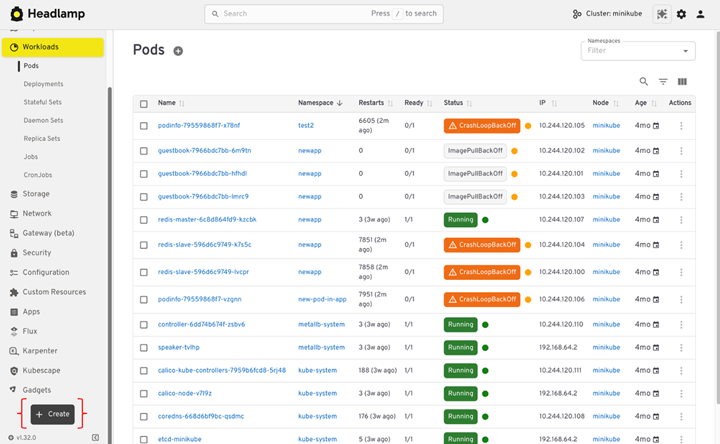
One of Headlamp’s most significant advantages lies in its robust approach to authentication and RBAC, fundamentally aligning with Kubernetes’ native security model. For desktop users, Headlamp directly consumes the kubeconfig file, meaning that authentication is handled by the underlying Kubernetes context. If a user’s kubeconfig provides access via client certificates, token files, or an external identity provider, Headlamp transparently utilizes these credentials. This "use what you already have" model drastically simplifies access management and reduces the potential for security misconfigurations associated with separate UI-specific authentication tokens. The Headlamp UI dynamically adapts to the user’s RBAC permissions, only presenting actions (e.g., edit, delete) that the user is authorized to perform, mirroring kubectl‘s behavior.
For in-cluster deployments, where shared access is the norm, Headlamp supports OpenID Connect (OIDC). This enterprise-grade authentication protocol allows Headlamp to integrate with existing identity providers (IdPs) such as Azure Active Directory, Okta, or Keycloak. This enables single sign-on (SSO) capabilities, consistent user provisioning, and centralized audit trails, which are critical requirements for large organizations. The guide details the necessary OIDC configuration parameters and highlights a common pitfall: ensuring the OIDC provider allows Headlamp’s callback URL and that ingress controllers correctly forward X-Forwarded-Proto headers to prevent http callback URL generation instead of https.
Regardless of the deployment model, the core principle remains: Headlamp adheres strictly to Kubernetes’ RBAC rules. This emphasis on "least privilege" ensures that users only have access to the resources and actions they are explicitly granted, a cornerstone of secure cloud-native operations. Practical guidance suggests starting with read-only access and progressively adding more permissions as needed, leveraging Kubernetes Roles and ClusterRoles effectively.
Multi-Cluster Management: A Game Changer for Scalability
Perhaps one of the most compelling reasons for adopting Headlamp, particularly in complex enterprise environments, is its native support for multi-cluster management. Kubernetes Dashboard is inherently a single-cluster tool, requiring users to switch contexts or even deploy separate instances to manage different clusters. This limitation becomes a significant operational burden as organizations expand their Kubernetes footprint.
Headlamp, by virtue of its client-side architecture and kubeconfig integration, inherently supports multi-cluster workflows. It reads cluster definitions directly from the user’s kubeconfig files, presenting all accessible clusters within a single UI instance. Users can effortlessly switch between development, staging, and production clusters, or across different geographical regions, without having to restart the application or manage multiple browser tabs. This capability significantly boosts developer productivity and reduces cognitive load, allowing engineers to maintain focus within a single interface.
The flexibility extends to handling multiple kubeconfig files simultaneously, allowing users to consolidate access to disparate clusters into a single Headlamp session. This feature, combined with the ability to add new clusters directly from the UI, offers an unparalleled level of convenience for managing distributed Kubernetes estates. Critically, this multi-cluster capability does not compromise security; each cluster continues to enforce its own RBAC rules, ensuring that permissions remain isolated and secure.
Streamlined Navigation and Resource Understanding
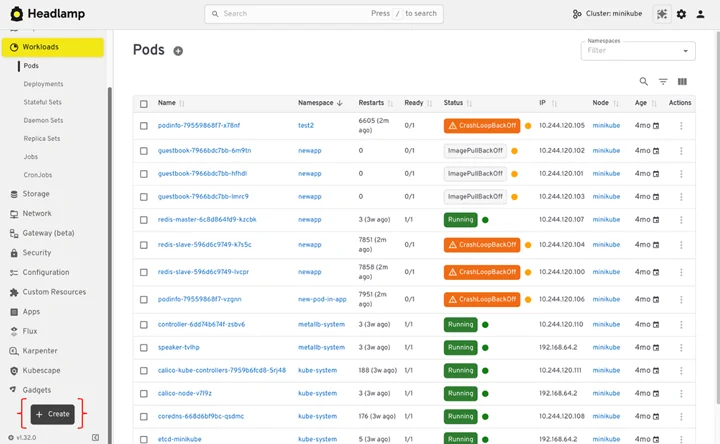
Headlamp maintains a familiar navigation structure for users transitioning from Kubernetes Dashboard, grouping resources logically into categories like Workloads, Storage, Configuration, and Network. This ensures that users can quickly locate familiar components. However, Headlamp enhances the user experience with improved search and filtering capabilities, which are crucial for navigating large clusters with numerous namespaces and resources.
A standout feature is Headlamp’s "Map View," which visually represents the relationships between different Kubernetes resources. While Dashboard primarily presented resources as lists, Map View provides a holistic, graphical representation of how a Deployment connects to its ReplicaSets, Pods, Services, and other associated objects. This visual context is invaluable for troubleshooting, allowing users to quickly identify dependencies, understand the flow of traffic, and pinpoint potential points of failure without having to manually inspect multiple YAML manifests or navigate through numerous linked pages. This capability addresses a common pain point for developers and operators: understanding the complex interconnections within a Kubernetes application stack.
Modern Application Deployment and Debugging
The approach to application deployment marks one of the most significant philosophical departures from Kubernetes Dashboard. Dashboard often provided forms and wizards for deploying applications, a user-friendly abstraction that, while helpful for beginners, often masked the underlying YAML manifests that are the true source of truth in Kubernetes. Headlamp pivots to a manifest-centric approach, aligning with modern GitOps principles and the reality of how most applications are deployed in production.
Instead of forms, Headlamp provides a direct YAML editor within the UI, allowing users to apply manifests directly. This design choice reinforces the importance of declarative configuration and promotes consistency with kubectl and other GitOps tools. For users who miss the wizard-like experience, the guide suggests leveraging kubectl create with --dry-run=client -o yaml to generate basic manifests, which can then be refined and applied through Headlamp. This workflow empowers users to create repeatable, version-controlled deployments, a significant improvement over GUI-generated configurations.
For day-to-day debugging, Headlamp covers all the essential functionalities previously offered by Dashboard, while adding significant enhancements:
- Live Log Streaming: Users can view pod logs directly in the UI, with the ability to switch between containers in multi-container pods. Logs stream live, providing real-time insights during deployments or incident response.
- In-Pod Shell Access: Headlamp allows users to
execdirectly into a running container from the UI, providing an interactive shell for quick diagnostic checks without switching to the command line. This functionality respects RBAC, ensuring only authorized users can access it. - Metrics and Resource Usage: Headlamp displays CPU and memory usage for pods and nodes, leveraging the Metrics Server (if installed). This provides immediate visibility into resource consumption, aiding in performance troubleshooting and capacity planning.
- Event Viewing: Kubernetes Events, often the first indicator of issues, are easily accessible within Headlamp. Users can view events at the cluster level or filtered by specific resources, offering crucial context for understanding why a workload might be failing or stuck.
These debugging features, combined with the Map View and enhanced search, provide a comprehensive toolkit for developers and operators to efficiently monitor, troubleshoot, and maintain their Kubernetes workloads.
Decommissioning Kubernetes Dashboard and Post-Migration Confidence
The final phase of the migration involves safely removing Kubernetes Dashboard. This step is only recommended after Headlamp has been thoroughly validated and the team is comfortable with its operation. Removing the old Dashboard reduces cluster clutter, frees up resources, and critically, eliminates unused access paths, enhancing the overall security posture. The guide provides specific commands for uninstalling Dashboard via Helm or its original manifest, followed by steps to clean up associated access artifacts like service accounts and cluster roles. This meticulous cleanup is vital for maintaining a secure and efficient cluster environment.
A comprehensive post-migration checklist ensures complete confidence in the transition. This checklist covers critical areas such as:
- Access and Visibility: Confirming that all users can access Headlamp and view the necessary resources across all clusters.
- Authentication and RBAC: Verifying that authentication mechanisms (kubeconfig or OIDC) are functioning correctly and that RBAC permissions are accurately enforced.
- Core Workflows: Ensuring that common operational tasks, from deploying applications to debugging workloads, are smoothly executable within Headlamp.
- Operational Confidence: Confirming that the new tooling improves efficiency and reduces operational overhead.
- Cleanup Confirmation: Verifying that Kubernetes Dashboard and its associated resources have been successfully removed.
- Team Alignment: Ensuring all team members are aware of the change and proficient in using Headlamp.
Broader Implications and Future Outlook
The strategic shift from Kubernetes Dashboard to Headlamp signifies a broader trend in the Kubernetes ecosystem: a move towards more mature, enterprise-grade tooling that prioritizes security, scalability, and developer experience. As Kubernetes continues its rapid adoption across industries, the demand for sophisticated management interfaces that can handle the complexities of multi-cluster, multi-cloud, and hybrid environments will only intensify.
Headlamp, with its flexible deployment models, robust authentication integrations, multi-cluster capabilities, and enhanced debugging features, positions itself as a frontrunner in this evolving landscape. Its alignment with GitOps principles and its extensible plugin architecture also suggest a future-proof design, allowing organizations to customize and extend its functionality as their needs evolve. The open-source nature of Headlamp, inviting community contributions, further ensures its continued development and relevance within the dynamic world of cloud-native computing. This migration is not just a tool swap; it represents an embrace of modern Kubernetes operational paradigms, promising improved security, efficiency, and developer satisfaction for years to come.
Related posts: