AWS CloudFormation Introduces Express Mode to Significantly Accelerate Development Workflows


Amazon Web Services (AWS) has announced the release of Express Mode for CloudFormation, a significant enhancement designed to drastically cut down deployment times for cloud infrastructure. This new capability allows developers to gain immediate feedback on their infrastructure code, accelerating iteration cycles, particularly in development, testing, and AI-driven automation workflows. The introduction of Express Mode marks another stride in AWS’s ongoing commitment to optimize the developer experience within its robust Infrastructure as Code (IaC) ecosystem.
The Evolution of Infrastructure as Code and the Need for Speed
Infrastructure as Code (IaC) has revolutionized how organizations manage their cloud resources, moving away from manual provisioning to declarative definitions. AWS CloudFormation stands as a cornerstone of this paradigm, enabling users to model, provision, and manage AWS resources using JSON or YAML templates. Complementary tools like the AWS Cloud Development Kit (CDK) and the AWS Serverless Application Model (SAM) further extend CloudFormation’s capabilities, abstracting complexity and allowing developers to define infrastructure using familiar programming languages.
In the fast-paced world of cloud development, the speed of deployment directly correlates with the pace of innovation. Rapid deployment cycles mean quicker feedback loops, allowing developers to iterate on designs, test changes, and deliver features to market faster. Recognizing this critical need, AWS has continuously sought ways to optimize deployment performance. In March 2024, the company published a detailed explanation of its "optimistic stabilization" strategy, which introduced the CONFIGURATION_COMPLETE event and reduced deployment times by up to 40%. Express Mode builds directly on this foundation, pushing the boundaries of deployment speed even further for specific use cases.
Understanding the Default CloudFormation Deployment Lifecycle: The Role of Stabilization
To fully appreciate the benefits of Express Mode, it’s essential to understand the traditional CloudFormation deployment process, particularly the concept of "stabilization." When a resource is defined in a CloudFormation template and deployed, its creation often involves multiple internal states beyond just being "created." For instance, an AWS::SQS::Queue might be created, but it might not immediately be ready to receive messages. Similarly, an Amazon EC2 instance is "launched" before it can respond to network requests, or an Amazon CloudFront distribution is "created" before its configuration propagates globally to all edge locations. An Amazon ECS service might be "active" before its containers pass health checks and reach desired capacity, and even a Lambda function deletion isn’t truly complete until associated network interfaces are cleaned up.
This critical phase, where a resource transitions from merely being configured to being fully operational and capable of serving traffic, is known as stabilization. CloudFormation’s default behavior is to wait for this stabilization process to complete for all resources within a stack before reporting a CREATE_COMPLETE status for the stack. This ensures that when CloudFormation signals a stack as complete, all its resources are fully operational and ready for immediate use, such as shifting production traffic. This robust default behavior is invaluable for production environments where resource readiness is paramount to maintaining service availability and integrity.
Introducing Express Mode: Accelerating the Development Feedback Loop
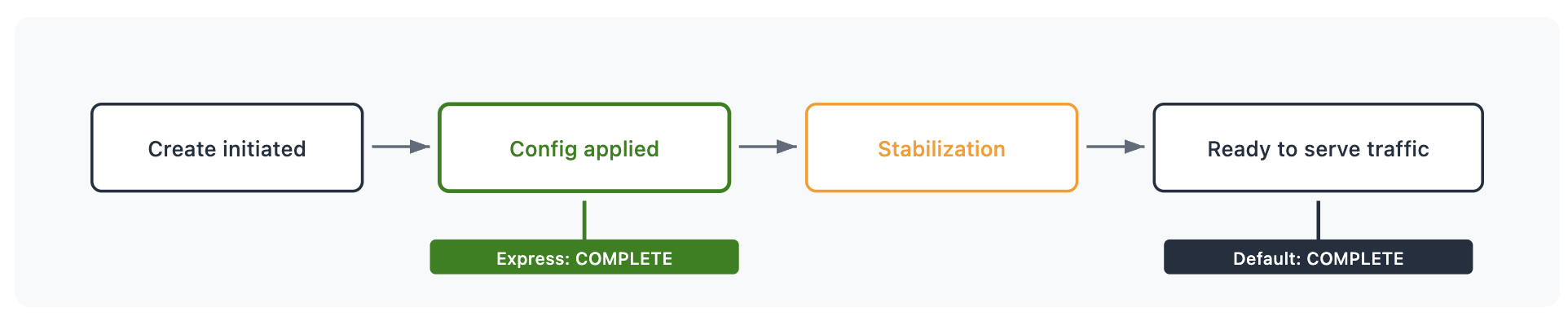
Express Mode fundamentally alters this waiting period for specific workflows. Instead of waiting for resources to achieve full stabilization, Express Mode instructs CloudFormation to complete the stack operation as soon as the resource configuration has been successfully applied. Resources then continue their stabilization process in the background, independently of the CloudFormation stack status.
This strategic shift means that developers receive immediate confirmation that their requested infrastructure changes have been accepted and configured, allowing them to proceed with subsequent development tasks without delay. While the underlying time for a resource to become fully ready to serve traffic remains the same, Express Mode significantly reduces the blocking time within the developer’s iteration cycle. CloudFormation communicates this expedited status clearly; for each resource, it provides a status reason: "Resource operation completed using express mode. It may continue becoming available in the background." This transparency ensures developers always know which resources are configured and which are still undergoing background stabilization.
Crucially, Express Mode does not compromise fundamental CloudFormation capabilities. Regardless of the chosen mode, CloudFormation continues to:
- Perform comprehensive pre-deployment validation to catch template errors early.
- Manage complex resource dependencies, ensuring resources are provisioned in the correct order.
- Provide detailed event streams for all resource state transitions.
- Maintain the integrity of the declared infrastructure state.
Technical Deep Dive: How Express Mode Optimizes the Deployment Timeline
The core difference lies in the signal CloudFormation emits for stack completion. In the default mode, the stack status transitions to CREATE_COMPLETE only after all resources have reached their fully stabilized, traffic-serving state. This ensures a "ready-to-go" stack.
With Express Mode, the stack reaches CREATE_COMPLETE (or UPDATE_COMPLETE, etc.) much earlier. The moment CloudFormation confirms that all API calls to provision or update resources have been successfully made and the configuration has been accepted by the underlying AWS service, the stack operation is marked as complete. The individual resources still enter their stabilization phase, but this process no longer blocks the stack operation itself. This architectural change is particularly beneficial for scenarios where developers need resource identifiers (like ARNs, DNS names, or security group IDs) immediately to configure the next layer of their application or to kick off further automation, rather than waiting for the resource to be fully operational for production traffic.
Key Use Cases and Strategic Advantages
Express Mode is strategically recommended for development workflows characterized by frequent iteration, where immediate feedback is more valuable than waiting for full production readiness.
1. Accelerated Development Iteration:
Consider a developer building a complex application environment involving a Virtual Private Cloud (VPC), multiple subnets, security groups, and an Application Load Balancer (ALB). The next step in their development might require the ALB’s DNS name and the security group ID to configure backend services or integrate with other application components. In the default mode, the developer would wait for the ALB to fully stabilize, which might involve health checks, target group registrations, and DNS propagation, before receiving the CREATE_COMPLETE signal and extracting these attributes. With Express Mode, these crucial identifiers (ARN, DNS name, security group bindings) become available in seconds, allowing the developer to immediately proceed to the next iteration of their application development, significantly shortening the development cycle. This drastically improves the developer’s "inner loop" productivity.
2. Enhancing AI Agent Workflows:
The rise of AI-driven infrastructure management and autonomous agents presents a compelling use case for Express Mode. AI agents tasked with generating, validating, and refining infrastructure templates require an extremely tight feedback loop. They need to deploy a template, observe the outcome, make adjustments, and redeploy—often multiple times in rapid succession. An AI agent does not typically need a CloudFront distribution to propagate globally or an ECS service to reach desired capacity before it can determine if the generated template is syntactically correct or logically sound. It primarily needs confirmation that the configuration was accepted by AWS.
Express Mode transforms what could be a 5-10 minute CloudFront deployment into a sub-minute confirmation. This allows the AI agent to validate, refine, and redeploy infrastructure configurations several times within the timeframe that a single default deployment would have consumed. This acceleration is critical for training, testing, and optimizing AI models that interact with infrastructure, fostering faster advancements in autonomous cloud operations.
3. Streamlining Dependent Stack Deployments:
Many complex cloud architectures are composed of multiple, interconnected CloudFormation stacks, often deployed in a sequence due to inter-stack dependencies (e.g., a network stack providing VPC IDs to an application stack). Each stack operation completing faster with Express Mode compounds the overall speed improvement for the entire deployment pipeline. Whether dependencies exist within a single stack or across stacks via CloudFormation’s export/import mechanisms, Express Mode handles retries and waits intelligently to ensure that dependent resources can still be provisioned correctly. It enables the entire dependency chain to move faster without compromising the logical order of resource creation. This is particularly beneficial for blue/green deployments or rapid environment provisioning where a full set of interdependent stacks needs to be brought up quickly.
Getting Started with Express Mode: Simple Implementation
Enabling Express Mode is straightforward and requires no changes to existing CloudFormation templates or resource types. It’s an operational parameter set at the time of deployment, giving users granular control over when to use it.
For deployments via the AWS Command Line Interface (CLI):
aws cloudformation create-stack
    --stack-name my-app-dev
    --template-body file://template.yaml
    --deployment-config '"mode": "EXPRESS"'
By default, Express Mode disables rollback for even faster iteration. If a resource fails to configure, the stack remains in its current state, allowing developers to immediately fix the issue and retry. This behavior is ideal for development environments where swift problem-solving is prioritized over automatic state reversion. However, for scenarios where rollback is desired, it can be explicitly re-enabled:
aws cloudformation create-stack
    --stack-name my-app-dev
    --template-body file://template.yaml
    --deployment-config '"mode": "EXPRESS", "disableRollback": false'
For developers utilizing the AWS Cloud Development Kit (CDK):
cdk deploy --expressTo enable rollback with CDK:
cdk deploy --express --rollbackAnd for those leveraging the AWS Serverless Application Model (SAM):
sam deploy --express
sam sync --express
To persist the Express Mode setting for future sam deploy or sam sync commands, the --save-params flag can be used, which stores the configuration in the samconfig.toml file:
sam deploy --express --save-paramsThe --disable-rollback flag can also be used alongside --express in SAM to control rollback behavior within the deployment configuration.

Additional Considerations and Broader Implications
Change Sets: Express Mode seamlessly integrates with CloudFormation Change Sets. When deployment-config is specified at create-change-set time, the configuration is stored with the change set and applied when the change set is executed. This ensures that the benefits of Express Mode extend to previewing and applying changes, maintaining consistency in deployment strategy.
Nested Stacks: For complex architectures built with nested CloudFormation stacks, enabling Express Mode on the parent stack automatically propagates this setting to all nested stacks within the hierarchy. This ensures that all resources across the entire stack hierarchy complete when their configuration is applied, providing a unified and accelerated deployment experience for multi-layered applications.
Impact on Developer Productivity and Innovation:
The ability to separate "is my configuration correct?" from "are my resources serving traffic?" is a pivotal shift. Express Mode is not intended to replace the default stabilization behavior for production deployments where readiness is paramount. Instead, it provides a crucial alternative for development and testing. By potentially reducing deployment wait times by significant margins—building on the previous 40% reduction and enabling sub-minute confirmations for resources like CloudFront—AWS is directly addressing a major bottleneck in the developer workflow. This translates into tangible benefits:
- Increased Developer Velocity: Less waiting means more coding and testing, leading to higher output.
- Faster Iteration Cycles: The ability to quickly deploy, test, and adjust fosters a more agile development process.
- Reduced Cost of Development: Shorter deployment times can mean less time resources are provisioned in development environments, potentially leading to cost savings.
- Enhanced Innovation: By removing friction from the deployment process, developers are empowered to experiment more freely and bring new ideas to fruition faster, accelerating time-to-market for new features and applications.
This continuous optimization of CloudFormation deployment speeds underscores AWS’s strategic focus on developer experience as a core differentiator. It ensures that as cloud architectures grow more complex and the pace of development intensifies, the foundational tools keep pace, allowing builders to focus on innovation rather than waiting. For a comprehensive overview of supported features and limitations, users are directed to the official CloudFormation Express Mode documentation.
Conclusion
Express Mode represents a significant advancement in AWS CloudFormation, offering developers unprecedented control over their deployment timelines. By providing immediate confirmation of infrastructure configuration, it empowers faster iteration for development, AI agent workflows, and dependent stack deployments, where the immediate availability of resource identifiers is prioritized over full traffic readiness. While the default stabilization behavior remains the gold standard for production environments requiring fully operational resources, Express Mode delivers a powerful tool for accelerating the development feedback loop, ultimately driving greater productivity and fostering a more dynamic and responsive cloud development ecosystem. This targeted optimization solidifies CloudFormation’s position as a leading IaC solution, continually evolving to meet the demands of modern cloud development.
Related posts: