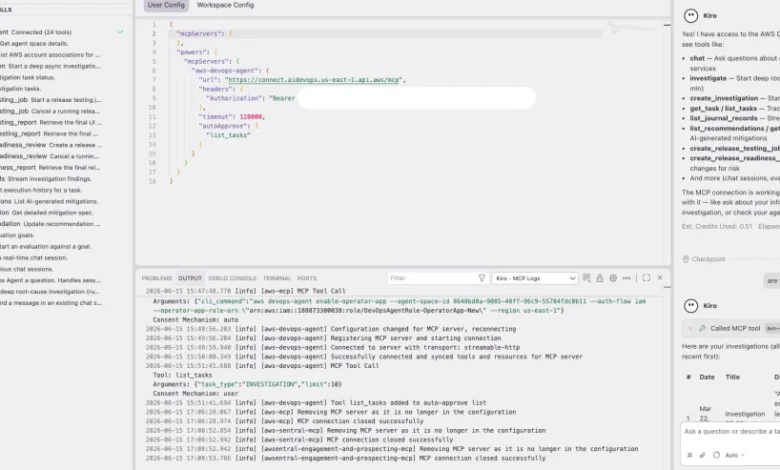
The modern cloud landscape, characterized by intricate microservices, serverless architectures, and distributed systems, has amplified the complexity of managing and troubleshooting applications. When a critical alarm blares at 2 AM, the immediate instinct of most engineers is to plunge into a multi-tabbed odyssey: sifting through logs, scrutinizing recent deployments, and meticulously tracing code paths across disparate systems. This fragmented approach demands constant context switching between the Integrated Development Environment (IDE), monitoring dashboards, log aggregators, and configuration management tools, severely hindering efficiency and delaying resolution. What if the very environment where code is written could seamlessly integrate this essential cloud intelligence—metrics, traces, topology, configurations—to offer a holistic view, pinpoint root causes, and even generate end-to-end fixes? This vision is now a reality with the introduction of The Kiro power for AWS DevOps Agent, a revolutionary integration designed to eliminate context switching by directly connecting your IDE to the AWS DevOps Agent, empowering developers and operators to investigate incidents, identify root causes, and generate remediation, all from within the familiar confines of their coding environment.
This groundbreaking release is poised to transform the daily workflows of developers and operators who build and maintain applications on Amazon Web Services (AWS), particularly those leveraging Kiro, Amazon’s AI-powered IDE. By embedding production intelligence and release management capabilities directly into the development environment, the Kiro power for AWS DevOps Agent allows teams to plan, architect, debug, and ship code with an unprecedented level of awareness regarding its operational implications. With this powerful integration, engineers can proactively review changes for potential production risks, swiftly investigate live incidents, optimize cloud costs, scrutinize architecture for inefficiencies, map complex service topologies, and generate precise remediation code—all through intuitive natural language conversations, enriched by the local context of their workspace.
The Evolving Landscape of Cloud Operations and Persistent Challenges
The journey from monolithic applications to highly distributed cloud-native architectures has introduced both immense flexibility and significant operational hurdles. Modern cloud applications are often composed of dozens, if not hundreds, of interconnected services, ranging from Amazon Elastic Container Service (Amazon ECS) tasks and Application Load Balancers to AWS Lambda functions and Amazon DynamoDB tables, all emitting vast streams of data across numerous Amazon CloudWatch metric dimensions. Navigating this intricate web of dependencies and data sources presents persistent challenges for operations teams:
- Data Fragmentation and Silos: Operational data—logs, metrics, traces, configuration files, deployment histories—is often scattered across multiple tools and platforms. Engineers waste valuable time aggregating and correlating this data manually, leading to delayed diagnoses.
- Context Switching Overhead: The constant toggling between IDEs, monitoring dashboards, log analysis tools, and configuration repositories imposes a heavy cognitive load, breaking concentration and reducing productivity. This friction directly contributes to longer Mean Time To Resolution (MTTR) for incidents.
- Complexity of Root Cause Analysis: In a distributed system, a single user-facing error might cascade through multiple services, making it exceedingly difficult to pinpoint the exact origin of a problem without a unified view of the entire stack.
- Reactive Operations: Despite advancements in observability, many teams remain in a reactive mode, addressing issues only after they manifest in production, rather than proactively identifying and mitigating risks during development.
Beyond operational challenges, the rapid evolution of AI coding agents has introduced new dynamics into the software delivery lifecycle. While AI can dramatically accelerate code generation, the subsequent stages of code review, testing, and pipeline processes, traditionally designed for human pace, often struggle to keep up. This creates new bottlenecks and persistent challenges for modern software delivery:
- Bottleneck Shifting: Faster code generation without corresponding advancements in delivery automation merely shifts the bottleneck downstream. Teams can write code quicker, but the time to deploy and validate it in production remains stagnant or even increases due to inadequate tooling for managing complexity.
- Proactive Risk Management Gap: The ability to review code changes for production risks, understand their potential impact on cost, performance, and reliability before deployment, is often limited. This lack of "shift-left" operational awareness leads to more issues discovered late in the cycle or, worse, in production.
- Exploratory Release Testing Deficiencies: Traditional testing methods often fall short in simulating real-world production scenarios. There’s a growing need for tools that facilitate exploratory release testing of web and API applications, enabling immediate mitigation of issues even before code changes are pushed.
The Kiro power for AWS DevOps Agent directly addresses these critical gaps by injecting release management intelligence into the IDE. This empowers developers to review changes for production risks and conduct exploratory release testing, ensuring that potential issues are identified and mitigated proactively, long before they can impact live environments.
Kiro Powers: Extending AI Capabilities with Specialized Domains
At its core, a Kiro power is a meticulously curated package designed to imbue Kiro with specialized capabilities within a particular domain, in this case, AWS operations. When installed, a power transforms Kiro into an even more intelligent assistant by providing it with:
- Tool Connections: Seamless integrations with your AWS environment and specific AWS services.
- Domain-Specific Knowledge: A rich repository of AWS best practices, common error recovery patterns, architectural guidelines, and security considerations.
- Intelligent Workflow Routing: Instructions that enable Kiro to intelligently route your natural language requests to the most appropriate workflow or tool for resolution.
Crucially, a Kiro power excels at combining your local workspace context—your current code, Git history, configuration files, and open issues—with cloud-side intelligence derived from metrics, traces, topology, and deployment history. This unique fusion allows Kiro to develop a comprehensive understanding of both what your code is intended to do and how your underlying infrastructure is actually behaving. This holistic perspective is vital for accurate diagnostics and effective remediation. For a deeper exploration of this powerful framework, the Kiro powers documentation offers extensive insights.
Each Kiro power typically includes a suite of components designed for maximum efficacy:
- API Integrations: Direct, secure connections to relevant AWS services and tools.
- Knowledge Bases: Curated data sets containing operational patterns, troubleshooting guides, and best practices.
- Specialized AI Models: Fine-tuned language models capable of understanding and reasoning about domain-specific queries.
- Pre-built Workflows: Automated sequences of actions to perform common operational tasks, from incident investigation to cost analysis.
The Kiro Power for AWS DevOps Agent: A Deep Dive
The Kiro power for AWS DevOps Agent consolidates the extensive capabilities of the AWS DevOps Agent into a single, seamless installation for Kiro. Once enabled, Kiro gains the ability to interact with a specialized AI agent possessing profound knowledge of your AWS infrastructure, your historical operational data, and a deep understanding of AWS best practices. This integration unlocks a suite of powerful functionalities, making operational tasks more intuitive and efficient:
- Production Risk Review: Before code ever leaves your local machine, Kiro can analyze proposed changes against production baselines, identifying potential performance regressions, security vulnerabilities, or cost escalations. It can simulate impacts and highlight areas of concern.
- Incident Investigation and Root Cause Analysis: Leveraging the comprehensive data aggregated by the AWS DevOps Agent, Kiro can rapidly investigate production incidents, correlate events across services, and pinpoint the precise root cause, often in minutes rather than hours.
- Cost Optimization Identification: Kiro can analyze your AWS resource usage in context of your application code and configuration, identifying idle resources, underutilized services, or opportunities for rightsizing and suggesting specific, actionable cost-saving measures.
- Architecture Review and Best Practice Adherence: Engage Kiro in a conversation about your application’s architecture. It can map service topology, identify common anti-patterns, suggest improvements based on AWS Well-Architected Framework principles, and ensure adherence to organizational standards.
- Service Topology Mapping: Kiro can dynamically generate and visualize the dependencies between your services, providing a clear, real-time understanding of your application’s architecture, crucial for both incident response and new team member onboarding.
- Remediation Code Generation: Once a problem is identified, Kiro can generate targeted code or infrastructure-as-code (IaC) fixes (e.g., CloudFormation templates, application configuration changes) directly in your workspace, accelerating the path to resolution.
- Natural Language Interaction: All these complex operations are accessible through simple, conversational prompts within Kiro, making advanced cloud operations accessible to a wider range of technical users.
Operational Mechanics: How Kiro Leverages Context
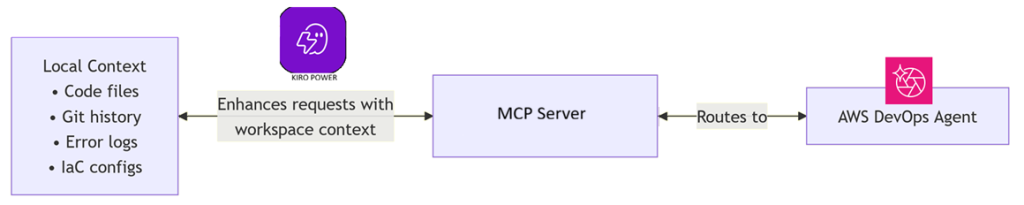
The power provides two complementary workflows that Kiro intelligently selects based on the nature of your request and the available context:
- Local-First Investigation: When your query implicitly or explicitly references elements within your local workspace (e.g., a specific code file, a recent Git commit, a local configuration file), Kiro prioritizes analyzing this local context. It then intelligently enriches this with relevant cloud intelligence fetched via the AWS DevOps Agent to provide a comprehensive answer or suggest actions.
- Cloud-First Investigation: For queries primarily focused on your AWS environment (e.g., "What’s the status of my ECS service?", "Show me the cost breakdown for my staging environment?"), Kiro initiates a query to the AWS DevOps Agent. The agent then retrieves the necessary cloud-side data, which Kiro processes and presents, potentially correlating it with any relevant local context it can infer.
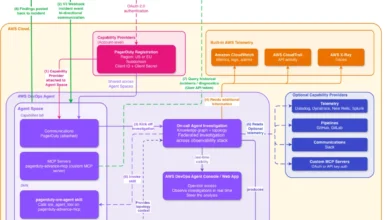
This symbiotic relationship is visually represented in the system’s architecture, where Kiro seamlessly combines local workspace context with the DevOps Agent’s cloud intelligence through the AWS DevOps Agent MCP (Model Context Protocol) Server. This MCP Server acts as the intelligent bridge, facilitating the secure and efficient exchange of information between your IDE and your AWS environment.
Prerequisites for Seamless Integration
Before harnessing the full potential of the Kiro power for AWS DevOps Agent, ensure the following prerequisites are met:
- Kiro Installation: You must have the Kiro IDE installed and configured on your development machine.
- AWS Account: An active AWS account with the necessary permissions for Kiro and the AWS DevOps Agent to access your resources.
- AWS DevOps Agent Setup: The AWS DevOps Agent must be deployed and configured within your AWS environment. This involves setting up an agent space and connecting relevant data sources.
- IAM Permissions: Appropriate AWS Identity and Access Management (IAM) permissions must be configured for Kiro and the DevOps Agent to interact securely with your AWS resources.
- Active Data Sources: The power functions optimally with an agent space that has active data sources connected. The richer the data sources (CloudWatch, X-Ray, CloudTrail, Config, etc.), the more profound and accurate the investigations and recommendations will be.
Getting Started: A Step-by-Step Guide
Setting up the Kiro power for AWS DevOps Agent is a straightforward process, designed for quick integration into your workflow. You can install it directly via a provided link or follow these detailed steps:
- Open Kiro: Launch your Kiro IDE.
- Navigate to Powers Panel: In the Kiro interface, locate and open the "Powers" panel. This panel lists all available and installed powers.
- Search and Install: Search for "AWS DevOps Agent" and select the Kiro power for AWS DevOps Agent. Click "Install" to add it to your Kiro environment.
- Configure
mcp.json: Once installed, navigate to themcp.jsonconfiguration file within your Kiro workspace. This file allows you to specify details about your AWS DevOps Agent connection. You will need to update values such as the AWS region and potentially the agent space ID to point to your deployed AWS DevOps Agent. Save the config file after making changes.
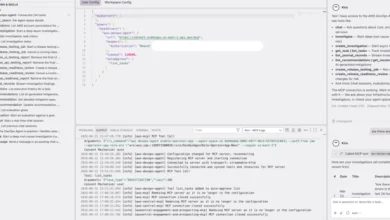
Upon successful installation and configuration, the Kiro powers panel will display the Kiro power for AWS DevOps Agent as active. Furthermore, in the MCP Servers panel, you will observe the DevOps Agent MCP connected, along with a list of the various tools and data sources it leverages. The power intelligently activates automatically when you mention relevant keywords in your Kiro conversation, such as "incident," "cost optimization," "architecture review," or "topology," seamlessly integrating its capabilities into your natural workflow.

Walkthrough: Investigating and Resolving a Production Incident with Kiro
Let’s illustrate the power of this integration with a realistic, high-stakes scenario. Your team receives a critical CloudWatch alarm: a key Amazon ECS service, checkout-api, responsible for processing customer transactions, is experiencing a surge in HTTP 503 (Service Unavailable) errors, accompanied by an alarming spike in task restarts. This indicates a severe operational disruption.
Step 1: Describe the Problem in Kiro
The on-call engineer, armed with the initial alarm details, turns to Kiro, articulating the problem in natural language:
“My ECS service checkout-api is throwing 503 errors. The alarm fired 10 minutes ago, and task restarts are spiking. Here’s an error snippet from the logs: Connection pool exhausted, max connections 50 reached.”
Because Kiro has continuous access to the engineer’s local workspace, it automatically includes relevant contextual information. This includes the service’s task definition (e.g., checkout-api-task.json), the application’s connection pool configuration found in application.yml, and a log of recent Git commits that might have introduced changes to the service.
Step 2: Kiro Initiates an Intelligent Investigation
Kiro, recognizing the keywords "503 errors," "task restarts," and "connection pool exhausted," routes this request to its specialized incident investigation workflow, powered by the AWS DevOps Agent. The engineer observes real-time progress as findings begin to stream in:
- Correlating Events: Kiro, via the DevOps Agent, immediately correlates the CloudWatch alarm with recent deployment events, scaling activities, and relevant logs across the ECS cluster.
- Analyzing Metrics: It pulls vital metrics from CloudWatch (e.g., CPU utilization, memory consumption, network I/O, database connection counts for the associated Amazon RDS instance) and traces from AWS X-Ray, identifying anomalous patterns.
- Reviewing Configuration Drift: Kiro cross-references the current production configuration with the baseline, checking for any recent parameter changes in RDS, ECS service definitions, or application settings.
- Mapping Service Dependencies: A dynamic topology map is generated, highlighting the
checkout-apiservice and its upstream/downstream dependencies, particularly the Amazon RDS database instance.
Step 3: Review Findings and Recommendations from DevOps Agent
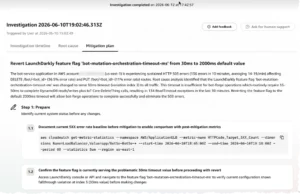
Within moments, the AWS DevOps Agent returns a detailed, actionable analysis directly within Kiro:
Root Cause: The investigation reveals a critical configuration mismatch. The application’s per-task connection pool limit (50) was designed for a smaller number of ECS tasks. However, when the auto-scaling policy triggered at 08:47 UTC, adding new tasks to handle increased load, each new task attempted to open 50 database connections. This collective demand rapidly exceeded the Amazon RDS instance’s max_connections parameter, which was set to a default of 100. This saturation led to connection rejections, manifesting as 503 errors and cascading task restarts.

Recommendation and Mitigation:
- Immediate Action: Reduce the per-task application connection pool size. A calculated optimal value would be
max_connections / max_tasks(e.g., 100 / 5 = 20 connections per task) to ensure the database can accommodate peak scaling. - Long-term Solution: Consider increasing the Amazon RDS instance class to support a higher
max_connectionslimit, or implement an Amazon RDS Proxy to efficiently manage and multiplex database connections, improving scalability and resilience.
Step 4: Generate and Apply the Fix with AI Assistance
Armed with a clear diagnosis, the engineer requests Kiro to implement the recommended fix. Because Kiro has immediate access to the local application.yml and the AWS CloudFormation template that defines the RDS instance, it intelligently generates a targeted, context-aware remediation:
- Application Configuration Update: Kiro modifies the
application.ymlfile in the local workspace, adjusting thespring.datasource.maximum-pool-sizeparameter from 50 to 20. - Infrastructure-as-Code (IaC) Enhancement: Kiro generates an update to the CloudFormation template, proposing a modification to the RDS parameter group to either increase the
max_connectionsparameter or introduce an RDS Proxy resource.
The generated fix is presented directly within the engineer’s workspace, ready for review, testing, and commit. This entire process—from alarm to resolution—is streamlined, reducing hours of manual investigation and context switching to mere minutes, all within a single environment.
Operating Across Multiple Agent Spaces
For teams managing multiple applications, each potentially with its own dedicated AWS DevOps Agent agent space, Kiro offers seamless flexibility. Engineers can naturally switch between different agent spaces within Kiro, and the AI will intelligently route questions to the correct environment, ensuring that contextual answers are always grounded in the relevant AWS infrastructure.
Broader Implications and Strategic Advantages
The introduction of the Kiro power for AWS DevOps Agent marks a significant leap forward in the journey towards autonomous operations and developer empowerment. Its implications extend far beyond faster incident resolution:
- Drastically Reduced MTTR: By unifying operational data and development context, the time taken to detect, diagnose, and resolve production incidents can be cut by a substantial margin, minimizing business impact and improving service reliability.
- True Shift-Left Operations: This power enables proactive identification and mitigation of production risks during the development phase. Developers gain immediate feedback on the operational implications of their code, fostering a culture of "operations awareness" from the outset.
- Enhanced Developer Productivity: Eliminating the need for constant context switching frees developers from tedious operational overhead, allowing them to focus more on innovation and coding, thereby boosting overall team productivity.
- Tangible Cost Efficiency: AI-driven cost optimization suggestions, correlated with actual code and infrastructure, provide actionable insights that can lead to significant savings on AWS cloud spend.
- Improved Observability and Understanding: By presenting a unified view of code, configuration, and cloud-side telemetry, Kiro enhances the overall observability of applications, making complex distributed systems easier to understand and manage.
- Accelerated Onboarding: New team members can rapidly gain an understanding of an application’s infrastructure, dependencies, and operational history by simply conversing with Kiro, significantly reducing the learning curve.
- Paving the Way for Agentic DevOps: This integration represents a key step towards the future of "Agentic DevOps," where AI agents collaborate with human engineers, taking on more autonomous roles in managing the software lifecycle from inception to operation.
Industry Reactions and Expert Commentary

The release has been met with significant anticipation within the cloud and DevOps communities. Tipu Qureshi, a Senior Principal Technologist in AWS Agentic AI and a key figure behind this innovation, highlighted the strategic importance of this integration: "Our goal with the Kiro power for AWS DevOps Agent is to empower engineers with autonomous operational systems. We are bridging the gap between development and operations by bringing critical cloud intelligence directly to the IDE. This is about making resilient, observable cloud applications easier to build and manage, ultimately leading to higher operational excellence and faster incident response automation for our customers."
Shashiraj Jeripotula (Raj), a Principal Partner Solutions Architect at AWS, echoed this sentiment, emphasizing the broader impact on the ecosystem: "This power is a testament to the growing synergy between AI agents, observability, and shift-left development. We’re working closely with ISV and AWS partners to ensure deep integrations that allow developers to leverage Model Context Protocol (MCP) and AI agents to build responsible, production-ready AI systems on AWS. The Kiro power for AWS DevOps Agent is a prime example of how we are helping teams achieve this."
Conclusion
The Kiro power for AWS DevOps Agent represents a paradigm shift in how developers and operators interact with their cloud environments. By seamlessly integrating the full operational intelligence of the AWS DevOps Agent directly into the Kiro IDE, it fundamentally closes the loop from detection to remediation without the friction of context switching.
Whether the task at hand involves triaging a critical production incident, strategically optimizing costs across a sprawling microservices architecture, or efficiently onboarding a new team member who needs to rapidly grasp the intricacies of your infrastructure, this power provides intelligent, contextual answers grounded in the real-time state of your AWS environment. This unified, AI-powered approach not only enhances operational efficiency but also fosters a more proactive and integrated culture of development and operations.
Experience the future of AI-powered cloud operations directly within your IDE. Install the Kiro power for AWS DevOps Agent today and unlock a new era of productivity and resilience. To delve deeper into its capabilities and explore further documentation, visit the Kiro powers documentation and the Interfacing with AWS DevOps Agent user guide.