AWS CloudFormation Introduces Express Mode for Rapid Development Deployments, Significantly Accelerating Infrastructure-as-Code Iteration.


Amazon Web Services (AWS) has unveiled CloudFormation Express Mode, a new feature designed to dramatically reduce deployment times for cloud infrastructure, particularly benefiting development workflows, AI agent-driven infrastructure provisioning, and interdependent stack deployments. This enhancement allows developers to receive immediate feedback on their infrastructure changes by completing stack operations as soon as resource configurations are applied, foregoing the traditional wait for full resource stabilization. This strategic shift addresses a long-standing challenge in cloud development, where the time taken for resources to become fully operational often slows down the iteration cycle, even when the underlying configuration is correct.
The Evolution of Infrastructure as Code and the Need for Speed
AWS CloudFormation stands as a foundational service for Infrastructure as Code (IaC) on the AWS platform, enabling developers and operations teams to model, provision, and manage AWS and third-party resources using declarative templates in JSON or YAML. Integrated seamlessly with tools like the AWS Cloud Development Kit (CDK) and AWS Serverless Application Model (SAM), CloudFormation streamlines the deployment of complex cloud architectures. The core promise of IaC is to bring software development best practices—version control, automation, testing—to infrastructure management. However, the inherent complexity and distributed nature of cloud resources have often meant that provisioning, even when automated, could be time-consuming, impacting the agility that IaC aims to deliver.
The speed of the deployment cycle directly correlates with the pace of innovation. Rapid iteration is crucial for developers experimenting with new architectures, building prototypes, or integrating new services. Recognizing this, AWS has continuously sought ways to optimize CloudFormation’s performance. In March 2024, the company introduced "optimistic stabilization," a strategy that significantly reduced deployment times by up to 40% through intelligent handling of resource readiness. This earlier improvement laid the groundwork, introducing the CONFIGURATION_COMPLETE event, which signaled a resource’s configuration acceptance before it was fully stabilized. Express Mode builds upon this foundation, offering an even more aggressive approach to speed for specific use cases.
Understanding Resource Stabilization: The Traditional Bottleneck
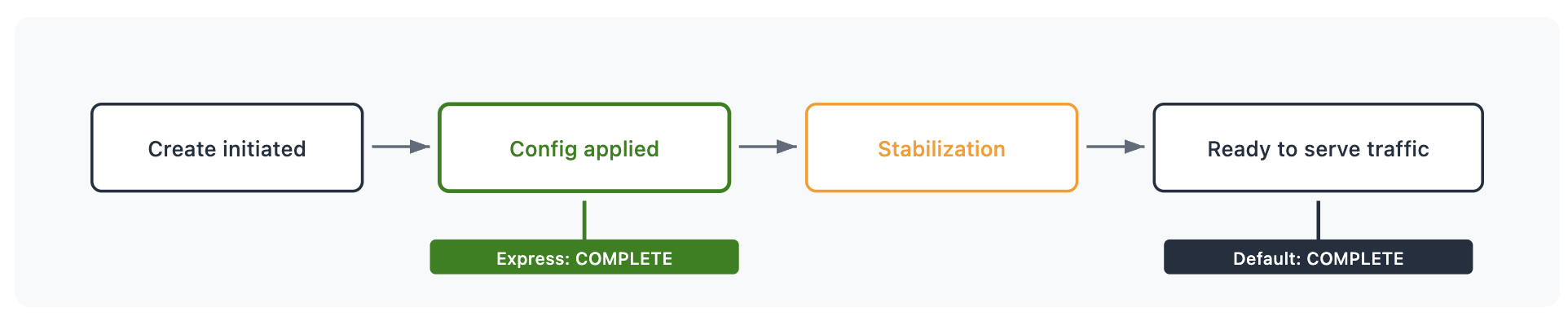
To fully grasp the significance of Express Mode, it is essential to understand the traditional CloudFormation deployment process, particularly the concept of "stabilization." When a resource like an AWS::SQS::Queue is added to a template and deployed, CloudFormation initiates its creation. While the resource might be "created" almost immediately, there is often a distinct time window before it is truly "ready to serve traffic." This gap is what AWS terms stabilization.
Consider several common AWS services:
- Amazon EC2 Instance: An EC2 instance might be "launched" and visible in the console within moments, but it takes additional time for the operating system to boot, applications to start, and for it to begin responding to HTTP requests or other network traffic.
- Amazon CloudFront Distribution: A CloudFront distribution is "created" quickly, but its configuration needs to propagate across hundreds of edge locations worldwide. This propagation process can take anywhere from 5 to 20 minutes, during which the distribution is not fully operational globally.
- Amazon ECS Service: An ECS service might reach an "active" state, but its containers still need to pass health checks, pull images, and reach the desired capacity before the service is genuinely ready to handle production traffic.
- AWS Lambda Function Deletion: Even in deletion, a Lambda function isn’t fully removed until associated network interfaces (ENIs) are cleaned up, which can introduce delays.
In the default CloudFormation deployment mode, a stack operation is reported as CREATE_COMPLETE (or UPDATE_COMPLETE, etc.) only after all resources within that stack have not only been configured but have also fully stabilized and are ready to serve traffic. This behavior is robust and highly desirable for production environments, where a "stack complete" status must unequivocally mean "ready to shift traffic." However, this built-in wait, while ensuring reliability, becomes a significant impediment in fast-paced development or automated iteration cycles.
CloudFormation Express Mode: A New Paradigm for Agility
Express Mode fundamentally alters this traditional completion logic by empowering developers to choose when CloudFormation reports a stack operation as complete. With Express Mode enabled, CloudFormation concludes the stack operation as soon as the resource configuration is applied. Crucially, resources continue their stabilization process in the background, becoming ready to serve traffic without blocking the CloudFormation stack’s reported completion.
This distinction is communicated clearly to the user. CloudFormation provides a status reason for each resource, indicating, "Resource operation completed using express mode. It may continue becoming available in the background." This transparency ensures that developers are always aware of which resources have merely had their configuration accepted and which are still undergoing background stabilization.
It is vital to underscore that Express Mode does not accelerate the actual stabilization time of the underlying AWS resources. An EC2 instance still takes the same time to boot, and a CloudFront distribution still requires the same propagation duration. What Express Mode accelerates is your iteration cycle by removing the blocking wait for these background stabilization processes. The benefit lies in the unblocking of subsequent development tasks or automated steps, allowing for a much tighter feedback loop.
Regardless of the chosen mode, CloudFormation’s core functionalities remain intact: it ensures the correct provisioning of resources, manages dependencies, and orchestrates complex deployments according to the template definitions. The change is purely in the reporting of the stack’s operational status.
Key Use Cases and Transformative Benefits
The introduction of Express Mode offers transformative benefits across several critical development and automation scenarios:
-
Accelerated Development Iteration:
For developers building out complex cloud infrastructure, such as a Virtual Private Cloud (VPC) with subnets, security groups, and an Application Load Balancer (ALB), the immediate need is often to obtain resource attributes—like the ALB’s DNS name or a security group ID—to configure the next layer of the application. Sending traffic to the ALB might not be necessary at this initial stage; merely knowing it exists and accessing its identifiers is sufficient. With Express Mode, these crucial attributes become available in seconds, allowing developers to retrieve ARNs, DNS names, and security group bindings almost instantly. This immediate feedback loop significantly reduces the time spent waiting, enabling developers to proceed to their next iteration or dependent configuration steps much faster. This accelerates prototyping, feature development, and bug fixes in non-production environments. -
Enhanced AI Agent Workflows:
The burgeoning field of AI-driven infrastructure management relies heavily on tight feedback loops. An AI agent iterating on infrastructure templates—deploying, observing the result, adjusting, and redeploying—requires near-instantaneous confirmation that its configuration changes have been accepted. Waiting for a CloudFront distribution to propagate globally, which can take over ten minutes, before an AI can decide if a template is correct is inefficient. Express Mode transforms a potentially multi-minute deployment into a sub-minute confirmation. This allows AI agents to validate, refine, and redeploy infrastructure configurations multiple times within the window that a single default deployment would have consumed, significantly boosting the efficiency and intelligence of automated infrastructure management systems. -
Streamlined Dependent Stack Deployments:
Many complex applications are structured using multiple CloudFormation stacks, often with dependencies between them (e.g., a core networking stack, a database stack, and an application stack). While CloudFormation intelligently manages dependencies within a single stack, and across stacks via import/export mechanisms, the overall deployment time for a multi-stack application is cumulative. By enabling Express Mode, each individual stack operation completes faster. Even with dependencies, CloudFormation handles necessary retries and waits to ensure that dependent resources can still be provisioned successfully. The result is a faster overall deployment pipeline for complex, multi-stack architectures without breaking the crucial dependency chain, leading to quicker environment provisioning and tear-down.
Implementation: Getting Started with Express Mode
Activating Express Mode is straightforward and requires no changes to existing CloudFormation templates or resource types. Developers simply choose when to receive the "done" signal by specifying a deployment configuration.
For AWS Command Line Interface (CLI) users, Express Mode is enabled per operation using a single parameter:
aws cloudformation create-stack
    --stack-name my-app
    --template-body file://template.yaml
    --deployment-config '"mode": "EXPRESS"'
By default, Express Mode disables rollback to facilitate faster iteration. If a resource fails to configure, the stack remains in its current state, allowing developers to immediately fix the issue and retry. To re-enable rollback behavior, which might be desired in some iterative testing scenarios, the disableRollback parameter can be set to false:
aws cloudformation update-stack
    --stack-name my-app
    --template-body file://template.yaml
    --deployment-config '"mode": "EXPRESS", "disableRollback": false'
Users of the AWS Cloud Development Kit (CDK) can leverage a dedicated flag:

cdk deploy --express
# To enable rollback:
cdk deploy --express --rollback
For applications built with the AWS Serverless Application Model (SAM), the --express flag can be used with sam deploy or sam sync:
sam deploy --express
sam sync --express
To persist this setting for future deployments, the --save-params flag can be used, which stores the Express Mode configuration in the samconfig.toml file:
sam deploy --express --save-paramsThe --disable-rollback flag also functions alongside --express within SAM commands, providing granular control over rollback behavior.
Additional Considerations and Broader Implications
Express Mode integrates seamlessly with other CloudFormation features:
- Change Sets: Express Mode is fully supported with change sets. The
--deployment-configparameter specified duringcreate-change-setis stored with the change set and automatically applied when the change set is executed, ensuring consistent behavior. - Nested Stacks: When Express Mode is enabled on a parent stack, its configuration propagates down to all nested stacks within the hierarchy. This ensures that all resources across the entire multi-stack architecture complete their operations once their configuration is applied, maintaining a unified fast-feedback experience.
This new capability represents a significant advancement in developer experience for AWS users. By disentangling "is my configuration correct?" from "are my resources serving traffic?", CloudFormation Express Mode provides a crucial choice. For production deployments, where operational readiness is paramount, the default, stabilization-aware behavior remains the optimal choice. However, for the vast majority of development, testing, and automated iteration scenarios, Express Mode unlocks unprecedented agility.
The implications for DevOps practices are profound. Faster feedback loops are a cornerstone of modern software delivery, contributing to reduced lead times, increased deployment frequency, and improved mean time to recovery (MTTR) in non-production environments. Developers can experiment more freely, identify configuration errors earlier, and iterate on infrastructure designs with minimal friction. This "shift-left" approach to infrastructure validation enhances overall quality and reduces the cost associated with prolonged development cycles.
AWS’s continuous investment in CloudFormation, exemplified by Express Mode and previous innovations like optimistic stabilization, underscores its commitment to improving the Infrastructure as Code experience. In a competitive landscape with various IaC tools, these enhancements ensure that CloudFormation remains a powerful and increasingly agile choice for managing cloud resources at scale. As cloud environments grow in complexity and automation becomes more sophisticated, tools that offer speed without compromising control will be indispensable. Express Mode is a timely addition, empowering developers to build and innovate faster than ever before on the AWS platform.