AWS CloudFormation Express Mode Accelerates Infrastructure Deployments by Up to Four Times

Amazon Web Services (AWS) has unveiled AWS CloudFormation Express mode, a significant enhancement to its popular infrastructure as code (IaC) service. This new deployment option is engineered to dramatically speed up the provisioning and updating of cloud resources, particularly for developers and AI tools engaged in rapid, iterative infrastructure development and management. By streamlining the deployment lifecycle, Express mode promises to reduce deployment times by up to 75% in specific scenarios, a move that is poised to improve developer productivity and accelerate innovation cycles within the AWS ecosystem.
The core innovation of Express mode lies in its refined approach to resource stabilization. Traditionally, AWS CloudFormation deployments involve a multi-stage process that includes not only the configuration of resources but also extensive stabilization checks. These checks are designed to ensure that newly provisioned or updated resources are fully operational and capable of serving traffic before the deployment is officially marked as complete. While crucial for production environments where absolute certainty of resource readiness is paramount, these comprehensive checks can introduce significant delays, especially in workflows that require frequent, rapid changes.
Express mode fundamentally alters this by completing a deployment once CloudFormation confirms that resource configurations have been successfully applied. Instead of waiting for extended stabilization periods, the system proceeds to the next stage, allowing resources to continue their operationalization in the background. This paradigm shift is particularly beneficial for use cases such as iterative development, where developers frequently modify and redeploy infrastructure components to test new features or configurations. It also caters to production scenarios where stakeholders are comfortable with a model that prioritizes speed over immediate, exhaustive confirmation of every resource’s operational status, relying instead on subsequent monitoring and eventual consistency.
A New Approach to Deployment Speed
The impetus behind CloudFormation Express mode stems from the evolving landscape of cloud development, where agility and rapid feedback loops are increasingly critical. The rise of AI-powered development tools, which often operate on sub-minute cycles for generating and testing infrastructure code, further underscored the need for faster deployment mechanisms. Standard CloudFormation deployments, while robust and reliable, could act as a bottleneck in these high-velocity environments.
"Every CloudFormation deployment performs stabilization checks after resource configuration is applied," explains the AWS announcement. "These checks serve an important purpose when you need to confirm resources can serve traffic before shifting load. However, many workflows do not require full stabilization to proceed." This statement highlights the targeted nature of Express mode, acknowledging that the traditional approach, while valuable, is not universally optimal.
The new mode is designed to benefit two primary categories of users and workflows:
- Iterative Development Workflows: Developers engaged in building and refining applications often need to deploy small changes to their infrastructure frequently. Waiting for lengthy stabilization periods for each minor adjustment can severely impede the development process. Express mode allows these developers to see their infrastructure changes reflected much faster, enabling quicker testing and iteration.
- Production Scenarios with Eventual Stabilization: For certain production workloads, the immediate, absolute confirmation of every single resource’s readiness might be less critical than the speed of deployment itself. In these cases, if the overall application architecture can tolerate a brief period where some components are still coming online, Express mode offers a substantial time-saving advantage. This is particularly relevant for AI-assisted infrastructure development, where generating and deploying infrastructure in near real-time is a key objective.
Under the Hood: How Express Mode Operates
The operational mechanism of CloudFormation Express mode is elegantly simple yet profoundly impactful. When enabled, the service bypasses the extensive post-configuration stabilization checks. The deployment is considered complete from CloudFormation’s perspective as soon as the desired state for each resource has been applied. Crucially, this does not mean resources are left in an incomplete state. They continue to initialize and become fully operational in the background.
A key feature integrated into Express mode is its built-in resilience against transient failures. CloudFormation automatically retries dependent resources that might encounter temporary issues during the provisioning process within the same stack. This automated retry mechanism alleviates the need for manual intervention and ensures that timing discrepancies between resource provisioning and stabilization are managed effectively. This inherent robustness handles the dynamic nature of cloud resource initialization, where dependencies and staggered startup times are common.
The distinction made by AWS is vital: "Express mode changes when the deployment completes, not how resources are provisioned." This clarifies that the underlying provisioning logic and resource management capabilities of CloudFormation remain intact. The change is purely in the completion criteria of the deployment lifecycle as reported by CloudFormation itself.
Demonstrable Performance Gains: Real-World Examples
To illustrate the tangible benefits of Express mode, AWS provides compelling examples that highlight the dramatic reduction in deployment times.
For instance, the deployment of an Amazon Simple Queue Service (SQS) queue, complete with a dead-letter queue (DLQ), can take approximately 64 seconds in standard mode. With Express mode enabled, this same deployment can be completed in as little as 10 seconds. This represents an improvement of over 6.4 times, showcasing the significant acceleration achievable.
Another impactful example involves the deletion of an AWS Lambda function that has an associated network interface attachment. In standard mode, this operation can be a time-consuming process, often taking between 20 to 30 minutes due to the complexities of detaching network interfaces and cleaning up associated resources. However, using Express mode, the same deletion operation can be finalized in up to 10 seconds. This is a staggering improvement, reducing a half-hour task to mere seconds, and underscores the value proposition for rapid infrastructure management.
These benchmarks, derived from internal testing and reported by AWS, provide concrete evidence of the performance uplift that developers and operators can expect when adopting Express mode. The implications for development cycles, testing, and even emergency patching or resource removal are substantial.
Getting Started with CloudFormation Express Mode
Implementing AWS CloudFormation Express mode is designed to be straightforward, requiring minimal changes to existing workflows and templates.
Via the AWS Management Console:
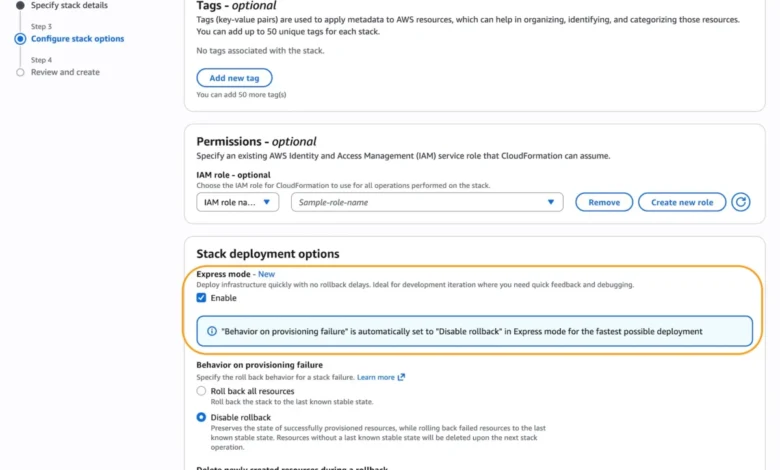
When creating a new CloudFormation stack within the AWS Management Console, users will find a new option under "Stack deployment options." Simply selecting "Enable" for "Express mode" will activate the accelerated deployment behavior for that stack. This user-friendly interface makes it accessible for all console users.
Via AWS CLI, SDKs, and IaC Tools:
For those who prefer programmatic management, Express mode is readily available through various AWS tools:
-
AWS Command Line Interface (AWS CLI): When executing CloudFormation commands, users can activate Express mode by specifying the
--deployment-configparameter. For example, to create a stack in Express mode with rollback disabled, the command would include:aws cloudformation create-stack --stack-name my-app --template-body file://template.yaml --deployment-config '"mode": "EXPRESS", "disableRollback": true'The example provided in the original announcement also includes
--capabilities CAPABILITY_IAMand--role-arn, which are standard parameters for many CloudFormation deployments, demonstrating that Express mode integrates seamlessly with existing command structures. -
AWS SDKs: Developers can leverage their preferred AWS SDKs to programmatically enable Express mode when interacting with the CloudFormation API.
-
Infrastructure as Code (IaC) Tools: Tools like the AWS Cloud Development Kit (AWS CDK) are also integrated. For AWS CDK, users can deploy stacks in Express mode using the command
cdk deploy --express. This command automatically generates the CloudFormation template and initiates the deployment through the Express mode pathway. -
AI Tools: The announcement also points to the integration of Express mode with AI tools such as Kiro, suggesting a future where AI agents can orchestrate rapid infrastructure changes with sub-minute feedback loops.
Configuration Options and Best Practices
When enabling Express mode, users have control over its behavior, particularly regarding rollback. By default, Express mode disables rollback to maximize deployment speed for iterative development. However, for production environments where a safety net is crucial, rollback can be re-enabled. This is achieved by setting disableRollback to false within the deployment-config parameter.

Alternatively, organizations can implement robust monitoring and cleanup mechanisms to manage failed deployments when rollback is disabled. This proactive approach ensures that even with accelerated deployments, potential issues are identified and addressed promptly.
The original announcement provides a practical example of incremental infrastructure building using Express mode:
# Iteration 1: Deploy IAM role
aws cloudformation create-stack
--stack-name my-microservice
--template-body file://iteration1-iam.yaml
--deployment-config '"mode": "EXPRESS"'
--capabilities CAPABILITY_IAM
--role-arn arn:aws:iam::123456789012:role/CloudFormationDeployRole

# Iteration 2: Add Lambda function
aws cloudformation update-stack
--stack-name my-microservice
--template-body file://iteration2-lambda.yaml
--deployment-config '"mode": "EXPRESS"'
--capabilities CAPABILITY_IAM
--role-arn arn:aws:iam::123456789012:role/CloudFormationDeployRole

# Iteration 3: Add SQS queue and event source mapping
aws cloudformation update-stack
--stack-name my-microservice
--template-body file://iteration3-sqs.yaml
--deployment-config '"mode": "EXPRESS"'
--capabilities CAPABILITY_IAM
--role-arn arn:aws:iam::123456789012:role/CloudFormationDeployRole
This multi-iteration deployment strategy effectively demonstrates how developers can build complex applications piece by piece, with each step benefiting from the speed of Express mode. It’s also recommended to ensure IAM role templates adhere to the principle of least privilege, a critical security best practice regardless of the deployment mode.
Comprehensive Compatibility and Future Outlook
A significant advantage of CloudFormation Express mode is its broad compatibility. It functions seamlessly with all existing CloudFormation templates and supports the full spectrum of CloudFormation features, including change sets and nested stacks. When Express mode is enabled on a parent stack, all its nested stacks will also automatically inherit and utilize Express mode, simplifying management for complex, multi-layered infrastructures.
For scenarios where complete resource operationalization is a prerequisite for proceeding – for example, before shifting live traffic or commencing critical testing – users are advised to continue utilizing the default deployment behavior. This ensures that the traditional stabilization checks are performed, guaranteeing a higher degree of certainty regarding resource readiness.
Availability and Integration with AI Tools
AWS CloudFormation Express mode is available starting today across all AWS commercial regions. Importantly, this new feature is offered at no additional cost to AWS customers, reinforcing AWS’s commitment to providing value-added services without increasing operational expenses.
AWS also highlights the growing synergy between CloudFormation and AI-driven development workflows. For developers looking to interact with CloudFormation APIs, search documentation, identify regional availability, and troubleshoot issues related to this new feature using their preferred AI tools, AWS recommends utilizing the AWS MCP Server and its associated plugins. This points towards a future where AI plays an even more integral role in cloud infrastructure management, with services like Express mode providing the necessary speed and responsiveness for AI agents.
For detailed information on regional availability and future roadmap updates, customers are directed to the AWS Capabilities by Region page. The comprehensive CloudFormation documentation also provides in-depth guidance on using Express mode and managing stacks.
Conclusion and Feedback Channels
The introduction of AWS CloudFormation Express mode marks a pivotal advancement in how cloud infrastructure is provisioned and managed on AWS. By significantly accelerating deployment times, particularly for iterative development and AI-driven workflows, AWS is empowering developers to innovate faster and more efficiently. The feature’s ease of adoption, broad compatibility, and integration with the broader AWS ecosystem position it as a valuable tool for a wide range of users.
AWS actively encourages feedback from its customer base. Developers are invited to share their experiences and suggestions regarding CloudFormation Express mode through AWS re:Post for AWS CloudFormation or via their standard AWS Support channels. This collaborative approach ensures that the service continues to evolve in alignment with the needs of the cloud computing community. The continued development and refinement of tools like CloudFormation Express mode underscore AWS’s dedication to providing cutting-edge solutions that drive productivity and foster innovation in the cloud.
Related posts: