Neo4j Expands Graph Database Capabilities with Public Preview of Virtual Graph for Major Cloud Data Warehouses

Neo4j, the global leader in graph database technology, has officially transitioned its Virtual Graph feature into public preview, signaling a significant shift in how enterprises architect and access their knowledge layers. The announcement follows a successful private preview period earlier this year and marks the expansion of the service to all Neo4j Aura customers. The update introduces native support for major data warehouse and lakehouse platforms, including Snowflake, Databricks, and Google BigQuery. This move is designed to address a growing demand among enterprise organizations to leverage graph-based insights directly from their existing data repositories without the operational overhead, cost, and risk associated with moving or duplicating massive datasets.
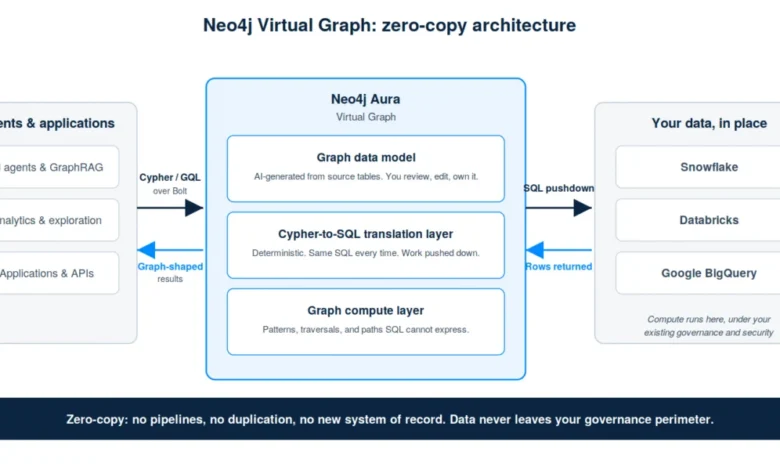
Virtual Graph represents a departure from traditional Extract, Transform, Load (ETL) paradigms. Built on a flexible foundation intended for future extensibility, the tool allows organizations to create a "virtual" representation of their data in a graph format while the underlying information remains in its original warehouse. This "zero-copy" architecture ensures that data stays governed by existing security controls while enabling the complex relationship-based querying that defines graph technology.
The Technological Shift Toward Zero-Copy Architecture
For years, the standard procedure for organizations wishing to utilize graph analytics involved migrating data from relational warehouses into a dedicated graph database. While effective for performance, this process created secondary systems of record, leading to data duplication and "data drift"—where the graph database becomes out of sync with the primary source of truth.
Neo4j’s Virtual Graph eliminates this trade-off. By treating the data warehouse as the storage layer and Neo4j as the query and logic layer, enterprises can maintain a single source of truth. The architecture is built on three core pillars: a graph data model, a Cypher-to-SQL translation layer, and a graph compute layer.
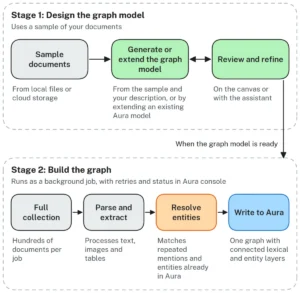
The graph data model can be optionally generated by built-in AI tooling. This system analyzes the source schema of a warehouse like Snowflake or BigQuery and proposes a model, identifying which entities should become nodes, which keys should represent relationships—even in the absence of declared foreign keys—and which columns should serve as properties. Users retain full ownership and can manually adjust these models before deployment.
The translation layer is perhaps the most technically significant component. When a user submits a query in Cypher—the industry-standard graph query language—Virtual Graph translates that request into optimized SQL. Crucially, Neo4j emphasizes that this translation is deterministic and not driven by Large Language Models (LLMs). This ensures that the same Cypher query will produce the same SQL execution plan every time, providing predictable performance and cost management within the host warehouse environment.
Chronology of Development and Availability
The roadmap for Neo4j Virtual Graph reflects a phased approach to enterprise readiness:
- Early 2024: Private Preview. Neo4j launched Virtual Graph in a restricted environment to gather feedback from select enterprise partners. The primary takeaway was a strong preference for "zero-copy" workflows to avoid the complexities of data pipelines.
- July 2024: Public Preview. The service is opened to all Neo4j Aura customers. This phase introduces support for Google BigQuery alongside existing support for Snowflake and Databricks.
- September 1, 2024: Billing Commencement. Neo4j has announced that while the public preview is currently free to use, billing will begin on September 1st. Pricing is expected to be at parity with the AuraDB Pro tier.
- Future Roadmap: General Availability (GA) and Beyond. Following the public preview, Neo4j plans to move toward General Availability. The roadmap includes "materialization" capabilities—allowing users to move a subset of a virtual graph into a native Neo4j database for high-performance needs—and federated queries that can span both native and virtual graphs in a single statement.
Strategic Importance for GraphRAG and AI Agents
The launch of Virtual Graph is closely tied to the rise of Generative AI and the need for more sophisticated retrieval methods. Standard Retrieval-Augmented Generation (RAG) typically relies on flat, vector-based retrieval. While effective for simple similarity searches, flat retrieval often fails to capture the intricate relationships between data points.
Neo4j argues that AI agents are only as effective as the context they reason over. In many enterprise use cases, answering a question requires "multi-hop" reasoning. For example, in financial services, identifying which accounts share a beneficial owner requires navigating through several layers of corporate structures and individual relationships. A flat database would struggle with this, whereas a graph database excels at it.
Virtual Graph provides the "knowledge layer" necessary for these AI agents. By surfacing warehouse data as a graph, Neo4j enables GraphRAG (Graph-enhanced RAG) without requiring the organization to rebuild their entire data infrastructure. This allows AI agents to "think" in terms of seconds by querying the virtual graph for complex context, providing a more robust foundation for enterprise-grade AI applications.
Technical Analysis: Virtual vs. Native Graph Implementations
Neo4j’s release documentation provides a clear distinction for architects deciding between Virtual Graph and native Neo4j (AuraDB or self-managed). The decision largely hinges on latency and the nature of the workload.
The Case for Virtual Graph:
This implementation is ideal for data that is too large or too heavily governed to move. It is best suited for workloads where "warehouse-grade" latency is acceptable. This includes GraphRAG over reference data, batch enrichment processes, analyst exploration, and agentic workflows that operate on a timescale of seconds rather than milliseconds. It serves as a permanent operating mode for many, or a low-friction entry point for those exploring graph capabilities for the first time.
The Case for Native Neo4j:
Native storage remains the gold standard for high-performance, real-time applications. If a workload requires millisecond traversals—such as real-time fraud scoring, online decisioning, or live identity resolution—native Neo4j is required. Native databases also support ACID-compliant writes and continuous updates, which are not currently the focus of the Virtual Graph read-centric architecture.
Neo4j’s upcoming "materialization" feature aims to bridge this gap, allowing organizations to model their data once in a virtual environment and then promote "hot" subsets of that data to a native graph for high-performance requirements without duplicating the modeling effort.
Market Implications and Enterprise Response
Industry analysts suggest that Neo4j’s move toward a virtualized, zero-copy model is a direct response to the "modern data stack" evolution. As Snowflake and Databricks become the gravity centers for enterprise data, specialized database vendors must find ways to integrate seamlessly rather than competing for the primary storage of data.
While Neo4j has not released specific customer quotes during this public preview launch, the transition from private preview was reportedly driven by intense enterprise demand for governance-first data access. Large-scale organizations in highly regulated sectors—such as banking, healthcare, and government—are often prohibited from creating multiple copies of sensitive data. Virtual Graph provides these entities with a pathway to advanced analytics that was previously blocked by compliance hurdles.
The inclusion of Google BigQuery in the public preview also highlights Neo4j’s commitment to a multi-cloud strategy. By supporting the three major cloud data platforms, Neo4j positions itself as a universal graph layer that can sit atop any major enterprise data lake.
Operational Implementation and Next Steps
For existing Aura customers, the process of deploying a Virtual Graph has been streamlined into a five-step workflow within the Aura Console:
- Connection: Users input their credentials for Snowflake, Databricks, or BigQuery.
- Modeling: The AI tool proposes a graph model based on the existing table schema.
- Review: Administrators adjust nodes, relationships, and properties to fit their specific domain needs.
- Creation: The virtual graph is instantiated without data movement.
- Querying: Users can immediately begin querying the data using Cypher via the Bolt protocol or the Neo4j console.
As the industry moves toward the September 1st billing date, the focus will likely shift toward performance optimization and the addition of graph algorithm support for virtualized data. Neo4j has also signaled that support for self-managed deployments and traditional operational databases (such as PostgreSQL or MySQL) is on the horizon, which would further solidify Virtual Graph as a central component of the enterprise data architecture.
In conclusion, the public preview of Neo4j Virtual Graph represents a significant milestone in the democratization of graph technology. By lowering the barrier to entry and respecting the gravity of existing data warehouses, Neo4j is enabling a new class of relationship-aware applications and AI agents that can operate at enterprise scale without the traditional burdens of data replication.
Related posts: