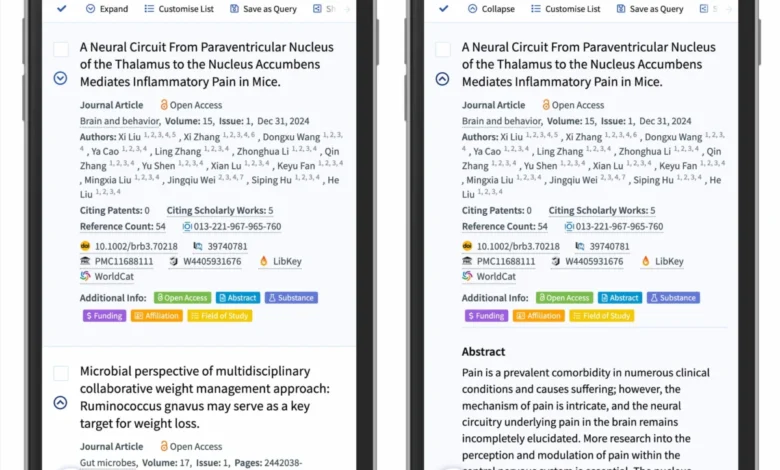
The design of user interfaces hinges on the predictability of interactive elements, yet few components suffer from as much inconsistency as the accordion menu. Recent research from the Nielsen Norman Group (NN/g) has clarified a long-standing debate among user experience (UX) designers: the choice of icon—whether a caret, chevron, arrow, or plus sign—directly dictates user behavior and the perceived functionality of a website. As web standards evolve, data suggests that simple, consistent visual cues significantly outperform complex or overloaded iconography, particularly in mobile-first environments.

The Anatomy of Accordion Confusion
An accordion is a vertically stacked list of headers that can be clicked to reveal or hide associated content. While common in e-commerce, documentation, and mobile navigation, the mechanism is often marred by inconsistent labeling. The primary conflict arises when users are unsure whether an element will trigger a page transition or merely expand a section.
Historical data indicates that when no icon is present, users default to the expectation that clicking a label will navigate them to a new, standalone page. Introducing custom or abstract icons often fails to resolve this ambiguity, as users lack a standardized mental model for these proprietary symbols. Furthermore, the "hit area"—the physical space a user interacts with—is not limited to the icon itself. Studies show that users distribute their attention and clicks between the text label and the accompanying icon with near-equal frequency. Consequently, if the icon implies an action different from the label, the user experience becomes fragmented and frustrating.

The Case Against Split Menus
A prevalent but increasingly discouraged design pattern is the "split menu." In this configuration, the text label is linked to a destination page, while the adjacent icon is designed specifically to expand the accordion. This approach is widely considered a usability failure. Data from usability testing reveals that users rarely distinguish between these two targets; they tend to tap the entire area, leading to unintentional page loads when they intended to view a submenu, or vice versa.
The professional consensus, supported by findings from major platforms like DHL, is that clarity should take precedence over density. The most effective navigation designs avoid split actions entirely. Instead, designers are encouraged to consolidate the interaction: the entire header should function as the expander, and a clear, internal link to an "Overview" or "All Products" page should be placed within the expanded content. This ensures that the user remains in control of the navigation flow, preventing accidental redirects.

Decoding Iconography: The Hierarchy of Reliability
The effectiveness of various symbols has been measured through extensive user testing. The results provide a clear hierarchy:
- The Caret (Triangle): The caret, pointing downward, is the most reliable indicator of a collapsible menu. It carries the least amount of "baggage" in terms of conflicting meanings. When a user interacts with it, the rotation to an upward or side-facing orientation provides immediate, intuitive feedback that the state of the content has changed.
- The Plus/Minus (+/-): While widely recognized, these symbols are highly overloaded. They are frequently used in other contexts, such as e-commerce (adding items to a cart) or data visualization (zooming). In multi-level navigation, having multiple plus signs open simultaneously can clutter the interface and confuse the hierarchy of the site.
- Arrows: Arrows are perhaps the most misunderstood. A right-facing arrow is often interpreted as an indicator of "next" or "forward" navigation, rather than an expansion event. Because users frequently associate arrows with page transitions, their use in accordions often leads to a high rate of user error, where participants expect a new page to load upon clicking.
Chronology of Standardized Web Interaction
The evolution of these design patterns has moved toward minimalism. In the early 2000s, the web was dominated by complex "fly-out" menus and decorative icons that often obscured function. As mobile traffic began to eclipse desktop traffic around 2015, the industry was forced to reconsider these patterns. The move toward responsive design necessitated a reduction in UI clutter.

Between 2018 and 2023, large-scale usability studies began to solidify the current "best practices." The findings were stark: simple is almost always better. The transition from complex, colorful navigation to the current standard of clean, text-based links supported by functional carets was driven by the need to minimize cognitive load. Today, the design community recognizes that the most "exciting" designs are often the ones that function so predictably that the user does not even notice the interaction.
Broader Implications for Digital Accessibility
The importance of these design choices extends beyond mere aesthetics. For users relying on assistive technologies, such as screen readers, the way an accordion is coded and labeled is critical. A button that behaves inconsistently—or one that uses an ambiguous icon—can render a site nearly impossible to navigate for visually impaired users.

When a design relies on an icon to communicate function, it must also include proper ARIA (Accessible Rich Internet Applications) labels. However, even with perfect coding, if the visual design is confusing, the cognitive barrier remains. By moving toward the standard of using a caret to signify expansion and a simple underline to signify a link, designers are not just making choices for "average" users; they are establishing a universal language that improves the accessibility of the web for everyone.
Strategic Recommendations for Designers
Based on current usability research, organizations should adopt a standardized approach to navigation elements:

- Prioritize the Underline: If a text element is a hyperlink, the most effective and universally understood signifier remains the underline. It does not require an arrow or an icon to explain its purpose.
- Standardize the Caret: Use the downward-pointing triangle/caret as the sole indicator for collapsible sections. Ensure that the icon rotates or changes orientation to provide clear visual feedback regarding the expanded state.
- Eliminate Split Targets: Remove any design that separates the functionality of the label from the icon. If a section has both an "overview" page and sub-categories, place the "overview" link inside the revealed section, not in the primary navigation header.
- Audit for Overload: Regularly audit navigation icons to ensure they are not being used in multiple, conflicting ways across the site. An icon should have one, and only one, meaning within a single user journey.
Conclusion
The research is clear: the pursuit of innovative UI elements often leads to unnecessary friction. While the debate over icons may seem trivial in the context of broader web development, the cumulative impact on user behavior is profound. By stripping away redundant arrows, avoiding the pitfalls of split-menu interactions, and leaning on the proven reliability of the caret, designers can create interfaces that are not only more usable but also more inclusive. The goal of modern web design is to provide a seamless experience where the interface disappears, allowing the user to focus entirely on the content. By adhering to these evidence-based standards, developers and designers can ensure that their platforms remain both functional and intuitive in an increasingly crowded digital landscape. As the web continues to grow, these small, deliberate choices in iconography will remain the foundation of a coherent and accessible user experience.