Resolving the ‘Video Format Not Supported’ Error on New MacBooks for YouTube TV: A Deep Dive into Digital Rights Management and Browser Compatibility

The acquisition of a new computer often heralds a period of enhanced productivity and seamless digital interaction. Users anticipate improved performance, a pristine operating environment free from legacy software, and the cutting-edge capabilities afforded by modern hardware. However, this initial optimism can occasionally be tempered by unexpected technical hurdles that emerge from the intricate interplay of new hardware, operating systems, and streaming service requirements. One such issue, increasingly reported by users transitioning to new Apple MacBook devices, manifests as a "This video format is not supported" error when attempting to access content on platforms like YouTube TV. This seemingly straightforward error message, while frustrating, points to a deeper technical challenge rooted in digital rights management (DRM) protocols and browser compatibility, specifically concerning Google’s Widevine CDM (Content Decryption Module).
The Initial Experience and the Unexpected Hurdle
The allure of a new MacBook is undeniable, promising a powerful and efficient ecosystem for both professional and personal use. Users often revel in the swiftness of applications, the clarity of high-resolution displays, and the extended battery life, all contributing to an expectation of uninterrupted digital consumption. For many, a primary use case involves streaming entertainment, including live television services such as YouTube TV. This subscription-based platform offers a comprehensive array of channels, on-demand content, and DVR capabilities, making it a cornerstone of modern media consumption.
The abrupt appearance of a "This video format is not supported" message, therefore, introduces an immediate disruption to this anticipated seamless experience. Instead of enjoying a favorite live broadcast or a newly released show, users are confronted with a technical barrier that prevents playback entirely. This error is particularly perplexing on a brand-new, high-specification device, leading to initial assumptions about incompatible video codecs or missing software components. However, the root cause is often far more nuanced than a simple format mismatch, residing in the mechanisms designed to protect copyrighted content.
Understanding the "Video Format Not Supported" Error
While the error message suggests an issue with the video file itself, in the context of streaming services like YouTube TV, it typically indicates a failure in the browser’s ability to decrypt and play back securely protected content. Streaming platforms employ various methods to prevent unauthorized copying and distribution of their copyrighted material. These methods fall under the umbrella of Digital Rights Management (DRM), a systematic approach to protecting intellectual property in digital form.
When a user attempts to play content on YouTube TV, the service doesn’t just send raw video data. Instead, it transmits encrypted video and audio streams. The user’s browser, in turn, needs a specific component—a Content Decryption Module (CDM)—to decrypt this stream before it can be rendered on screen. If this CDM is missing, disabled, or improperly configured, the browser cannot unlock the content, resulting in the "video format not supported" error, even if the underlying video codec (e.g., H.264, VP9, AV1) is technically compatible with the system.
The Core Solution: Widevine DRM

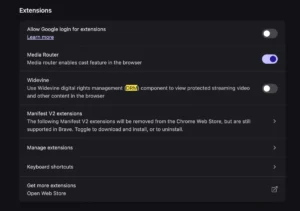
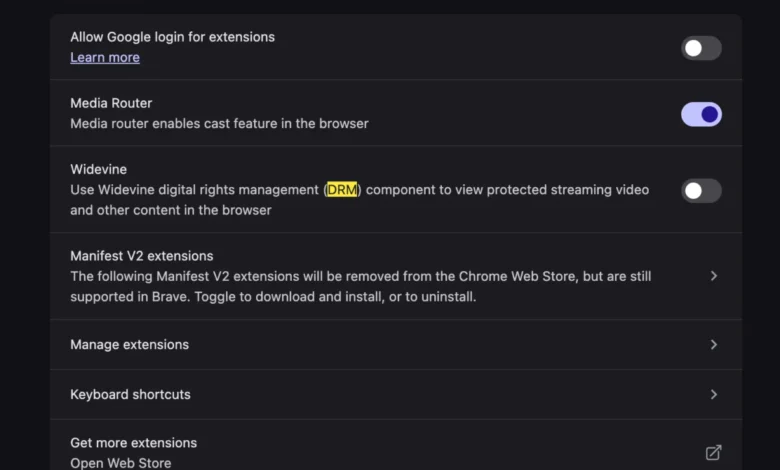
Through troubleshooting and community discussions, the recurring solution to this specific problem on new MacBooks accessing YouTube TV has consistently pointed to the activation of Google’s Widevine DRM within the web browser. Widevine is one of the most widely adopted DRM schemes globally, utilized by a vast majority of major streaming services, including Netflix, Hulu, Disney+, Amazon Prime Video, HBO Max, and, crucially, YouTube TV.
The process to resolve the issue typically involves navigating to the browser’s internal settings or components page and ensuring that the Widevine Content Decryption Module is enabled. For browsers based on Chromium (like Google Chrome, Microsoft Edge, and Brave), this module is usually built-in and enabled by default. However, in certain scenarios—perhaps due to a fresh installation, specific security settings, or an update glitch—it might be inadvertently disabled or require explicit activation. For browsers like Mozilla Firefox, Widevine is offered as a plugin or component that users might need to allow. Safari, Apple’s native browser, handles DRM through its own FairPlay system, which can sometimes lead to compatibility challenges with services primarily relying on Widevine. However, YouTube TV specifically leverages Widevine for its primary DRM protection across most platforms.
What is Widevine? A Deep Dive into Digital Rights Management
To fully appreciate the significance of Widevine, it is essential to understand its role within the broader landscape of Digital Rights Management. Widevine Technologies was founded in 1999 and quickly became a prominent player in content protection. In 2010, Google acquired Widevine, integrating its DRM solutions deeply into the Android ecosystem, Chrome browser, and various Google services, including YouTube and YouTube TV.
Widevine operates on a client-server model. When a user requests protected content, the streaming service sends an encrypted license request to the Widevine server. The server then verifies the user’s rights (e.g., subscription status) and issues a decryption key back to the user’s CDM within their browser or device. This CDM then decrypts the video stream in real-time. The entire process is designed to be largely invisible to the end-user, ensuring a smooth playback experience while simultaneously safeguarding content from piracy.
Widevine offers different security levels, known as L1, L2, and L3, which correspond to varying degrees of hardware and software protection:
- Widevine L1: This is the highest level of security, where decryption and all cryptographic operations are performed entirely within a trusted execution environment (TEE) of the device’s hardware. This level is crucial for streaming high-definition (HD) and ultra-high-definition (UHD) content.
- Widevine L2: Decryption occurs within the TEE, but other cryptographic operations might be handled by software.
- Widevine L3: The lowest level of security, where all decryption and cryptographic operations are performed in software. This level is typically used for standard-definition (SD) content or on devices with less robust hardware security.
For a service like YouTube TV, especially for HD and 4K streams, Widevine L1 is often required. A malfunction or disablement of the Widevine CDM, particularly concerning its ability to interface with the device’s TEE, can lead to the inability to play back high-quality content, manifesting as the "video format not supported" error.
Browser Integration and Compatibility
The implementation and management of Widevine vary across different web browsers, contributing to the complexity of troubleshooting.

- Google Chrome: As Widevine is owned by Google, Chrome has native and robust support for the CDM. It is typically integrated as a core component, managed automatically, and updated alongside the browser. Problems here are rare but can occur due to corrupted profiles or specific extension conflicts.
- Microsoft Edge: Being based on Chromium, Edge also incorporates Widevine natively. Its behavior and management are very similar to Chrome’s, offering strong compatibility with Widevine-protected content.
- Mozilla Firefox: Firefox supports Widevine through a plugin or add-on model. Users typically need to grant permission for Firefox to install and activate the Widevine CDM. Mozilla’s approach emphasizes user control, meaning the module might not be active by default on a fresh installation or after certain updates, requiring manual intervention.
- Apple Safari: Safari primarily uses Apple’s proprietary FairPlay DRM system. While FairPlay is widely adopted for Apple’s own ecosystem (Apple TV+, iTunes), it generally does not directly support Widevine. This means that streaming services that rely exclusively on Widevine might not function optimally or at all on Safari without specific workarounds or if the service offers alternative DRM pathways. For YouTube TV, while some compatibility might exist through other means, using a Widevine-enabled browser like Chrome or Edge is often the most reliable solution on macOS.
The interaction between the operating system (macOS in this case), the browser, and the Widevine CDM is critical. On a new MacBook, especially with recent macOS versions, there can be subtle configuration differences or security enhancements that might temporarily interfere with how Widevine is recognized or allowed to operate by the browser. This underscores the need for users to ensure their browser is up-to-date and that all necessary content protection components are enabled.
YouTube TV’s Technical Landscape
YouTube TV, launched in 2017, has rapidly expanded to become a significant player in the live TV streaming market. Its technical infrastructure is designed to deliver a high-quality, low-latency streaming experience across a multitude of devices and platforms. This involves sophisticated encoding using modern video codecs (such as H.264, VP9, and increasingly AV1), adaptive bitrate streaming (DASH or HLS) to adjust quality based on network conditions, and robust DRM to protect the vast library of licensed content.
For YouTube TV, Widevine serves as the primary DRM system for most non-Apple environments. The service negotiates content licenses with broadcasters and content creators, which invariably include strict requirements for copy protection. Without a functioning Widevine CDM, YouTube TV cannot fulfill these licensing obligations, and therefore, it will refuse to play the content, issuing the "video format not supported" error rather than risking unprotected playback. This is a deliberate design choice by content providers to maintain the integrity of their intellectual property.
The Broader Implications of DRM
The prevalence of DRM systems like Widevine highlights a perpetual tension in the digital media landscape: the balance between content protection and user experience. From the perspective of content creators and distributors, DRM is an indispensable tool to safeguard revenue streams, prevent piracy, and maintain the value of their intellectual property. Industry data consistently shows that digital piracy remains a significant threat, costing content industries billions annually.
However, from the user’s perspective, DRM can sometimes be perceived as an inconvenience, adding layers of complexity to accessing legally purchased or subscribed content. Issues like the "video format not supported" error, though resolvable, contribute to user frustration and necessitate technical troubleshooting that many users are ill-equipped to handle. Critics of DRM also point to its potential to restrict fair use, limit interoperability between devices, and concentrate control over digital content in the hands of a few technology companies.
Despite these criticisms, the current ecosystem of digital content distribution heavily relies on DRM. Major studios and networks mandate its use as a condition for licensing their content to streaming services. Therefore, understanding and ensuring the proper functioning of DRM components like Widevine is not merely a technical fix but a prerequisite for engaging with a significant portion of modern digital media.
Common Troubleshooting Steps Beyond Widevine

While enabling Widevine is the specific solution for the YouTube TV issue, it is part of a broader set of troubleshooting steps applicable to general streaming playback problems. These include:
- Browser Updates: Always ensure the web browser is updated to the latest version. Updates often include critical security patches, performance enhancements, and refreshed CDM components.
- Clear Browser Cache and Cookies: Corrupted cache data or outdated cookies can sometimes interfere with streaming services. Clearing them often resolves transient issues.
- Check Internet Connection: A stable and sufficiently fast internet connection is crucial for streaming. Bandwidth fluctuations or intermittent connectivity can lead to playback errors.
- Operating System Updates: Keeping macOS updated ensures that the underlying system components and drivers that browsers rely on are current and compatible.
- Disable Browser Extensions: Certain browser extensions, especially ad-blockers or privacy tools, can sometimes inadvertently block DRM components or script execution necessary for streaming. Temporarily disabling them can help identify conflicts.
- Hardware Acceleration: Ensure hardware acceleration is enabled in browser settings. This allows the GPU to assist in video decoding, which can be essential for high-resolution content and complex DRM operations.
- Test in Another Browser: If one browser fails, trying another (e.g., Chrome if Firefox fails, or vice-versa) can help isolate whether the issue is browser-specific or system-wide.
Statements and Industry Context
While no direct official statements are typically issued for individual user troubleshooting scenarios like a "video format not supported" error, the actions and policies of key industry players infer their positions. Google, as the owner of Widevine and YouTube TV, continuously works to ensure the seamless operation of its DRM system across supported platforms. Their rationale is clear: to provide a secure environment for content creators, thus enabling the availability of premium content on their platforms. Similarly, Apple, with its commitment to user privacy and security, has developed its own robust DRM system, FairPlay, and often integrates hardware-level security features into its devices that can interact with DRM requirements. The challenge for both companies, and indeed the entire streaming industry, is to maintain stringent security measures without unduly burdening the end-user with complex technical configurations. The ongoing development of web standards, such as Encrypted Media Extensions (EME), aims to standardize how browsers interact with DRM systems, theoretically reducing compatibility issues over time.
Future of Streaming and DRM
The landscape of streaming and DRM is continuously evolving. As video resolutions increase (8K streaming is on the horizon) and content libraries expand, the demands on DRM systems will only grow. There is a trend towards even deeper hardware integration for DRM, making it more robust against software-based attacks. Simultaneously, there’s a push for greater transparency and user control within the digital rights management framework. The goal remains to achieve a delicate balance: providing content creators with the assurance that their intellectual property is protected, while offering consumers a frictionless and high-quality viewing experience.
For users navigating the complexities of modern digital media, understanding the underlying technologies like Widevine DRM is becoming increasingly important. The "This video format is not supported" error on a new MacBook, while initially daunting, serves as a practical lesson in the intricate architecture that underpins our daily consumption of streaming entertainment. The resolution—a simple toggle of a browser setting—reaffirms that even in an age of advanced technology, sometimes the most profound solutions lie in understanding the fundamental components at play.