Fixing the YouTube TV This Video Format Is Not Supported Error on New MacBooks and Browsers

Transitioning to a new personal computer or workstation is traditionally characterized by a noticeable enhancement in system performance, marked by rapid boot times, optimal thermal management, and the absence of legacy software bloat. However, modern computing environments rely heavily on a complex ecosystem of digital rights management (DRM) protocols, proprietary codecs, and browser-level configurations. When migrating to fresh hardware—particularly modern Apple Silicon MacBooks running the latest iterations of macOS—users frequently encounter unexpected compatibility hurdles that disrupt routine digital consumption.
Among these technical friction points, a growing number of subscribers attempting to access live television and on-demand content through streaming platforms have been met with an abrupt error notification: "This video format is not supported." This specific diagnostic message typically surfaces when launching web-based streaming applications like YouTube TV on a freshly initialized browser profile. Rather than stemming from hardware failure or network latency, the error is deeply rooted in modern web security architectures, specifically the absence or deactivation of essential digital decryption modules required by major media conglomerates to prevent unauthorized content distribution.
Understanding the Root Cause: Digital Rights Management and Browser Architecture
To comprehend why a high-performance, contemporary computing device fails to render a standard video stream, one must examine the underlying mechanics of modern web-based video delivery. Premium media services, including YouTube TV, Netflix, Amazon Prime Video, and Hulu, are legally and contractually obligated by content creators and studios to protect their intellectual property from piracy. To satisfy these rigorous security mandates, streaming services utilize encrypted media extensions (EME) and media source extensions (MSE) alongside robust digital rights management systems.

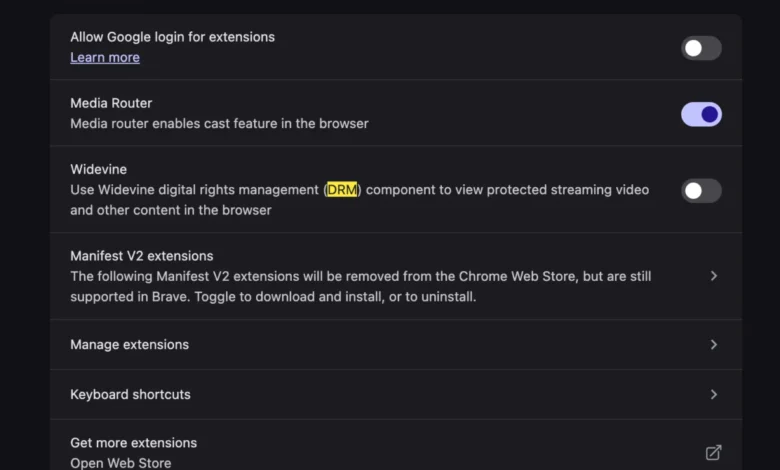
Google’s Widevine content protection system has emerged as an industry-standard DRM architecture across the global digital landscape. Widevine provides the cryptographic scaffolding necessary to safely decrypt, decode, and render high-definition and 4K video streams directly within web browsers such as Google Chrome, Microsoft Edge, Brave, and Vivaldi. When a user sets up a new machine, browsers often default to a high-privacy or stripped-down state where proprietary plugins and modular decryption components are either disabled or left uninitialized. Without an active Widevine Content Decryption Module (CDM) operating within the browser environment, the platform cannot safely negotiate the decryption of the incoming media stream, resulting in the abrupt termination of playback and the presentation of the unsupported format warning.
Historical Context and the Evolution of Browser Codecs
The dependency on modular decryption frameworks like Widevine represents a significant evolution in how web browsers handle multimedia content. Historically, viewing video content on the internet necessitated the installation of third-party browser plugins, most notably Adobe Flash Player, Microsoft Silverlight, or Apple QuickTime. These plugins frequently introduced severe security vulnerabilities, system instability, and excessive power consumption, prompting a massive industry-wide migration toward native web standards.
With the widespread adoption of HTML5, the World Wide Web Consortium (W3C) sought to standardize video playback without relying on external plugins. However, commercial content providers refused to distribute high-value programming over open, unencrypted HTML5 channels due to rampant intellectual property theft. This impasse led to the integration of Encrypted Media Extensions into the HTML5 specification, allowing browsers to interface directly with secure, sandboxed decryption modules provided by third parties such as Google (Widevine), Microsoft (PlayReady), and Apple (FairPlay Streaming).
While this architectural shift successfully eliminated the vulnerability-laden plugin era of the past, it created a new category of user-facing troubleshooting challenges. When a user transitions to a new operating system installation or deploys a fresh browser instance, the automatic download and enablement of these critical decryption components can occasionally fail due to network restrictions, enterprise security policies, or automated privacy settings. Consequently, users face playback obstructions that mimic hardware incompatibilities, even when operating on cutting-edge silicon architectures.

Diagnostic Analysis: Isolating the Playback Failure
When the "This video format is not supported" notification appears on a modern MacBook, users frequently misdiagnose the origin of the malfunction. Initial troubleshooting steps typically involve clearing browser caches, disabling ad-blocking extensions, updating the macOS operating system, or reinstalling the web browser entirely. While these measures address general software corruption, they fail to resolve the core issue if the underlying decryption subsystem remains dormant.
Data collected from consumer technical support forums and browser telemetry indicate that the vast majority of these errors on new macOS devices are concentrated within Chromium-based browsers. Safari, Apple’s native browser, utilizes its own proprietary FairPlay Streaming framework natively integrated into the operating system, minimizing third-party module dependency for Apple-centric services. However, a substantial market segment of Mac users continues to rely on Google Chrome or alternative Chromium variants for cross-platform synchronization, advanced developer tools, or specific extension ecosystems.
When a fresh instance of a Chromium browser is launched on a new MacBook, the browser process attempts to download and register the Widevine CDM during initial background updates. If this background provisioning process is interrupted—due to strict firewall configurations, virtual private networks (VPNs), or aggressive anti-tracking extensions—the browser lacks the cryptographic keys required to decode Widevine-protected streams. As a result, when YouTube TV’s media player initializes a handshake with the browser, the platform detects the absence of a compliant decryption environment and halts the transmission, throwing the generic format error code to protect copyrighted material.
Step-by-Step Resolution Procedures
Resolving the "This video format is not supported" error on a newly configured system requires manual verification and activation of the browser’s internal decryption components. Although the exact procedural pathway varies slightly depending on the specific web browser utilized, the fundamental methodology remains consistent across modern Chromium-compatible environments.

Enabling Widevine in Google Chrome and Chromium Browsers
For users experiencing this disruption within Google Chrome or derivative browsers such as Brave, Opera, or Vivaldi, the remediation process involves ensuring that plugin execution and automated component updates are fully enabled:
- Access Browser Settings: Open the browser menu by selecting the three vertical dots in the upper-right corner and navigating to the "Settings" panel, or by entering
chrome://settingsdirectly into the address bar. - Navigate to Privacy and Security: Scroll down the sidebar menu to locate and select "Privacy and security," followed by "Site settings."
- Inspect Additional Content Settings: Expand the advanced content options to locate "Protected content identifiers" or "Additional content settings."
- Verify DRM Control Configuration: Ensure that the option allowing sites to play protected content is explicitly enabled. If the setting is toggled off, the browser will block the execution of the Widevine CDM.
- Force Component Updates: Users can verify the installation status of the decryption module by navigating to
chrome://componentsin the address bar. Locate the entry labeled "Widevine Content Decryption Module" and select "Check for update." This action forces the browser to fetch and register the latest signed binary required for secure media playback. - Restart the Application: Completely quit the browser application (ensuring all background helper processes are terminated) and relaunch the software before navigating back to the streaming platform.
Industry Implications and the Future of Streamlined Digital Delivery
The friction experienced by consumers during hardware migrations underscores a broader, ongoing challenge within the digital media and browser development sectors: balancing uncompromising digital rights management with seamless user experience. As media conglomerates increasingly transition traditional cable television infrastructure to cloud-based streaming networks like YouTube TV, reliability and accessibility have become paramount competitive differentiators.
Streaming service providers invest heavily in adaptive bitrate streaming algorithms and multi-DRM orchestration platforms to ensure uninterrupted content delivery across an exploding array of consumer hardware, ranging from mobile operating systems and smart televisions to high-end desktop workstations. However, the reliance on browser-level modular components introduces external points of failure over which streaming providers exercise limited direct control.
Software engineers and browser developers continually refine automated background update mechanisms to minimize the likelihood of uninitialized decryption modules. Modern web standards organizations are also exploring more transparent error-reporting frameworks, which could eventually replace ambiguous notifications like "This video format is not supported" with precise diagnostic directives, instructing the user explicitly to enable necessary security extensions rather than forcing independent technical investigation.

Ultimately, while the transition to a new computer system will continue to present minor operational hurdles, understanding the symbiotic relationship between web browsers, digital rights management protocols, and streaming applications empowers users to rapidly restore full functionality. By ensuring that cryptographic modules such as Widevine are properly initialized within the browser environment, subscribers can bypass artificial compatibility barriers and resume normal consumption of live and on-demand digital programming without enduring prolonged system troubleshooting or unnecessary hardware replacements.