React Native 0.87 Arrives with Default Strict TypeScript, SwiftPM Support, and Elevated Toolchain Requirements

The core architecture of cross-platform mobile development is undergoing a significant evolution today with the official release of React Native 0.87. Rolled out to the global developer community, this milestone update elevates the Strict TypeScript API to the default JavaScript interface, introduces experimental support for the Swift Package Manager (SwiftPM) on iOS, and updates the Metro bundler to version 0.87. Alongside these major feature rollouts, the release enforces higher minimum toolchain benchmarks, mandating Node.js 22, Android Gradle Plugin (AGP) 9, and Kotlin 2.0 or higher. As older iterations such as version 0.84 transition out of official support, version 0.87 establishes a modernized baseline designed to enhance type safety, streamline native dependency management, and improve overall build performance.
Evolutionary Timeline: From Opt-In Preview to Default Standard
The journey toward React Native 0.87 began in earnest with the release of version 0.80, which initially introduced the Strict TypeScript API as an optional preview alongside the deprecation of deep imports. Recognizing the inherent risks of breaking changes in a vast ecosystem, the core development team deliberately chose a staged rollout. Throughout the subsequent months, maintainers collaborated closely with ecosystem partners and library authors to refine root exports, identify compatibility friction points, and build automated migration paths.
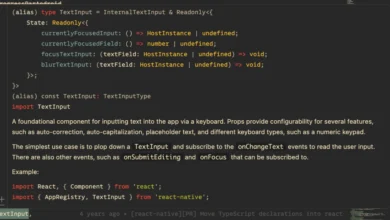
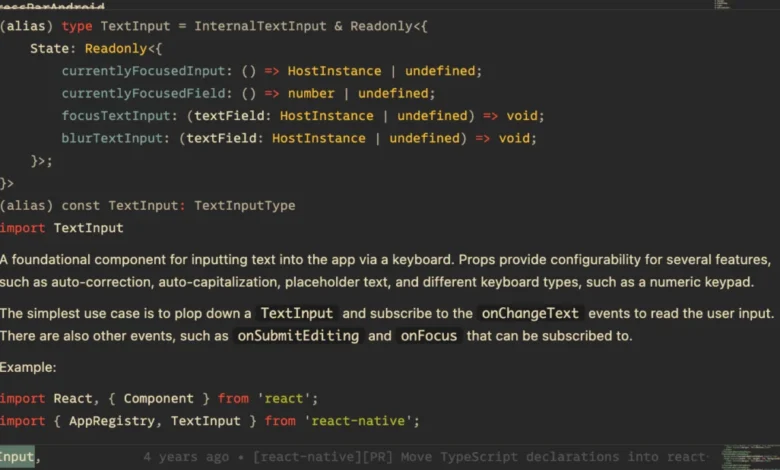
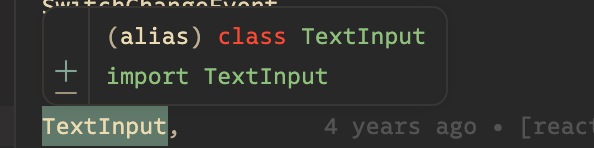
By version 0.87, this preparatory work culminates in making the Strict TypeScript API the mandatory default for all new and upgraded projects. While the transition introduces intentional breaking changes across the public API surface, it addresses long-standing developer pain points. By incorporating rich documentation comments directly onto symbols, the new types drastically improve the developer experience. Developers hovering over core components like TextInput now see comprehensive type information and inline documentation instantly, replacing the blank or minimal tooltips characteristic of legacy types.
Despite the default shift, the React Native maintainers have implemented a temporary bridge for teams requiring more time to refactor sprawling codebases. Developers can opt out of the Strict TypeScript API through version 0.88 by adding the "react-native-legacy-deep-imports" custom condition to their tsconfig.json file. However, the core team has confirmed that legacy TypeScript types will be permanently excised in the release immediately following 0.88, signaling a definitive end-of-life for the older implementation. To ease the transition, automated tooling such as specialized ESLint fixers and agent-driven migration skills remain available to the community.
Streamlining iOS Infrastructure with Experimental Swift Package Manager Support

Perhaps the most structurally ambitious addition in React Native 0.87 is the introduction of experimental support for the Swift Package Manager (SwiftPM) on iOS. For years, CocoaPods has served as the undisputed backbone of iOS dependency management within the React Native ecosystem. While CocoaPods remains the default and fully supported path in 0.87, SwiftPM offers a compelling native alternative that eliminates external tooling dependencies like Ruby and Bundler, requiring only Xcode to function.
Implementing SwiftPM required a fundamental rethinking of how React Native distributes its precompiled binaries. Because SwiftPM enforces much stricter structural and header-location rules than CocoaPods, the core team reorganized the framework architecture. This restructuring introduced dedicated header-only XCFrameworks, standardizing header resolution through conventional framework and header search path mechanics. Consequently, developers adopting SwiftPM may need to adjust bare-form angle includes, updating imports to explicitly reference their namespaces—for instance, changing #import to #import <React/RCTAppDelegate.h>.
Integrating SwiftPM into an existing or new project has been designed to minimize friction. Developers can execute a single deintegration command—npx react-native spm –deintegrate—which injects Swift package references directly into the existing Xcode project file (.xcodeproj) without overwriting manual signing configurations, capabilities, or build phases. Crucially, unlike traditional CocoaPods workflows, developers do not need to execute a manual installation command after every native dependency modification. Subsequent builds automatically detect changes and trigger autolinking, eliminating a frequent source of developer friction.
Under-the-Hood Enhancements: Metro 0.87 and Android Gradle Plugin 9
Beyond frontend architecture and iOS tooling, React Native 0.87 brings substantial updates to the build and bundling layers of the framework. Metro, the JavaScript bundler engineered specifically for React Native, has been updated from version 0.84 to 0.87. This upgrade delivers a faster, leaner bundling pipeline, optimizing cold-start times and incremental build performance across large-scale enterprise applications.
On the Android side, version 0.87 marks the first React Native release to officially support the Android Gradle Plugin (AGP) 9. Because AGP 9 introduces significant API shifts and breaking build changes, the React Native team recommends that upgrading projects temporarily opt out of built-in Kotlin and the new DSL behavior by explicitly declaring flags within their gradle.properties files. These temporary opt-outs ensure build stability while the broader Android ecosystem prepares for native AGP 9 adoption, a transition actively coordinated through community-led Request for Comments (RFC #1006).
Elevated Toolchain Requirements and Ecosystem Implications
The enforcement of stricter minimum toolchain requirements underscores the framework’s pivot toward modern computing standards. By establishing Node.js 22, AGP 9, and Kotlin 2.0+ as mandatory prerequisites, React Native ensures that applications benefit from the latest security patches, performance optimizations, and language features provided by upstream maintainers. However, these elevated thresholds also mean that organizations maintaining legacy infrastructure must systematically audit their continuous integration and deployment (CI/CD) pipelines prior to attempting an upgrade.
The release of version 0.87 was driven by a collaborative global effort involving 74 contributors who authored a total of 265 commits. This distributed model of open-source stewardship highlights the maturity of the React Native ecosystem, where community-driven proposals and rigorous testing cycles directly shape core framework architecture.
Broader Industry Impact and Strategic Outlook
From an industry perspective, React Native 0.87 reinforces Meta’s ongoing commitment to narrowing the performance and developer-experience gap between cross-platform frameworks and native platform development. By embracing modern TypeScript standards natively, React Native aligns closely with web development best practices, enabling safer refactoring and more predictable codebases. Simultaneously, the exploration of SwiftPM signals a pragmatic willingness to reduce reliance on legacy toolchains like Ruby on macOS, aligning mobile development workflows closer with modern Apple ecosystem standards.
As version 0.87 establishes itself as the new stable baseline and version 0.84 moves into unsupported territory, engineering teams are encouraged to leverage automated migration tools and the React Native Upgrade Helper. While upgrades involving major toolchain shifts invariably require careful coordination, the structural payoff—characterized by enhanced type safety, cleaner dependency management, and faster build times—positions React Native applications for scalable, long-term stability.