Unboxing and configuring a brand-new computer is universally recognized as a satisfying computing experience, characterized by lightning-fast boot times, a complete absence of accumulated digital clutter, and optimal hardware performance that far surpasses an aging predecessor. However, transitioning to a fresh machine—particularly when migrating to modern macOS hardware architecture—frequently exposes unforeseen compatibility hurdles tied to new hardware specifications, proprietary software layers, and stringent digital rights management protocols. Among the most frustrating of these early setup anomalies is a sudden playback failure on major streaming platforms, specifically manifested by the cryptic and disruptive error message: "This video format is not supported" when attempting to access live or on-demand content through YouTube TV.
For cord-cutters and digital-first households relying on subscription television services to replace traditional cable broadcasts, losing access to live programming, sports broadcasts, and local news immediately upon setting up a high-end workstation or laptop is more than a minor inconvenience; it represents an unexpected barrier in modern device migration. While historical computing eras often required tedious manual installation of disparate audio and video codecs, modern web browsers handle media playback through sophisticated, integrated architectures. Despite these advancements, platform migrations often trigger default security and content protection settings that inadvertently block authenticated media streams. Resolving this playback interruption requires understanding the underlying media decryption technologies utilized by modern streaming aggregators and navigating browser-level configuration settings to restore full functionality.

The Technical Roots of Browser-Based Media Delivery
To comprehend why a modern MacBook running cutting-edge hardware components fails to render a standard video stream, one must examine the complex ecosystem of digital rights management (DRM) and browser-based media decoding. Over the past decade, the web development community and major media conglomerates transitioned away from vulnerable, resource-heavy browser plugins like Adobe Flash and Microsoft Silverlight. Instead, the industry standardized around HTML5 video specifications coupled with Encrypted Media Extensions (EME) and Media Source Extensions (MSE). These native browser capabilities allow web applications to interact directly with secure content decryption modules (CDMs) to safely stream premium, copyrighted media without exposing raw video feeds to unauthorized interception.
YouTube TV, alongside competing enterprise streaming giants such as Netflix, Amazon Prime Video, and Hulu, relies heavily on robust DRM frameworks to satisfy strict content licensing agreements mandated by television networks, movie studios, and sports leagues. Google, the parent company of both YouTube and the Chrome web browser, heavily utilizes Widevine, a prominent DRM modular system acquired by Google in 2010. Widevine provides secure distribution and playback of digital content across a vast array of operating systems, hardware architectures, and browser environments. While Google Chrome integrates Widevine natively, other Chromium-based browsers—such as Microsoft Edge, Brave, Vivaldi, and Opera—as well as alternative rendering engines, require explicit authorization or background component downloads to execute the CDM successfully. When a user migrates to a new machine, these auxiliary security modules are occasionally disabled by default, omitted during automated browser profile synchronization, or temporarily blocked by aggressive local security configurations and privacy extensions. Consequently, when the browser attempts to handshake with YouTube TV’s content delivery network (CDN), the absence of an active, verified Widevine module terminates the media pipeline, resulting in the abrupt "This video format is not supported" warning screen.
Historical Context and the Evolution of Web Media Standards
The current reliance on proprietary content decryption modules represents a significant chapter in the ongoing evolution of web standards and intellectual property protection. In the early days of online video, platforms experimented with numerous proprietary formats, forcing users to manually download, install, and update dynamic link libraries (DLLs) and system codecs such as DivX, Xvid, QuickTime components, and various Windows Media Player extensions. This fragmented ecosystem routinely caused system instability, security vulnerabilities, and endless user frustration as media players clashed with operating system updates.

As high-definition and eventually 4K ultra-high-definition streaming became commercially viable, content creators and distributors demanded cryptographic guarantees that their digital assets could not be effortlessly pirated or intercepted via screen-recording software operating at the hardware kernel level. This demand led to protracted standardization battles within the World Wide Web Consortium (W3C). Privacy advocates and open-source proponents initially resisted the standardization of EME, arguing that embedding proprietary DRM directly into open web standards undermined the foundational openness of the internet and hindered independent browser development. Despite these controversies, the W3C ultimately ratified EME as a recommendation in 2017, cementing modular DRM systems like Google’s Widevine, Microsoft’s PlayReady, and Apple’s FairPlay Streaming as the tripartite pillars of modern web video delivery. Today, consumers rarely ponder the complex cryptographic handshakes occurring behind the scenes until a hardware upgrade, a fresh operating system installation, or a strict browser privacy setting disrupts the delicate harmony between the browser engine and the content decryption module.
Step-by-Step Resolution: Enabling Widevine in Modern Browsers
For users encountering the playback obstruction on a new MacBook, rectifying the issue does not require third-party codec packs, terminal commands, or complex operating system modifications. Because the underlying hardware is fully capable of hardware-accelerated video decoding, the remedy lies entirely within the browser’s internal preference architecture. The exact path to resolve the error depends on whether the user is operating Google Chrome, Brave, Vivaldi, or another Chromium-derived browser.
To restore uninterrupted streaming capabilities, users should execute the following diagnostic and corrective sequence:

- Launch the preferred web browser and ensure the application has been updated to its most recent stable release version, as outdated binaries may contain legacy bugs affecting component auto-updates.
- Navigate to the browser’s internal settings menu by typing the appropriate control string into the URL address bar (e.g.,
chrome://settingsfor Google Chrome orbrave://settingsfor Brave) or by accessing the primary application menu. - Locate the privacy and security configuration panel, which typically governs site permissions, protected content, and auxiliary component execution.
- Search for settings related to protected content, automated component downloads, or specific digital rights management modules.
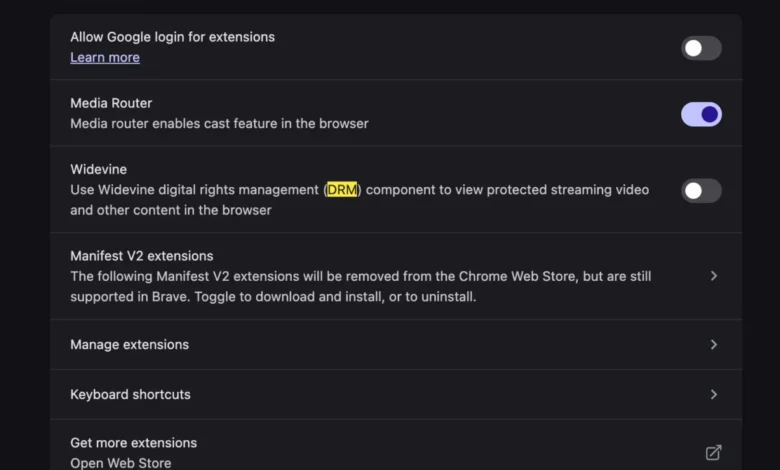
- Verify that the option permitting the browser to download and utilize proprietary media components—specifically the Widevine Content Decryption Module—is explicitly toggled to the enabled state.
- If the setting was previously disabled, toggle it off and back on to force the browser to query its distribution servers and re-initialize the CDM binary.
- Completely restart the browser application to flush cached session data and ensure the newly activated decryption module loads correctly into system memory.
- Navigate back to YouTube TV, sign in to the user account if prompted, and initiate a live stream to confirm that the error message has been successfully resolved.
By ensuring that the browser is authorized to run secure decryption modules, the system bridges the gap between hardware execution and the stringent security demands of commercial streaming networks.
Industry Implications and Future Outlook for Browser-Based Streaming
The frequency with which users encounter setup friction during device transitions highlights persistent challenges in user experience design across the consumer technology landscape. While hardware manufacturers continuously strive to streamline the unboxing and data-migration process—allowing users to seamlessly transfer bookmarks, passwords, and application states via cloud synchronization—deep system-level dependencies like browser components, security certificates, and DRM frameworks frequently fail to transition with absolute fidelity. This disconnect often results in unexpected troubleshooting burdens for consumers who expect plug-and-play simplicity from premium computing hardware.
Furthermore, the growing dominance of modular DRM systems like Widevine underscores ongoing tensions between digital security, platform interoperability, and user agency. As media consumption shifts irreversibly toward subscription-based cloud streaming, browser developers and operating system vendors must navigate complex regulatory and licensing landscapes to ensure that security protocols do not inadvertently alienate legitimate consumers. Industry analysts note that as web technologies evolve toward enhanced hardware-software integration—exemplified by Apple’s transition to its proprietary Silicon architecture and Google’s continuous optimization of Chromium for diverse platforms—streamlining the initialization of media decryption components will remain a critical priority for software architects. Until automated setup protocols completely eliminate these residual configuration gaps, awareness of underlying browser modules will remain an essential troubleshooting tool for modern digital consumers navigating new hardware ecosystems.