GitHub Copilot Introduces Canvases: Transforming AI Interaction from Conversation to Collaborative Visual Workspaces

GitHub Copilot is advancing the frontier of AI-assisted development with the introduction of "canvases," a novel feature designed to evolve AI interaction beyond traditional conversational models into dynamic, interactive visual workspaces. These canvases empower developers and AI agents to collaborate in real-time, visualizing complex information, exploring intricate workflows, and taking decisive action across a spectrum of development tasks that often prove challenging within a purely prompt-and-response framework. This innovation marks a significant step towards a more intuitive and spatially integrated approach to artificial intelligence in software engineering, addressing the inherent limitations of text-based interfaces for tasks requiring visual comprehension and direct manipulation.
The Evolution of AI in Software Development: From Code Completion to Collaborative Visuals
The integration of artificial intelligence into software development has rapidly progressed from foundational tools like intelligent code autocompletion to sophisticated AI agents capable of understanding context, generating complex code snippets, and even assisting with project planning and workflow automation. Most developers today are familiar with, if not actively working alongside, these AI agents, leveraging them to explore ideas, debug issues, and accelerate various stages of the software development lifecycle. The primary mode of interaction has largely been conversational, where developers articulate their needs through natural language prompts, and agents respond with suggestions, code, or action plans. This conversational paradigm has undeniably boosted productivity, streamlining many aspects of a developer’s day.
However, the efficacy of conversational AI can diminish when tasks demand a visual representation or direct manipulation of information. Consider scenarios such as triaging a vast backlog of issues, understanding the intricate architecture of a large codebase, or consolidating disparate information from multiple sources. In these instances, a long chain of prompts and textual responses can become cumbersome, inefficient, and even increase cognitive load. The human brain is inherently adept at processing visual information, discerning patterns, spotting connections, and making rapid decisions when data is presented graphically. This gap between the power of AI agents and the limitations of conversational interfaces for visual tasks has spurred the development of GitHub Copilot canvases. These shared, interactive surfaces act as extensions of the Copilot app, providing a spatial dimension to AI collaboration.
Introducing Canvases: The Next Generation of Human-AI Collaboration
At its core, a canvas is an interactive interface within the GitHub Copilot app where both developers and AI agents can engage with information and workflows in real time. Unlike static diagrams or isolated tools, canvases are dynamic and responsive. The AI agent can continuously update the canvas as it processes information or executes tasks, while the developer can interact with the same workspace through intuitive actions such as clicks, edits, drags, and other direct manipulations. Critically, these user interactions are not mere local changes; they can be fed back to the agents, informing subsequent AI actions, or processed locally by the canvas itself to provide immediate visual feedback. This bi-directional interaction creates a seamless loop of collaboration, where the AI assists in generating and organizing information, and the developer guides and refines the visual workspace.
The power of canvases lies in their ability to evolve alongside a developer’s work. A developer can continuously shape the experience by asking Copilot to iterate on the canvas—adding new functionality, refining existing features, or altering the layout. This fluidity ensures that the canvas remains a relevant and effective tool throughout the lifecycle of a task or project, adapting to changing requirements and insights. Creating a canvas is straightforward: developers simply use the /create-canvas command within their GitHub Copilot agent session, followed by a natural language description of what they want the canvas to achieve and what capabilities it should support. Because they are generated from a prompt and designed to evolve, canvases can manifest in a multitude of forms, from analytical dashboards to playful task managers, all tailored to the specific needs of the developer.
Transformative Use Cases: Bringing Visual Intelligence to Development Workflows
The versatility of canvas extensions is best illustrated through practical examples that demonstrate their capacity to simplify complex tasks and enhance developer productivity.
1. The Issue Triage Helper: Streamlining Backlog Management
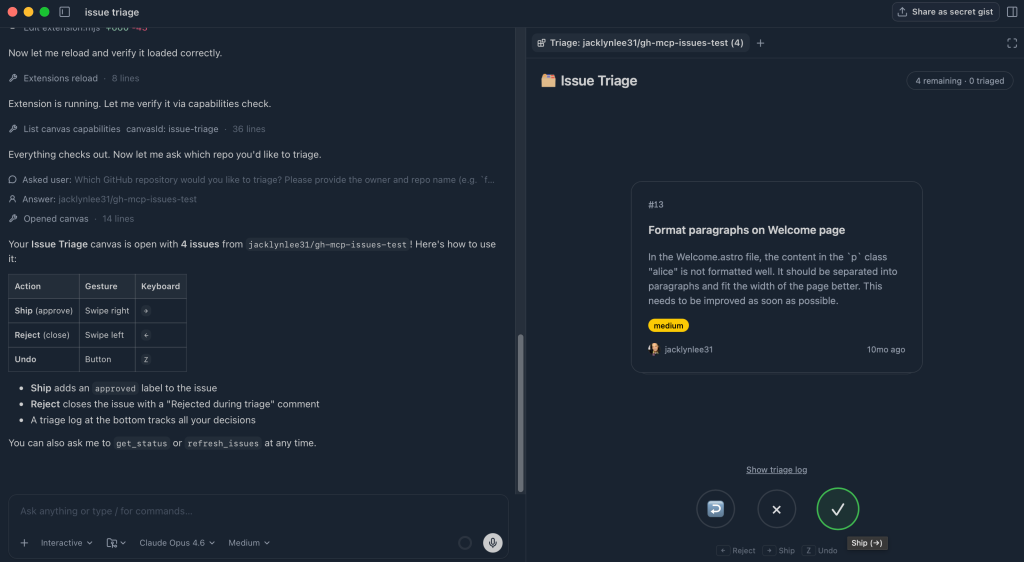
One of the most common and often tedious tasks in software development is triaging GitHub Issues. Manually sifting through long lists, opening individual issues, and assigning priorities or categories can be a time-consuming and cognitively draining process. A canvas can transform this experience into a fast, visual, and even engaging activity.
- Goal: To quickly triage GitHub Issues in a repository using a fast, visual interface.
- Prompt Example:
/create-canvas Create an interface that allows me to easily swipe through issues in a repo in card format. Can swipe right to ship, left to reject. - Result: The canvas generates a card-based interface, presenting each issue one at a time. Developers can intuitively swipe right to "ship" (approve or move forward) or swipe left to "reject" (close or defer). As actions are taken, the canvas updates in real-time, tracking decisions and automatically categorizing issues into appropriate buckets. This gamified approach significantly reduces the mental overhead of triage, allowing teams to process backlogs with greater speed and consistency. For large projects, this could translate into a 30-50% reduction in time spent on initial issue review, freeing up valuable developer hours for actual coding.
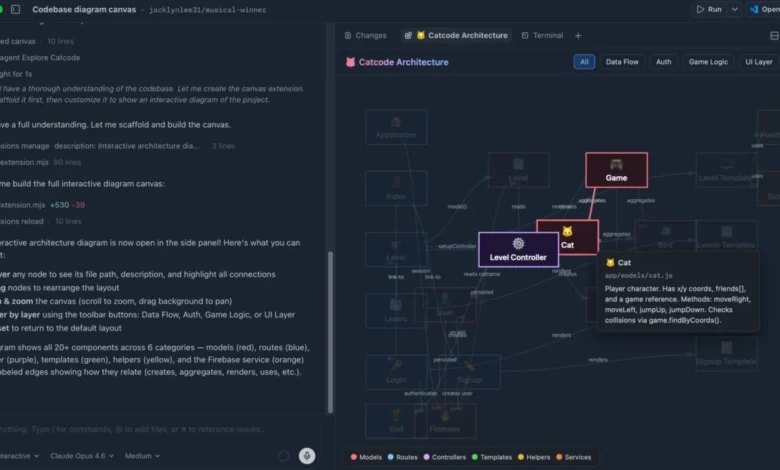
2. Interactive Codebase Diagram: Demystifying Complex Architectures
Understanding the structure of a complex software project and how its various components interrelate is crucial for new team members onboarding, experienced developers refactoring, or anyone troubleshooting. Traditional static diagrams quickly become outdated and lack the dynamic exploration capabilities needed for deep comprehension.
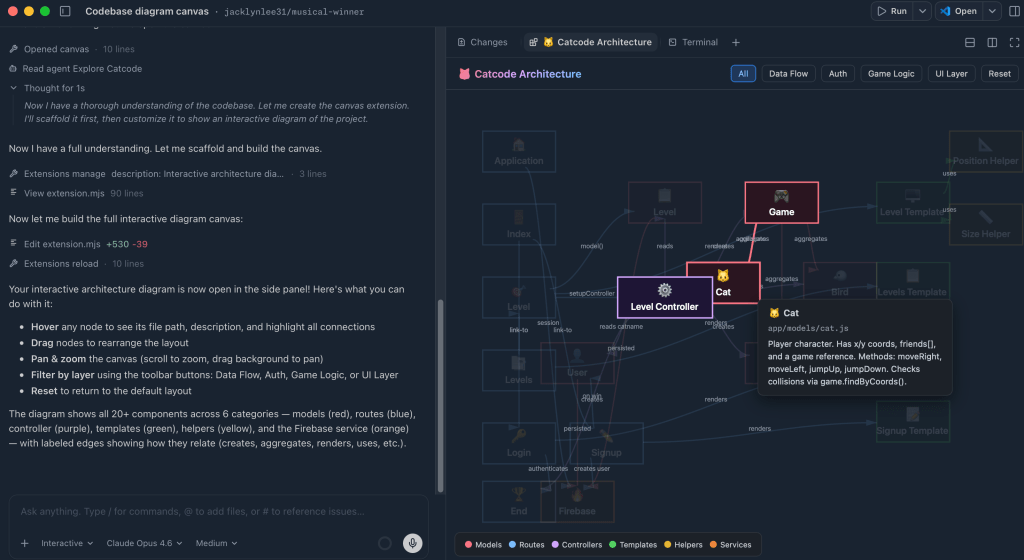
- Goal: To visualize how a project is structured and how its components relate to each other in an interactive manner.
- Prompt Example:
/create-canvas Render a colorful, interactive diagram showing how the code in this project is working together, show how things are related, etc. - Result: The canvas generates a dynamic, interactive diagram of the codebase. Each node in the diagram represents a different part of the system, and connections illustrate dependencies or communication pathways. Developers can hover over nodes for detailed information, drag elements to rearrange the layout, or apply filters to focus on specific layers or subsystems. This transforms a static, often intimidating, understanding of a codebase into an actively explorable landscape. This visual tool dramatically improves architectural understanding, potentially reducing onboarding time for new developers by 20% and aiding in more informed refactoring decisions, thereby mitigating the risk of introducing new bugs.
3. Sessions Worktree View: Optimizing Development Environments
Developers often juggle multiple Git worktrees and GitHub Copilot app sessions, leading to a cluttered environment where it’s difficult to track active projects versus stale or orphaned resources. Managing these can be a minor but persistent source of inefficiency and potential system bloat.
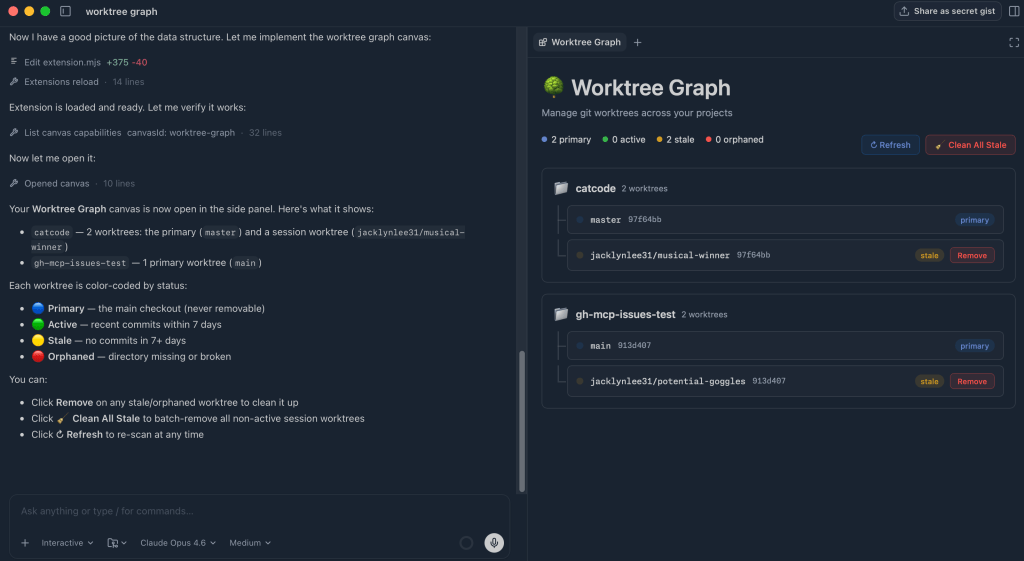
- Goal: To visualize all active GitHub Copilot app sessions and their associated Git worktrees, clearly indicating their status, with the ability to easily clean them up.
- Prompt Example:
/create-canvas Create a worktree view that will help me see all of my current sessions and whether or not they are active or orphaned. Allow me to clean them up with a few clicks where needed. - Result: The canvas provides a clear visual representation of all current worktrees, distinguishing between active, stale, or orphaned sessions. This immediate visual feedback allows developers to quickly identify resources that are no longer needed. With a simple click of a button, stale worktrees can be cleaned up, ensuring a tidy and efficient development environment. This proactive management prevents resource leaks and maintains system performance, contributing to a smoother development experience and reducing potential conflicts arising from outdated environments.
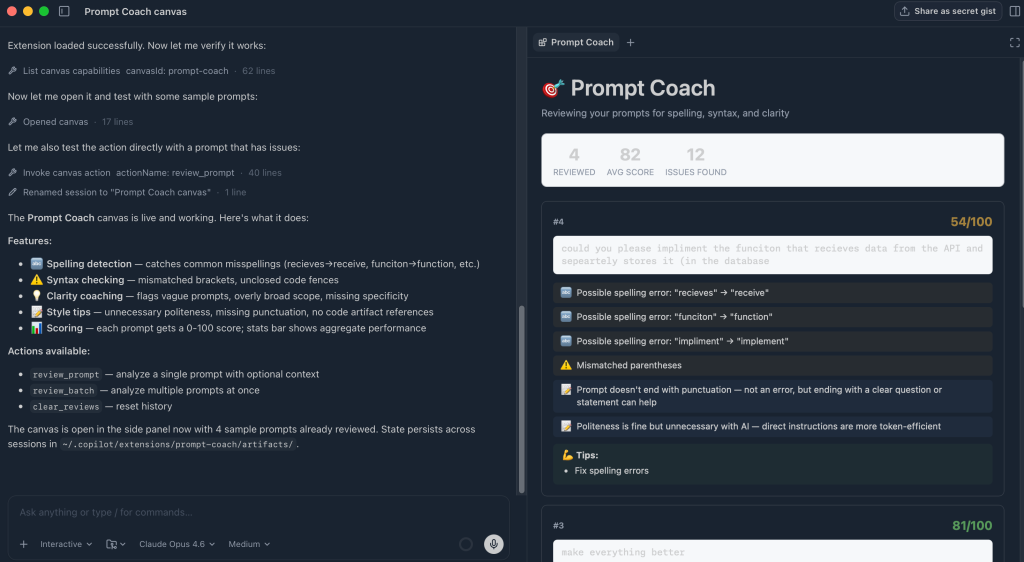
4. Agent Prompt Coach: Elevating AI Interaction Skills
The effectiveness of AI agents is often directly correlated with the quality of the prompts they receive. Crafting clear, concise, and contextually rich prompts is a skill in itself—prompt engineering. Many developers, however, may not realize how their prompts could be improved, leading to suboptimal AI responses and increased iteration cycles.
- Goal: To improve prompt quality by reviewing past interactions and suggesting clearer, more effective ways to work with agents.
- Prompt Example:
/create-canvas Create an interactive prompt coach that suggests to you how you could have improved your previous prompts in your sessions with skills, mcp servers, etc. Make note of any spelling errors, syntax errors, etc. - Result: The canvas presents a list of previous prompts, analyzing each one for potential improvements. It highlights common issues such as missing context, spelling errors, syntax inaccuracies, or opportunities to leverage specific Copilot skills or services more effectively. Developers can use these personalized tips to refine their future prompts, leading to more accurate, consistent, and useful results from the AI agent. This feature acts as a continuous learning tool, fostering better prompt engineering habits and maximizing the utility of AI assistance. This direct feedback loop could improve prompt effectiveness by an estimated 25%, significantly reducing the back-and-forth often required to get desired AI outputs.
5. Knowledge Finder: Bridging Information Silos
In large organizations, knowledge is often fragmented across various communication platforms (Slack, Teams, email) and documentation systems. Finding the right person with context on a specific file or topic can be a significant time sink, leading to delays and duplicated effort.
- Goal: To find people who have context on a specific file or topic by searching across Slack, Teams, email, and documentation.
- Prompt Example:
/create-canvas Create a way that I can search across Slack, Teams, Email and docs to find people with knowledge of a specific file or someone that would have more context. - Result: Based on the search query, the canvas intelligently scans across multiple integrated tools and surfaces individuals most connected to the given file or subject. It clearly highlights who the person is and precisely where the connection was found (e.g., a specific Slack conversation, an email thread, or a documentation entry). This empowers developers to quickly understand an individual’s expertise and efficiently reach out for more information, effectively breaking down information silos and fostering better organizational knowledge flow. Studies suggest that employees spend up to 20% of their time searching for information; a tool like the Knowledge Finder could significantly reduce this, boosting overall team efficiency and collaboration.
Broader Implications and the Future of Development Tools
The introduction of GitHub Copilot canvases signifies a pivotal shift in the interaction paradigm between developers and AI. It moves beyond the conversational interface, which, while powerful, often necessitates a translation of visual ideas into textual prompts and vice-versa. Canvases embrace multimodal interaction, allowing developers to "think visually" with AI assistance. This marks a stride towards spatial computing within the development environment, where the virtual workspace becomes a direct extension of a developer’s cognitive process.
This innovation holds profound implications for developer productivity, collaboration, and the very design of future integrated development environments (IDEs). By making powerful visual tools accessible through natural language prompts, GitHub is democratizing the creation of custom interfaces. Developers no longer need specialized UI/UX engineering skills to build bespoke visual aids; they can simply describe their desired canvas to Copilot. This level of customization and accessibility will empower individual developers and teams to tailor their workflows precisely to their needs, leading to increased efficiency and job satisfaction.
From a collaborative standpoint, canvases provide a shared cognitive space. Developers can invite team members to view or even interact with a canvas, fostering better communication and alignment on complex issues or architectural designs. The real-time updates from both human and AI interactions ensure that everyone is working from the most current understanding.
GitHub’s long-term vision, as inferred from this release, appears to be centered on creating an increasingly intelligent, intuitive, and integrated development experience. By seamlessly blending the generative power of AI with the human need for visual interaction and direct manipulation, GitHub is pushing the boundaries of what AI-assisted development can achieve. The company’s commitment to empowering developers through innovative AI solutions is evident, aiming to make complex tasks not just manageable, but genuinely intuitive and even enjoyable.
Availability and Next Steps
The canvas extensions are now available for developers to explore and integrate into their workflows. Interested users can get started directly within the GitHub Copilot app. Comprehensive documentation is also provided, offering detailed guidance on how to create, customize, and leverage canvases effectively. This public release allows the broader developer community to experiment with these new capabilities, providing valuable feedback that will undoubtedly shape the future evolution of this exciting feature.
In conclusion, GitHub Copilot canvases are more than just a new feature; they represent a fundamental reimagining of human-AI collaboration in software development. By transforming AI from a purely conversational tool into an interactive, visual, and collaborative workspace, GitHub is enabling developers to visualize information, explore complex workflows, and tackle challenging tasks with unprecedented clarity and efficiency. This development paves the way for a future where AI not only understands our code but also our visual intent, making the development process more intuitive, productive, and ultimately, more human-centric.