The Evolution and Utility of RAID Systems
The concept of RAID was formally introduced in a 1987 paper from the University of California, Berkeley, titled "A Case for Redundant Arrays of Inexpensive Disks (RAID)." The authors argued that by grouping multiple smaller, cheaper drives, one could achieve the performance of a high-end mainframe drive while providing fault tolerance. Over the decades, this technology has evolved from hardware-based controllers to the highly efficient software-defined storage solutions used by modern platforms like Synology, QNAP, UGREEN, and TrueNAS.
Today, RAID is no longer just for enterprise servers. Home labs and small business NAS (Network Attached Storage) devices rely on these configurations to protect against hardware failure. Whether utilizing Linux-based software RAID (mdadm) or the advanced ZFS filesystem, the underlying mathematics of capacity and safety remain consistent. Understanding these metrics is the first step in ensuring that a storage array is configured correctly to handle the rigors of 24/7 operation.
Calculating Usable Capacity: The Fundamental Logic
At the heart of every storage array is the relationship between the number of drives (N) and the size of the smallest drive (S). In any standard RAID configuration, the array is limited by the smallest drive in the group. If you mix a 4TB drive with three 8TB drives, the system will effectively treat all four drives as 4TB units, wasting the remaining capacity.
The usable capacity can be calculated using established formulas:
- RAID 0 (Striping): Offers maximum capacity (N × S) and speed, but provides zero redundancy. A single drive failure results in the total loss of all data.
- RAID 1 (Mirroring): Provides high redundancy, where data is written to two drives simultaneously. The usable capacity is equivalent to one drive (S).
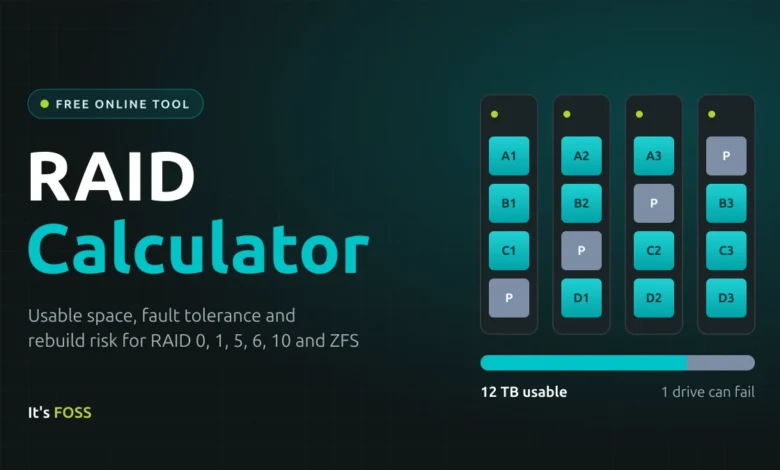
- RAID 5 (Single Parity): Requires at least three drives and offers the capacity of (N-1) × S. It allows for one drive failure without data loss.
- RAID 6 (Double Parity): Requires at least four drives and offers (N-2) × S. This is currently the industry-recommended configuration for high-capacity drives, as it protects against two simultaneous failures.
- RAID 10 (Striped Mirrors): Combines the speed of striping with the safety of mirroring. It requires an even number of drives, providing a usable capacity of (N/2) × S.
For users deploying ZFS, the nomenclature changes to RAIDZ1, RAIDZ2, and RAIDZ3. These correspond to single, double, and triple parity, respectively. The capacity calculation remains similar to traditional RAID 5 and 6, but the overhead of ZFS checksums and metadata requires users to anticipate slightly less usable space than raw calculations suggest.
Rebuild Risk and the URE Factor
A common misconception among novice storage administrators is that a RAID array is "safe" once it is configured. However, the most dangerous period for any array is the "rebuild" or "resilver" process—the time during which a failed drive is being replaced and the data is being reconstructed from parity.
During this window, the controller must read every single bit of data from the remaining drives to calculate the missing information. This is where the Unrecoverable Read Error (URE) rating becomes vital. A URE is a physical failure of a sector on the disk. Consumer-grade drives are typically rated for one error per 10^14 bits read (roughly 12.5 TB). When a rebuild involves 24TB or more, the statistical probability of encountering an unreadable sector is significantly high.
If the controller hits a URE while rebuilding a RAID 5 array, the process will often halt, potentially leading to total data loss. This is why experts increasingly advise against RAID 5 for arrays containing 8TB or larger drives. RAID 6 and RAIDZ2 provide a critical safety net; if a single sector becomes unreadable during a rebuild, the second parity drive allows the system to bypass the error and complete the reconstruction successfully.
The ZFS Paradigm: A Shift in Data Management
The rise of ZFS as a preferred storage management system has shifted the conversation from hardware-level RAID to software-defined filesystems. Unlike traditional RAID, which treats drives as blind block devices, ZFS is "self-healing." It stores checksums for every block of data. If a block becomes corrupted, ZFS detects the discrepancy and automatically restores the correct data from a mirrored or parity-protected copy.
This architectural difference means that ZFS only reconstructs the data that is actually in use, rather than the entire disk capacity. Furthermore, ZFS allows for more granular control over data integrity. However, it requires a higher threshold of system resources, particularly RAM, to manage its metadata effectively. As noted by developers in the OpenZFS project, the recent introduction of "RAIDZ expansion" in version 2.3 has addressed one of the longest-standing complaints about ZFS: the difficulty of adding a single drive to an existing pool.
Strategic Implications and Best Practices
The decision of which RAID level to deploy must be based on a clear assessment of risk versus cost. For professional data environments, the following guidelines are widely accepted:
- Never confuse RAID with backup. RAID is designed for high availability—ensuring that if a drive fails, the server keeps running. It does not protect against accidental file deletion, ransomware, fire, or theft. The "3-2-1" rule remains the gold standard: three copies of data, on two different media, with one copy stored off-site.
- Size Matters. With modern 18TB or 22TB drives, the time required to rebuild an array can span several days. During this time, the performance of the entire system is degraded, and the stress placed on the remaining drives is immense. In such environments, RAID 6 or RAIDZ2 is not merely a preference; it is a necessity for long-term stability.
- Performance Expectations. While RAID 0 offers the fastest read/write speeds, it is strictly unsuitable for any production environment. RAID 10 is the preferred choice for performance-critical applications, such as databases or high-end video editing workstations, though it comes at the expense of 50% of the total raw storage capacity.
- Filesystem Overhead. Users should always anticipate that the "usable capacity" shown in a calculator will be higher than the "free space" reported by an operating system. This discrepancy arises from two factors: the difference between decimal (TB) and binary (TiB) measurements, and the filesystem’s own reservation of "slop space," which prevents fragmentation and allows for optimal write performance.
Future-Proofing Storage Infrastructure
As we look toward the future of storage, the focus is shifting from simple capacity to reliability and manageability. For home and enterprise users alike, the integration of power management features—such as spinning down idle drives—is becoming a standard consideration. While an average drive might draw 5 to 10 watts during active use, scaling this across an eight-drive array results in a significant power and thermal footprint.
Furthermore, the industry is increasingly moving toward "all-flash" arrays for performance-sensitive tasks. While the cost per gigabyte of SSDs remains higher than HDDs, the lack of mechanical parts drastically reduces the risk of traditional read-write failures. However, the logic of RAID remains: regardless of whether the medium is a spinning platter or a NAND flash chip, the fundamental necessity for redundancy to guard against hardware failure remains the cornerstone of modern data management.
Ultimately, the choice of a RAID configuration is a balance of priorities. A small home NAS for media streaming may be perfectly served by the capacity-efficient RAID 5. A mission-critical database, however, requires the performance of RAID 10 or the ironclad safety of RAIDZ2/3. By utilizing the available mathematical tools and understanding the inherent risks of rebuild times and URE rates, administrators can make informed decisions that protect their data for the long term. Regardless of the specific layout chosen, the most important aspect of any storage strategy remains the backup—a layer of protection that no RAID array, no matter how sophisticated, can ever replace.
Related posts: