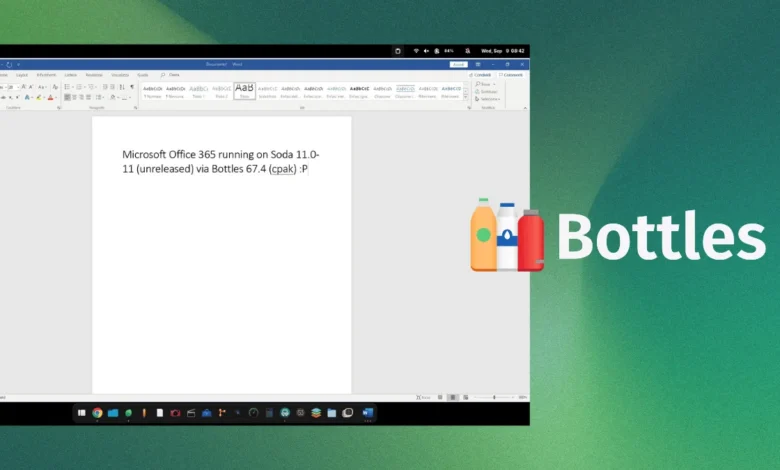
The long-standing barrier preventing Microsoft 365 from operating on Linux desktop distributions may finally be yielding to advancements in compatibility software. Mirko Brombin, the lead developer behind the popular open-source application Bottles, has publicly demonstrated a functional installation of the Microsoft 365 suite running within a Linux environment. This development, showcased through a series of technical logs and visual proofs on social media, marks a significant milestone for the Linux community, which has historically struggled to achieve stable compatibility with Microsoft’s proprietary office ecosystem.
Technical Foundation and Methodology
The success of this implementation relies on the integration of a specialized Wine-based runner known as Soda. Bottles, an application designed to streamline the management of Windows environments (or "bottles") on Linux, has served as the interface for this experiment. Brombin’s recent progress utilizes an unreleased version of the Soda runner, paired with the recently updated Bottles version 67.4.
Unlike previous attempts that often resulted in installers crashing or failing to authenticate, Brombin’s configuration successfully navigated the complete Microsoft 365 installation process. The system reportedly registered his legitimate license, bypassed two-factor authentication hurdles, and successfully launched Microsoft Word. Furthermore, the installation demonstrated full integration with OneDrive, a component that has traditionally proven difficult to bridge due to its deep reliance on Windows-specific background services.

Initial performance metrics provided by the developer indicate that the suite is surprisingly efficient. The memory footprint of the Microsoft 365 environment, when running under this configuration, remained under 500MB. This suggests that, if refined, the implementation could be performant enough for daily use on mid-range hardware without imposing the significant overhead typically associated with virtualization or heavy emulation.
Chronology of Compatibility Efforts
The quest to bring Microsoft Office to Linux is nearly as old as the platform itself. For decades, users have relied on alternatives such as LibreOffice, OnlyOffice, or web-based versions of Microsoft 365. However, professional requirements often dictate the use of the desktop versions of Excel, Word, and PowerPoint, which feature advanced macros and formatting capabilities absent in web or open-source equivalents.
- Pre-2020: The Wine project, the primary compatibility layer for running Windows applications on Unix-like systems, focused on basic functionality. Microsoft Office compatibility remained limited to legacy versions like Office 2007 or 2010.
- 2021-2023: As Microsoft shifted toward the "Software as a Service" (SaaS) model with Microsoft 365, the application architecture moved toward tighter integration with Windows-specific APIs and browser-based rendering engines, making traditional Wine-based compatibility increasingly difficult.
- September 2026: Mirko Brombin publicly shares the results of his work using build 2608 (20326.20144) of Microsoft 365. This build is noted as the final version supported by the installer for Windows 10 and 11, indicating that the current success is anchored to a specific, stable release of the Microsoft software.
The Role of Soda and Upstream Wine
While Bottles serves as the user-facing application, the underlying magic is provided by Soda. Soda is a derivative of the Wine project, specifically optimized for the execution of modern Windows games and complex software suites. By customizing the Wine prefix to handle the specific security and authentication tokens required by Microsoft 365, Brombin has demonstrated that the primary obstacle is not the lack of Windows code, but rather the configuration of the compatibility environment.
Industry observers note that because Soda is built upon the foundational Wine project, any specific patches or "hacks" developed by the Bottles team could potentially be upstreamed. This is a critical distinction in the open-source community: if the code required to run Microsoft 365 is integrated into the mainline Wine project, it would theoretically enable users of other tools—such as Lutris or the professional-grade CrossOver—to run the software without needing the specific Bottles ecosystem.

Comparative Analysis: The CrossOver Precedent
The professional standard for running Windows software on Linux has historically been CodeWeavers’ CrossOver. According to the company’s compatibility database, Microsoft Office 365 is currently classified under the "Installs, Will Not Run" status. Despite years of development and paid commercial support, the complexity of Microsoft’s authentication and telemetry services has prevented a "Gold" or "Platinum" rating for the modern suite.
The fact that an independent developer utilizing open-source tools has managed to bypass these hurdles suggests a shift in the effectiveness of Wine-based translation layers. However, analysts caution that "running" the software is vastly different from "fully supporting" it. Enterprise-grade stability, handling complex Excel macros with large datasets, and maintaining integration with corporate domain controllers are separate challenges that go beyond mere application launch.
Broader Implications for Linux Adoption
The absence of a native Microsoft Office suite has frequently been cited as the primary "barrier to entry" for corporate and academic users considering a migration to Linux. While many office tasks can be handled by cloud alternatives, the reliance on proprietary formatting and specific Office features keeps a significant segment of the workforce tethered to Windows.
If this development matures into a stable, "one-click" installer, the impact on Linux desktop market share could be substantial. It would effectively remove the "Office gap," allowing IT departments to consider Linux-based workstations without fear of losing compatibility with the corporate standard for document production.

However, a cautionary note remains: Microsoft has not officially signaled any intent to support Linux, and the company could theoretically introduce changes to their authentication or installation protocols that would break these compatibility layers overnight. Historically, Microsoft has focused its Linux efforts on the server side—specifically via Azure and WSL (Windows Subsystem for Linux)—rather than the desktop.
Future Outlook and Next Steps
As of now, the broader public cannot replicate these results. The specific version of the Soda runner required for this functionality has not yet been released, and the official repository for Bottles still lists the Microsoft Office installer as a pending request. The community is currently awaiting further updates from the Bottles development team regarding the integration of these patches into the main software branch.
For the Linux enthusiast community, the success of this endeavor represents a victory of persistence. It validates the capability of the Wine-based architecture to adapt to increasingly complex software environments. While it is unlikely that we will see a "Microsoft Office for Linux" released by Redmond, the work of developers like Mirko Brombin ensures that the gap between the two worlds continues to narrow, providing users with the flexibility to choose their operating system without compromising their workflow requirements.
As the project continues to evolve, the focus will likely shift from simply launching the application to ensuring long-term stability and security. For now, the successful login and operation of the Microsoft 365 suite on a Linux kernel stands as a testament to the robust and ever-expanding capabilities of open-source software engineering.