In the fast-evolving landscape of artificial intelligence application development, developers and enterprise teams face a persistent, foundational limitation: production chat agents suffer from acute operational amnesia. A user can spend hours meticulously explaining their system architecture, deployment pipeline preferences, and technical stack specifications, only for the AI to completely erase that context the moment the session terminates. By the following morning, the agent greets the returning user as a total stranger, forcing developers to rely on inefficient, manual re-briefing workflows.
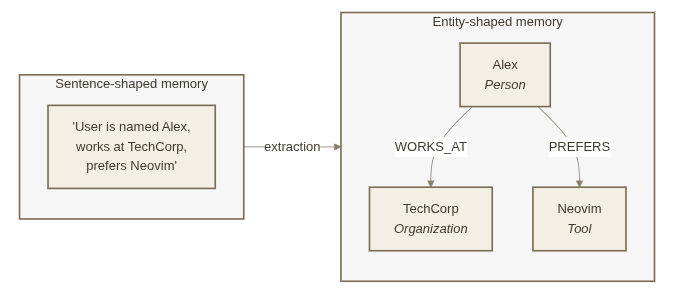
This architectural bottleneck has persisted despite significant advancements in large language model (LLM) capabilities and vastly expanded context windows. The core issue is not the underlying intelligence of the models themselves, but rather a lack of durable, persistent infrastructure capable of retaining what an agent learns over time and recalling that information at precisely the right conversational juncture. Recognizing this critical gap, Neo4j Labs has officially introduced a groundbreaking solution: @neo4j-labs/nams-ai-provider, a community-driven package designed to equip any Vercel AI SDK-compatible model with persistent, cross-session memory backed by a sophisticated Neo4j knowledge graph.
Architectural Challenges of Traditional AI Memory
Writing conversational data down to a database is a relatively trivial engineering task; however, determining which specific pieces of information belong in an active prompt during turn four hundred of a complex dialogue is an entirely different discipline. Historically, most memory layers utilized flat lists of strings searched via vector embeddings. While effective for simple text retrieval, vector-based diaries fall short when an agent needs to answer structural questions about a user rather than merely parroting past phrases.

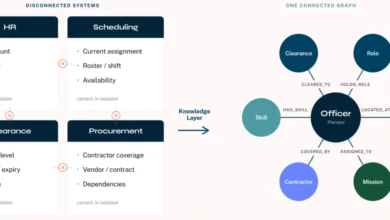
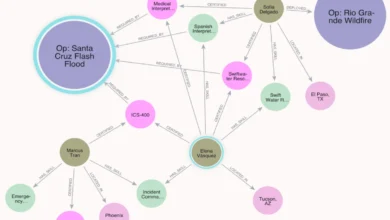
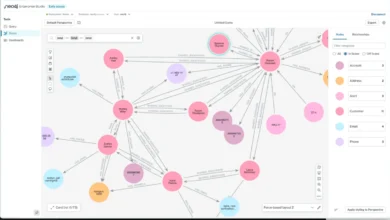
Vector search functions similarly to a personal diary, recording thoughts chronologically. In contrast, an entity-shaped knowledge graph functions like a dynamic address book. It tracks people, software tools, decisions, and the complex relationships between them. This structural distinction allows developers to correct a single inaccurate data point—such as a user’s location or preferred programming language—without needing to rewrite entire paragraphs or historical logs.
By leveraging the hosted Neo4j Agent Memory Service (NAMS), the newly released package bridges the gap between unstructured chat logs and structured relational intelligence. Crucially, it accomplishes this without requiring developers to provision a dedicated Neo4j cluster, choose a separate vector database, or manually manage complex embedding pipelines.

Seamless Integration via the Vercel AI SDK
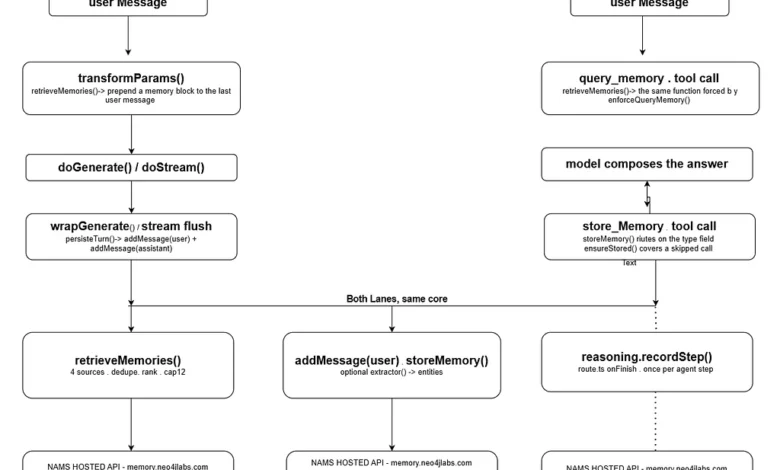
The integration process for @neo4j-labs/nams-ai-provider has been engineered for maximum simplicity, requiring little more than a free API key and a minor model swap. By building directly on top of the Vercel AI SDK, Neo4j Labs capitalized on three core extension points provided by the framework: transformParams, wrapGenerate, and wrapStream.
These extension points mirror the exact operational shape required for a high-performance memory system: reading relevant context immediately before an API call and writing newly acquired insights immediately afterward. Because the functionality operates as a standard provider, a developer’s memory stores outlive any specific model. An application can transition seamlessly from OpenAI’s GPT models to Anthropic’s Claude or Google’s Gemini without losing historical context, as the user history resides securely within the centralized Neo4j knowledge graph rather than a transient model context window.

The package supports three distinct integration modes to accommodate varying architectural requirements:
- Provider Mode: Automatically wraps a base provider to make memory entirely invisible to the core application logic. Changing a single configuration string in the model registry enables persistent memory across all interactions.
- Middleware Mode: Allows developers to decorate existing model instances directly, injecting context and capturing session history with minimal boilerplate code.
- Tools Mode: Exposes memory management as explicit Zod-validated tools that the model can invoke autonomously. This grants end-users and developers real-time visibility into when the agent is querying or storing information. Additionally, integration with the Model Context Protocol (MCP) allows agents to merge memory tools with external server capabilities.
Guaranteed Retrieval and Fail-Safe Engineering
One of the most notable innovations shipped in @neo4j-labs/nams-ai-provider addresses an industry-wide vulnerability in tool-based memory architectures. Historically, system instructions commanding an agent to query its memory prior to answering were treated by models as advisory suggestions rather than strict operational rules. Consequently, models would frequently bypass memory lookups entirely, resulting in interactions where agents appeared functional while remaining completely oblivious to user history.

To eliminate this ambiguity, the package introduces two robust execution hooks leveraging the Vercel AI SDK: enforceQueryMemory() and ensureMemoryStored(). The enforceQueryMemory function acts as a prepareStep hook, guaranteeing that retrieval processes occur during the execution loop without prescribing rigid tool execution orders. Meanwhile, ensureMemoryStored operates as an onFinish hook, ensuring that conversational turns are persistently recorded even if the model fails to explicitly invoke its storage tools.
Furthermore, the system has been constructed with fail-safe reliability at its core. Recognizing that a memory layer sits directly in the critical path between user and model, the underlying architecture dictates that if a memory service disruption occurs, the primary model call must still succeed. Retrieval and persistence failures degrade gracefully into logged warnings rather than throwing unhandled exceptions in the request lifecycle.

Industry Implications and Future Outlook
The introduction of graph-backed memory providers marks a significant maturation phase for autonomous AI agents deployed in enterprise production environments. By moving beyond simple vector similarity search and embracing structured graph queries, developers can now provide auditable, explainable, and multi-tenant memory layers that scale efficiently across serverless infrastructures.
Industry analysts note that as enterprises increasingly demand autonomous agents capable of long-term task execution, robust cross-session memory will transition from a supplementary feature to a mandatory architectural requirement. While @neo4j-labs/nams-ai-provider is currently released as an actively maintained Neo4j Labs project under an Apache-2.0 license, its reliance on modern standards like the Vercel AI SDK positions it as a strong blueprint for future community-driven AI infrastructure developments.

Developers and engineering teams can install the package via standard package managers to begin integrating persistent, graph-backed memory into their next-generation chat applications, finally solving the age-old problem of conversational amnesia in artificial intelligence.
Related posts: