Streamlining Operational Efficiency with the New AWS CodeDeploy RESTART Deployment Mode

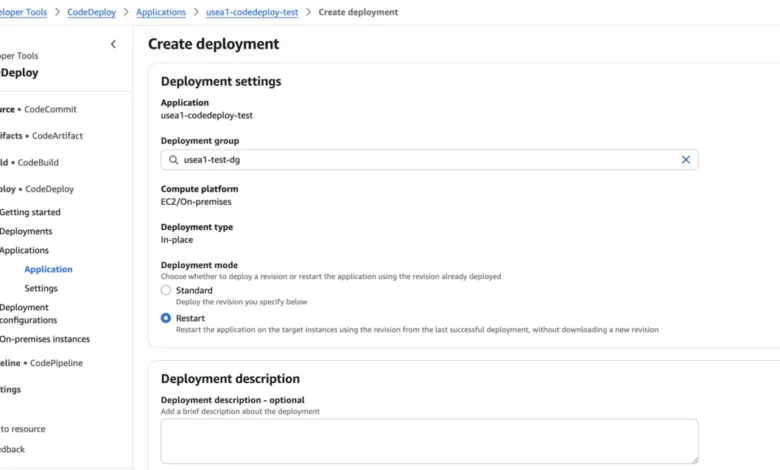
Operators tasked with maintaining fleet health and configuration consistency have long grappled with the inherent risks of restarting production environments. Whether addressing memory leaks in long-running JVM services, recovering from unhealthy process states, or propagating minor runtime configuration changes, the act of recycling hosts has historically been a fragmented, high-stakes endeavor. Previously, AWS CodeDeploy users faced a binary choice: redeploy the current application revision—which often meant repeating successful work—or rely on custom-built scripts that frequently bypassed the production safeguards built into the AWS ecosystem. Today, Amazon Web Services has introduced a purpose-built solution to this operational challenge: the RESTART deployment mode.
By integrating the restart operation directly into the CodeDeploy workflow, this new feature allows organizations to maintain rigorous standards for batch sizing, health checks, alarm monitoring, and automated rollback behaviors. This transition from external, ad-hoc scripting to a native, managed deployment process represents a significant shift in how DevOps teams approach fleet maintenance.
The Evolution of Fleet Maintenance
In the traditional DevOps lifecycle, restarting a fleet is considered a routine, albeit sensitive, operation. However, the lack of a standardized tool often leads to "script sprawl." When engineers rely on custom bash or Python scripts to cycle hosts, they are essentially reinventing the wheel—and often missing critical safety checks.
For instance, a common failure mode in custom restart scripts involves the lack of stateful awareness. If a script initiates a batch restart without monitoring the health of the previous batch, a single configuration error can ripple through the entire fleet. If the first batch fails to transition to a "running" state, a naive script may continue its execution, systematically taking down the entire application stack. This scenario, which has been reported by various enterprise customers, highlights the danger of decoupling restart operations from centralized deployment governance.
With the introduction of the RESTART deployment mode, the operation is governed by the same CreateDeployment API used for standard code updates. This means that if a restart causes an alarm to trigger or a health check to fail, CodeDeploy immediately halts the process. By keeping the failure within the active batch, the impact is isolated, and the rest of the fleet remains untouched, thereby preventing a catastrophic service outage.
How RESTART Functions Under the Hood
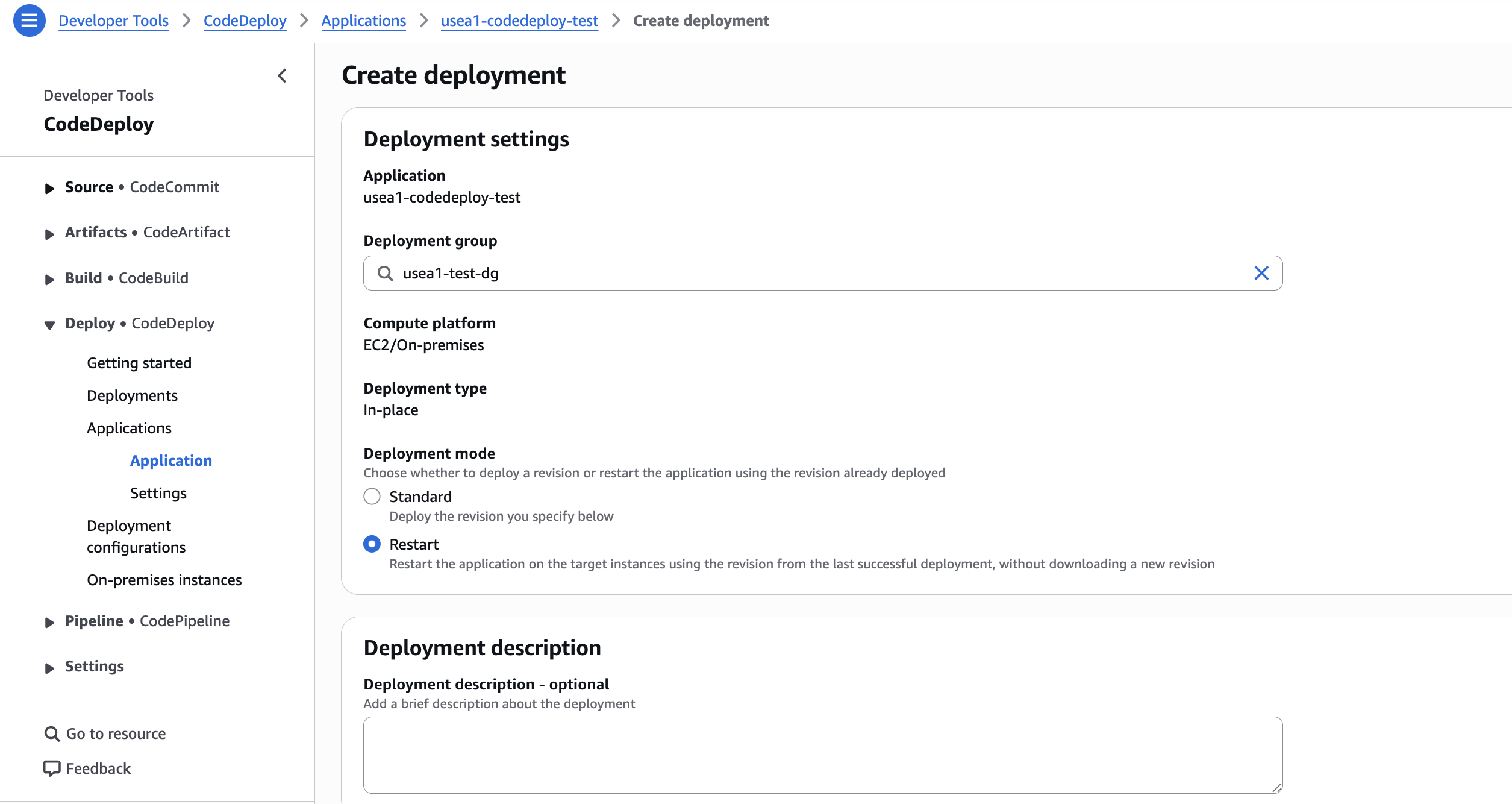
The operational mechanics of the RESTART mode are designed for both speed and reliability. When a user sets the deploymentMode parameter to RESTART without providing a new revision, CodeDeploy automatically resolves the deployment group’s last successful revision.
The lifecycle of a restart deployment follows a specific, rigorous sequence: ApplicationStop, DownloadBundle, BeforeInstall, Install, AfterInstall, ApplicationStart, and ValidateService. For CodeDeploy agents version 2.1.0 and later, the process is further optimized through "local reuse." Instead of performing a full network transfer of the application bundle, the agent utilizes the previously deployed archive residing on the host. This dramatically reduces the latency of the restart process. In scenarios where a host has been replaced or the archive is otherwise unavailable, the agent defaults to a standard download, ensuring that the process remains robust even in failure-prone environments.
Performance Benchmarks and Efficiency
The efficiency gains associated with the RESTART mode are substantial, particularly for fleets managed by Application Load Balancers (ALBs). According to feature testing conducted by AWS, a restart deployment can be up to 6.14 times faster than a standard redeployment.
In controlled tests involving m5.large instances and 1 GB revisions, researchers observed that the primary bottleneck in standard deployments—the re-downloading of bundles and the repetitive traffic control phases—is largely mitigated by the RESTART mode. For a 50-host fleet, the time saved through this new method ranged from 82.6 seconds to over 424 seconds, depending on the configuration and the use of ALB-backed traffic routing.
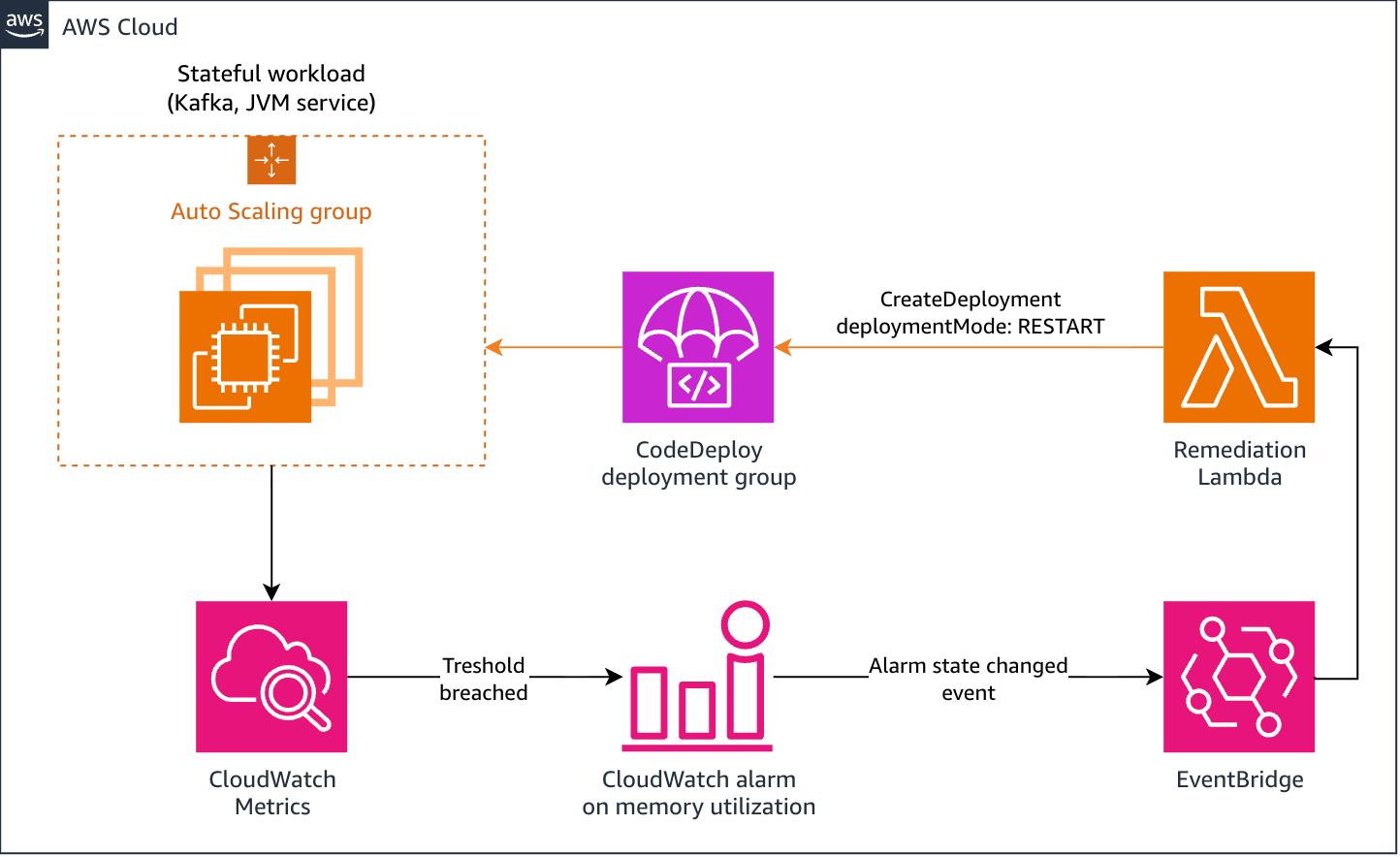
These performance metrics are not merely academic; they represent a fundamental improvement in the "Mean Time to Recovery" (MTTR) for services that require periodic recycling. For example, self-managed Kafka brokers or Java-based services that suffer from cumulative memory growth can now be subjected to a managed, self-healing loop. By pointing a CloudWatch alarm at an Amazon EventBridge rule that triggers a RESTART deployment, engineers can automate the recycling of resource-heavy nodes without manual intervention or the fragility of cron jobs.
Safety Controls and Operational Guardrails
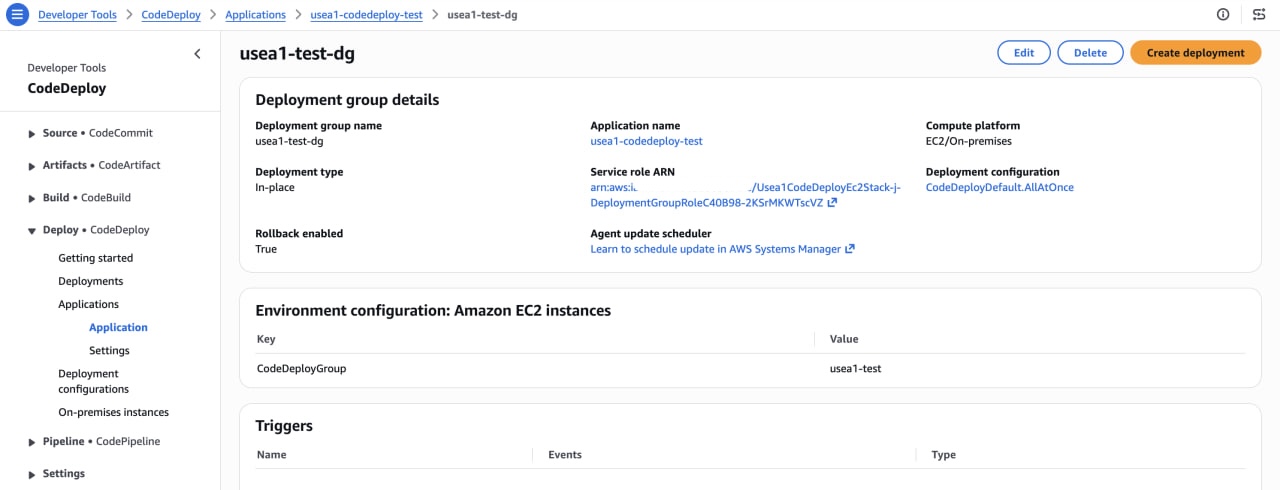
One of the most critical aspects of this update is that it does not abandon the safety controls that users have come to expect from AWS. The RESTART mode respects all existing configurations, including deployment-group-level alarm monitoring and rollback settings.
However, there is a distinct difference in how traffic is handled. Unlike a standard deployment, which includes explicit BlockTraffic and AllowTraffic hooks for load balancers, the RESTART mode keeps the host registered with the load balancer while the application is in flux. Consequently, developers must ensure that their ApplicationStop scripts are designed to gracefully drain in-flight requests. This requires a shift in how application lifecycle hooks are written—moving toward a model where the application acknowledges it is entering a restart state and ceases accepting new work before the process exits.
For organizations operating under strict incident response protocols, the RESTART mode provides an override-alarm-configuration option. This allows administrators to proceed with a restart even if an alarm is currently in an ALARM state, provided that the action is part of an approved incident runbook. This feature is gated by specific permissions (codedeploy:UpdateDeploymentGroup), ensuring that the ability to bypass safety checks is restricted to authorized personnel.
Broader Implications for Infrastructure Management
The introduction of the RESTART deployment mode signifies a broader trend in cloud infrastructure management: the move toward "infrastructure as a product." By treating fleet restarts as a first-class citizen in the deployment pipeline, AWS is effectively reducing the "operational tax" paid by engineering teams.
The implications are threefold:
- Reduced Human Error: By moving away from custom shell scripts, the probability of human error—such as typos in script variables or improperly handled edge cases—is significantly reduced.
- Improved Observability: Because restart events are now recorded as formal deployment records, they are visible in the CodeDeploy console and via APIs. This provides auditors and SREs with a clear history of when and why a fleet was restarted, which is vital for compliance and post-mortem analysis.
- Scalability of Maintenance: As fleets grow, the manual overhead of maintenance increases non-linearly. The ability to automate the restart loop using EventBridge and Lambda allows infrastructure to scale without requiring a proportional increase in the size of the SRE team.
Strategic Adoption and Limitations
While the benefits are clear, users must be aware of the inherent constraints. The RESTART mode is currently intended for in-place deployments on Amazon EC2 and on-premises hosts. It is not designed for blue/green deployment patterns, where the infrastructure itself is replaced rather than recycled. Furthermore, because the mode relies on the last successful revision, it is imperative that the target environment is in a state where that revision is valid.
For teams currently struggling with the maintenance of stateful services, the move to RESTART is highly recommended. It represents the final bridge between the need for periodic host maintenance and the strict requirements of a modern, safety-conscious deployment environment. By incorporating this into their CI/CD pipelines, organizations can spend less time managing the lifecycle of their infrastructure and more time focusing on the application logic that drives their business value.
In summary, the RESTART mode is a maturation of the AWS DevOps toolset. It acknowledges that the lifecycle of a cloud-based application is not just about the initial deployment, but about the ongoing stability and health of the fleet over time. Through this integration, AWS continues to shift the burden of operational complexity from the customer to the platform, reinforcing the reliability of the underlying infrastructure.
Related posts: