Command-Line Slide Presentations Become a Reality with Open-Source Python Project Spiel

The intersection of software development utilities and terminal-based environments has long fostered creative, if niche, engineering solutions. Among these is Spiel, an innovative open-source Python library designed to allow developers and system administrators to craft and deliver full-fledged slide presentations directly within a command-line interface. Built upon the robust styling architecture of the Rich package, Spiel represents a novel approach to developer-centric tooling, blending the minimalist aesthetics of terminal environments with the structured delivery format of traditional slideshow software. Although the project’s official GitHub repository is currently archived—largely due to dependency constraints tied to older iterations of the Textual framework—the underlying mechanics of the library offer a fascinating study in Python-based rendering and the ongoing evolution of text-user interfaces (TUIs).
The Genesis of Terminal-Based Presentations
To understand the utility of Spiel, one must examine the broader historical context of terminal-based computing and the modern resurgence of Command-Line Interface (CLI) workflows. For decades, text-based interfaces were the primary mode of interaction with computer systems, eventually giving way to graphical user interfaces (GUIs) in the late 20th century. However, modern software engineers, DevOps professionals, and data scientists frequently spend the vast majority of their working hours inside terminal emulators.
The desire to remain within this optimized environment without switching contexts to external applications like Microsoft PowerPoint, Apple Keynote, or web-based slide decks inspired the creation of terminal presentation tools. Spiel emerged as a clever solution to this specific workflow friction. By leveraging Python—a dominant language in automation, data science, and scripting—developers could theoretically write their presentation decks using the exact same language and environment they use to build software, removing the cognitive overhead of formatting external graphical documents.
Technical Architecture: How Spiel and Rich Power the Terminal
At its core, Spiel relies heavily on external dependencies that specialize in high-performance terminal rendering. The most significant of these dependencies is Rich, an immensely popular Python library created by Will McGugan. Rich enables developers to add rich text, syntax-highlighted code, tables, progress bars, and beautiful formatting to terminal outputs.
Spiel utilizes Rich’s rendering engine to construct individual slides as renderable objects. By wrapping these objects into a cohesive framework, Spiel manages the state of the presentation, tracking navigation between slides and handling user inputs such as keyboard arrows.
The architecture of a Spiel presentation revolves around two primary concepts: Decks and Slides. A Deck acts as the container for the entire presentation, while individual slides are defined either through decorators—a common and idiomatic Python design pattern—or through explicit programmatic construction using slide classes.
Installation and Getting Started
For developers interested in exploring or evaluating the Spiel framework, the installation process is straightforward, though best practices dictate the isolation of dependencies. While the GitHub repository provides a Docker container for instantaneous evaluation—allowing users to execute the command $ docker run -it --rm ghcr.io/joshkarpel/spiel without touching their local Python environment—standard usage requires local installation via Python’s package manager, pip.
Industry standard recommendations for installing third-party Python packages advise the creation of a virtual environment to prevent package version conflicts across global system libraries. A typical setup procedure involves initializing a virtual environment in the terminal, activating it, and executing the installation command:
pip install spielOnce installed, users can verify the integrity of the package and its dependencies by invoking the built-in demonstration deck included with the software:
spiel demo presentSuccessful execution of this command launches a fully interactive terminal presentation, demonstrating the responsiveness of the layout engine and confirming that keyboard controls—such as navigating forward and backward through slides using directional arrows—are functioning correctly.
Programming Decks: A Closer Look at Spiel Code Structure
The design philosophy behind Spiel emphasizes programmatic flexibility. Developers can define presentations as executable Python scripts, allowing for dynamic content generation, live code execution previews, or automated slide creation.
Consider the baseline implementation of a single-slide presentation using Spiel’s decorator syntax:
from rich.console import RenderableType
from spiel import Deck, present

deck = Deck(name="Your Deck Name")

@deck.slide(title="Slide 1 Title")
def slide_1() -> RenderableType:
    return "Your content here!"

if __name__ == "__main__":
    present(__file__)
For more complex presentations requiring customized layouts, styling, and alignment, Spiel supports explicit object-oriented definitions. Developers can leverage Rich’s alignment and styling modules to construct sophisticated visual hierarchies inside the terminal window. For example, applying custom color palettes to text objects and centering content vertically and horizontally within a slide is handled natively through helper functions:
from rich.align import Align
from rich.console import RenderableType
from rich.style import Style
from rich.text import Text
from spiel import Deck, Slide, present

def make_slide(
    title_prefix: str,
    text: Text,
) -> Slide:
    def content() -> RenderableType:
        return Align(text, align="center", vertical="middle")
    return Slide(title=f"title_prefix Slide", content=content)

deck = Deck("Test Deck")

title_slide = make_slide(
    title_prefix="First",
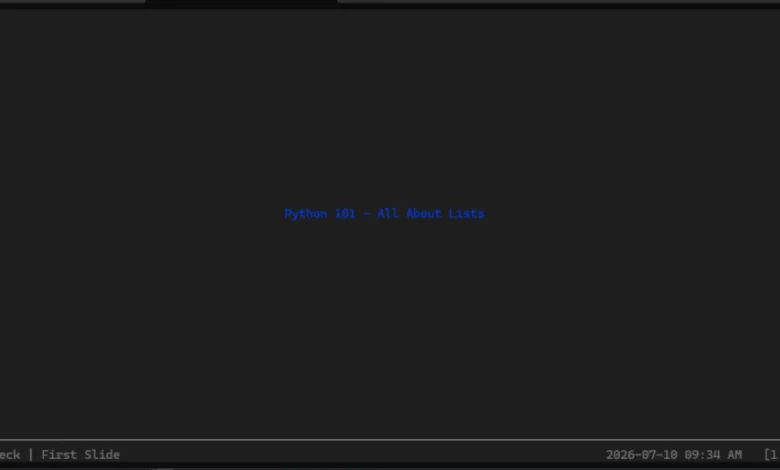
    text=Text("Python 101 - All About Lists", style=Style(color="blue"))
)

intro_slide = make_slide(
    title_prefix="Second",
    text=Text("A Python list is", style=Style(color="red"))
)

deck.add_slides(title_slide, intro_slide)

if __name__ == "__main__":
    present(__file__)
When executed, this script renders a clean, distraction-free presentation directly in the command line. Navigation is handled seamlessly via standard keyboard arrow keys, and exiting the presentation requires only a standard keyboard interrupt (CTRL+C).
Current Status, Maintenance, and Community Implications
Despite its elegant design and utility for terminal power-users, Spiel currently occupies an uncertain space within the open-source ecosystem. The GitHub repository for the project is marked as archived. While official documentation and code repositories remain accessible for cloning, study, and local deployment, active development has ceased.
An analysis of the repository’s metadata and underlying dependencies suggests that the archival is primarily driven by technical debt associated with upstream libraries. Specifically, Spiel appears tightly coupled to an older iteration of the Textual framework—another advanced TUI library by Textualize. Because of breaking changes introduced in newer versions of Textual, upgrading the underlying architecture would require a substantial rewrite of Spiel’s core presentation management logic. Without active maintenance from the original author, Josh Karpel, the project remains frozen in time.
Industry Analysis: The Value of Niche Developer Tooling
The lifecycle of projects like Spiel highlights a broader trend in open-source software development: the rise and fall of micro-utilities designed to solve hyper-specific workflow problems. While enterprise software and major frameworks like Django, React, or Kubernetes receive continuous corporate backing and vast contributor networks, smaller CLI utilities often rely entirely on the personal bandwidth of individual developers.
When an independent creator steps away from a project, it enters a state of archival, posing strategic questions for teams that rely on such software. In the case of Spiel, the practical implications are relatively minor; because presentations are ephemeral artifacts—typically compiled and delivered for a single event—using an archived library for a local tech talk or internal team demonstration carries minimal operational risk, provided it runs successfully on the host machine.
Furthermore, the concepts pioneered by Spiel continue to influence the broader developer ecosystem. The demand for terminal-native productivity tools remains exceptionally high. Engineers frequently seek ways to streamline documentation, code reviews, and technical demonstrations without breaking flow state by transitioning to graphical interfaces.
Broader Impact on Terminal User Interfaces
In recent years, the Python ecosystem has witnessed a renaissance in terminal user interface design. Libraries such as Rich, Textual, and Plotext (which allows for plotting charts directly in the terminal) have transformed the command line from a purely utilitarian text output stream into a vibrant, interactive canvas.
Even if Spiel itself is not actively maintained, it serves as a valuable educational blueprint and proof-of-concept for developers interested in building custom presentation software tailored to technical audiences. The integration of Python scripts with real-time slide generation opens up possibilities that traditional GUI software cannot easily replicate—such as dynamically querying databases, executing live code snippets, or fetching live API metrics directly into slide contents during a presentation.
Conclusion and Future Outlook
Spiel remains a compelling example of creative problem-solving within the Python developer community. By bridging the gap between slide decks and terminal emulators, it offered a unique workflow for technical speakers who prefer to live entirely within the command line.
While the archival status of the GitHub repository signals that new feature updates are unlikely, the codebase remains fully functional for local use via virtual environments and containerized workflows. Whether the project is eventually revived by its original author, forked by an enthusiastic community member, or simply serves as inspiration for the next generation of TUI presentation tools, Spiel has left a notable footprint in the landscape of developer-focused Python utilities. For engineers looking to impress their peers at their next internal tech talk or technical meetup, installing Spiel and spinning up a code-driven terminal slide deck remains an engaging and thoroughly unique option.