The intersection of software development tools and minimalist computing environments has long fascinated systems programmers and terminal enthusiasts. While graphical user interface frameworks like PowerPoint, Keynote, and web-based alternatives such as Reveal.js dominate the corporate and academic presentation landscape, a niche yet innovative open source project has captured the attention of command line interface (CLI) aficionados. Developed by software engineer Josh Karpel, the Python-based library known as Spiel introduces a novel approach to slide creation, allowing users to build, format, and deliver rich presentations directly inside a computer terminal.
Although the repository currently bears an archived status on GitHub, preventing active development or modern upgrades due to dependencies on older iterations of the Textual framework, its architectural framework remains a compelling study in terminal UI design. By leveraging the capabilities of the widely adopted Rich library—a Python package for writing rich text and beautiful application output to terminal windows—Spiel demonstrates how developers can bypass traditional heavy graphics engines and present structured information within a standard text-based shell.
Main Facts and Technological Foundation
At its technical core, Spiel operates as a presentation deck manager designed entirely for the command line. Traditional presentation software requires window managers, hardware-accelerated graphics libraries, and significant memory footprints. In contrast, terminal-based applications utilize standard character cell displays, treating the computer screen as a grid of text characters and ANSI color codes.
Spiel achieves its visual presentation quality by sitting on top of Rich, an advanced Python library created by Will McGugan. Rich supplies the underlying mechanisms for syntax highlighting, tables, progress bars, Markdown rendering, and advanced text alignments. By wrapping these capabilities into a deck-and-slide metaphor, Spiel enables developers to define sequential units of content using standard Python decorators or functional object instantiation.
Despite its archived status, the project continues to serve as an educational touchstone for developers interested in terminal user interface (TUI) design. The inability to upgrade to newer versions of the Textualize stack—likely the primary driver behind the repository’s archival—highlights the rapid pace of evolution within the Python ecosystem, where downstream dependencies can sometimes outpace niche project maintenance schedules.
Chronology and Development Timeline
The trajectory of Spiel reflects a common pattern within the open source community: a developer identifies a quirky, highly specialized problem, crafts an elegant software solution to solve it, and eventually moves on as time or dependency shifts dictate.
While exact historical git commit dates vary, the conceptual genesis of Spiel aligns with the broader maturation of modern terminal utilities during the early 2020s. Around this period, libraries like Rich and Textual revitalized the command line, transforming drab, monochrome text interfaces into vibrant, interactive applications complete with mouse support, reactive layouts, and sophisticated typography.
- Inception and Design: Josh Karpel conceptualized Spiel as a mechanism to write presentations using Python code rather than visual editors, ensuring that technical talks or internal developer documentation could be delivered without leaving the shell environment.
- Integration with Rich: The project integrated the Rich package to handle the heavy lifting of layout positioning, color schemes, and renderable objects.
- Documentation and Community Release: Comprehensive documentation was established, offering straightforward installation pathways via Docker and standard Python package index (
pip) workflows. - Archival Phase: Due to architectural limitations—specifically involving legacy versions of the Textual framework that could not be seamlessly upgraded without breaking core presentation loops—the repository was officially archived on GitHub, halting new feature development while keeping existing codebases accessible for read-only use and local execution.
Installation and Setup Procedures
For developers interested in evaluating Spiel or dissecting its internal codebase, the project provides multiple entry points ranging from zero-installation containerized execution to traditional local package management.
According to the official project specifications, users who maintain Docker on their local machines can launch a pre-configured instance of Spiel instantly without modifying their host Python environment. This can be executed directly from the terminal via the following command:
docker run -it --rm ghcr.io/joshkarpel/spielAlternatively, for developers wishing to inspect the source code, run custom presentations, or build local slide decks, installation via Python’s package manager is the standard route. It is strongly recommended to isolate the installation within a virtual environment to prevent dependency conflicts with global packages. The setup sequence involves creating and activating a virtual environment, followed by executing the installation command:
pip install spielOnce installed, verification is straightforward. Developers can execute the built-in demonstration deck to ensure that terminal dimensions, color rendering, and key bindings operate correctly:
spiel demo presentUpon successful execution, the terminal transitions into an interactive presentation mode where users can navigate forward and backward through slides using standard keyboard arrow keys, terminating the session via a standard keyboard interrupt (CTRL+C).
Architectural Implementation and Code Structure
Spiel offers flexibility in how slides are authored, supporting both decorator-based definitions and explicit programmatic construction. This dual approach allows authors to choose between concise inline code structures and reusable component functions.
The foundational design pattern relies on the Deck and present modules. A basic one-slide implementation utilizes Python decorators to bind presentation content directly to callable functions that return Rich-compatible renderable types:
from rich.console import RenderableType
from spiel import Deck, present

deck = Deck(name="Your Deck Name")

@deck.slide(title="Slide 1 Title")
def slide_1() -> RenderableType:
    return "Your content here!"

if __name__ == "__main__":
    present(__file__)
For more complex presentations requiring dynamic formatting, custom styling, and layout positioning, developers can construct modular slide factories. By utilizing Rich classes such as Align, Text, and Style, authors gain precise control over typography, color palettes, and spatial distribution across the terminal grid:
from rich.align import Align
from rich.console import RenderableType
from rich.style import Style
from rich.text import Text
from spiel import Deck, Slide, present

def make_slide(
    title_prefix: str,
    text: Text,
) -> Slide:
    def content() -> RenderableType:
        return Align(text, align="center", vertical="middle")
    return Slide(title=f"title_prefix Slide", content=content)

deck = Deck("Test Deck")

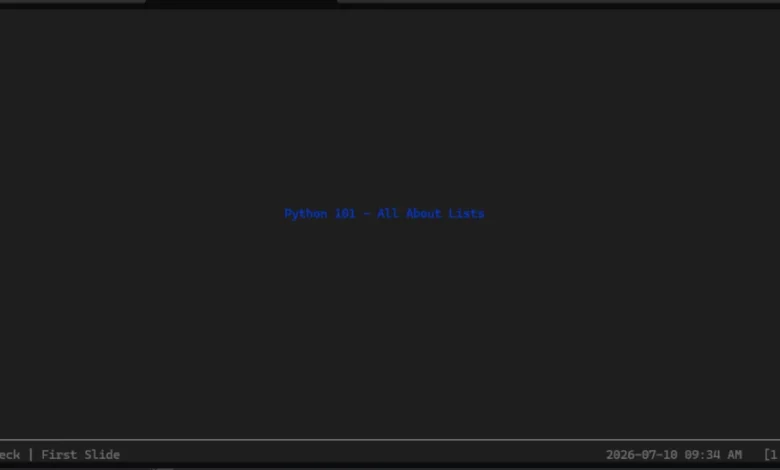
title_slide = make_slide(
    title_prefix="First",
    text=Text("Python 101 - All About Lists", style=Style(color="blue"))
)

intro_slide = make_slide(
    title_prefix="Second",
    text=Text("A Python list is", style=Style(color="red"))
)

deck.add_slides(title_slide, intro_slide)

if __name__ == "__main__":
    present(__file__)
This programmatic paradigm ensures that presentations can be version-controlled alongside source code, tested with automated unit testing frameworks, and dynamically generated based on runtime data or system metrics.
Broader Impact, Industry Implications, and Future Outlook
While terminal-based presentation software occupies a remarkably specialized niche, the underlying technologies driving tools like Spiel carry significant implications for modern software development workflows.
As remote work, infrastructure-as-code, and cloud-native engineering environments continue to dominate the technology sector, developers spend an increasing proportion of their working hours inside terminal emulators. Tools that reduce context switching—allowing engineers to write documentation, build code, and deliver technical talks directly from a command-line interface—offer measurable ergonomic advantages. Furthermore, code-driven presentations eliminate the formatting discrepancies often encountered when transferring proprietary slide decks between different operating systems or presentation software versions.
However, the archived status of Spiel underscores a persistent vulnerability in the open source ecosystem: the reliance of downstream projects on rapidly evolving foundational libraries. When core UI frameworks like Textual undergo major structural revisions, dependent projects managed by single developers or small volunteer groups frequently face insurmountable maintenance overhead, forcing them into archival states.
Despite these hurdles, the concepts pioneered by Spiel and similar TUI tools point toward a resilient future for text-based computing. Whether the original repository is eventually revived by its creator, forked by community maintainers, or serves merely as inspiration for future command-line utilities, it remains a testament to the creativity inherent in the Python open source community. For developers seeking to inject technical elegance into their next conference talk or internal team review, Spiel provides a functional, highly customizable blueprint for bringing the slide deck directly to the shell.