When an alarm fires at 2 AM, the immediate response from most engineers typically involves a frantic scramble across multiple interfaces: sifting through logs in one terminal, scrutinizing recent deployment manifests in another, and meticulously tracing code paths within their Integrated Development Environment (IDE). This fragmented approach, however, often necessitates constant context switching, as crucial operational intelligence – encompassing metrics, traces, service topology, and configuration data – resides in disparate browser tabs and applications. The groundbreaking Kiro power for AWS DevOps Agent directly addresses this fundamental challenge, seamlessly integrating critical cloud intelligence into the developer’s IDE. This innovative solution connects Kiro, Amazon’s AI-powered IDE, directly to the AWS DevOps Agent, enabling engineers to investigate incidents, pinpoint root causes, and generate remediation code from the very environment where they craft their software.
This development marks a significant leap forward for both developers and operators who leverage Kiro to build and manage applications within the AWS ecosystem. The primary objective is to dramatically accelerate the troubleshooting of production issues by eliminating the need to leave the familiar confines of their editor. This article will delve into the mechanics of this transformative power, outline its extensive capabilities, and provide a step-by-step example of resolving a real-world incident, showcasing its practical application and profound impact on operational efficiency. By bridging the gap between development and operations, the Kiro power for AWS DevOps Agent is poised to redefine how teams interact with their cloud infrastructure, fostering a more integrated and responsive approach to cloud management.
The Evolving Landscape of Cloud Operations: Persistent Challenges
Operating modern cloud applications is an increasingly complex endeavor, akin to navigating an intricate maze of interconnected services. A seemingly innocuous user-facing error can cascade, requiring deep dives into the operational nuances of Amazon Elastic Container Service (Amazon ECS) tasks, the routing logic of Application Load Balancers, the execution patterns of AWS Lambda functions, the data access characteristics of Amazon DynamoDB tables, and dozens of Amazon CloudWatch metric dimensions. This intricate web often leaves operators grappling with persistent challenges that hinder efficient incident resolution and proactive management.
One of the foremost challenges is context fragmentation. Engineers are forced to piece together a coherent picture from a multitude of dashboards, log aggregators, tracing tools, and configuration management systems. Each tool provides a sliver of the truth, but the synthesis of these disparate data points into actionable insights is a manual, time-consuming, and error-prone process. This fragmentation directly contributes to extended Mean Time To Resolution (MTTR) for incidents, as valuable time is lost in data correlation rather than problem-solving.
Another significant hurdle is cognitive load. The sheer volume and velocity of operational data can be overwhelming. Alert fatigue is a common symptom, where engineers become desensitized to a constant barrage of notifications, making it harder to distinguish critical alerts from noise. Understanding the interdependencies between services, especially in dynamic microservices architectures, requires deep institutional knowledge that is often siloed or difficult to access quickly during high-pressure situations. The mental burden of retaining and recalling this vast amount of information, coupled with the pressure of a live incident, exacerbates the difficulty of rapid diagnosis.
Furthermore, proactive risk identification remains elusive for many organizations. While observability tools provide retrospective analysis, predicting potential production issues before they manifest as alarms is a more advanced capability. Reviewing code changes for potential operational risks—such as misconfigured resource limits, inefficient database queries, or security vulnerabilities that could impact runtime—is often an afterthought or a manual process performed late in the development cycle, leading to costly remediation efforts.
Modern Software Delivery Bottlenecks: A Race Against Time
The advent of AI coding agents has undeniably revolutionized the pace of code generation. Developers can now produce functional code snippets, entire functions, or even basic applications at an unprecedented speed. However, this acceleration in code creation has exposed a new bottleneck: the subsequent stages of the software delivery lifecycle. Code review, rigorous testing, and pipeline processes, traditionally designed for human-centric pace, have struggled to keep up with the velocity of AI-assisted development. This mismatch creates two persistent challenges for modern software teams:
Firstly, the increased velocity of code generation outpaces traditional quality gates. While AI can write code quickly, it doesn’t inherently guarantee production readiness, security, or optimal performance. Manual code reviews can become overwhelmed, leading to superficial checks or missed critical issues. Automated testing suites, while essential, may not cover all edge cases or anticipate complex interactions within a distributed system. This can result in a higher volume of defects making their way into later stages of the pipeline or, worse, into production.
Secondly, the lack of integrated operational context during development. Developers often work in isolation from the production environment, making it difficult to assess the real-world impact of their changes. Understanding how a new feature or refactor might affect system performance, resource utilization, or potential failure modes requires insights into live operational data and architectural topology. Without this "shift-left" operational intelligence, potential production risks are only identified much later, increasing the cost and complexity of fixes.
Faster code generation without corresponding delivery automation merely shifts the bottleneck downstream, leading to a build-up of unreviewed, untested, or potentially risky code awaiting deployment. The Kiro power for AWS DevOps Agent directly tackles this by embedding release management intelligence within the IDE. This empowers developers to review their changes for production risks and even conduct exploratory release testing of their web and API applications before pushing code changes. Any identified issues can be immediately mitigated within the development environment, dramatically reducing the likelihood of production incidents and accelerating the path to reliable deployment.
Introducing Kiro: Amazon’s AI-Powered IDE
Before diving deeper into the Kiro power for AWS DevOps Agent, it’s essential to understand its foundational platform: Kiro. Kiro is Amazon’s innovative, AI-powered Integrated Development Environment, designed to fundamentally transform the developer experience. Launched with the vision of making development more intuitive, efficient, and intelligent, Kiro integrates advanced artificial intelligence capabilities directly into the coding workflow. It goes beyond mere code completion or syntax highlighting, offering sophisticated features like intelligent code generation, context-aware suggestions, and automated refactoring, all powered by large language models and machine learning.
Kiro’s core philosophy revolves around minimizing developer friction and maximizing productivity. It aims to act as an intelligent co-pilot, understanding the developer’s intent, anticipating their needs, and providing assistance throughout the entire software development lifecycle—from planning and architecture to debugging and deployment. Its integration with AWS services is a natural extension of this vision, providing developers with a unified environment that spans both their local codebase and the vast resources of the cloud. The IDE itself is built to be extensible, allowing for the addition of specialized "powers" that augment its capabilities in specific domains.
The AWS DevOps Agent: A Foundation for Cloud Intelligence
Central to the Kiro power is its connection to the AWS DevOps Agent. The AWS DevOps Agent is a critical component within the AWS ecosystem, acting as a centralized intelligence hub for operational data and release management. It’s designed to collect, aggregate, and analyze a wide array of information from various AWS services and customer applications. This includes, but is not limited to, CloudWatch metrics, application logs, X-Ray traces, configuration changes from AWS Config, deployment histories from CodeDeploy, and resource topology from AWS CloudFormation and Service Catalog.
The agent’s primary role is to provide a holistic view of the operational health and performance of cloud applications. By consolidating data from disparate sources, it enables a deeper understanding of system behavior, identifies anomalies, and facilitates the correlation of events across different layers of the infrastructure stack. Crucially, the AWS DevOps Agent doesn’t just collect data; it processes and contextualizes it, providing the underlying intelligence that Kiro leverages for its advanced operational capabilities. It acts as the "eyes and ears" of the operational environment, making sense of the vast amounts of data generated by modern cloud applications and making that intelligence consumable by AI agents.
Unpacking Kiro Powers: An Extensible Framework
A "Kiro power" represents a curated, specialized package designed to extend Kiro’s core capabilities into a specific domain. In the context of the Kiro power for AWS DevOps Agent, this domain is AWS operations. When installed, a power injects specialized knowledge, tool connections, and intelligent routing instructions into Kiro, transforming it into an expert assistant for that particular area. This modular approach allows Kiro to remain lightweight while offering deep, domain-specific functionality as needed.
Each power is typically comprised of several key components:
- Tool Connections: These are the integrations that allow Kiro to communicate with external services and APIs. For the AWS DevOps Agent power, this means secure, authenticated connections to the AWS DevOps Agent, and by extension, to the various AWS services that the agent monitors.
- Domain-Specific Knowledge: Powers are imbued with specialized knowledge bases that encompass best practices, common error recovery patterns, architectural guidelines, and operational procedures relevant to their domain. This allows Kiro to provide intelligent, context-aware advice.
- Workflow Instructions: These instructions guide Kiro on how to interpret user requests and route them to the appropriate automated workflows. For instance, a query about an incident will trigger an investigation workflow, while a request for architectural review might initiate a topology mapping and analysis workflow.
Critically, a Kiro power excels at combining two distinct but equally important sources of context:
- Local Workspace Context: This includes the code being written, the local Git history, configuration files (e.g.,
application.yml,serverless.yml), and project structure. This provides Kiro with an understanding of what the developer is building and how it’s intended to function. - Cloud-Side Intelligence: This comes from the AWS DevOps Agent and includes real-time metrics, service topology, deployment history, and resource configurations. This provides Kiro with an understanding of how the infrastructure is behaving in production and what has changed recently.
By seamlessly blending these two contexts, Kiro can understand both the intent behind the code and the reality of the infrastructure, enabling truly end-to-end incident resolution and proactive operational management. For those interested in the broader framework, the Kiro powers documentation offers a deeper exploration of this extensible architecture.
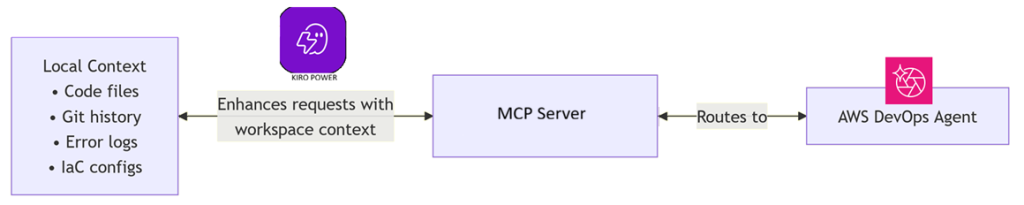
Deep Dive: The Kiro Power for AWS DevOps Agent
The Kiro power for AWS DevOps Agent effectively bundles the comprehensive capabilities of the AWS DevOps Agent into a singular, easily installable package for the Kiro IDE. Once activated, Kiro gains the ability to engage in natural language conversations with a specialized AI agent. This agent possesses a profound understanding of your specific AWS infrastructure, historical operational data, and adherence to AWS best practices. This integration empowers developers and operators with a powerful suite of functionalities directly within their development environment:
- Incident Investigation and Root Cause Analysis: Rapidly diagnose production issues by correlating logs, metrics, traces, and deployment events across your AWS environment. The AI agent can automatically identify potential root causes based on observed patterns and historical data.
- Cost Optimization Analysis: Review the cost implications of your architecture and identify opportunities for optimization, such as underutilized resources, inefficient configurations, or potential savings from reserved instances or spot instances.
- Architecture Review and Validation: Validate your cloud architecture against AWS best practices for reliability, security, performance efficiency, and cost optimization. The agent can highlight deviations or suggest improvements based on observed patterns and well-architected principles.
- Service Topology Mapping: Visualize the interconnectedness of your services and resources within AWS. This helps in understanding dependencies, identifying potential single points of failure, and tracing data flows across complex distributed systems.
- Production Risk Assessment of Code Changes: Proactively assess the potential impact of local code changes on the production environment before deployment. This can include evaluating resource consumption, potential performance bottlenecks, or security vulnerabilities introduced by new code.
- Exploratory Release Testing: Conduct lightweight, automated tests against your web and API applications in a pre-production or staging environment, leveraging the agent’s insights into expected system behavior and common failure modes.
- Automated Remediation Code Generation: Based on identified issues and recommended fixes, Kiro can generate targeted code changes (e.g., in CloudFormation templates, application configuration files, or even application code) to resolve problems directly within your workspace.
Technical Architecture and Workflow
The Kiro power for AWS DevOps Agent operates through two complementary workflows, which Kiro intelligently selects based on the user’s natural language request:
-
Observability & Analysis Workflow: Triggered by requests related to incidents, performance issues, or architectural reviews. In this workflow, Kiro sends contextual information from the user’s local workspace (e.g., current code, configuration files, recent Git changes) to the AWS DevOps Agent. The agent then leverages its vast repository of cloud intelligence – including real-time metrics, historical logs, trace data, and infrastructure topology – to perform a comprehensive analysis. It identifies anomalies, correlates events, and pinpoints potential root causes or optimization opportunities. The findings are then streamed back to Kiro, presented in a clear, actionable format.
-
Release & Remediation Workflow: Activated when the user requests to review code changes for production risks, perform exploratory testing, or generate a fix. Here, Kiro again provides the local workspace context to the AWS DevOps Agent. The agent simulates or analyzes the potential impact of these changes on the production environment, drawing upon its knowledge of existing infrastructure, deployment patterns, and operational history. If risks are identified or a fix is requested, the agent synthesizes remediation steps, which Kiro then translates into actionable code modifications within the user’s IDE.
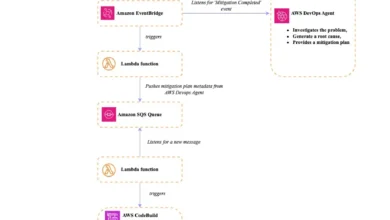
The intricate dance between Kiro’s local context and the DevOps Agent’s cloud intelligence is visualized in Figure 1. Kiro, residing on the developer’s workstation, maintains access to the local codebase, Git history, and configuration files. This local context is securely transmitted to the AWS DevOps Agent MCP (Model Context Protocol) Server. The MCP Server, in turn, orchestrates interactions with various AWS services – pulling metrics from CloudWatch, logs from CloudWatch Logs, traces from X-Ray, deployment history from CodeDeploy, and configuration details from AWS Config. This robust architecture ensures that the AI agent has a comprehensive, real-time understanding of both the development intent and the operational reality, enabling truly intelligent assistance.
Prerequisites for Seamless Integration
To fully harness the capabilities of the Kiro power for AWS DevOps Agent, certain prerequisites must be met, ensuring a smooth and secure integration:
- Kiro IDE Installation: Ensure that Kiro, Amazon’s AI-powered IDE, is correctly installed and configured on your development machine.
- AWS Account and Credentials: You must have an active AWS account with appropriate permissions to access the AWS DevOps Agent and the various AWS services it monitors (e.g., CloudWatch, X-Ray, ECS, RDS). Secure AWS credentials configured for your Kiro environment are essential.
- AWS DevOps Agent Configuration: An AWS DevOps Agent instance must be deployed and configured within your AWS environment. This includes setting up an agent space and connecting relevant data sources (e.g., CloudWatch, X-Ray, application logs, infrastructure components).
- Network Connectivity: Ensure that your Kiro IDE has network connectivity to the AWS DevOps Agent MCP Server. This might involve configuring VPNs, security groups, or VPC endpoints depending on your network architecture.
- Understanding of AWS Services: While Kiro simplifies many tasks, a foundational understanding of the AWS services your applications utilize (e.g., ECS, Lambda, DynamoDB, RDS) will enhance your ability to interpret Kiro’s recommendations and engage effectively with the AI agent.
The power is designed to work effectively with any agent space that has active data sources. Naturally, the more data sources connected to your AWS DevOps Agent, the richer and more comprehensive the investigations and recommendations Kiro can provide, leading to deeper insights and more accurate resolutions.
Getting Started: A Step-by-Step Guide
Setting up the Kiro power for AWS DevOps Agent is a streamlined process, designed for quick integration into your existing workflow. You can initiate the installation directly via a dedicated link, or follow these clear steps:

- Open Kiro IDE: Launch the Kiro IDE on your workstation.
- Navigate to Powers Panel: In the Kiro interface, locate and open the "Powers" panel. This is typically accessible through a sidebar or a dedicated menu option.
- Search for AWS DevOps Agent Power: Within the Powers panel, use the search functionality to find "AWS DevOps Agent."
- Install the Power: Select the Kiro power for AWS DevOps Agent from the search results and click the "Install" button. Kiro will handle the necessary downloads and configurations.
- Configure
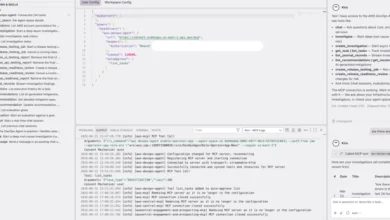
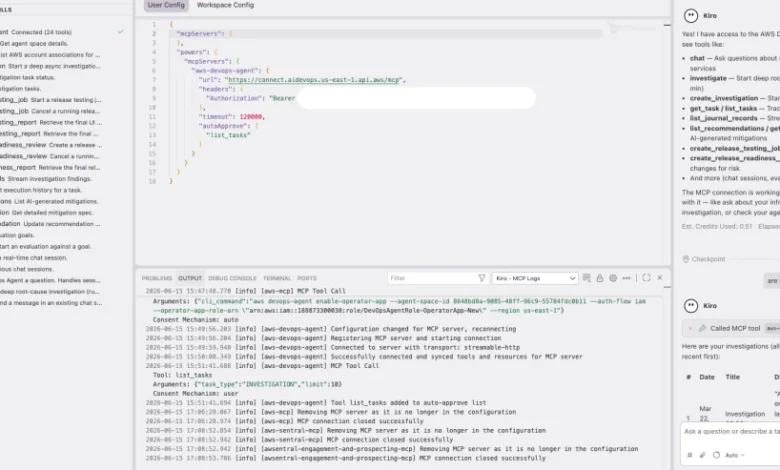
mcp.json: After installation, navigate to themcp.jsonfile within your Kiro workspace. This file contains configuration settings for the Model Context Protocol (MCP) servers. You will need to modify specific values within this file to point Kiro to your AWS DevOps Agent instance. This typically involves entering the endpoint URL for your DevOps Agent MCP Server and any required authentication tokens or region information. Save the configuration file after making these changes.
Upon successful installation and configuration, the Kiro power for AWS DevOps Agent will be listed in the powers section of the Kiro panel (Figure 2, if image was provided). In the MCP Servers panel, you should observe the DevOps Agent MCP listed as "connected," alongside a display of the various tools it integrates with (Figure 3, if image was provided). The power is designed for intuitive activation, automatically engaging its capabilities when you mention relevant keywords in your conversation with Kiro, such as "incident," "cost optimization," "architecture review," or "topology." This natural language interface ensures that the powerful capabilities of the DevOps Agent are always at your fingertips, seamlessly integrated into your daily development and operational tasks.
Walkthrough: Investigating a Production Incident with Kiro
To illustrate the practical efficacy of the Kiro power for AWS DevOps Agent, let’s walk through a realistic scenario that many DevOps teams face regularly. Imagine your team receives a critical Amazon CloudWatch alarm: an Amazon ECS service named checkout-api is consistently returning HTTP 503 errors, and, alarmingly, the associated task restarts have spiked in the last few minutes.
Step 1: Describe the Problem to Kiro
Instead of opening multiple browser tabs and disparate tools, you turn directly to Kiro, leveraging its natural language interface. You type:
"My ECS service checkout-api is throwing 503 errors. The alarm fired 10 minutes ago. Here’s the error from my logs: Connection pool exhausted, max connections 50 reached."
Crucially, because Kiro has seamless access to your local workspace, it doesn’t just process your textual input. It automatically augments your query with relevant contextual information from your project. This includes your ECS task definition (e.g., checkout-api-task-definition.json), your application’s connection pool configuration from application.yml (which might specify spring.datasource.hikari.maximum-pool-size), and even your recent Git commits related to the checkout-api service. This immediate contextual enrichment is a game-changer, providing the AI agent with a far more comprehensive understanding of the problem space.
Step 2: Kiro Initiates the Investigation Workflow
Upon receiving your query, Kiro intelligently routes it to the specialized incident investigation workflow within the AWS DevOps Agent power. You observe real-time progress as findings begin to stream into your Kiro console:
- CloudWatch Metric Analysis: Kiro, via the DevOps Agent, immediately queries CloudWatch for metrics related to the
checkout-apiservice. It identifies a sharp increase in HTTP 5xx errors and a corresponding drop in healthy host count for the associated Application Load Balancer (ALB). Concurrently, it observes a surge inDatabaseConnectionsmetric for the Amazon RDS instance backing the service, nearing itsmax_connectionslimit. - ECS Task State and Event Correlation: The agent correlates these metrics with ECS events, noting multiple
STOPPEDandSTARTINGevents for tasks within thecheckout-apiservice, indicating instability and restarts. It also cross-references with ECS service logs, confirming theConnection pool exhaustederror across multiple task instances. - Deployment History Review: Kiro checks recent deployments via AWS CodeDeploy or other CI/CD integrations. It finds that an auto-scaling policy for the
checkout-apiservice recently scaled up the number of ECS tasks from 2 to 5 instances approximately 15 minutes before the alarm fired. - Configuration Drift Detection: The DevOps Agent also checks AWS Config and CloudFormation stacks to identify any recent configuration changes to the ECS service, its associated Load Balancer, or the backing RDS instance that might explain the behavior. It notes that the RDS instance
max_connectionsparameter is set to 100, and theapplication.ymlin your local workspace specifies amaximum-pool-sizeof 50 per application instance.
Step 3: Review Findings and Recommendations
Within moments, the DevOps Agent returns a detailed analysis, synthesized from its comprehensive data correlation:
Root Cause: The primary root cause has been identified as a database connection limit exhaustion. The RDS instance max_connections parameter is configured to 100. The application.yml in your local workspace, which dictates the connection pool size for each checkout-api ECS task, is set to 50. When the auto-scaling policy added tasks at 08:47 UTC, increasing the task count from 2 to 5, the cumulative demand for database connections immediately exceeded the RDS limit (5 tasks * 50 connections/task = 250 requested connections vs. 100 allowed connections). This led to connection failures, HTTP 503 errors, and subsequent ECS task restarts.
Recommendation and Mitigation: To resolve this issue, the agent provides two clear, actionable recommendations:
- Reduce Per-Task Connection Pool: Modify the application’s connection pool configuration (
maximum-pool-sizeinapplication.yml) to ensure the aggregate connections do not exceed the RDSmax_connectionslimit. A safe calculation would bemax_connections / max_tasks(100 / 5 = 20 connections per task). - Increase RDS Instance Class: Alternatively, or in conjunction with the first recommendation, consider upgrading the Amazon RDS instance class to one that supports a higher
max_connectionsparameter, providing more headroom for scaling.
Step 4: Generate and Apply the Fix
Armed with a clear root cause and actionable recommendations, you ask Kiro to implement the proposed fix. You type:
"Kiro, please apply the recommendation to reduce the per-task connection pool to 20 connections."

Because Kiro has direct access to your application.yml file and understands the context of your AWS CloudFormation template (if your RDS instance or ECS service is defined there), it intelligently generates a targeted fix:
application.ymlModification: Kiro automatically modifies theapplication.ymlfile in your local workspace, changingspring.datasource.hikari.maximum-pool-size: 50tospring.datasource.hikari.maximum-pool-size: 20.- CloudFormation Template Update (Optional): If the RDS
max_connectionsparameter were also managed via CloudFormation and needed adjustment, Kiro could similarly generate a modification to your CloudFormation template (e.g., updating theDBParameterGroupassociated with the RDS instance). - Git Integration: The generated fix is applied directly within your workspace, clearly highlighted for review. Kiro can even stage the changes for commit, ready for you to review, add a commit message, and push to your repository.
This end-to-end workflow, from alarm detection to automated fix generation, occurs entirely within your IDE, eliminating costly context switching and dramatically reducing incident resolution time.
Operating Across Multiple Agent Spaces
For teams managing a diverse portfolio of applications, each potentially with its own dedicated AWS DevOps Agent agent space (e.g., for different environments like prod-us-east-1, dev-eu-west-1, or for distinct microservices), the Kiro power for AWS DevOps Agent offers seamless navigation. Kiro intelligently lists available agent spaces and, based on your natural language query or specified context, routes your question to the correct one. This capability ensures that operational intelligence is always targeted and relevant, regardless of the complexity of your multi-application or multi-environment AWS setup.
Broader Impact and Strategic Implications for DevOps
The introduction of the Kiro power for AWS DevOps Agent transcends mere feature enhancement; it represents a significant strategic shift in the realm of DevOps and cloud management. Its implications are far-reaching, promising to reshape how organizations build, deploy, and operate applications in the cloud.
One of the most profound impacts is on developer productivity and satisfaction. By bringing operational context directly into the IDE, developers are no longer siloed from production realities. They gain immediate feedback on the potential operational impact of their code, fostering a more informed and proactive development approach. This reduces frustration associated with context switching and empowers developers to "shift left" on operational concerns, catching issues earlier when they are cheaper and easier to fix.
For operational efficiency, the benefits are equally transformative. The drastic reduction in MTTR for incidents is a direct outcome of integrated intelligence and automated remediation. Instead of spending hours correlating data, engineers can focus on understanding the underlying systemic issues and implementing strategic solutions. This frees up valuable time for proactive work, such as system hardening, performance tuning, and architectural improvements, rather than constant firefighting.
The power also contributes significantly to cost optimization. By identifying underutilized resources, inefficient configurations, or opportunities for architectural improvements, Kiro helps organizations reduce their AWS spend without compromising performance or reliability. This intelligent financial governance becomes an integrated part of the development and operational workflow, rather than a separate, periodic exercise.
Furthermore, the Kiro power enhances knowledge sharing and onboarding. New team members can quickly gain an understanding of complex infrastructure and application dependencies by conversing with Kiro, which can map service topology, explain architectural decisions, and even provide historical context on incidents and resolutions. This democratizes operational knowledge, reducing the bus factor and accelerating the productivity of new hires.
From a strategic perspective, this innovation reinforces AWS’s commitment to empowering developers and streamlining cloud operations. It positions Kiro not just as an IDE, but as a central nervous system for cloud development and management, leveraging AI to bridge the traditional divide between development and operations. This move towards agentic AI within the IDE sets a new standard for intelligent developer tooling, indicating a future where AI not only writes code but also intelligently manages its lifecycle and operational health.
Expert Perspectives and Future Outlook

The architects behind this transformative technology, like Tipu Qureshi, a Senior Principal Technologist in AWS Agentic AI, emphasize its role in fostering "operational excellence and incident response automation." Qureshi’s work focuses on designing resilient, observable cloud applications and autonomous operational systems. He envisions a future where such tools enable AWS customers to move beyond reactive incident response to a proactive, self-healing cloud environment. The Kiro power for AWS DevOps Agent is a tangible step towards this vision, empowering engineers to build more robust systems from the outset.
Shashiraj Jeripotula (Raj), a Principal Partner Solutions Architect at AWS, highlights the broader implications for "agentic development tooling" and "shift-left observability." Raj’s expertise lies in building deep integrations across observability, AI, and development tools, helping developers leverage AI agents and the Model Context Protocol (MCP) to build responsible, production-ready AI systems on AWS. He sees the Kiro power as crucial for embedding operational intelligence early in the development cycle, ensuring that AI-generated code is not just fast but also operationally sound.
The future trajectory for such integrated AI-powered platforms is clear: continuous enhancement of predictive capabilities, deeper integration with security tooling for DevSecOps, and expansion into more specialized domains. As cloud environments continue to grow in complexity, the demand for intelligent, context-aware assistance will only intensify. The Kiro power for AWS DevOps Agent is not merely a tool; it is a harbinger of a new era in cloud operations, where AI serves as an indispensable partner in navigating the intricacies of modern distributed systems.
Conclusion
The Kiro power for AWS DevOps Agent represents a paradigm shift in how developers and operators interact with their cloud environments. By seamlessly integrating the comprehensive operational intelligence of the AWS DevOps Agent directly into the Kiro IDE, it effectively closes the loop from incident detection to remediation, all without the disruptive friction of context switching. This revolutionary approach unifies local workspace context—the code, configurations, and Git history—with real-time cloud-side analysis, providing a holistic and actionable view of the entire application lifecycle.
Whether the task at hand is the urgent triage of a production incident, the meticulous optimization of costs across a myriad of services, or the streamlined onboarding of a new team member requiring a rapid understanding of complex infrastructure, this power delivers contextual answers grounded in the tangible reality of your AWS environment. It moves beyond theoretical knowledge, providing insights derived directly from your operational data and architectural topology.
Experience the future of AI-powered cloud operations directly within your IDE. Install the Kiro power for AWS DevOps Agent today and unlock unparalleled efficiency and intelligence in your daily development and operational workflows. For those eager to delve deeper into its capabilities, comprehensive information is available through the Interfacing with AWS DevOps Agent documentation and the broader Kiro powers documentation. This innovation is not just about making tasks easier; it’s about fundamentally transforming the way we build, manage, and scale applications in the cloud.
Related posts: