Unlocking the Terminal: How Developer Josh Karpel Crafted Spiel for Command-Line Presentations

For decades, the command-line interface (CLI) has remained the domain of system administrators, programmers, and developers who prefer the speed, efficiency, and minimalism of text-based computing. From managing servers to writing code, the terminal offers an unvarnished view of operating systems. However, presenting graphical slide decks has traditionally required heavyweight, GUI-driven software such as Microsoft PowerPoint, Apple Keynote, or web-based tools like Google Slides. A clever open-source developer named Josh Karpel sought to bridge this gap, introducing a novel solution that allows technical professionals to design and deliver full-featured presentations directly inside their computer terminal.
The project, aptly named Spiel, leverages the powerful Rich Python library to render visually striking slides complete with custom styles, alignments, and text formatting. While the software project is currently archived on GitHub, preventing further direct upgrades from newer iterations of underlying dependencies like Textual, it continues to serve as an intriguing case study in creative UI development within constrained environments. Exploring how Spiel operates, how developers can install and utilize it, and what its existence implies for the future of developer tooling reveals a fascinating intersection of minimalist software design and practical utility.
Background Context and the Rise of Rich Text in Python
To understand the mechanics behind Spiel, one must examine the ecosystem of modern terminal styling tools. For a long time, outputting styled text in a terminal was limited to basic ANSI escape codes—a cumbersome method prone to formatting errors and poor cross-platform compatibility. The landscape changed dramatically with the introduction of Python packages designed to elevate the terminal experience, most notably Will McGugan’s Rich library.
Rich brought high-level rendering capabilities to the command line, enabling developers to easily output syntax-highlighted code, tables, progress bars, Markdown, and beautifully aligned text. Recognizing the potential of Rich, open-source developers began experimenting with non-traditional applications for terminal-based rendering. Josh Karpel’s Spiel emerged as one of the most imaginative manifestations of this trend. By utilizing Rich as its layout and rendering engine, Spiel bypassed the need for complex graphical subsystems, allowing a presentation deck to be defined entirely in Python code and executed seamlessly within a standard terminal window.
Although the official GitHub repository for Spiel notes that it is archived—largely due to reliance on an older, unupgradable version of the Textual framework—the underlying concepts remain entirely functional and accessible for local experimentation, education, and niche technical demonstrations.
Getting Started with Spiel: Installation and Verification
For developers interested in exploring terminal-based presentations firsthand, Spiel offers multiple paths for deployment, ranging from zero-install containerization to traditional package management via Python’s pip utility.
According to the project’s documentation, users with Docker installed on their local machine can test Spiel instantly without modifying their host environment or managing Python dependencies. By executing a single command in the terminal:
docker run -it --rm ghcr.io/joshkarpel/spielUsers can launch a pre-configured container instance and experience the software immediately. However, for those intending to build custom presentations or integrate Spiel into a personal workflow, a local installation is recommended. Best practices in Python development dictate the creation of an isolated virtual environment to prevent package conflicts before executing the standard installation command:
python -m venv spiel-env
source spiel-env/bin/activate
pip install spiel
Once the installation process concludes successfully, developers can verify that the package functions correctly on their system by executing the built-in demonstration command:
spiel demo presentUpon successful execution, the terminal transitions into an interactive presentation mode, allowing users to navigate through pre-built slides using standard keyboard commands.
Crafting Custom Presentations: Architecture and Code Examples
The core philosophy of Spiel is rooted in "presentations as code." Rather than interacting with a graphical drag-and-drop interface, creators define their slide decks programmatically using Python scripts. This approach aligns closely with modern infrastructure-as-code and documentation-as-code paradigms favored by software engineers.
The framework provides two primary mechanisms for adding slides to a presentation deck: explicit instantiation using classes or decorator-based functions. A basic one-slide implementation demonstrates the minimalist syntax required to get a presentation running:
from rich.console import RenderableType
from spiel import Deck, present

deck = Deck(name="Your Deck Name")

@deck.slide(title="Slide 1 Title")
def slide_1() -> RenderableType:
    return "Your content here!"

if __name__ == "__main__":
    present(__file__)
For more advanced presentations requiring custom layouts, styling, and alignment, developers can utilize Rich’s composition classes alongside Spiel’s core data structures. The following comprehensive example illustrates how to build a multi-slide presentation featuring customized text colors, alignments, and metadata:
from rich.align import Align
from rich.console import RenderableType
from rich.style import Style
from rich.text import Text
from spiel import Deck, Slide, present

def make_slide(
    title_prefix: str,
    text: Text,
) -> Slide:
    def content() -> RenderableType:
        return Align(text, align="center", vertical="middle")
    return Slide(title=f"title_prefix Slide", content=content)

deck = Deck("Test Deck")

title_slide = make_slide(
    title_prefix="First",
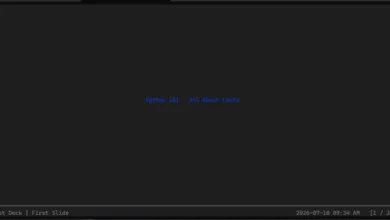
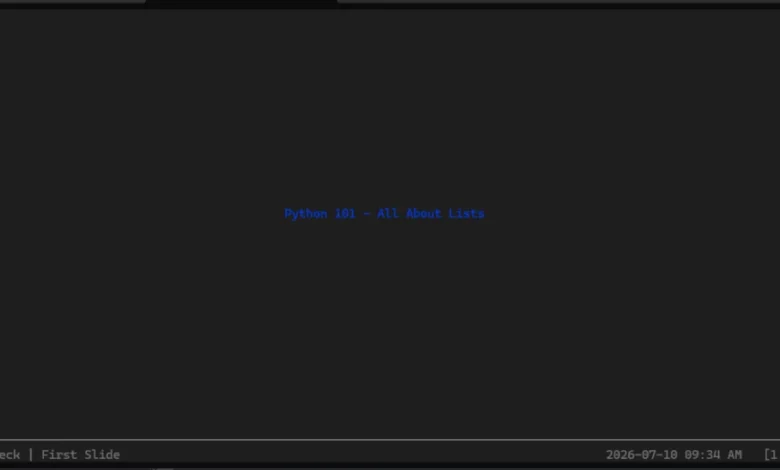
    text=Text("Python 101 - All About Lists", style=Style(color="blue"))
)

intro_slide = make_slide(
    title_prefix="Second",
    text=Text("A Python list is mutable and ordered.", style=Style(color="red"))
)

deck.add_slides(title_slide, intro_slide)

if __name__ == "__main__":
    present(__file__)
When executed, the script compiles the defined slides into an interactive terminal application. Navigation is intuitive: presenters use standard keyboard arrow keys to move forward and backward through the deck, while pressing Ctrl+C safely exits the presentation environment.
Technical Analysis and Ecosystem Implications
The emergence and subsequent archiving of projects like Spiel highlight broader trends and challenges within the open-source Python ecosystem. On one hand, the project demonstrates the remarkable flexibility of libraries like Rich and Textual, proving that terminal interfaces can transcend basic logging and text output to deliver rich multimedia and interactive experiences. For developers working heavily within SSH sessions, remote servers, or constrained environments, the ability to deliver a polished technical presentation without launching a heavy window manager represents a novel productivity gain.
Conversely, the archived status of Spiel underscores the maintenance burdens inherent in modern software development. Python’s rapid iteration cycle, combined with the fast-paced evolution of underlying UI frameworks like Textual, means that experimental or single-developer open-source projects can quickly encounter dependency walls. When an upstream library undergoes breaking changes, projects lacking dedicated maintenance teams often face deprecation.
Despite these limitations, the architectural pattern pioneered by Spiel—defining presentation decks programmatically and rendering them via advanced CLI engines—remains an inspiring proof of concept. It encourages developers to rethink the boundaries of traditional software interfaces and demonstrates how creative problem-solving can repurpose standard tools for entirely unexpected use cases. Whether through the revival of Spiel by a new maintainer or the eventual creation of spiritual successors, terminal-based presentations occupy a fascinating niche in the ongoing evolution of developer tooling.
Related posts: