Transitioning to a newly purchased personal computer is universally regarded as a productive and refreshing technological milestone. Users are routinely greeted by pristine storage drives, lightning-fast boot sequences, and a complete absence of the digital clutter that inevitably accumulates over years of heavy usage. However, this hardware refresh often introduces unforeseen software compatibility hurdles, particularly when users attempt to migrate their daily workflows, media consumption habits, and streaming services to a fresh operating system environment. Among the most frustrating of these early integration obstacles is an abrupt error message encountered by numerous users migrating to Apple’s latest Silicon-based MacBook lineup: the dreaded "This video format is not supported" notification when attempting to load live or on-demand broadcasts on YouTube TV.
For cord-cutters and live television enthusiasts who rely on browser-based streaming to catch nightly news broadcasts, live sports, and syndicated programming, losing access to their primary viewing platform can bring daily routines to a grinding halt. When this specific error materializes, it immediately prevents the video player from rendering frames, leaving users staring at a blank black screen or a static warning box. Fortunately, unlike more complex hardware failures or persistent network bottlenecks, this issue is rarely indicative of a permanent defect in either the macOS environment or the underlying Apple Silicon architecture. Instead, it typically stems from a security and digital rights management (DRM) configuration within the user’s web browser—specifically, the disabled state of a critical component known as the Google Widevine Content Decryption Module.
Understanding the Digital Rights Management Landscape

To comprehend why a modern, high-performance MacBook would struggle to decode a mainstream video stream, it is necessary to examine the complex landscape of modern digital rights management and web standards. Premium content providers, including major television networks, film studios, and subscription streaming services such as YouTube TV, are legally and contractually obligated by copyright holders to protect their video feeds from unauthorized piracy, interception, and high-definition screen recording. To achieve this, these platforms utilize encrypted streaming protocols that require specialized decryption modules to operate seamlessly within a web browser.
Historically, the consumption of protected web video required the installation of third-party browser plugins and proprietary codecs, most notably Adobe Flash Player or Microsoft Silverlight. These legacy tools were notorious for introducing severe security vulnerabilities, consuming excessive system resources, and causing frequent browser instability. In response to these widespread performance and security pain points, the World Wide Web Consortium (W3C) established the Encrypted Media Extensions (EME) API standard. EME allows web browsers to communicate natively with Content Decryption Modules (CDMs), removing the need for archaic third-party plugins while still maintaining robust cryptographic security for copyright holders.
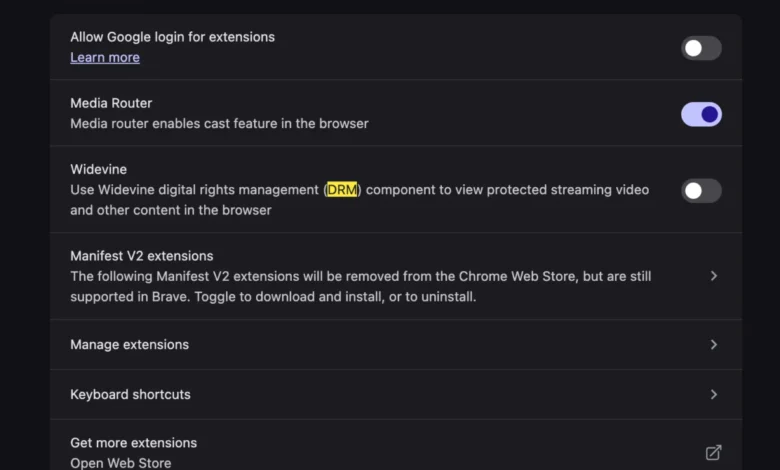
Google Widevine has emerged as the industry standard Content Decryption Module for the vast majority of mainstream web browsers, including Google Chrome, Microsoft Edge, Brave, Vivaldi, and other Chromium-based platforms. Apple’s proprietary Safari browser relies on its own native FairPlay Streaming architecture, which is deeply integrated into the macOS operating system framework. However, a significant portion of power users and cross-platform consumers prefer to utilize Chromium-based browsers for their synchronization features, extension ecosystems, and developer tools. When a user migrates to a new Mac and installs a fresh instance of a Chromium browser, certain advanced security features—including the automatic downloading and execution of the Widevine CDM—may occasionally fail to initialize correctly, or they may be disabled by default due to strict privacy and sandboxing configurations implemented during the initial setup process.
The Anatomy of the MacBook Migration Experience

The transition to Apple Silicon—encompassing the M1, M2, M3, and M4 generations of processors—has fundamentally transformed the personal computing market since its inception in late 2020. These systems deliver unprecedented energy efficiency, thermal performance, and computational throughput, allowing laptops to handle demanding tasks ranging from professional video editing to high-bitrate media playback with minimal battery drain. When consumers unbox these machines, the setup assistant guides them through restoring applications from a Time Machine backup or migrating files via Apple’s Setup Assistant utility.
While this migration process excels at transferring documents, bookmarks, and local application preferences, it can occasionally disrupt the delicate handshake between browser binaries and external binary components like the Widevine CDM. Security software, restrictive default firewall settings, or automated enterprise provisioning profiles applied during corporate deployments can also interfere with a browser’s ability to fetch and execute the necessary decryption libraries from Google’s distribution servers. Consequently, when the browser attempts to handshake with the YouTube TV streaming servers, the platform recognizes that the environment lacks a functioning DRM decryption pipeline. Rather than crashing outright, the player defaults to a safety protocol, halting the stream and displaying the "This video format is not supported" warning message to the end user.
Step-by-Step Resolution Procedures
Resolving this specific playback obstruction does not require advanced terminal commands, manual codec compilation, or registry modifications reminiscent of computing eras past. Because modern web browsers handle DRM components natively, the fix involves verifying that the browser is explicitly permitted to download, install, and execute the Google Widevine plugin.

For users running Google Chrome or compatible Chromium-based browsers on macOS, the diagnostic and remediation process typically follows a straightforward path. First, users should navigate to the browser’s internal components page by typing chrome://components directly into the address bar and pressing Enter. This administrative dashboard displays a comprehensive list of all auxiliary modules, plugins, and background utilities that power the browser’s extended functionality.
Within this directory, users must locate the entry labeled "WidevineContentDecryptionModule." Under normal operating conditions, this entry will display an active version number, indicating that the module is fully operational. If the version reads "0.0.0.0" or if the component fails to initialize, users must click the "Check for update" button adjacent to the listing. This action forces the browser to query Google’s repository, download the latest compatible binary for the macOS architecture, and unpack it into the appropriate application support directory.
In addition to checking the internal components registry, users must ensure that protected content playback is globally enabled within their browser’s privacy and security preferences. This can be accomplished by navigating to the browser settings menu, selecting "Privacy and security," clicking on "Site settings," and drilling down into the "Additional content settings" or "Protected content" sub-menu. Within these parameters, the toggle permitting sites to play protected content must be explicitly turned on. Once these settings are properly adjusted, restarting the browser clears any lingering cache anomalies, allowing the YouTube TV web player to successfully authenticate with the Widevine module and resume high-definition live streaming without further interruption.
Broader Industry Implications and the Future of Web Streaming

The friction experienced by users encountering codec and DRM errors on newly configured hardware highlights a persistent challenge in the modern consumer technology ecosystem: balancing uncompromising digital security with frictionless user experience. As media consumption increasingly shifts away from dedicated hardware set-top boxes and local media players toward browser-based, cloud-delivered streaming architectures, the reliance on complex underlying web standards has never been higher.
Industry analysts note that while standards like HTML5, EME, and Widevine have successfully eliminated the security nightmares associated with legacy browser plugins like Adobe Flash, they introduce opaque points of failure that can perplex average consumers. When a video stream fails, the error messages provided by streaming applications are frequently generic, pointing vaguely toward unsupported formats or network connectivity issues rather than identifying the precise absence of a background decryption module. This lack of transparent diagnostic feedback often leads to user frustration, unnecessary customer support inquiries, and unwarranted skepticism toward new hardware platforms.
Furthermore, as streaming providers continue to adopt advanced video compression codecs—such as AV1 and High Efficiency Video Coding (HEVC)—to deliver 4K resolution and high dynamic range (HDR) content over constrained bandwidth connections, hardware acceleration and software decoding pipelines must work in absolute harmony. Manufacturers of operating systems, browser vendors, and streaming service providers face continuous pressure to streamline the provisioning of these background components during initial system onboarding.
For now, awareness remains the primary defense against these minor yet disruptive digital speedbumps. By understanding that modern web video relies on secure, modular decryption frameworks rather than monolithic system-wide codecs, users migrating to new MacBooks can swiftly diagnose and resolve playback anomalies. As the technology sector marches toward even more tightly integrated cloud computing and streaming paradigms, ensuring the seamless, automated configuration of foundational web components will remain a critical priority for developers striving to deliver true plug-and-play harmony in the digital age.