Understanding RAID Configurations and Calculating Storage Efficiency for Modern Data Centers

In the modern era of high-density data storage, understanding the intricacies of Redundant Array of Independent Disks (RAID) configurations is no longer reserved for enterprise system administrators. As consumer-grade Network Attached Storage (NAS) units from manufacturers like Synology, QNAP, and UGREEN become household staples, home users and small business owners face the same storage reliability challenges as large-scale data centers. At the heart of these systems is the balance between usable capacity, performance, and the statistical likelihood of data loss during drive replacement, a process known as rebuilding or resilvering.
The Evolution and Mechanics of RAID
The concept of RAID was formally defined in a 1987 paper by researchers at the University of California, Berkeley, titled "A Case for Redundant Arrays of Inexpensive Disks." The authors proposed that by grouping multiple smaller, cheaper drives, one could achieve the performance and reliability of a single expensive mainframe disk. Over the decades, these configurations have evolved into industry standards that define how data is striped across drives, mirrored for redundancy, or protected via mathematical parity.
The primary objective of any RAID array is to mitigate the physical limitations of mechanical hard drives. As disk capacities have soared into the 20TB and 24TB range, the time required to reconstruct an array following a drive failure has increased significantly. This has created a "rebuild window" where the remaining drives in an array are under intense stress, increasing the statistical probability of encountering an Unrecoverable Read Error (URE).
Calculating Usable Capacity and Redundancy
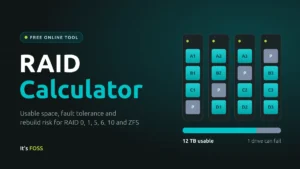
Determining the usable capacity of a storage array depends on the chosen RAID level and the number of drives involved. The fundamental rule for all traditional RAID configurations is that the total usable space is limited by the smallest drive in the set. If a user mixes a 4TB drive with three 8TB drives, the system will effectively treat all disks as 4TB units, wasting 12TB of potential capacity.
- RAID 0 (Striping): Offers maximum capacity and speed but zero redundancy. A single drive failure results in total data loss.
- RAID 1 (Mirroring): Provides high redundancy by cloning data across pairs. Usable capacity is equal to the size of the smallest single drive.
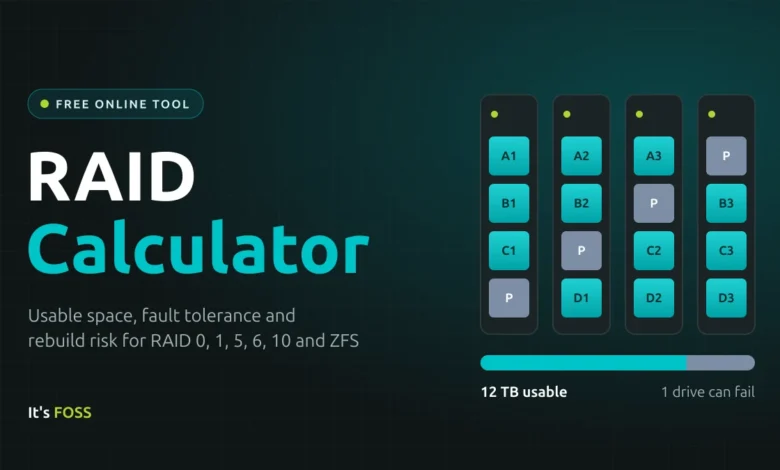
- RAID 5 (Single Parity): Requires a minimum of three drives. Usable capacity is defined as (N-1) × S. It survives one drive failure.
- RAID 6 (Double Parity): Requires a minimum of four drives. Usable capacity is defined as (N-2) × S. It survives two simultaneous drive failures, making it the industry standard for modern, high-capacity mechanical drives.
- RAID 10 (Striped Mirrors): A hybrid that provides both performance and high fault tolerance. It requires an even number of drives and provides (N/2) × S capacity.
The Mathematics of Rebuild Risk
The most critical factor in choosing a RAID level today is the rebuild risk. When a drive fails, the RAID controller or filesystem must read every single block of data from the surviving drives to reconstruct the missing information. The probability of encountering a URE during this process is not merely a theoretical concern; it is a calculated risk based on the drive’s bit error rate (BER) specifications.
For example, a consumer-grade hard drive typically has a URE rating of 1 error per 10¹⁴ bits read. If a user is rebuilding a 24TB array, the statistical likelihood of encountering an unreadable sector is exceptionally high, often exceeding 80%. In contrast, enterprise or NAS-class drives are often rated at 1 error per 10¹⁵ bits, significantly lowering the risk to approximately 17%. Because of this, industry experts consistently advise that for arrays consisting of drives larger than 8TB, RAID 6 or RAIDZ2 (the ZFS equivalent) is the minimum standard to ensure that a single bad sector during a rebuild does not result in a catastrophic loss of the entire array.
ZFS vs. Traditional Hardware RAID
While traditional RAID—managed by hardware controllers or Linux’s mdadm—remains prevalent, ZFS has gained significant traction for its ability to protect against "silent data corruption." Traditional RAID systems are often "bit-blind"; they read and write data without verifying the integrity of the information. If a sector on a disk silently flips a bit, the controller will not know, and it may pass that corrupted data to the user.
ZFS operates as both a filesystem and a volume manager, employing checksums for every block of data. If the system detects a mismatch between the checksum and the stored data, it automatically initiates a repair from the redundant parity or mirror. This self-healing capability is a paradigm shift for data integrity, though it comes at the cost of higher RAM requirements and a more rigid expansion process. Historically, adding drives to a ZFS pool was cumbersome, though recent updates like OpenZFS 2.3 have introduced more flexible expansion options, bridging the gap between ZFS and the relative ease of traditional Linux software RAID.
Operational Costs: Power and Thermal Considerations
Beyond raw capacity and redundancy, the environmental footprint of a storage array is a relevant consideration for long-term ownership. Power consumption is directly correlated with the number of disks and their rotational speed (typically 5,400 or 7,200 RPM). A standard 8TB NAS drive might consume approximately 5 to 9 watts during operation.
For an eight-bay NAS, this equates to a baseline power draw of 40 to 72 watts, excluding the motherboard, CPU, and cooling fans. Over a year of 24/7 operation, this can lead to hundreds of kilowatt-hours (kWh) of consumption. Users are encouraged to factor in the total cost of ownership (TCO), including electricity, when scaling their storage solutions, as inefficient drive configurations can result in thousands of dollars in energy costs over the five-to-ten-year lifecycle of a server.
The "RAID is Not a Backup" Mandate
Regardless of the sophistication of the RAID configuration—whether it is a simple RAID 1 or an enterprise-grade RAIDZ3—a fundamental industry mantra remains: RAID is not a backup. RAID provides high availability, ensuring that a system remains operational if a disk fails. It does not protect against accidental file deletion, ransomware attacks, software-level data corruption, or physical disasters such as fire or theft.
Data management professionals advocate for the 3-2-1 backup rule: maintain at least three copies of your data, stored on two different types of media, with one copy kept in a geographically distinct off-site location. RAID protects against hardware failure, while a robust backup strategy protects against human error and unforeseen catastrophe.
Implementation Trends and Future Outlook
The current landscape of data storage is shifting toward software-defined storage (SDS) and appliance-based solutions. Companies like Synology have popularized the use of proprietary "Hybrid RAID" (SHR) systems, which allow for the mixing of different drive sizes by partitioning the disks into smaller logical units. While these systems offer greater flexibility for home users, they remain fundamentally grounded in the same mathematical principles of parity and striping used in traditional RAID 5 and 6.
As we move toward the widespread adoption of 30TB+ hard drives, the industry is increasingly focused on technologies that reduce rebuild times, such as "distributed spares" and "declustered RAID." These technologies allow the entire array to participate in the reconstruction process, drastically reducing the time a volume spends in a degraded state.
For the average user, the takeaway remains clear: as drive densities increase, the margin for error during a failure event shrinks. Whether one is deploying a professional server or a home media NAS, prioritizing redundancy via double-parity configurations and maintaining a rigorous off-site backup schedule is the only way to ensure long-term data durability in an era of massive digital growth. Understanding these calculations is the first step toward building a resilient architecture that can withstand the inevitable failure of mechanical storage media.