Introducing RESTART: A New Native Deployment Mode for AWS CodeDeploy Fleet Management

Operators and DevOps engineers frequently face the challenge of restarting server fleets to implement runtime configuration updates, resolve stuck processes, or restore infrastructure to a known-good state. Historically, this routine maintenance has presented a significant operational burden for AWS CodeDeploy users. To achieve a fleet-wide restart, administrators were forced into a binary choice: perform a full redeployment of the current revision—which often resulted in redundant processing—or rely on ad-hoc, custom scripts that existed outside the protective guardrails of the CodeDeploy ecosystem. This operational gap has now been closed with the introduction of the RESTART deployment mode, a purpose-built feature designed to bring native, controlled, and high-speed fleet recycling to the AWS cloud environment.
The Evolution of Fleet Maintenance
For years, the absence of a native "restart" function meant that teams were managing fleet stability through workarounds. Custom scripts, while functional, often lacked the sophisticated safety mechanisms inherent to AWS services. A common failure pattern involved scripts that would initiate a sequential restart of hosts without integrated health checks. If an underlying configuration error caused the first batch of instances to fail during startup, the script would frequently proceed to the next batch, ultimately leading to a cascading failure across the entire infrastructure.
The new RESTART deployment mode addresses these risks by formalizing the process within the CodeDeploy workflow. By utilizing the existing CreateDeployment API, the feature ensures that restarts are no longer "blind" operations. Instead, they are subject to the same rigorous batch sizing, minimum healthy capacity requirements, alarm monitoring, and automated rollback behaviors that define standard production deployments. This transition shifts fleet maintenance from a high-risk manual procedure to a managed, transparent, and observable service activity.
Technical Mechanics and Operational Workflow
The RESTART mode functions by reapplying the most recent successful application revision to Amazon Elastic Compute Cloud (EC2) instances and on-premises servers. The process is streamlined to bypass unnecessary data transfers when possible. For CodeDeploy agents version 2.1.0 and later, the system attempts to utilize local archive reuse. When a restart is initiated, the agent verifies the existing revision on the host; if valid, it skips the time-consuming DownloadBundle phase, though the step remains part of the cryptographically signed deployment workflow for security consistency.
Once the deployment begins, the lifecycle hooks—including ApplicationStop, BeforeInstall, Install, AfterInstall, ApplicationStart, and ValidateService—are executed in their established order. This ensures that any drift in managed files is corrected and that services are verified post-restart before the deployment moves to the next batch. By integrating this into the native API, AWS has allowed developers to treat a restart with the same auditability as a production code rollout, providing a clear history of every fleet-wide operation.
Performance Benchmarks and Efficiency
The efficiency gains associated with the RESTART mode are significant, particularly for large-scale fleets. During internal testing conducted by AWS, a 50-host fleet backed by an Application Load Balancer (ALB) saw speed improvements of up to 6.14x compared to standard deployments. In these scenarios, a process that previously required over eight minutes was condensed into roughly 80 seconds.
Data collected during these feature tests highlights the performance impact across various configurations. For instance, in a 100-host fleet, the time saved was approximately 400 seconds. While the speedup is most pronounced when local bundle reuse is possible, even in environments without load balancers, the orchestration of the restart within the CodeDeploy framework ensures that the deployment follows a deterministic path. These metrics represent a shift in how infrastructure teams should approach long-running, stateful services, such as self-managed Kafka brokers or Java Virtual Machine (JVM) applications that suffer from memory fragmentation or growth over extended periods of uptime.
Strategic Implications for Automated Remediation
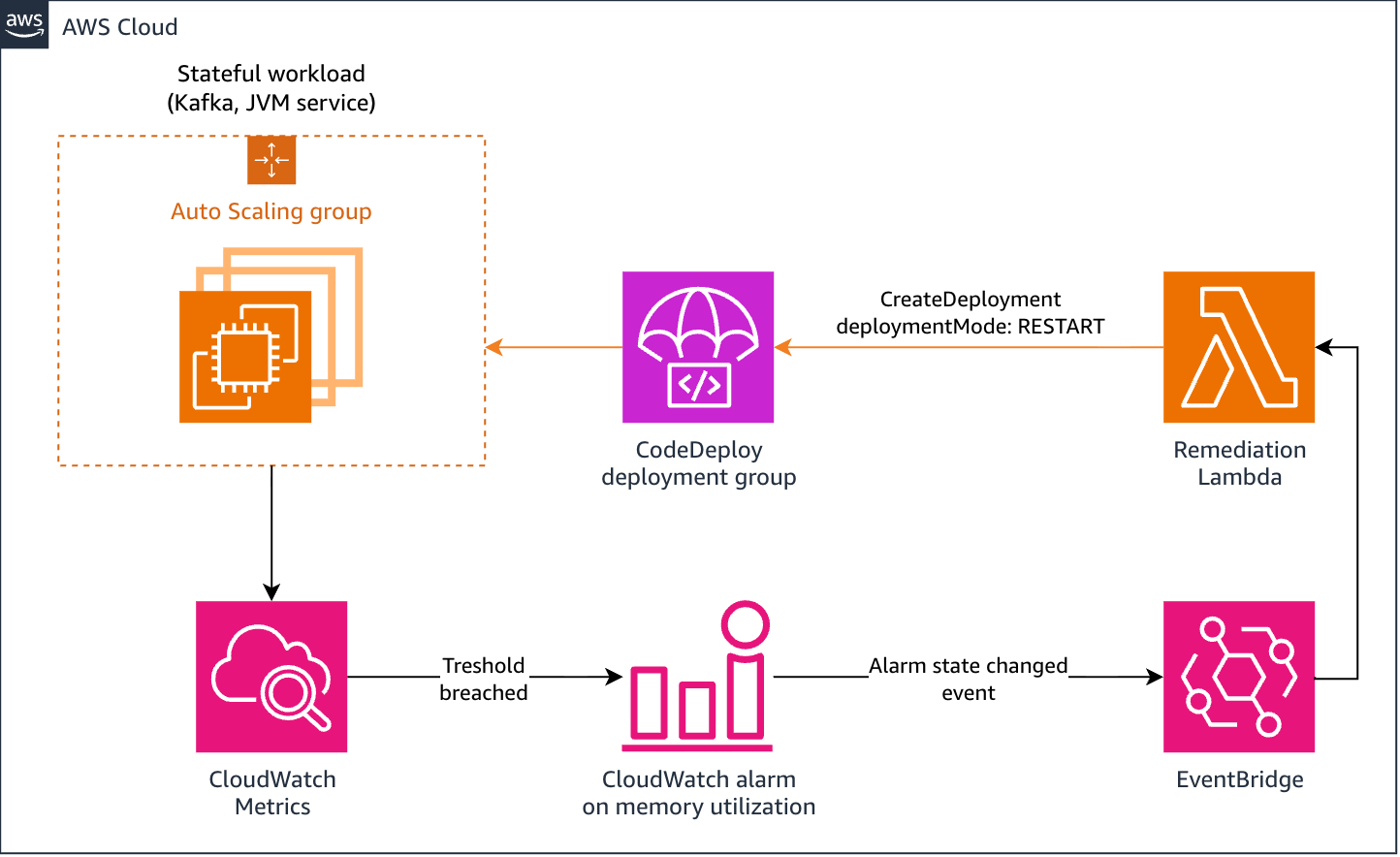
Beyond manual intervention, the RESTART mode serves as a foundational element for automated self-healing systems. Modern cloud architectures often require periodic recycling of stateful nodes to maintain performance. Previously, this necessitated complex cron jobs or external state machines to monitor health and trigger restarts.
With the new mode, developers can create a sophisticated remediation loop. By linking an Amazon CloudWatch alarm—which tracks metrics like memory pressure or latency—to an Amazon EventBridge rule, a Lambda function can be triggered to invoke CreateDeployment with the deploymentMode: RESTART parameter. This architecture enables the fleet to essentially manage its own lifecycle. If a service begins to degrade, the system autonomously triggers a controlled restart, observing all configured safety limits. This "self-healing" capability is a substantial upgrade over traditional, non-aware cron-based restarts, which could potentially take down critical capacity if left unchecked.
Safety Controls and Guardrails
Despite the simplified nature of the RESTART command, the feature maintains the strict safety profile required for production environments. One critical distinction is the handling of traffic control. Unlike a standard deployment, the RESTART mode does not automatically execute BlockTraffic or AllowTraffic load balancer steps. Consequently, developers must ensure that their ApplicationStop scripts are configured to gracefully drain in-flight requests.
Furthermore, the system remains sensitive to pre-existing alarm states. If a deployment group has an alarm in the ALARM state, the deployment will fail as expected to protect the integrity of the fleet. While there is an override mechanism for emergency incident response—requiring elevated codedeploy:UpdateDeploymentGroup permissions—the default behavior is to halt progress if the system detects instability. This conservative approach reinforces that RESTART is intended to be a safe, managed operation rather than an administrative shortcut that bypasses health validation.
Deployment Prerequisites and Implementation
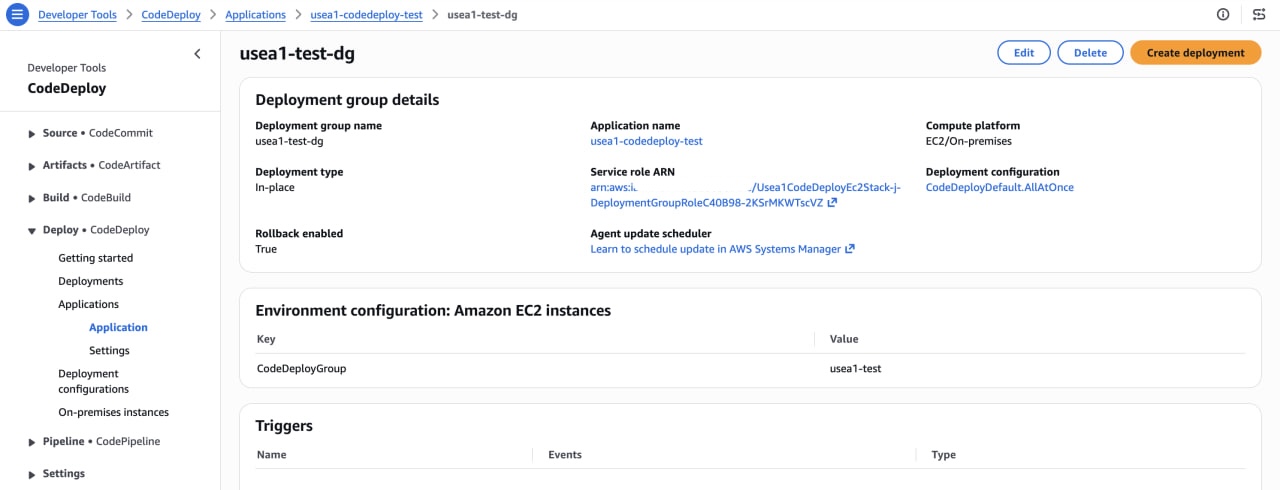
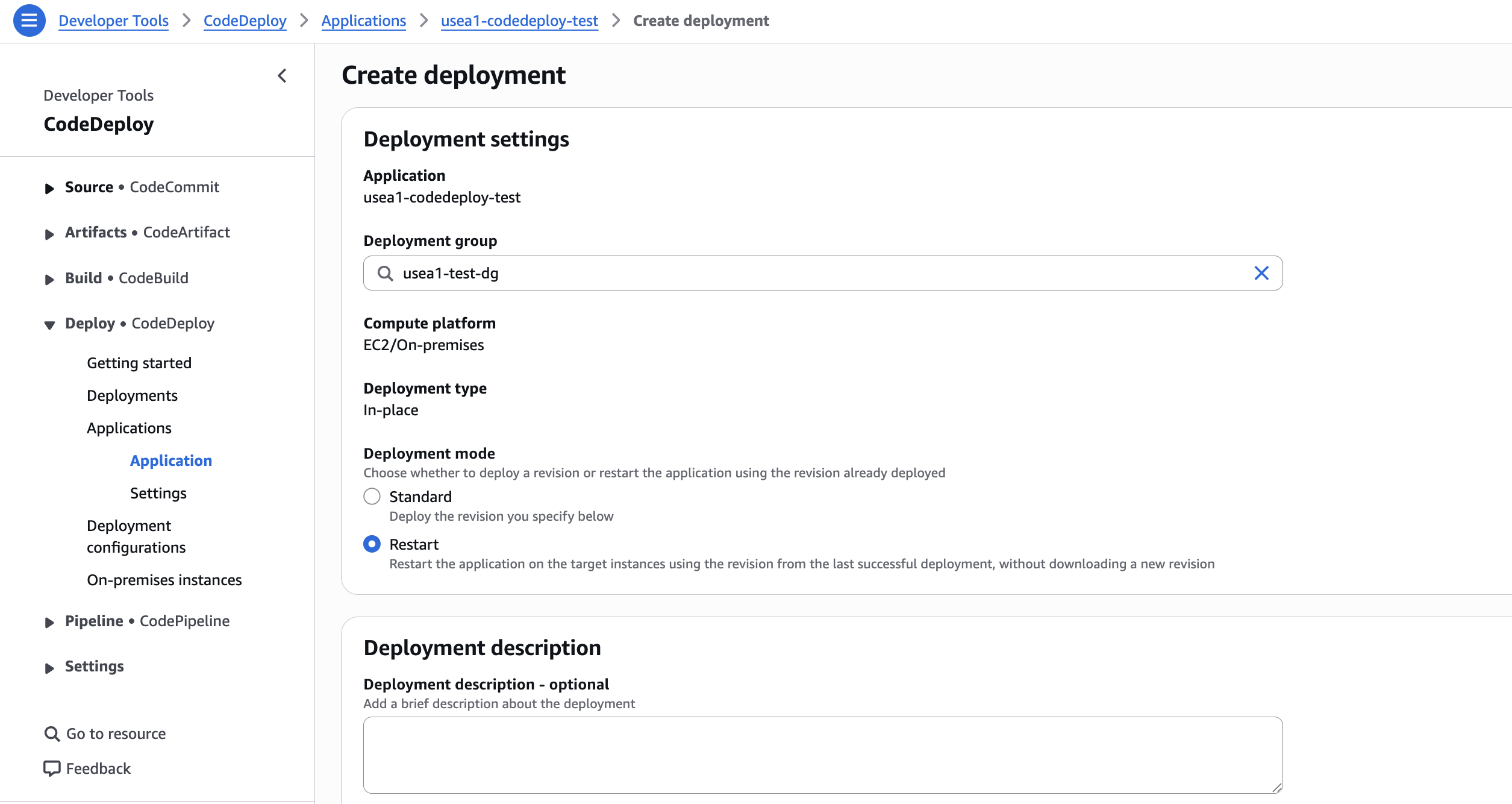
Transitioning to the RESTART mode requires minimal friction. For teams utilizing the AWS Command Line Interface (CLI), the implementation involves simply adding the --deployment-mode RESTART flag to the create-deployment command. The system automatically resolves the last successful revision, eliminating the need to manually pin or define the deployment bundle.
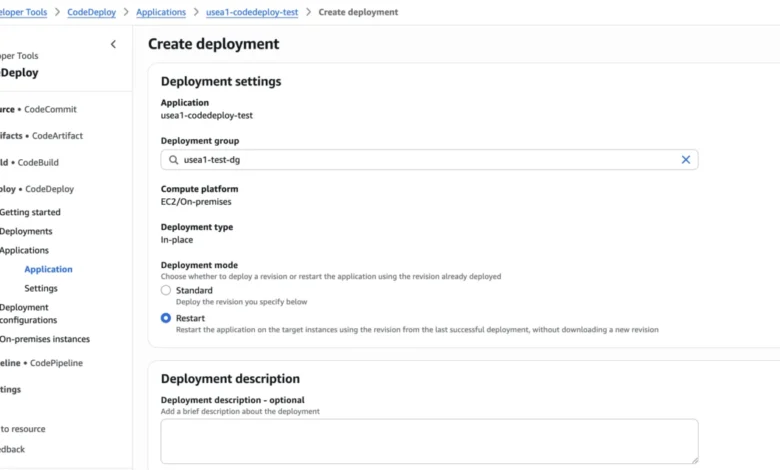
In the AWS Management Console, the process is equally straightforward. Users navigate to their deployment group, initiate a "Create deployment" request, and select "Restart" from the deployment mode dropdown. The console provides immediate visibility into the status of the restart, allowing operators to monitor progress in real-time through the standard deployment dashboard. This parity between the CLI and the graphical interface ensures that teams can standardize their incident response runbooks across different levels of technical expertise.
Broader Impact on DevOps Culture
The introduction of the RESTART mode reflects a growing trend in cloud-native operations: the formalization of "day two" maintenance tasks. As infrastructure scales, the distinction between a software deployment and a hardware/process refresh becomes blurred. By bringing fleet recycling into the first-class API surface of CodeDeploy, AWS is signaling a move toward more resilient, self-managing systems.
The implications for cost and stability are notable. Reduced deployment times lead to shorter maintenance windows, allowing for more frequent, smaller-scale restarts. This, in turn, reduces the risk of "state rot," where long-running processes drift from their desired configuration. Furthermore, by consolidating these operations into a single tool, organizations can reduce the reliance on fragmented, undocumented shell scripts, which are often a point of failure during high-pressure incident response scenarios.
Conclusion and Future Outlook
The deployment of the RESTART mode marks a significant maturity milestone for AWS CodeDeploy. By providing a safe, fast, and automated way to recycle infrastructure, AWS has addressed a long-standing pain point for DevOps teams managing complex, stateful, or long-running workloads. While the speed of the operation—up to 6.14x faster in testing—is an attractive benefit, the true value lies in the integration of safety, observability, and automated remediation.
As enterprises continue to move toward immutable infrastructure and highly automated, self-healing environments, tools that provide native hooks for maintenance are essential. The RESTART mode is not merely a convenience feature; it is an architectural component that enables more reliable, predictable, and maintainable cloud-native systems. Organizations looking to optimize their fleet management practices should evaluate their existing maintenance scripts and consider migrating these processes to the integrated, policy-driven RESTART mode. This shift promises to enhance operational consistency while providing a robust framework for managing the lifecycle of production services in an increasingly dynamic cloud landscape.