A prevailing misconception among many corporations is the assumption that the general populace is clamoring for an incessant influx of new artificial intelligence features, products, and workflows. This notion posits that AI will seamlessly supersede all existing, potentially outdated, practices and rectify inherent inefficiencies in current operational methodologies. However, emerging insights from user experience research and adoption trends reveal a starkly different reality: the majority of individuals do not inherently desire more AI, at least not in the manner often envisioned by ambitious AI leadership. This divergence between corporate AI strategy and actual user needs has significant implications for product development, investment, and long-term adoption, underscoring a critical need for a more nuanced, human-centric approach to AI integration.
The Disconnect: Corporate Ambition vs. User Reality
The pervasive "AI-first" mindset often propagated within tech companies and venture capital circles assumes an insatiable public appetite for AI-driven innovation. This perspective frequently overlooks fundamental user behaviors and psychological barriers to adoption. Companies invest heavily in developing cutting-on-edge AI functionalities, anticipating widespread enthusiasm and rapid integration into daily routines. Yet, studies, including those highlighted by IBM, indicate consistently low adoption and retention rates for many newly introduced AI features, despite substantial delivery costs and the inherent risk of reputational damage for companies pushing unrefined or unhelpful AI solutions. This gap suggests that merely branding a feature as "AI-powered" is not, in itself, a compelling value proposition. As usability experts from the Nielsen Norman Group have articulated, AI typically resides in the realm of "Key Activities" and "Key Resources" within a business model canvas, not directly as a "Value Proposition" for the end-user. The perceived value must stem from tangible improvements to existing tasks or the fulfillment of unmet needs, not from the technology itself.
Beyond the Hype: Low Adoption and High Costs
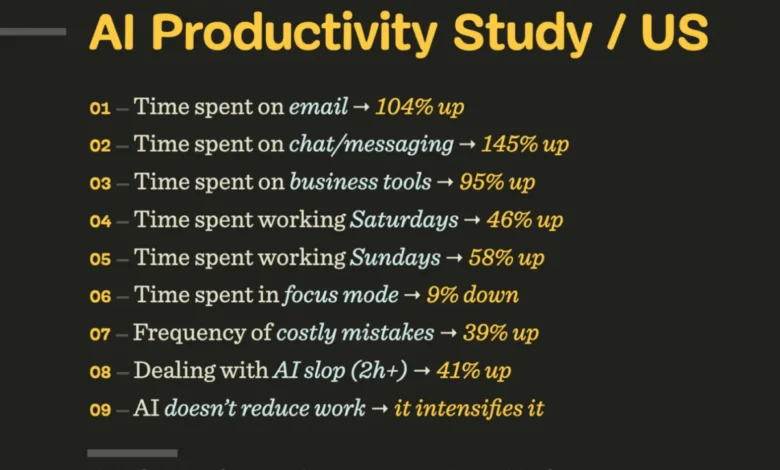
The financial and operational implications of this disconnect are substantial. Developing sophisticated AI models, integrating them into complex systems, and maintaining their performance requires considerable resources. When these efforts culminate in features that users either ignore or actively avoid, the return on investment diminishes significantly. Moreover, the hidden costs extend beyond direct development expenses. Poorly implemented AI can introduce new layers of complexity, requiring users to learn new tools or adapt to unfamiliar workflows, often pulling them away from established, comfortable methods. This disruption can lead to decreased productivity, increased frustration, and a general reluctance to engage with future AI offerings. The "hallucination problem," where AI generates incorrect or nonsensical information, further compounds these issues. Users become responsible for verifying AI outputs, a task that can be more time-consuming and mentally taxing than generating the content from scratch. This "cost of finding and fixing AI hallucinations" effectively negates the perceived efficiency gains, transforming a supposed shortcut into an additional burden.
AI as an Amplifier, Not a Panacea
One of the more challenging aspects of current AI deployment is its tendency to amplify pre-existing organizational shortcuts and shortcomings. Rather than magically resolving years of accumulated technical debt, fragmented data, inconsistent decision-making, or entrenched internal politics, AI often brings these issues into sharper focus. If an organization’s data quality is poor, an AI system trained on that data will likely produce unreliable or biased results. If workflows are already disjointed across multiple systems, introducing another "AI tool" often exacerbates the fragmentation, forcing users to "hop on and off" yet another platform. This means that inconsistencies or conflicting priorities within an organization are not just exposed but are often handed directly to the end-user, who is then tasked with making sense of the resultant "mess." This scenario not only undermines the promise of AI but also transfers the burden of organizational dysfunction onto the individual, leading to more work that is rarely rewarding.
The Human Element: Fear, Anxiety, and Resistance

Beyond practical usability concerns, the human dimension of AI adoption is profoundly influenced by fear and anxiety. The media, along with some industry voices, frequently sensationalizes the potential for AI to replace human jobs, leading to widespread apprehension about job security and the future of work. For many, AI doesn’t arrive as a welcome assistant but as an uninvited guest, dictated by corporate mandates and implemented at a pace that feels alienating. This creates a natural "resistance to change" rooted in a deep-seated anxiety about one’s place in a rapidly evolving world. Consequently, user perception of AI is less often excitement and more frequently caution, skepticism, or even outright dread. Unlike other software features that are typically predictable and reliable, AI’s occasional unpredictability and propensity for errors can make it feel like a liability rather than an asset. People are not envisioning a future filled with AI art museums, AI-narrated children’s books, AI romantic partners, or swarms of AI agents managing their finances; instead, they seek stability, predictability, and genuine human connection.
What Users Truly Value: Reliability and Augmentation
The path to successful AI integration lies in understanding what users genuinely value. It’s not about the "speed of delivery" as an end in itself; rather, it’s about enabling individuals to perform tasks effectively, with sufficient time for critical thinking and sound decision-making. There is an intrinsic reward in doing work well, a sense of achievement that can be eroded by tools that merely accelerate output without enhancing quality or job satisfaction. Users do not compare AI features to human fallibility; they compare them to other features within software ecosystems. If an AI feature is unreliable while a non-AI alternative is consistently dependable, the latter will be chosen.
What users consistently demand from any technology, including AI, are features that are fast, accessible, reliable, predictable, and useful—every single time. Crucially, they prefer tools that augment their existing ways of working rather than completely replacing entire workflows. The ideal application of AI involves offloading the most mundane, annoying, and boring tasks—those from which users derive no pleasure. This strategic automation of tedious and mentally exhausting activities is where AI’s true value becomes evident and much easier to grasp. For instance, in jobs that involve repetitive data entry, scheduling, or preliminary research, AI can free up human workers to focus on more creative, strategic, and inherently human aspects of their roles, such as problem-solving, client interaction, or innovative design.

The "AI-Second" Paradigm: Seamless Integration
For AI to truly deliver on its promise, it must transition from being a "bolt-on" feature to being deeply and seamlessly integrated into existing workflows. This necessitates an "AI-second" approach, where the technology quietly supports and enhances tasks in the background, adapting to human mental models rather than forcing humans to adapt to the machine. This means AI should complement how people think and make decisions, not dictate them. Whether these features are explicitly branded as "AI," "smart," or simply "automation" becomes secondary to their functionality and utility. The key is that users must be clearly aware of the use cases where AI genuinely assists them and feel inspired to discover new applications independently.
This "AI-second" paradigm champions subtle, humble, and ambient AI that takes on a supportive role, tackling the dull and unnecessary aspects of work. It’s about creating tools that are so intuitive and helpful that their AI underpinning becomes almost invisible. As Bo Young Lee succinctly articulated, the desire is not for AI to create art or teach children or make medical decisions, but "to do all the physical and mental labor that taxes me so I can read books written by humans and go to art galleries to engage with art made by humans. I want AI that makes my life easier rather than forces me to change myself." This sentiment encapsulates the core user demand: AI should serve humanity, not redefine it in its own image.
Implications for Design and Business Strategy

The implications of this user perspective for product designers, developers, and business strategists are profound. It mandates a shift from a technology-first to a human-first design philosophy for AI. Companies must invest more heavily in user research, ethnographic studies, and iterative prototyping to truly understand user pain points and how AI can alleviate them without disrupting cherished workflows or increasing cognitive load. This means prioritizing reliability and predictability over flashy, unproven features.
For businesses, the strategic focus should move from simply acquiring or developing AI capabilities to integrating them thoughtfully to enhance employee productivity and customer satisfaction. This might involve:
- Targeted Automation: Identifying specific, repetitive, and low-value tasks that AI can automate to free up human capacity.
- Contextual Assistance: Embedding AI within existing applications to offer intelligent suggestions, summaries, or predictive insights at the point of need, rather than requiring users to switch to a separate AI tool.
- Transparent Functionality: Clearly communicating what AI can and cannot do, managing expectations, and providing mechanisms for users to correct errors or provide feedback.
- Ethical Deployment: Addressing concerns about data privacy, bias, and job security proactively through transparent policies and retraining initiatives.
Educational resources, such as Vitaly Friedman’s "Design Patterns For AI Interfaces" video courses, offer practical guidance for designers and developers seeking to bridge this gap. These resources emphasize user experience (UX) principles in the context of AI, focusing on creating interfaces that are intuitive, reliable, and genuinely helpful. They advocate for design patterns that prioritize user control, transparency, and seamless integration, thereby fostering trust and encouraging adoption.
Conclusion: Redefining AI’s Role

In conclusion, the prevailing narrative that people crave "more AI" is a fundamental misinterpretation of user needs. The reality is that individuals seek tools that enhance their lives, streamline their work, and preserve their autonomy and human connections. They desire AI that acts as a silent, reliable partner, diligently automating the drudgery of daily tasks, thereby freeing up time and mental space for more meaningful, creative, and human endeavors. This doesn’t mean spending more time interacting with AI; it means spending more time with people, pursuing passions, and engaging in work that brings genuine satisfaction. The future of successful AI lies not in its ubiquity, but in its utility, its reliability, and its profound, yet often invisible, capacity to make human lives richer and more focused on what truly matters. The shift from "AI-first" to "human-first AI" is not merely a design preference; it is an imperative for sustainable innovation and widespread adoption.