North Korean Threat Actors Operate Sophisticated Phishing Kit Targeting Zoom and Microsoft Teams Users for Cryptocurrency Theft

North Korean threat actors, operating under the moniker BlueNoroff, have been revealed to be actively employing a sophisticated, operator-driven phishing kit designed to impersonate widely used communication platforms like Zoom and Microsoft Teams. This campaign, dubbed "ClickFix-style" due to its use of typosquatted domain names, aims to trick unsuspecting victims into delivering malware and compromising sensitive information, particularly cryptocurrency wallets. Cybersecurity firm JUMPSEC has detailed this operation, highlighting a repeatable victim acquisition pipeline that leverages compromised industry contacts, social engineering, and reconnaissance of digital asset holdings.
The ClickFix campaign represents a significant evolution in the tactics of North Korean state-sponsored hacking groups, moving beyond simple phishing attempts to a more integrated and automated system for targeting high-value individuals. The operationalization of trust abuse, by combining compromised credentials with social engineering, allows BlueNoroff to establish initial access through seemingly legitimate channels and then escalate their attacks. The primary objective appears to be the theft of cryptocurrency, with the attackers profiling victims’ digital wallets before deploying malware, enabling a strategy of selective targeting based on potential financial gain.
A Pattern of Deception: Evolution of ClickFix and ClickFake Interview
This latest revelation builds upon a growing body of research into North Korean cyber activities. Researchers have been documenting similar tactics since early 2025. A related threat cluster, tracked by Sekoia under the name "ClickFake Interview," further illustrates this trend. This group employs similar ClickFix-like lures, often centered around fictitious job interviews or technical support for video and audio issues, to deceive targets into executing malicious commands. The consistent theme across these campaigns is the exploitation of common user concerns and the manipulation of trust within professional networks.
The methodology employed by BlueNoroff is particularly insidious due to its reliance on compromised trusted contacts. The initial vector often involves attackers hijacking legitimate Telegram accounts belonging to individuals within the cryptocurrency sector. These compromised accounts are then used to send malicious links to high-ranking employees of major companies, often disguised as invitations to a Calendly meeting. This approach leverages existing professional relationships and the inherent trust placed in colleagues or known contacts, making the initial lure highly convincing.

The Deceptive Journey: From Telegram to Fake Zoom Meetings
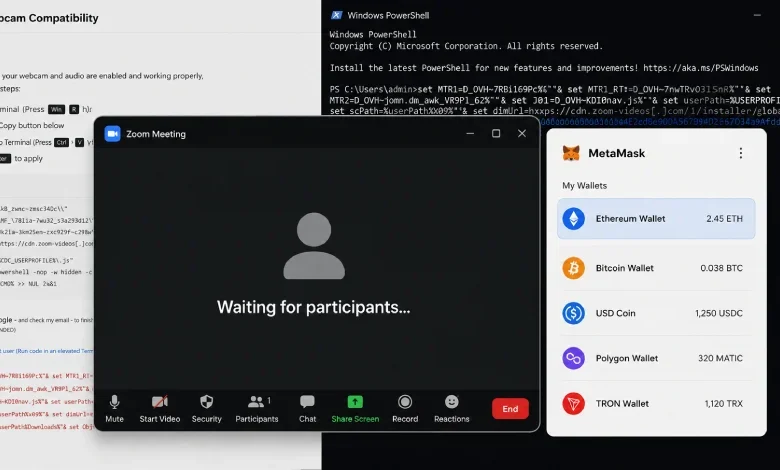
Once a victim clicks on the provided link, they are redirected to a meticulously crafted phishing page that impersonates a legitimate Zoom or Microsoft Teams meeting invitation. The user is prompted to enter their name and grant webcam access. This seemingly innocuous request is a critical step in the attack. Upon granting permissions, the victim’s webcam stream is surreptitiously transmitted to the attackers’ control panel via the mediasoup WebRTC framework. This allows the threat actors to not only observe the victim but also to gather visual intelligence.
The deception continues as the victim is then presented with a page that simulates being in a Zoom call alone, with a message indicating they are "waiting for other participants." This creates a sense of normalcy while the attackers prepare for the next phase. The operators can then utilize their control panel to manage the simulated meeting, send pre-scripted messages like "your mic isn’t working," and trigger a fake "Zoom SDK Update." This update is, in reality, the ClickFix payload, designed to execute on the victim’s system.
A critical component of the attack chain is the simultaneous fingerprinting of the victim’s web browser. This process inventories all installed cryptocurrency wallets, providing the attackers with detailed information about potential targets for theft. Following this reconnaissance, the "admin" of the attack joins the fake meeting. The video feed the victim observes is not a live stream but a sophisticated pre-recorded video. These videos are constructed using AI-generated headshots, created with tools like OpenAI’s ChatGPT, and superimposed onto authentic body movements captured from previous victim sessions. This innovative technique ensures that the fake participants appear plausible and exhibit natural body language, further enhancing the illusion.
"So, each successful attack feeds source material into the composites used against the next target," JUMPSEC explained in their report. "This combined with the Telegram account takeover method means that the fake meeting shows a plausibly familiar-looking face, moving with the body language of someone who was actually captured on camera." This cyclical process of gathering data and using it to enhance future attacks makes the campaign increasingly difficult to detect and resist.
Targeting Specific Platforms: Why Zoom and Teams?
JUMPSEC identified two distinct lure variants, one for Zoom and another for Microsoft Teams, with the Teams version exhibiting a higher degree of polish. The Teams lure supports features like emoji reactions and advanced wallet probes before malware delivery. The ClickFix attack chains are engineered to be compatible with both Windows and macOS operating systems, broadening their potential reach.

The specific focus on Zoom and Microsoft Teams, rather than other platforms like Google Meet, is a deliberate strategic choice by the threat actors. Sean Moran, head of threat research and enablement at JUMPSEC, elaborated on three key reasons for this focus:
- ClickFix Pretext: The core pretext of the attack relies on an "outdated Zoom/Teams SDK" or similar technical issue. This specific technical framing is most effective on platforms that users perceive as having substantial desktop clients, such as Zoom and Teams. Google Meet, being primarily browser-based, does not lend itself as easily to this particular social engineering tactic.
- Target-Application Fit: Zoom and Microsoft Teams are widely adopted as the default communication tools within the cryptocurrency, venture capital, and startup ecosystems. These platforms are frequently used for critical investor calls, partnership discussions, and high-stakes business meetings. Google Meet, while prevalent, is often perceived more as a general-purpose communication tool for less sensitive interactions.
- Typosquatting Surface: The domain registration strategies employed by the attackers capitalize on the structure of Zoom and Teams URLs. Domains like "us.zoom.06webin.us" are highly similar to legitimate Zoom links, making it easier for users to fall for the deceptive URLs due to the presence of subdomains and recognizable branding. In contrast, "meet.google.com" offers a more limited and less easily spoofed domain structure.
While the current phishing kit primarily features Zoom and Teams lure pages, JUMPSEC noted the existence of an unimplemented stub for a Google Meet equivalent within the source code. This suggests that the exclusion is a tactical decision based on the effectiveness of the current strategy rather than a lack of capability. The attackers are likely prioritizing resources towards the most successful attack vectors.
Technical Details and Operator Identification
The self-propagating nature of the campaign is a significant concern. Any victim who runs the payload with Telegram Web open or Telegram Desktop installed is susceptible to their Telegram session being stolen and reused to target their own contacts. This creates a cascading effect, where each compromised account becomes a vector for further attacks.
Further technical analysis of the ClickFix campaign has revealed hard-coded bot tokens and chat IDs within the stealer binary responsible for Telegram exfiltration. Querying the Telegram API using these tokens has led to the identification of an operator known by the handle "John" (@alchemy_john_mac). Evidence suggests that as recently as May 2026, this individual was actively engaging with administrators of the MAIV cryptocurrency group, inquiring about vesting contracts and methods for withdrawing funds. This provides a direct link between the technical infrastructure and an individual actively involved in the operation.
An examination of the threat actor’s infrastructure uncovered five distinct versions of the phishing kit developed between May 31 and July 14, 2026. This rapid iteration indicates continuous development, refinement, and adaptation by the BlueNoroff group, suggesting ongoing investment in their cybercriminal operations.

Broader Implications for Cybersecurity and the Digital Asset Economy
The BlueNoroff ClickFix campaign underscores a critical trend in the cybersecurity landscape: the increasing sophistication of nation-state-backed threat actors targeting the digital asset economy. As the Web3 and cryptocurrency sectors continue to mature, threat actors are recognizing that compromising individuals with access to significant digital wealth can be as lucrative, if not more so, than directly attacking blockchain infrastructure.
The implications of this campaign extend far beyond the immediate theft of cryptocurrency. The exploitation of trusted communication channels, the use of AI for deception, and the sophisticated social engineering tactics employed highlight the evolving nature of cyber threats. Organizations must recognize that their security posture needs to encompass not only technical defenses but also a robust understanding of human factors, identity management, and the security of communication channels.
"BlueNoroff’s continued refinement demonstrates that organisations must consider identity, relationships and communication channels as critical parts of their security posture," JUMPSEC concluded. The ability of these threat actors to adapt and innovate, as evidenced by the use of deepfake-like video and the exploitation of platform-specific vulnerabilities, necessitates a proactive and multi-layered approach to cybersecurity. The ongoing efforts by groups like BlueNoroff serve as a stark reminder of the persistent and evolving threats faced by individuals and organizations operating in the digital realm.