The Blueprint for AI-Ready Design: How Structured Systems Minimize Drift and Maximize Prototype Quality

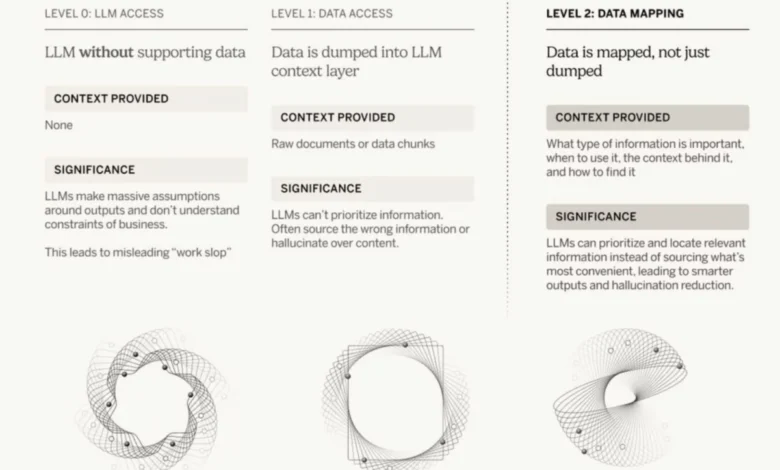
The rapid integration of artificial intelligence into creative workflows, particularly in user experience (UX) and product design, has unveiled both immense potential and significant challenges. While AI-generated prototypes promise unprecedented speed and efficiency, their consistent delivery of high-quality, on-brand results remains elusive. This inconsistency often stems from subtle yet pervasive issues embedded within existing design systems: undocumented decisions, hard-coded values that circumvent established guidelines, and an over-reliance on AI’s ability to infer design intent from visual mock-ups alone. To bridge this gap between AI’s promise and its practical application, a paradigm shift towards meticulously structured and explicitly guided design systems is imperative.
This critical need for enhanced guidance has been underscored by industry experts, including Hardik Pandya from Atlassian, who recently presented a comprehensive guide on cultivating "LLM-readable design systems." This practical framework focuses on key objectives: reducing design drifts, minimizing errors, maintaining contextual integrity, and ultimately elevating the quality of AI-generated prototypes. The insights offered by Pandya, complemented by resources like Vitaly Friedman’s "Design Patterns For AI Interfaces" video course, provide a timely and essential roadmap for designers navigating the evolving landscape of AI-powered design.
The Genesis of Inconsistency: Why AI Prototypes Drift
The enthusiasm surrounding AI’s capabilities in design often overlooks a fundamental truth: AI, particularly large language models (LLMs), excels at pattern recognition and generation based on the data it’s trained on. However, design is not merely about patterns; it’s about intentionality, brand identity, accessibility standards, and a myriad of nuanced decisions. When AI is tasked with generating prototypes from a design system rife with inconsistencies, the output inevitably reflects these flaws.
A primary culprit is the prevalence of "design debt"—unresolved design issues and inconsistencies that accumulate over time. This debt manifests in several ways:

- Undocumented Decisions: Many design choices are made in meetings, through informal discussions, or are simply tribal knowledge residing within a designer’s head. Without explicit documentation, AI has no codified principles to follow, leading to arbitrary choices and divergence from established guidelines.
- Hard-Coded Values: Designers or developers might bypass design tokens or variables for specific instances, embedding fixed values for colors, spacing, or typography directly into a design. These "one-off" solutions break the system’s integrity, and AI, encountering them, might erroneously interpret them as valid patterns, perpetuating inconsistencies.
- Implicit vs. Explicit Guidance: Expecting AI to "make sense" of complex mock-ups or design flows purely visually is akin to asking it to write a novel by showing it a collection of random sentences. AI thrives on explicit instructions, clearly defined parameters, and structured data, not implicit visual cues it has to interpret. Data from various industry reports suggest that up to 30% of design projects experience significant delays due to inconsistencies and rework, a problem exacerbated by unguided AI.
These issues create a fertile ground for "drift"—where AI-generated outputs diverge from established brand guidelines, user experience principles, or technical specifications. The consequence is prototypes that require extensive manual correction, negating the very efficiency AI is meant to provide and increasing the overall time and cost of design iterations.
Transforming Design Decisions into Infrastructure
At the heart of an AI-ready design system lies a profound shift in how design decisions are perceived: they must be treated as critical infrastructure. This means moving beyond the idea of design documentation as a secondary, optional task and elevating it to a foundational element of the product development lifecycle. Just as code infrastructure dictates application behavior and ensures scalability, design infrastructure must explicitly guide AI’s generative processes to maintain consistency and quality.

For AI to produce superior prototypes, it requires not just "better data," but "better human guidance" in a machine-readable format. This guidance encompasses a comprehensive set of directives:
- Clear Priorities: What are the non-negotiable aspects of a design (e.g., accessibility, brand identity, performance, user privacy)? These priorities must be explicitly stated to allow AI to weigh conflicting requirements.
- Defined Decision Paths: How are design conflicts resolved? What principles govern component selection or layout choices under different scenarios? This eliminates ambiguity for AI.
- Explicit Design Principles: The guiding philosophies that inform all design work, such as "clarity over complexity," "user-centricity," or "progressive disclosure." These principles act as ethical and functional guardrails for AI.
- Examples and Anti-patterns: Demonstrations of correct usage and clear warnings against incorrect applications. Visual examples paired with textual explanations significantly enhance AI’s understanding.
- Do’s and Don’ts: Specific, unambiguous instructions that leave no room for AI misinterpretation, such as "Do use this button for primary calls to action" and "Don’t use this button for secondary actions."
Every significant design decision—from the choice of a specific component to the overarching strategy for prioritizing tasks—must find its way into a formalized specification file. This structured documentation serves as the AI’s "rulebook," ensuring that its generative actions align perfectly with human intent and established brand guidelines. This approach minimizes ambiguity and empowers AI to act as a highly efficient assistant rather than an unguided artist, reducing the potential for costly errors in later development stages.
The Role of Auditing in Maintaining Design System Integrity
Before AI can reliably consume a design system, the system itself must be robust, consistent, and free of internal contradictions. This necessitates rigorous auditing, a process often overlooked but vital for long-term health. The rise of AI in design has only amplified the importance of clean, well-structured data, making automated auditing tools indispensable.
One such powerful utility is FigmaLint, a free Figma plugin that offers an invaluable suite of features for design system quality assurance. FigmaLint systematically scans design files for common inconsistencies and errors, including:
- Token Usage: Ensuring that design tokens (e.g., for colors, typography, spacing) are consistently applied and not overridden by hard-coded values. This is crucial for maintaining brand integrity and making global changes effortless.
- Interactive States: Verifying that components have all necessary interactive states (hover, focus, active, disabled) defined and correctly implemented, which is critical for a smooth user experience and accessibility.
- Accessibility Adherence: Flagging potential accessibility issues, such as insufficient color contrast, missing semantic labels, or improper tab order, helping teams meet WCAG (Web Content Accessibility Guidelines) standards.
- Detached Instances: Identifying instances of components that have been detached from their master components, leading to inconsistent updates and a breakdown of the design system’s single source of truth.
- Layer Renaming and Structure: Promoting consistent naming conventions and layer organization, which is crucial for both human readability, collaborative workflows, and efficient AI processing.
FigmaLint serves as a critical pre-processing step, effectively "cleaning" the design system data before it is fed to an AI. This is particularly beneficial for organizations collaborating with external vendors or integrating third-party component libraries, where inconsistencies are common due to varying design practices. By automating the detection and, in some cases, auto-fixing of these issues, FigmaLint significantly reduces manual effort, improves design documentation quality, and lays a solid foundation for more accurate AI-generated code and documentation. The implication is a vastly improved starting point for AI, reducing the likelihood of "garbage in, garbage out" scenarios and enhancing the overall fidelity of AI-generated prototypes.

The Three-Layered Framework for AI-Ready Design Systems
Hardik Pandya’s guide articulates a robust, three-layered framework that empowers AI to produce high-fidelity, consistent prototypes: Spec Files, a Token Layer, and an Auditing Mechanism. This framework establishes a clear and actionable pipeline for AI consumption, turning abstract design principles into concrete, machine-interpretable instructions.
-
Spec Files: The AI’s Instruction Manual
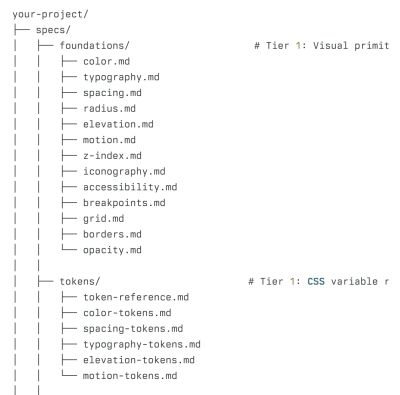
Spec files are the cornerstone of this framework. These are structured Markdown files that contain explicit design principles, guidelines, and rules. Unlike visual mock-ups, which require AI to interpret visual cues, spec files provide clear, unambiguous instructions. Examples of content within spec files include:
- Spacing Rules: Definitive guidelines for vertical and horizontal spacing between elements, often tied to a consistent 4-point or 8-point grid system.
- Color Choices: Prescribed color palettes, including primary, secondary, accent, and semantic colors, along with their usage contexts (e.g., "Use
$color-dangeronly for critical error messages"). - Component Usage Guidelines: Detailed instructions on when and how to use specific UI components (e.g., "Use a primary button for destructive actions only if accompanied by a confirmation dialog," or "Avoid using more than two distinct font sizes on a single screen for better readability").
- Priorities and Constraints: Information on design priorities (e.g., mobile-first approach, performance considerations, localization requirements) and technical constraints.
- Accessibility Standards: Explicit rules for contrast ratios (e.g., AA or AAA WCAG levels), focus states, keyboard navigation, and semantic HTML structure for components.
The critical advantage of using text-based spec files is their cost-effectiveness and accuracy. Generating prototypes from explicit text instructions is significantly more reliable than relying on AI’s visual pattern recognition, which can be prone to misinterpretation or "hallucination." This approach shifts the paradigm from AI trying to "guess" design intent to AI meticulously "executing" explicit instructions. It also aligns with the principle that extending code or design through clear parameters is often more effective than generating entirely new structures from ambiguous inputs, leading to more predictable and maintainable outputs.
-
The Token Layer: The Language of Consistency
The token layer is a centralized repository that lists and keeps updated all design tokens used throughout the system. Design tokens are the single source of truth for all design values—colors, typography, spacing, border radii, shadows, animation durations, etc. Instead of AI inventing plausible values ad hoc (e.g., picking a random shade of blue), it is constrained to choose from a closed set of named, pre-defined variables (e.g.,$color-brand-primary,$spacing-medium,$font-size-h1).This layer is paramount for several reasons:
- Unwavering Consistency: Ensures that every design element adheres to the brand’s visual identity, reinforcing brand recognition and trust.
- Scalability: Allows for easy global updates; changing a token value updates every instance across the entire design system and all