JupyterLab Workshop Extension Bridges the Gap Between Passive Documentation and Interactive Education

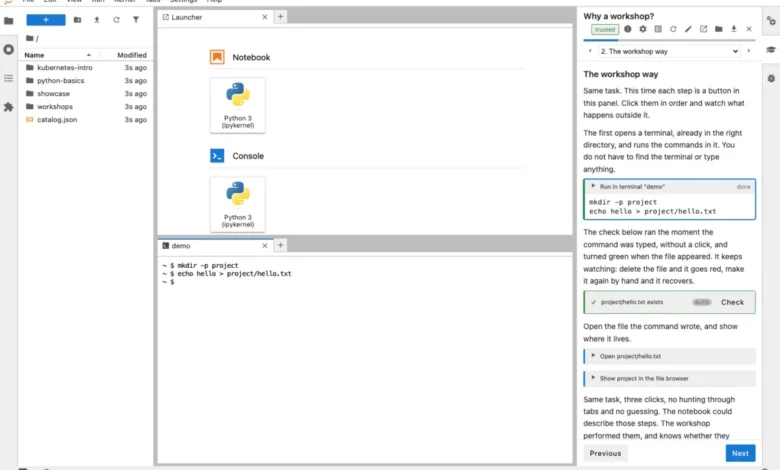
The landscape of technical education within data science and software engineering is undergoing a fundamental shift as developers move away from static, passive tutorials toward integrated, hands-on learning environments. Last week, software developer Graham Dumpleton released the jupyterlab-workshop extension, a specialized tool designed to transform the JupyterLab interface into a comprehensive, interactive classroom. By separating instructional content from the technical workspace, this extension addresses long-standing limitations in how coding skills are taught, moving beyond the traditional constraints of standard Jupyter Notebooks.
The extension is now available via PyPI and is documented on ReadTheDocs, providing a framework where instructions reside in a dedicated sidebar while the primary interface remains a functional, user-controlled JupyterLab session. This architecture allows learners to engage with terminals, code editors, and file systems in real-time, effectively mirroring the professional developer experience rather than simulating it through abstract notebook cells.
The Limitations of the Notebook Paradigm
For over a decade, the Jupyter Notebook has served as the de facto standard for technical instruction. However, as the complexity of software development has increased, the shortcomings of the notebook-as-tutorial model have become more pronounced. Traditionally, a notebook forces a linear, cell-based flow. This creates three primary challenges: the "passive walkthrough" effect, where a learner merely executes cells without internalizing the logic; the "language confinement" issue, where instructions cannot easily facilitate shell-level commands or virtual environment configuration; and the "document conflation" problem, where instructions and code become inextricably linked, leading to messy work states and an inability to track progress accurately.
Industry experts have long noted that when learners rely solely on "Shift+Enter" execution, they fail to develop the muscle memory required for command-line proficiency. Furthermore, because notebooks are typically limited to the kernel they are running in, they cannot adequately teach tasks such as multi-file project management, version control via Git, or complex system-level installations. Dumpleton’s extension resolves these issues by allowing the instructional panel to interact directly with the JupyterLab host environment, enabling a "check-and-verify" loop that ensures the learner has successfully completed a step before progressing.
Chronology of Development and Design Philosophy
The development of jupyterlab-workshop was prompted by the creation of 24 "wrapture" workshops—a series of tutorials designed to teach complex software integration concepts. During the creation of these workshops in early September 2026, it became clear that existing solutions were either too heavy-handed or insufficiently flexible.
The development timeline was rapid:
- Early September 2026: The author identifies a need for a more robust instructional delivery system during the production of the wrapture workshops.
- Mid-September 2026: The jupyterlab-workshop extension is conceptualized and built from the ground up, specifically to integrate with existing JupyterLab native features.
- Late September 2026: The extension is released alongside the wrapture workshops, hosted on Binder to demonstrate its efficacy in a serverless, zero-cost environment.
Unlike previous platforms such as Educates—a robust, Kubernetes-based training system also developed by Dumpleton—the new extension is designed for accessibility. While Educates provides an enterprise-grade solution for complex, multi-service clusters, jupyterlab-workshop targets the individual developer, small teams, and open-source project maintainers who require a low-friction method to provide guided tutorials without the overhead of managing a Kubernetes cluster.
Technical Architecture and Verification Mechanisms
The core of the jupyterlab-workshop system is its use of MyST Markdown and a structured manifest file (workshop.yaml). This design allows the entire workshop to be version-controlled in a Git repository, making it highly portable.
Each workshop consists of a series of pages, each containing "actions" and "verifications." When a learner clicks a command in the sidebar, the extension executes that command in the user’s real terminal. This is not a simulation; if a user wishes to modify the command or type it manually, the environment remains fully responsive and unrestricted.
The "verify" block represents the most significant departure from traditional learning tools. It can be configured to run Python scripts in an isolated kernel, execute shell commands, or perform pattern matching on file contents. This creates a gating mechanism. For example, a workshop can be programmed to remain on a specific page until the learner has successfully created a file with a specific content string or executed a git commit with a specific message. By providing immediate feedback, the tool prevents the "silent failure" scenario, where an error at step three renders the lesson impossible to complete by step eight.
Deployment and Accessibility
A primary driver for the extension’s design was the democratization of technical training. By utilizing JupyterLab’s inherent versatility, the workshops can be deployed across a variety of platforms:
- Local Environments: Developers can install the extension directly into their virtual environments.
- Binder/Codespaces: The workshops are compatible with mybinder.org and GitHub Codespaces, allowing learners to access fully configured environments in their browser with no local setup.
- JupyterLite: Perhaps the most significant innovation is the compatibility with JupyterLite, which runs entirely in the browser using WebAssembly. This allows a workshop to be served as static files on GitHub Pages, eliminating the need for backend servers entirely.
This flexibility shifts the burden of infrastructure away from the instructor. An open-source maintainer can now include a "tutorial" folder in their repository, and a user can simply click a link to be transported into a fully interactive, self-paced learning environment.
Industry Implications and Future Outlook
The release of jupyterlab-workshop highlights a broader trend toward "infrastructure-as-code" education. As AI-assisted coding tools become more prevalent, the demand for human-centric, verifiable learning paths has increased. Critics of AI-generated code argue that it creates a generation of developers who can generate code but cannot debug or understand the underlying system architecture. Tools like this extension mitigate that risk by forcing the learner to engage with the system at a granular, command-line level, while using the "workshop" format to provide the necessary guardrails.
While Educates remains the gold standard for high-stakes, corporate, and multi-user environments requiring complex backend orchestration, jupyterlab-workshop fills the void for the "long tail" of technical training. It is a lightweight, portable, and highly extensible solution that aligns with the current move toward browser-based, serverless development environments.
The author has stated that further documentation regarding the creation of workshops from scratch and advanced deployment strategies is forthcoming. For now, the showcase collection—available via Binder and Codespaces—serves as the primary reference for those interested in implementing this framework.
As technical education continues to merge with the development environment itself, the success of such tools will likely be measured by their adoption among open-source maintainers. By reducing the barrier to entry for creating high-quality, interactive tutorials, jupyterlab-workshop may fundamentally alter how documentation is perceived—moving from static reference material to an active, collaborative, and verified educational experience. Whether this approach becomes the new standard for technical onboarding remains to be seen, but the infrastructure to support such a shift is now firmly in place.