In the fast-paced ecosystem of modern web development, quality assurance is frequently sidelined due to perceived complexities, financial burdens, and tight project deadlines. For developers working within the Drupal content management system, automated testing has historically been viewed as an optional luxury rather than an essential component of the software development lifecycle. However, the integration of modern, open-source testing frameworks is fundamentally altering this calculus. By lowering the barrier to entry for end-to-end (E2E) testing, tools such as Cypress are bridging the gap between rigorous quality control and agile deployment schedules.
The historical reluctance to adopt automated testing in Drupal environments usually stems from the steep learning curve associated with legacy testing suites, which often required intricate configurations, separate driver architectures, and complex syntax. Developers accustomed to rapid prototyping found that writing and maintaining test scripts could consume more time than building the features themselves. Furthermore, the dynamic nature of Drupal—characterized by modular architectures, contributed themes, and intricate user-permission matrices—made reliable UI testing notoriously difficult.
To address these industry pain points, development teams have increasingly turned toward JavaScript-based testing frameworks that operate directly within the browser context. Originally introduced as a developer-friendly alternative to Selenium, Cypress has gained substantial traction across the open-source community. Its architectural design allows it to run in the same run-loop as the application, providing real-time reloading, automatic waiting, and native access to DOM elements. When applied to Drupal projects built using modern workflows such as Composer and local development environments like Lando or DDEV, Cypress offers a streamlined pathway to achieving robust test coverage without requiring a dedicated QA engineering department.
Establishing the Technical Foundation
Implementing Cypress within a standard Drupal 9 or Drupal 10 project begins with a properly structured local development environment. Industry best practices recommend utilizing the official drupal/recommended-project template via Composer, which separates Drupal’s core code from the vendor directory and the web root. A typical project directory at this stage contains the vendor/ and web/ directories, alongside configuration files such as composer.json and .editorconfig.
The installation process leverages Node.js and npm, the standard package manager for JavaScript ecosystems. By initializing a Node project at the root of the repository via the npm init command, developers generate a foundational package.json manifest. Installing Cypress as a development dependency is subsequently executed through the terminal command npm install cypress --save-dev.

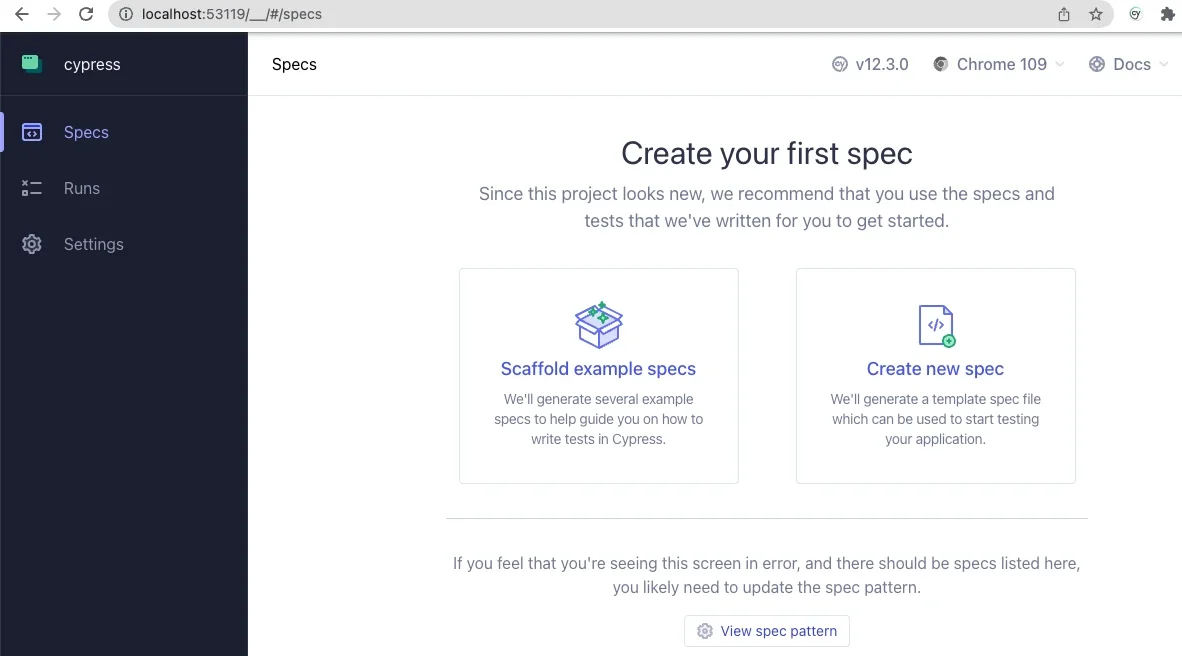
Once installed, launching the Cypress test runner for the first time via npx cypress open initiates an interactive graphical user interface. For developers establishing a new testing pipeline, selecting the end-to-end testing configuration prompts the application to automatically scaffold the necessary directory structures and configuration templates. The resulting project tree introduces a dedicated cypress/ directory alongside a primary configuration file, cypress.config.js.
Configuring this environment to communicate seamlessly with a local Drupal instance requires tailoring the baseUrl parameter within the configuration file to match the local development URL, such as https://my-drupal-site.local. Additionally, defining specific viewport dimensions—such as 1440 pixels wide by 900 pixels high—ensures consistent rendering conditions across test runs, mitigating false positives caused by responsive design breakpoints.
Crafting and Executing Functional Specifications
With the configuration established, developers can begin authoring spec files within the designated integration or e2e directories. A well-designed test suite validates both public-facing functionality and authenticated user workflows. For instance, a basic testing script can verify the successful loading of the site’s front page and ensure that critical structural elements, such as the primary page title (h1.page-title), are present and correctly rendered.
Beyond static page validation, Cypress excels at simulating complex user interactions. A standard authentication test script can programmatically navigate to the /user/login route, input credentials into specific form fields identified by their CSS selectors, and trigger the submission event.
describe('Loads the front page', () =>
  it('Loads the front page', () =>
    cy.visit('/')
    cy.get('h1.page-title')
      .should('exist')
  );
);

describe('Tests logging in using an incorrect password', () =>
  it('Fails authentication using incorrect login credentials', () =>
    cy.visit('/user/login')
    cy.get('#edit-name')
      .type('Sir Lancelot of Camelot')
    cy.get('#edit-pass')
      .type('tacos')
    cy.get('input#edit-submit')
      .contains('Log in')
      .click()
    cy.contains('Unrecognized username or password.')
  );
);
The practical value of this approach becomes immediately apparent during test execution. As Cypress steps through the scripted interactions in a simulated browser window, developers can observe real-time feedback on the left-hand control panel alongside visual DOM updates on the right. This transparency frequently uncovers subtle front-end anomalies—such as flexbox CSS alignments obstructing clickable elements—that might otherwise evade manual QA until production deployment.
Tailoring the Framework for Drupal Architectures
To maximize efficiency across large-scale Drupal projects, Cypress allows for the creation of custom commands housed within the support files directory. By extending the core Cypress API, developers can encapsulate repetitive Drupal-specific routines into reusable functions. This modular approach significantly reduces code duplication and simplifies test maintenance as the underlying CMS evolves.
For example, standardizing user authentication and session termination can be achieved by defining custom commands such as drupalLogout and loginAs.
/**
 * Logs out the user.
 */
Cypress.Commands.add('drupalLogout', () =>
  cy.visit('/user/logout');
)

/**
 * Basic user login command. Requires valid username and password.
 *
 * @param string username
 *   The username with which to log in.
 * @param string password
 *   The password for the user's account.
 */
Cypress.Commands.add('loginAs', (username, password) =>
  cy.drupalLogout();
  cy.visit('/user/login');
  cy.get('#edit-name')
    .type(username);
  cy.get('#edit-pass').type(password,
    log: false,
  );

  cy.get('#edit-submit').contains('Log in').click();
);
Furthermore, advanced integrations can bridge front-end testing workflows with back-end administrative tools like Drush, Drupal’s command-line shell. By leveraging environment variables to execute Drush commands directly within test scripts, developers can bypass traditional UI login bottlenecks entirely. A custom command utilizing the drush user-login (or drush uli) utility can programmatically generate a one-time login URL for a specific user ID, enabling instant authentication while adhering to security best practices that discourage hardcoding plaintext passwords into test repositories.
/**
 * Logs a user in by their uid via drush uli.
 */
Cypress.Commands.add('loginUserByUid', (uid) =>
  cy.drush('user-login', [],  uid, uri: Cypress.env('baseUrl') )
    .its('stdout')
    .then(function (url)
      cy.visit(url);
    );
);
Broader Industry Implications and Future Outlook
The growing adoption of JavaScript-driven E2E frameworks within the PHP-centric Drupal community reflects a broader shift toward language-agnostic tooling in enterprise web development. Historically, Drupal developers relied on PHP-based testing frameworks such as PHPUnit or Behat. While these tools remain indispensable for unit and behavioral testing, they often struggle with modern, JavaScript-heavy front-end interfaces dominated by single-page application (SPA) principles and complex AJAX interactions.
By incorporating Cypress into the deployment pipeline, organizations minimize the risk of regressions during core updates, module patches, and custom theme deployments. Automated visual and functional validation ensures that content management workflows, editorial interfaces, and user permission models function as intended prior to code promotion.
As digital agencies and enterprise IT departments face mounting pressure to deliver secure, highly performant web properties with minimal downtime, the integration of automated testing tools transitions from a nice-to-have optimization to a core operational requirement. Through frameworks like Cypress, the Drupal ecosystem demonstrates its capacity to adapt to modern software engineering standards, ensuring long-term maintainability and reliability for complex digital platforms.