Kubernetes administrators and DevOps engineers working with high-performance computing, machine learning training workloads, and large-scale batch processing frequently encounter a familiar bottleneck: a submitted Kubernetes Job sits suspended indefinitely, generating no application logs, while its associated Pods fail to materialize. In cluster environments managed by Kueue—the native Kubernetes job queueing controller designed for batch and machine learning workloads—this behavior is often entirely intentional. Kueue may be actively evaluating whether the submitted workload has sufficient cluster resource allocation to proceed.
Historically, diagnosing these pending workloads required operators to manually execute a cumbersome series of command-line instructions, correlating disparate large YAML objects, and piecing together the admission trajectory across multiple namespace and cluster-scoped resources. However, the release of the new Kueue plugin for Headlamp, developed during the 2026 CNCF Linux Foundation (LFX) Mentorship program, introduces a streamlined visual workflow. This integration allows administrators to trace workload admission natively within the Headlamp user interface, fundamentally changing how cluster operators diagnose pending Kubernetes batch jobs.
Background and Context of Kubernetes Batch Queueing
As enterprise adoption of Kubernetes expands beyond traditional stateless microservices into intensive batch processing, AI, and data analytics, native Kubernetes schedulers often fall short. The standard kube-scheduler is designed for rapid Pod placement rather than coarse-grained quota management, fair-sharing, and multi-tenant batch prioritization. To bridge this gap, Kueue emerged as a specialized batch queueing controller, intercepting workloads before they reach the scheduler to manage resource distribution, borrowing limits, and priority queues.
Despite its efficacy, Kueue’s multi-layered architecture—spanning LocalQueues, ClusterQueues, ResourceFlavors, and Cohorts—created a steep troubleshooting curve. When a job stalled, engineers routinely struggled to answer a foundational question: Is the Pod pending due to standard Kubernetes scheduling constraints, or has Kueue withheld admission due to quota exhaustion?
Recognizing this diagnostic friction, contributor Utkarsh Raj, guided by maintainers René Dudfield and Kevin Hannon, developed the Kueue plugin (version 0.1.0-alpha) for Headlamp, an extensible open-source Kubernetes web UI. Funded and structured under the CNCF LFX Mentorship initiative for Term 2 of 2026, the plugin aims to bridge the gap between abstract queueing logic and administrative visibility.
The Chronology and Architecture of Kueue Admission
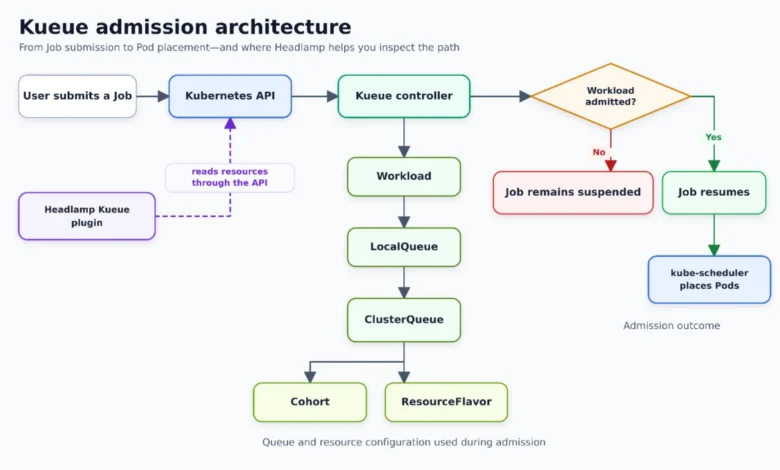
Understanding the troubleshooting workflow requires separating Kueue’s admission phase from standard Kubernetes Pod scheduling. When a user submits a Kubernetes Job, Kueue intercepts the resource request and generates a corresponding Workload object. This object encapsulates the resource demands of the job, such as CPU, memory, and specialized hardware accelerators like GPUs.
Kueue then evaluates the Workload against a hierarchy of entities:
- LocalQueue: A namespaced entry point where the Job is initially routed.
- ClusterQueue: A cluster-scoped entity that aggregates quotas and defines global admission policies.
- ResourceFlavor: Representations of distinct compute classes defined by node labels, taints, or topology constraints.
- Cohort: Optional groupings of ClusterQueues that permit the borrowing and lending of idle quota across disparate teams or projects.
If these criteria are met, Kueue updates the Workload status, marks it as admitted, and resumes the underlying Job. Only at this juncture does the standard kube-scheduler assume control, evaluating node availability, taints, tolerations, and affinity rules to bind Pods to actual hardware nodes.
Step-by-Step Diagnostic Workflow in Headlamp
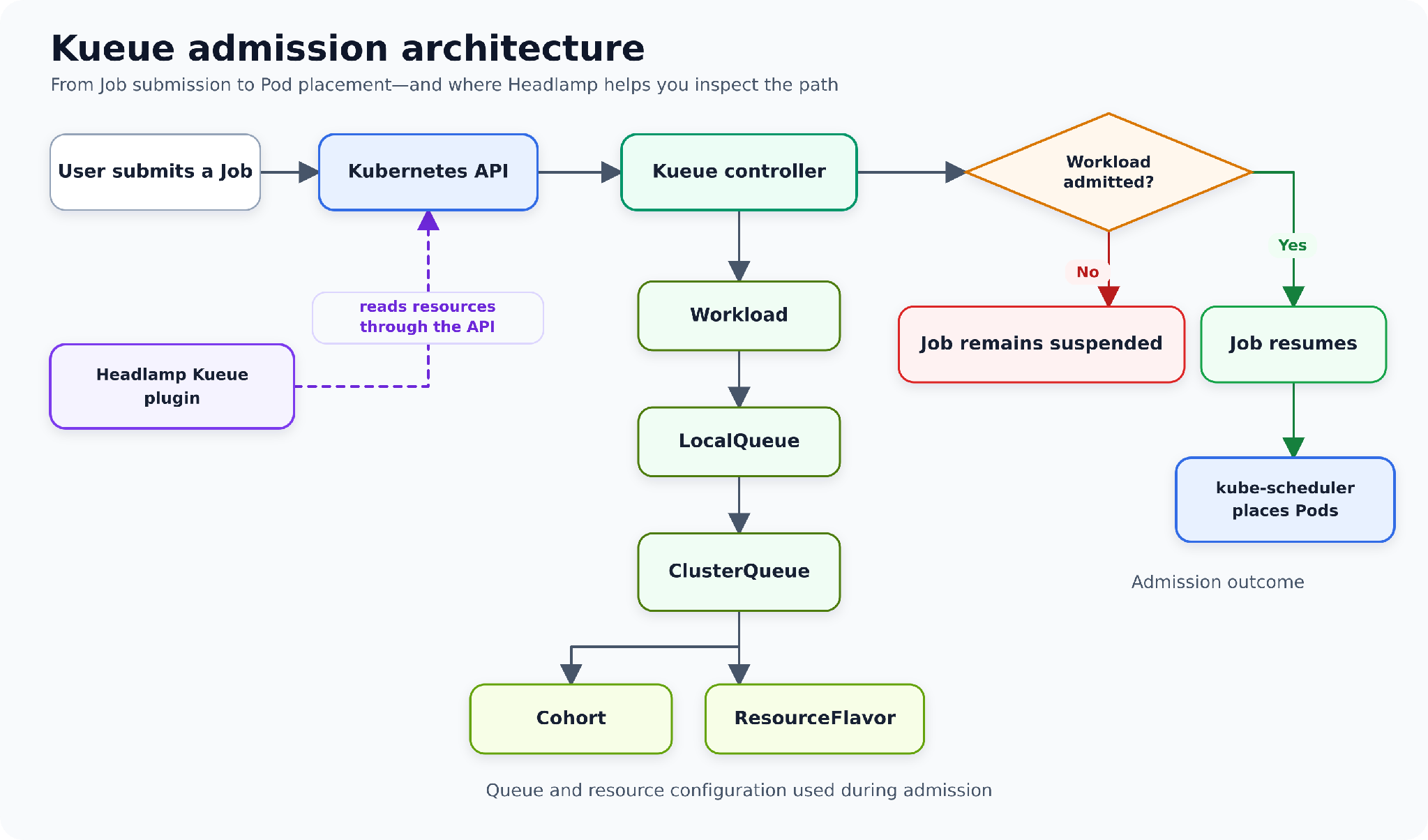
The Headlamp-first troubleshooting methodology transforms what was once a reactive CLI hunt into a structured, visual inspection path.
Step 1: Evaluating the Workload State
Administrators begin by navigating to the Kueue section within the Headlamp dashboard, specifically selecting the Workloads view under the target namespace. The interface provides an immediate scan of workload statuses, highlighting whether resource requests are pending, admitted, or terminated.
Step 2: Inspecting Status Conditions and Events
Rather than parsing raw YAML manifests, operators can inspect high-level status conditions such as QuotaReserved and Admitted. If a job remains stalled, condition messages explicitly articulate the underlying blockage—such as a ClusterQueue possessing insufficient CPU quota to satisfy a multi-pod parallel deployment. Integrated event logs further display historical transaction attempts made by the Kueue controller.
Step 3: Analyzing Aggregate Resource Requests
Batch jobs frequently span multiple Pods with substantial aggregate resource footprints. Headlamp aggregates these metrics, displaying total requested CPU, memory, and parallel execution parameters. This prevents administrators from miscalculating demand by examining isolated single-pod templates.
Step 4 through 6: Traversing Queue Hierarchies
When admission is blocked, Headlamp enables seamless navigation from the Workload to its linked LocalQueue, subsequent ClusterQueue, and underlying ResourceFlavors or Cohorts. For instance, if a job requests three CPU cores while its assigned ClusterQueue enforces a strict nominal quota limit of two cores, the UI immediately exposes this mathematical discrepancy. Administrators can review fair-sharing limits, borrowing capacities, and node flavor assignments without issuing manual kubectl describe commands.
Implications and Current Alpha Limitations
The introduction of the Headlamp Kueue plugin marks a significant maturation step for Kubernetes batch management toolsets. By translating complex, multi-object CRD (Custom Resource Definition) relationships into an intuitive graphical interface, the tool significantly reduces Mean Time to Resolution (MTTR) for cluster operators managing congested multi-tenant clusters.
However, stakeholders must account for the constraints of the initial 0.1.0-alpha release. The plugin is strictly read-only. It does not introduce native creation, modification, suspension, resumption, or deletion workflows for Kueue-specific resources. Administrators must continue utilizing standard Kubernetes mechanisms, kubectl, or kueuectl for active cluster mutations and GitOps pipelines. Headlamp preserves standard YAML inspection and resource modification capabilities where user RBAC permissions permit.
Community Response and Future Outlook
Early feedback from the Kubernetes and Headlamp communities has been overwhelmingly positive, particularly regarding the clarity brought to complex cluster-queue cohort borrowing limits. The integration demonstrates the power of the Headlamp plugin architecture, built using TypeScript and React, in surfacing deep custom resource insights directly within a general-purpose cluster dashboard.
For organizations running heavy machine learning pipelines or high-throughput computational workloads on Kubernetes, the ability to instantly discern whether a stalled job is restricted by Kueue quotas or blocked by standard kube-scheduler constraints eliminates hours of speculative debugging. As the Kueue plugin matures beyond its alpha designation, developers anticipate broader interactive controls and enhanced telemetry integrations, further cementing Headlamp as a primary operational pane of glass for modern cloud-native infrastructure.
Related posts: