OsFoundry Desktop Integration Unifies AI Coding Agent Sessions Across Dozens of Platforms Without Compromising Security

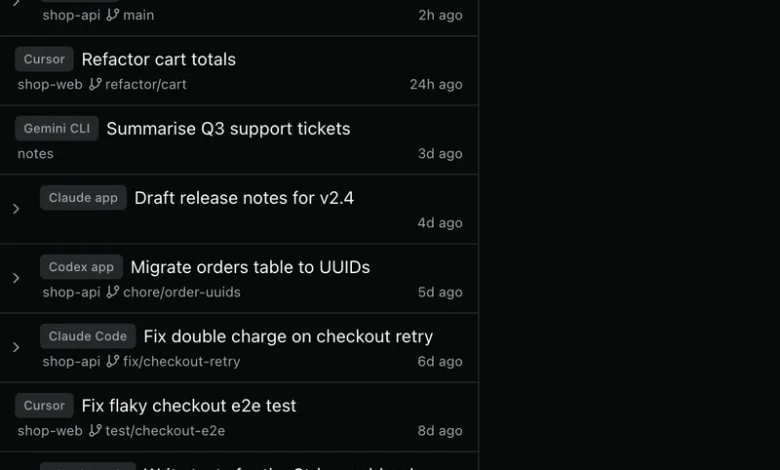
The landscape of software development has fundamentally shifted with the mass adoption of AI-driven coding assistants and command-line tools. Developers frequently juggle multiple environments—ranging from Claude Code and Codex CLI to Cursor, Gemini CLI, Qwen Code, and OpenCode—to accelerate their daily workflows. However, this fragmented ecosystem has introduced a new organizational challenge: tracking down, reviewing, and resuming past AI coding sessions that are scattered across disparate local directories, log files, and proprietary databases. Enter osFoundry, a newly detailed desktop utility designed to solve this exact fragmentation problem by aggregating local session metadata into a single, unified interface without ever interacting with proprietary cloud networks or authentication tokens.
The Fragmentation Problem in Modern AI-Assisted Development
As artificial intelligence models become increasingly integrated into software engineering pipelines, developers rely heavily on specialized agents to execute complex, multi-step tasks. These tasks often include debugging complex race conditions, refactoring legacy codebases, running test suites, and generating automated documentation. Every time a developer initiates a session within an environment like Claude Code or Codex, the application records a comprehensive transcript of the interaction—tracking modified files, executed shell commands, selected branches, and computational models used.

Historically, retrieving a past session required developers to manually navigate terminal history, recall specific project directories, or search through opaque JSONL log files located deep within hidden system directories such as ~/.claude/projects/ or ~/.codex/sessions/. This friction not only wastes valuable engineering time but also disrupts deep-focus states. Furthermore, because each AI application operates within its own silo, developers working across multiple tools often lose track of contextual continuity, making it difficult to audit historical code changes or resume paused multi-day tasks efficiently.
Architecture and Operating Principles: Local-First Data Harvesting
To address these inefficiencies, osFoundry approaches session management through a strict local-first, read-only architectural paradigm. Rather than acting as a centralized proxy or cloud-based service, the osFoundry desktop application directly inspects existing session files and SQLite indices already written to the host machine by each supported platform.
The software currently supports twelve distinct AI development environments: Claude Code, the native Claude desktop application, Codex CLI, the Codex desktop app, Gemini CLI, Qwen Code, OpenCode, Copilot CLI, Cursor, Devin, Antigravity, and Kiro. By targeting these pre-existing local artifacts, osFoundry completely bypasses the need for network communication or API calls to external servers for session discovery.

Crucially, osFoundry respects the security boundaries established by the primary AI tools. The application intentionally avoids reading authentication credentials, login tokens, or sensitive configuration profiles. When a user selects a historical session to resume, osFoundry does not execute the underlying AI task itself; instead, it intelligently constructs the appropriate command-line instruction—such as claude --resume <id> or codex resume <id>—and launches it within an integrated terminal pane inside the correct project directory, preserving the user’s local security permissions and environment variables.
Chronology and Feature Rollout
The development of osFoundry’s multi-agent aggregation tool follows a systematic response to the growing complexity of local AI tooling.
- Phase One: Discovery and Indexing: The desktop application scans designated local directories upon launch, parsing lightweight metadata from the beginning and end of large session transcripts (which can frequently exceed hundreds of megabytes per file, with median sizes for Claude Code transcripts reaching approximately 168 megabytes on macOS systems).
- Phase Two: Metadata Filtering and Search: Users can filter sessions instantly using keyword queries, application chips, or time-based parameters. The interface displays vital contextual details, including the associated Git branch, the active AI model, the recording timestamp, and the specific repository folder.
- Phase Three: Contextual Safety Checks: osFoundry implements robust safeguards regarding Git branch synchronization. If a historical session was recorded on a feature branch (e.g.,
fix/checkout-retry) but the local directory has since been switched to themainbranch, osFoundry triggers an explicit confirmation dialog. It executesgit rev-parse --abbrev-ref HEADto verify the state, warning the user of the discrepancy without forcefully executing automated checkouts that could disrupt active workspace modifications. - Phase Four: Execution and Resumption: Upon user confirmation, the software opens the session either via standard CLI resumption or within osFoundry’s native auxiliary chat interface, ensuring uninterrupted workflow continuity.
Comparative Overview: App Responsibilities vs. osFoundry Integration
| Functional Domain | Primary AI Apps (Claude Code, Codex, etc.) | osFoundry Desktop Application |
|---|---|---|
| Authentication & Security | Maintains user login state and session tokens securely. | Reads unencrypted local session files and SQLite indices exclusively read-only; never touches auth tokens. |
| Transcript Generation | Writes detailed conversation logs to local storage (~/.claude/projects/ etc.). |
Parses and indexes session lists, displaying metadata such as repository paths, branches, and models. |
| Execution Control | Executes tool calls, shell commands, and handles native confirmation prompts. | Spawns a terminal pane in the correct folder, dynamically building resume commands (claude --resume <id>). |
| ID Management | Generates and assigns unique session identifiers. | Utilizes recorded session IDs to formulate accurate command-line continuation strings. |
Practical Application: A Real-World Workflow Scenario
To understand the practical utility of osFoundry, consider a common engineering scenario involving a payment processing bug. A developer investigating a duplicate charge issue on an e-commerce platform utilizes Claude Code within a repository named shop-api on a branch called fix/checkout-retry.

The recorded transcript captures the entire conversational thread:
- User Prompt: "Customers get charged twice when they press Pay again after a timeout. Find out why."
- AI Action: Executes a read operation on
src/payments/charge.tsand performs a grep search forcreatePaymentIntent. - AI Diagnosis: Identifies that every retry creates a new payment intent rather than reusing the existing transaction.
- Resolution: Modifies
src/payments/charge.ts, executesnpm test -- payments, and confirms that all 42 test cases pass successfully.
Days later, when the developer needs to reference or audit this specific intervention, searching for the keyword "checkout" within osFoundry instantly surfaces the session alongside related sessions from Cursor or Gemini CLI. By clicking "Open in Terminal," osFoundry checks the current Git status of the shop-api directory, alerts the developer if the active branch differs from the recorded session branch, and executes the precise continuation command without requiring manual directory traversal or ID lookup.
Security Boundaries and Limitations
While osFoundry offers profound convenience for power users of AI coding agents, its developers have explicitly defined strict operational boundaries to maintain user trust and system integrity:

- Strictly Read-Only Operations: All integrations utilize read-only file access. The system cannot alter historical logs or inject malicious payloads into past transcripts.
- On-Demand Parsing: To preserve system memory and CPU resources, full transcript bodies are parsed only when a specific session is actively selected for review or resumption, preventing performance degradation caused by massive log files.
- Permission Safeguards: Permission modes that bypass standard CLI safety checks are deliberately restrained. Sessions recorded with permissive execution flags default back to standard CLI safety protocols unless the user manually overrides the setting for that specific launch instance.
- Platform-Specific UI Isolation: Advanced graphical features exclusive to proprietary applications—such as the browser panels of the Codex app or the artifact connectors of the native Claude application—remain tethered to their respective environments and are not forcefully ported into the universal terminal view.
Broader Industry Implications and Future Outlook
The introduction of universal session aggregators like osFoundry signals a maturing ecosystem in AI-assisted software engineering. As developers transition from experimenting with isolated tools to orchestrating complex, multi-agent workflows across multiple IDEs and CLI utilities, the ability to maintain a coherent audit trail becomes paramount.
Industry analysts note that local-first aggregation tools represent a privacy-conscious middle ground in developer tooling. By avoiding cloud-based telemetry and relying entirely on local file parsing, osFoundry mitigates enterprise security concerns regarding proprietary source code exposure and compliance mandates.
As osFoundry continues to expand its feature set—including its newly launched platform agent sessions board designed to monitor active, pending, and completed background agents—the utility of unified local metadata management is expected to become an industry standard. Developers seeking to streamline their multi-agent workflows can access the open-source architecture via osFoundry’s official documentation and download binaries tailored for macOS, Windows, and Linux environments.
Related posts: