Kubernetes UI Evolution: A Comprehensive Guide to Migrating from Dashboard to Headlamp

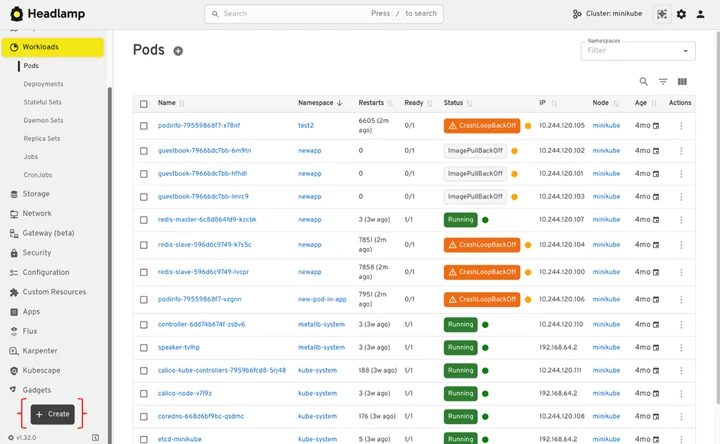
The Kubernetes ecosystem is witnessing a significant shift in how users interact with their clusters, moving towards more robust, secure, and flexible graphical user interfaces. A prime example of this evolution is the increasing adoption of Headlamp as a modern alternative to the long-standing Kubernetes Dashboard. This transition, driven by evolving operational demands and security best practices, empowers administrators and developers with enhanced multi-cluster management, superior authentication mechanisms, and a more versatile plugin architecture. This article delves into the critical aspects of migrating from Kubernetes Dashboard to Headlamp, outlining the architectural differences, practical steps, and the profound implications for cloud-native operations.
The Evolving Landscape of Kubernetes Management
As Kubernetes deployments have grown in scale and complexity, the need for sophisticated management tools has become paramount. Early solutions like Kubernetes Dashboard provided essential visibility into cluster resources but often faced limitations concerning security, multi-cluster support, and extensibility. Modern cloud-native environments, characterized by distributed microservices, hybrid cloud strategies, and stringent security requirements, necessitate a new generation of UI tools. Headlamp, an open-source project developed by organizations like Microsoft, addresses these contemporary challenges by offering a client-centric, identity-aware approach to Kubernetes management.
Architectural Divergence: Dashboard’s In-Cluster Model vs. Headlamp’s Client-Centric Approach
The fundamental difference between Kubernetes Dashboard and Headlamp lies in their architectural philosophies. Kubernetes Dashboard operates exclusively as an in-cluster web application. It resides within the Kubernetes cluster it manages, accessing the Kubernetes API via a dedicated ServiceAccount. This model means the UI’s authentication and authorization are tied to the permissions granted to its ServiceAccount within that specific cluster. While straightforward for single-cluster environments, this design presents challenges in multi-cluster setups, requiring separate Dashboard instances and token management for each. It also centralizes the attack surface within the cluster itself.
In contrast, Headlamp offers a more flexible model. It can run either as a desktop application on a user’s machine or deployed within a cluster. When operating on the desktop, Headlamp leverages the user’s existing kubeconfig file. This is a crucial distinction, as it means Headlamp directly inherits the user’s identity and Role-Based Access Control (RBAC) permissions, mirroring the experience of using kubectl. This "identity-driven" approach enhances security by eliminating the need for separate token generation or managing a privileged ServiceAccount for the UI itself. When deployed in-cluster, Headlamp adopts a similar ServiceAccount model to Dashboard but is designed with greater emphasis on integration with enterprise identity providers via OpenID Connect (OIDC) for shared access, offering a more robust authentication layer. This dual-mode capability allows Headlamp to cater to diverse operational needs, from individual developer workstations to centralized platform dashboards.
Drivers for Migration: Addressing Operational and Security Gaps
The decision to migrate from Kubernetes Dashboard to Headlamp is often spurred by several key factors:
- Enhanced Security Posture: Kubernetes Dashboard’s reliance on ServiceAccount tokens, often requiring manual generation and management, has been a source of security concerns. The potential for token leakage or misconfiguration can expose clusters to unauthorized access. Headlamp’s desktop mode, by directly using the user’s
kubeconfig, aligns authentication with existingkubectlpractices, reducing credential proliferation. Its in-cluster mode, with robust OIDC integration, offers enterprise-grade single sign-on (SSO) capabilities. - Multi-Cluster Management: Modern cloud-native environments rarely consist of a single Kubernetes cluster. Organizations typically manage multiple clusters for development, staging, production, and various geographic regions. Kubernetes Dashboard is inherently single-cluster focused, demanding users to switch contexts or manage multiple browser tabs. Headlamp, designed from the ground up for multi-cluster environments, allows seamless switching between clusters loaded from a single or multiple
kubeconfigfiles, significantly improving operational efficiency. - Improved Developer Experience and Extensibility: Headlamp’s architecture supports a rich plugin ecosystem, allowing teams to extend its functionality with custom views, integrations, and automation. This extensibility is vital for tailoring the UI to specific organizational workflows and integrating with other DevOps tools. Furthermore, its manifest-driven deployment approach aligns with GitOps principles, promoting infrastructure as code and repeatable deployments, a departure from Dashboard’s form-based wizard.
- Operational Efficiency and Troubleshooting: Features like the Map View in Headlamp provide a visual representation of resource relationships, which is invaluable for understanding complex application topologies and accelerating troubleshooting. Real-time log streaming and in-browser
execcapabilities reduce context switching for developers and SREs.
The Migration Journey: A Phased Approach
Migrating to Headlamp is a structured process that prioritizes continuity and security. A phased rollout is generally recommended, particularly for shared production clusters, allowing teams to familiarize themselves with the new tool while maintaining access to the existing Dashboard.
1. Pre-Migration Planning and Assessment:
Before initiating the migration, a thorough assessment is crucial. This involves documenting current Dashboard usage patterns, identifying critical workflows, and verifying existing kubeconfig configurations. Ensuring that kubectl can successfully interact with target clusters (e.g., kubectl config current-context, kubectl get nodes, kubectl get pods -n <namespace>) confirms the foundational authentication and RBAC permissions are in place for Headlamp. This step minimizes surprises and validates that Headlamp can leverage the same trusted identity and permissions.
Organizations must also decide on their Headlamp deployment strategy:
- Desktop (User-Managed): Ideal for individual developers or small teams, offering the fastest path to adoption. Users install Headlamp directly on their workstations, and it connects using their local
kubeconfig. This approach directly aligns with the user’s existing permissions and requires minimal cluster-side configuration. - In-Cluster (Platform-Managed): Best suited for shared environments, where a central platform team manages and provides access to a common UI. Headlamp is deployed as a Kubernetes workload (e.g., via Helm) within the cluster. This option allows for centralized management, consistent upgrades, and integration with corporate identity providers for authentication. Many organizations opt for a hybrid approach, providing an in-cluster Headlamp for shared operational tasks while encouraging desktop installations for individual developer workflows.
2. Headlamp Installation and Initial Configuration:
The installation process for Headlamp is designed for simplicity, leveraging common package managers for desktop deployment and Helm for in-cluster scenarios.
-
Desktop Installation:
- Windows:
winget install headlamporchoco install headlamp. - macOS:
brew install --cask headlamp. - Linux:
flatpak install flathub io.kinvolk.Headlamp.
Upon installation, users can launch Headlamp like any other application, and it will automatically detect and use their defaultkubeconfig.
- Windows:
-
In-Cluster Installation:
For shared access, Headlamp is typically deployed using its Helm chart:helm repo add headlamp https://kubernetes-sigs.github.io/headlamp/ helm repo update kubectl create namespace headlamp helm install headlamp headlamp/headlamp --namespace headlampPost-installation, administrators can verify the deployment by checking pod and service status. Accessing the in-cluster Headlamp can be done via
kubectl port-forwardfor quick testing or, more robustly, by exposing it through an Ingress controller for a stable, shared URL. Proper Ingress configuration, including TLS and forwardingX-Forwarded-Protoheaders, is critical for secure and functional access, especially when integrating OIDC.
3. Authentication and RBAC: A Cornerstone of Security
Headlamp’s approach to authentication and RBAC is a significant enhancement over Kubernetes Dashboard. It inherently aligns with Kubernetes’ native security model, ensuring that user permissions are consistently enforced.
- Desktop Authentication: Headlamp desktop clients directly utilize the user’s
kubeconfig. This means the authentication methods configured inkubeconfig(e.g., client certificates, OIDC tokens, cloud provider integrations) are directly applied. There’s no separate login flow for Headlamp itself, which simplifies credential management and strengthens the security posture by relying on established Kubernetes authentication practices. Users only see and can perform actions that theirkubeconfigcontext allows. - In-Cluster Authentication: For shared in-cluster deployments, Headlamp supports OpenID Connect (OIDC) for user authentication. This enables integration with enterprise identity providers (IdPs) such as Azure AD, Okta, Auth0, or Google Identity Platform. This allows organizations to leverage existing SSO infrastructure, ensuring consistent access policies and centralized user management. The OIDC flow requires configuring Headlamp with client ID, client secret, and issuer URL, and critically, ensuring the IdP is configured to allow Headlamp’s callback URL (e.g.,
https://YOUR_HEADLAMP_URL/oidc-callback). - RBAC Enforcement: Regardless of the deployment model, Headlamp strictly adheres to Kubernetes RBAC rules. If a user’s identity (derived from
kubeconfigor OIDC) lacks permission to view, edit, or delete a specific resource, Headlamp’s UI will reflect this by either hiding the resource or disabling corresponding actions. This "least privilege" principle is automatically enforced, ensuring that the UI acts merely as a visual client, not an elevated access mechanism. This contrasts with some legacy Dashboard configurations where a broad ServiceAccount might have been granted excessive permissions, leading to potential over-privilege.
4. Multi-Cluster Management: A Seamless Experience
One of Headlamp’s standout features is its native support for managing multiple Kubernetes clusters from a single interface. This is a critical capability for modern cloud-native operations, where clusters often span different environments, clouds, or geographical regions.
- Kubeconfig-Driven Cluster Discovery: Headlamp discovers clusters by parsing the
kubeconfigfiles available to it. For desktop users, this means all clusters configured in their default~/.kube/config(or specified via theKUBECONFIGenvironment variable) become accessible. Headlamp also supports loading multiplekubeconfigfiles simultaneously, allowing users to consolidate access to disparate clusters (e.g.,KUBECONFIG=~/.kube/dev:~/.kube/prod headlamp). - Intuitive Cluster Switching: The Headlamp UI provides an easy-to-use cluster selector, allowing users to switch contexts effortlessly between development, staging, and production clusters without launching separate applications or navigating complex command-line prompts. This streamlines operations and reduces the cognitive load associated with managing diverse Kubernetes estates. The RBAC rules for each selected cluster are dynamically applied, ensuring that users only interact with resources they are authorized to access in that specific context.
5. Operational Workflows: Navigating, Deploying, and Debugging
Headlamp enhances daily operational tasks, from viewing resources to deploying applications and debugging workloads.
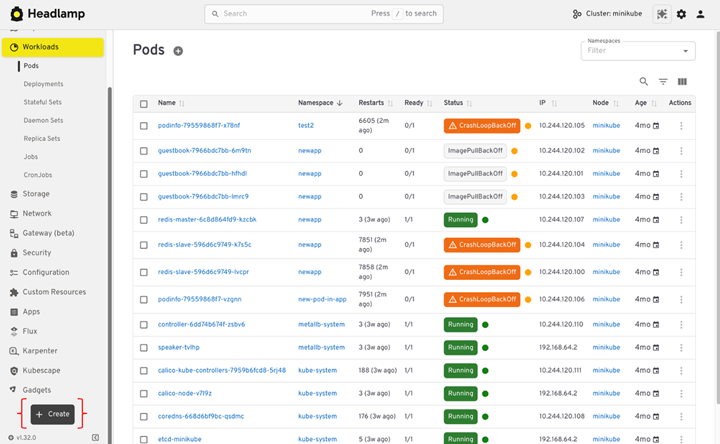
- Resource Navigation and Inspection: Headlamp retains the familiar hierarchical organization of Kubernetes resources (Workloads, Config & Storage, Network, Cluster) found in Dashboard. Users can easily filter resources by namespace, inspect YAML definitions, and view detailed information for individual objects. The ability to edit YAML directly from the UI (subject to RBAC) provides flexibility for quick adjustments.
- Enhanced Visibility with Map View: Beyond traditional list views, Headlamp introduces a "Map View" that visually represents the relationships between Kubernetes resources. This graphical representation is invaluable for understanding complex dependencies within an application, troubleshooting issues by tracing connections between Deployments, Pods, Services, and Ingresses, and quickly identifying broken links or misconfigurations. This capability significantly elevates the diagnostic experience compared to purely list-based UIs.
- Manifest-Driven Application Deployment: This is arguably the most significant workflow shift from Kubernetes Dashboard. While Dashboard historically relied on forms and wizards for application deployment, Headlamp embraces the industry-standard manifest-driven approach. Users deploy applications by pasting or uploading YAML manifests directly into the UI. This aligns with GitOps principles, promoting declarative configuration, version control, and repeatable deployments. For users accustomed to form-based deployment,
kubectl create --dry-run=client -o yamlcan be used to generate initial YAML manifests, which can then be refined and applied via Headlamp. Headlamp serves as a powerful observability layer for applications deployed via Helm, Kustomize, or GitOps tools, providing visibility into the resources these tools create and manage. - Streamlined Debugging Capabilities: Headlamp significantly improves day-to-day debugging workflows:
- Live Log Streaming: Users can view real-time logs from individual containers within a pod directly in the UI, with the ability to switch between containers in multi-container pods. This is crucial for monitoring application behavior during rollouts or investigating active incidents.
- In-Browser
Exec: Headlamp provides a built-in terminal forexec-ing into running containers. This eliminates the need to switch back to the command line for quick diagnostic checks or running commands inside a workload, again respecting RBAC permissions. - Resource Metrics: Integration with metrics servers allows Headlamp to display CPU and memory usage for pods and nodes, offering quick insights into resource consumption and potential bottlenecks.
- Event Monitoring: The UI provides direct access to Kubernetes events, which are often the first indicators of issues like pending pods, image pull failures, or scaling problems. This centralized event view expedites root cause analysis.
6. Post-Migration: Decommissioning Kubernetes Dashboard
Once Headlamp is fully operational and the team is comfortable with its workflows, the final step is to safely decommission Kubernetes Dashboard. This is a critical security and hygiene measure.
- Confirmation of Headlamp Readiness: Before removal, ensure that all critical workflows have been successfully replicated and tested in Headlamp, and that all users can access the necessary clusters and resources.
- Uninstalling Dashboard: If Kubernetes Dashboard was installed via Helm, it can be removed with
helm uninstall kubernetes-dashboard -n kubernetes-dashboard. For manifest-based installations, the original YAML files can be used withkubectl delete -f <manifest-file>. - Cleaning Up Access Artifacts: A crucial step is to identify and remove any ServiceAccounts, ClusterRoles, ClusterRoleBindings, and Secrets that were created exclusively for Kubernetes Dashboard access. Leaving these artifacts in place constitutes a security risk, as they represent unused, potentially privileged credentials.
- Communication and Transition: Inform all stakeholders about the successful migration and the deprecation of Kubernetes Dashboard, providing clear instructions on accessing and utilizing Headlamp as the new standard UI.
Broader Implications and Future Outlook
The migration from Kubernetes Dashboard to Headlamp reflects a broader trend in the cloud-native ecosystem towards more secure, extensible, and user-centric tooling. Headlamp’s open-source nature and active community contribute to its continuous development, with ongoing enhancements driven by real-world operational needs. Its plugin architecture offers a future-proof foundation, allowing organizations to adapt and extend the UI as their Kubernetes environments evolve.
This shift empowers platform teams to provide a robust, centrally managed, and securely authenticated UI for their users, while simultaneously offering developers a powerful, personalized, and efficient tool for daily interaction with their clusters. By aligning with modern Kubernetes best practices—such as declarative configuration, least privilege security, and multi-cluster management—Headlamp positions itself as a cornerstone in the evolving toolkit for Kubernetes operations.
The transition represents not just a tool swap, but an upgrade in how organizations interact with and manage their complex Kubernetes infrastructure, promising enhanced security, improved developer productivity, and greater operational clarity. As Kubernetes continues its rapid adoption across industries, solutions like Headlamp will be instrumental in making its power more accessible and manageable for a diverse range of users.
Related posts: