Seamless AI Integration, Not More Tools, Drives User Value in Modern Software Design

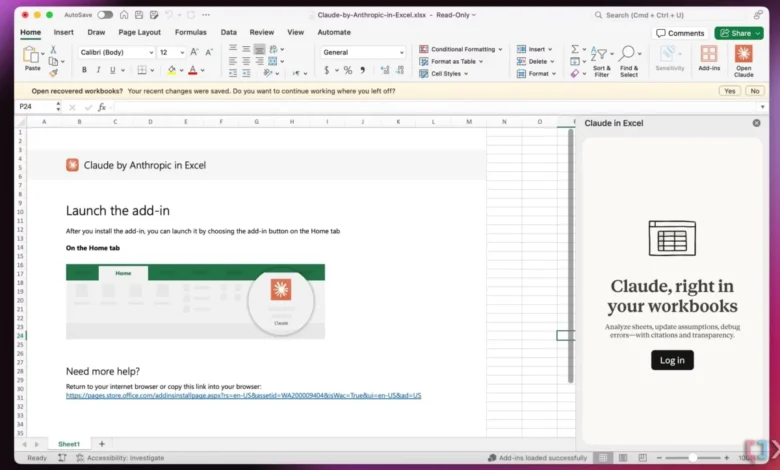
The modern digital landscape is increasingly characterized by a paradox: an explosion of innovative tools promising to revolutionize productivity, juxtaposed with a growing sense of user fatigue from managing an ever-expanding array of applications. A critical re-evaluation of user experience (UX) principles suggests that the path to true digital efficiency lies not in adding more tools, but in the seamless, intelligent integration of useful capabilities that align with users’ established mental models. This paradigm shift, often referred to as "Quiet AI," champions embedding artificial intelligence into existing workflows, making advanced functionalities feel intuitive and almost invisible.
The Overload of Tools and the Quest for Simplicity
For decades, the trajectory of software development has largely followed a path of specialization, with new applications emerging to address every conceivable niche. While this has fostered innovation, it has also led to what many users describe as "tool fatigue." Professionals in various sectors often find themselves juggling multiple platforms—from communication apps and project management suites to specialized creative and analytical software—each demanding its own learning curve, interface navigation, and context switching. This constant shifting between applications is not merely inconvenient; it carries a significant cognitive load, leading to reduced focus, increased errors, and diminished overall productivity. Research in cognitive psychology consistently demonstrates that task switching can significantly impact efficiency, with some studies suggesting productivity losses of up to 40% when users frequently interrupt one task to attend to another.
The promise of artificial intelligence, while immense, initially threatened to exacerbate this problem. The early wave of "AI-first" products often presented themselves as standalone solutions, requiring users to adopt entirely new workflows or dedicate specific time to interacting with them. While powerful, these tools frequently failed to account for the years of incremental design decisions and ingrained user habits that have shaped expectations for how software should behave. Users, already accustomed to certain interaction patterns and data structures, found themselves grappling with yet another distinct interface, another set of commands, and another mental model to internalize. This approach often prioritizes the AI’s capabilities over the human user’s established comfort and efficiency.
The Emergence of "Quiet AI": A Paradigm Shift in User Experience
In contrast to the "AI-first" approach, a more user-centric philosophy is gaining traction: "Quiet AI." This concept advocates for AI tools that operate subtly in the background, providing assistance without demanding overt attention or forcing users into new interaction patterns. Quiet AI is designed to integrate useful capabilities directly into the environments where users already perform their work, enhancing existing tools and workflows rather than replacing them. The core idea is to address problems of high severity, high frequency, and high frustration with minimal disruption.
This shift marks a significant evolution in software design, moving beyond the traditional WIMP (Windows, Icons, Menus, Pointer) interface model that defined the graphical user interface revolution of the 1980s and 90s. While WIMP established intuitive navigation, the modern challenge is to infuse intelligence without sacrificing that hard-won simplicity. Quiet AI aligns perfectly with this goal, leveraging the familiarity of established interfaces while discreetly augmenting them with intelligent automation and assistance.

Excellent real-world examples of Quiet AI are increasingly prevalent. The integration of advanced AI capabilities within established productivity suites, such as Microsoft Copilot’s presence across Excel, PowerPoint, and Word, exemplifies this philosophy. Instead of requiring users to export data to a separate AI tool for analysis or content generation, Copilot offers assistance directly within the application. A user working in Excel, for instance, can ask for insights on specific rows or columns, generate summaries, or even create new data visualizations without ever leaving their spreadsheet environment. This contextual assistance streamlines workflows, reduces cognitive load, and leverages the user’s existing proficiency with the application, thereby enhancing productivity without imposing new burdens. Similarly, AI-powered smart replies in email clients or predictive text features in messaging apps operate as Quiet AI, anticipating needs and offering assistance without fanfare.
Folder Instructions: A Vision for System-Level AI Integration
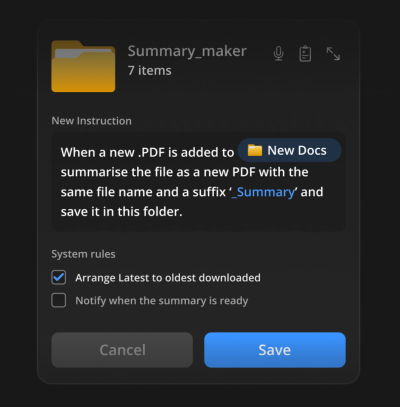
One particularly compelling concept that embodies the principles of seamless integration and Quiet AI is "folder instructions," as proposed by Karthikeya GS. This innovative idea reimagines file management, transforming passive digital folders into intelligent, context-aware assistants. Instead of merely serving as containers for files, these folders are imbued with user-defined instructions and system rules that dictate their behavior and automate tasks.
Imagine creating a folder for a "Passport Application." With folder instructions, a user could define its purpose: "This folder is for my passport renewal. Any document placed here should be checked for completeness against the passport agency’s checklist. Once all required documents are present, automatically compile them into a single PDF, compress it, and alert me to upload." The system, guided by these instructions and potentially linked to relevant official databases or APIs, could then monitor the folder, identify missing documents, flag incorrect formats, and even initiate the compilation process autonomously.

Similarly, a folder designated for "Project Research" could be instructed to automatically summarize newly added PDF articles, extract key takeaways, and categorize them based on predefined tags. A "Client Invoices" folder could be set to automatically verify invoice details, flag discrepancies, and trigger payment reminders. This level of automation, locally scoped to a specific folder on the user’s machine (unless broader permissions are explicitly granted), represents a powerful yet unintrusive form of AI assistance. It addresses specific, often repetitive and frustrating, tasks directly at the point where the work happens, significantly reducing manual effort and potential for human error.
The brilliance of folder instructions lies in its alignment with an existing, deeply ingrained mental model: the concept of a folder as an organizational unit. Users understand folders; they know how to create them, rename them, and move files into them. By extending this familiar concept with intelligent capabilities, the system provides advanced AI features without requiring users to learn a new tool or navigate a complex "smart workflow." It’s a natural evolution of an established interaction pattern, making powerful AI feel like an organic extension of the operating system itself.
Industry Perspectives and Expert Commentary
The emphasis on seamless integration and Quiet AI resonates strongly with UX professionals and industry analysts alike. UX researchers consistently advocate for design solutions that prioritize user goals and minimize cognitive friction. "The goal of good design isn’t to showcase technology, but to make tasks effortless for the user," states a prominent UX expert, underscoring the shift away from ‘shiny new workflows’ towards invisible utility. "When AI disappears into the background, it becomes truly powerful, allowing users to focus on their core work rather than the mechanics of the tools."

Software developers, while acknowledging the technical complexities of deep integration, recognize its strategic importance. "Building robust APIs and ensuring interoperability across different platforms is challenging," explains a lead software architect at a major tech firm, "but the payoff in user satisfaction and stickiness is immense. Users are less likely to abandon a platform that seamlessly anticipates their needs." This perspective highlights the critical role of well-designed API ecosystems and open standards in facilitating this integrated future.
Market analysts predict a significant acceleration in the adoption of embedded AI. Reports suggest that the market for AI capabilities integrated into existing enterprise software solutions will outpace that of standalone AI applications in the coming years. This trend is driven by businesses seeking to leverage AI for productivity gains without overhauling their entire IT infrastructure or retraining their workforce on entirely new systems. The value proposition is clear: increased efficiency, reduced operational costs, and an enhanced employee experience.
The Economic and Productivity Impact
The implications of this shift from tool proliferation to seamless integration are profound, touching upon individual productivity, organizational efficiency, and the broader economic landscape. For individuals, it translates into less time spent on administrative overhead and more time dedicated to creative problem-solving and strategic thinking. By reducing the mental burden of context switching and automating repetitive tasks, users can experience a measurable increase in focus and output.
For organizations, the benefits are even more substantial. Streamlined workflows mean faster project completion, fewer errors in data handling, and improved decision-making processes, as employees have easier access to AI-powered insights within their familiar work environments. The cost savings associated with reduced training requirements for new tools and the increased efficiency of operations can be considerable. Furthermore, businesses that successfully implement integrated AI solutions are likely to see higher employee satisfaction and retention, as their workforce feels empowered rather than overwhelmed by technology.
Challenges and Future Outlook
While the advantages of seamless integration are clear, its implementation comes with its own set of challenges. Data privacy and security become paramount when AI operates within a user’s local files and applications. Designers must ensure transparency regarding data usage and provide clear controls for users to manage permissions and access. The potential for "over-automation" is another concern; users need to maintain agency and control, ensuring that AI assistance remains an aid rather than an autonomous agent dictating their work. Striking the right balance between helpful automation and user control will be a continuous design challenge.
Looking ahead, the future of software design will increasingly prioritize these integrated, intelligent experiences. The emphasis will be on creating fluid digital environments where technology anticipates needs, automates mundane tasks, and provides insightful assistance without ever feeling intrusive. This necessitates a deep understanding of user psychology, robust technical architectures, and a commitment to continuous iteration based on real-world user feedback.

Conclusion: The Enduring Value of Thoughtful Integration
In conclusion, the true value of advanced technology, particularly artificial intelligence, emerges not from its standalone brilliance but from its ability to augment human capabilities within existing, familiar contexts. Users do not crave more tools; they demand more intelligent, seamless integrations that simplify their daily routines, reduce frustrations, and empower them to accomplish their goals with greater ease and precision. This philosophy, embodied by "Quiet AI" and innovative concepts like "folder instructions," represents a crucial evolution in user experience design. It promises a future where technology truly serves humanity by fading into the background, allowing us to focus on what truly matters: our work, our creativity, and our lives, unburdened by digital clutter. For professionals seeking to master these critical design principles and implement AI features that genuinely enhance user interaction, resources like Vitaly’s "Design Patterns For AI Interfaces" video course offer invaluable guidance and practical frameworks for navigating this evolving landscape.
Related posts: