Unboxing and configuring a brand-new personal computer is frequently characterized by a seamless user experience, marked by rapid boot times, an absence of accumulated digital clutter, and vastly superior hardware performance compared to aging legacy machines. However, hardware upgrades and transitions to modern operating systems frequently introduce distinct compatibility hurdles that can disrupt established digital workflows. A prominent example of this phenomenon has recently surfaced among users migrating to Apple Silicon and modern macOS environments, where attempting to stream live television or video content via YouTube TV results in an abrupt system interruption accompanied by the error message: "This video format is not supported."
For consumers relying on subscription-based streaming platforms to replace traditional cable television, encountering playback failures on a freshly initialized device presents an immediate operational barrier. While the transition to modern high-performance laptops—such as Apple’s M-series MacBook lineup—typically streamlines media consumption through advanced hardware decoders and energy-efficient processing architecture, software dependencies and default browser configurations can occasionally fail to synchronize out of the box. Comprehensive investigation into this specific playback error reveals that the root cause is rarely tied to hardware limitations or network infrastructure failures; rather, it originates from missing browser-level modules required to process encrypted media streams. Resolving this issue does not require complex command-line interventions, external codec installations reminiscent of older computing eras, or extensive system troubleshooting, but rather a simple adjustment to browser settings.
Understanding the Technical Anatomy of Digital Media Playback
To comprehend why modern browsers occasionally reject standard video feeds on newly minted hardware, one must examine the complex ecosystem of digital rights management (DRM) and web video standards. Over the past decade, the publishing of protected media over the web has shifted from proprietary browser plugins—such as Adobe Flash and Microsoft Silverlight—to standardized architectures governed by the World Wide Web Consortium (W3C). These modern frameworks rely heavily on two core components: Media Source Extensions (MSE) and Encrypted Media Extensions (EME).

When a consumer navigates to a platform like YouTube TV, the browser does not merely download a static video file. Instead, it receives an encrypted data stream that must be decrypted in real time before being passed to the hardware graphics processor for rendering. This decryption process is governed by Content Decryption Modules (CDMs). One of the most widely deployed CDMs across the global web ecosystem is Google’s Widevine technology. Widevine CDM is responsible for securely managing encryption keys, enforcing digital rights policies, and ensuring that premium content distributed by broadcasters does not fall victim to unauthorized copying or piracy.
On a newly configured MacBook, standard web browsers—whether utilizing Chromium-based engines like Google Chrome, Microsoft Edge, Brave, or alternative clients—may have certain security flags, automated update sequences, or modular plugins disabled by default during initial profile creation. If the browser lacks an active, fully initialized instance of the Widevine CDM, or if the browser environment blocks the execution of proprietary decryption modules for privacy or performance evaluation reasons, the playback pipeline collapses. When YouTube TV attempts to handshake with the client browser to verify secure content delivery and receives no valid acknowledgment from a functional decryption module, the platform halts playback entirely, generating the generic "This video format is not supported" diagnostic notification.
The Evolution of Browser-Based Streaming and DRM Dependencies
The necessity of modules like Widevine highlights a broader historical shift in how operating systems and web browsers handle multimedia content. In the early days of online video, web browsers required users to manually download and install a variety of third-party audio and video codecs to render different formats, ranging from older MPEG standards to specialized proprietary codecs. This fragmentation frequently led to frustrating user experiences characterized by browser crashes, security vulnerabilities, and outdated software components.
With the widespread adoption of HTML5, industry stakeholders sought to unify web video delivery. However, content providers—particularly major television networks, live sports broadcasters, and Hollywood movie studios—refused to distribute high-value intellectual property over open web standards without robust protection against piracy. This stalemate led to the development of EME, which effectively decoupled the decryption mechanism from the core rendering engine of the browser.

Consequently, modern web browsers now bundle or dynamically download cryptographic modules like Widevine, FairPlay Streaming (developed by Apple), or Microsoft PlayReady to handle secure playback seamlessly. For the average consumer, this architecture operates entirely behind the scenes, requiring zero manual intervention under normal operating conditions. However, when a user sets up a brand-new computer, migrates user profiles via migration assistant tools, or installs a clean instance of a web browser on an unfamiliar operating system environment, the automated deployment pipeline for these cryptographic sub-modules can occasionally stall. The browser successfully communicates with YouTube TV’s servers, but the local environment lacks the specific decryption keys or plugin permissions required to unlock the stream, triggering the incompatibility warning.
Step-by-Step Resolution Procedures for Affected Users
Resolving the "This video format is not supported" error on a new MacBook requires navigating the browser’s internal settings rather than modifying macOS system parameters. Because the vast majority of modern alternative browsers—including Microsoft Edge, Brave, Vivaldi, Opera, and Google Chrome—are built upon the Chromium open-source project, the underlying mechanism for managing protected content remains remarkably consistent across different applications.
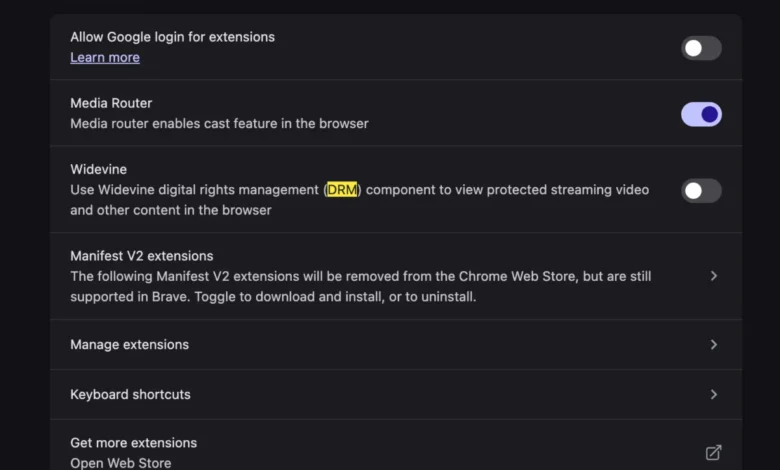
To restore full functionality to YouTube TV and eliminate the error message, users must verify that the browser’s component handling for protected media is explicitly enabled.
First, users should ensure their browser application is running the most current software iteration. Software developers frequently push silent background updates that patch component initialization bugs and ensure that digital rights modules are properly registered with the local operating system’s security architecture.

Second, users must navigate to the browser’s settings menu, specifically locating the privacy, security, or content settings sections. Within these menus, look for designations related to "Protected Content," "Widevine Content Decryption Module," or "Identifiers for protected media." On Chromium-based browsers, ensuring that the option allowing sites to play protected content is toggled to the active position forces the browser to check for, download, and initialize the necessary Widevine components.
In instances where the toggle appears active but the error persists, forcing a refresh of the browser’s internal component database is often required. This can typically be achieved by accessing the browser’s internal components page (such as typing chrome://components or edge://components into the address bar), locating the WidevineCDM entry, and manually selecting the check for update prompt. This action compels the browser to re-download the decryption module from secure servers, repairing any corrupted file structures resulting from the initial system migration or setup process. Once the module is updated and the browser is restarted, the decryption pipeline re-establishes its connection with YouTube TV, allowing live streams and recorded media to render correctly without further interruption.
Broader Industry Implications and the User Experience Paradox
The friction experienced by users encountering codec and DRM errors on new hardware sheds light on a persistent paradox in modern computing: as hardware and software grow increasingly sophisticated, the margin for silent, unexpected failures widens. Migrating to a high-end machine like a modern MacBook is intended to eliminate technical friction, offering instant-on capabilities, pristine displays, and superior energy efficiency. Yet, the complex web of security protocols, licensing agreements, and modular software architectures required to support contemporary digital media consumption can occasionally create roadblocks that confound even technologically proficient consumers.
Furthermore, this issue underscores the delicate balance web developers and streaming platforms must maintain between robust content protection and frictionless accessibility. As streaming services increasingly transition toward 4K resolution, high dynamic range (HDR) content, and advanced audio profiles, the dependency on hardware-accelerated decryption modules will only intensify. Broadcasters face constant pressure from rights holders to secure their feeds against unauthorized distribution, making digital rights management a non-negotiable component of modern web architecture.

At the same time, consumer expectations demand absolute reliability. When a legitimate subscriber pays for a live television service and is greeted by an obscure technical error message on a premium device, the immediate frustration highlights the fragility of the modern digital media supply chain. Platforms like YouTube TV, alongside browser vendors such as Google, Apple, and Mozilla, continue to refine
automated diagnostic tools and error-handling routines to minimize these occurrences. However, edge cases—such as fresh hardware deployments, customized security extensions, and enterprise network policies—will continue to trigger isolated compatibility failures.
Ultimately, understanding the mechanics behind errors like "This video format is not supported" empowers consumers to troubleshoot modern computing hurdles with confidence. By recognizing that the notification is rarely an indication of broken hardware, but rather a manifestation of missing cryptographic components, users can bypass hours of unnecessary frustration. As the boundaries between traditional television broadcasting and web-based streaming continue to dissolve, mastering these foundational aspects of browser configuration will remain an essential skill for navigating the digital landscape.