What’s new in the Jetpack Compose November ’26 release | Android Developers’ Blog


The release of Compose 1.13 represents the latest step in Google’s long-term strategy to modernize Android development. Since its inception, Jetpack Compose has sought to simplify and accelerate UI development on Android through a declarative paradigm. The 1.13 release is particularly noteworthy for its focus on performance, the graduation of several adaptive layout tools, and the consolidation of its design language around Material 3.

Graphics and Visual Fidelity
A central pillar of the 1.13 update is the expansion of the graphics API, which introduces tools for more sophisticated visual effects. The headline feature is the introduction of progressive blur, which allows developers to create seamless transitions from sharp to blurred states. Built upon the draw-phase lambda using Modifier.blur and BlurRadiusSpec, this feature enables complex visual designs such as vertical or horizontal gradients, focal spotlight effects, and custom procedural blur maps using AGSL RuntimeShaders. This capability effectively bridges the gap between static design mockups and the dynamic requirements of mobile applications.
Furthermore, the release simplifies the integration of complex geometric shapes. Developers can now utilize PolygonShape and MorphPolygonShape directly within the foundation library. Previously, creating rounded polygons or animating between two shapes required external dependencies and manual path calculations. By bringing these functionalities into the core Compose UI, the update significantly reduces the overhead for developers seeking to implement high-end UI animations.

Performance improvements in the graphics pipeline have also been addressed. The introduction of automated vector draw cache sharing in VectorPainter reduces redundant bitmap allocations, particularly when rendering static icons. This refinement, enabled by default, ensures that applications remain responsive even as visual complexity increases. Similarly, the performance of Modifier.border has been optimized to handle runtime shaders consistently across all shape types, ensuring that visual polish does not come at the cost of frame budget.
Material 3 and the Shift in Design Standards
The release of Compose Material 3 version 1.5.0 marks a critical transition period for the Android platform. As Material 3 approaches its sixth year of availability, Google has officially deprecated the legacy Compose Material 2 library. This decision reflects the company’s commitment to a unified design language. By graduating nearly all new expressive components to stable and reducing experimental annotations by 52 percent, the team has signaled that Material 3 is now the standard for modern Android application development.

For development teams still utilizing Material 2, the recommendation is clear: a migration to Material 3 is necessary to ensure long-term support and access to the latest security and feature patches. This shift is not merely aesthetic; it involves adopting more robust components that offer better performance and deeper integration with the latest system-level design features.
Advanced Text Handling and State Management
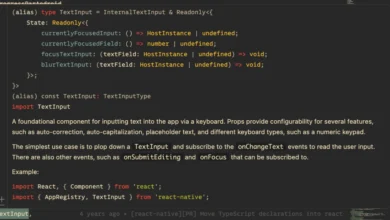
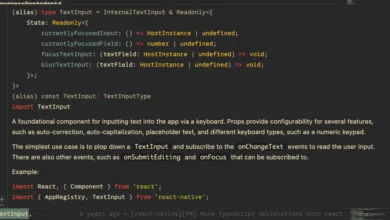
Text rendering has received significant attention in this release, specifically regarding the migration toward state-based APIs. The value-based BasicTextField and legacy Material 2 TextField are now deprecated in favor of the more performant and robust state-based BasicTextField and TextFieldState. This architectural change allows for synchronous state updates and better integration with complex text requirements, such as undo/redo history and change tracking buffers.
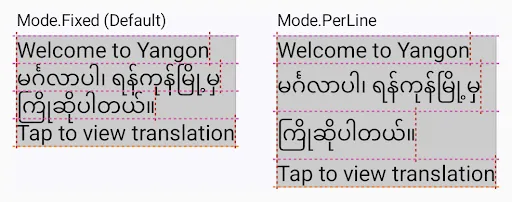
The introduction of LineHeightStyle.Mode.PerLine is a critical addition for developers building applications for international markets. By calculating line height independently for each line, this mode prevents the clipping or collision of tall scripts, such as Thai, Khmer, or Burmese, within mixed-language paragraphs. This enhancement, combined with the new mergeable FontVariation.Settings, demonstrates a concerted effort to support global user experiences with high typographic precision.
Performance Benchmarks and Analysis
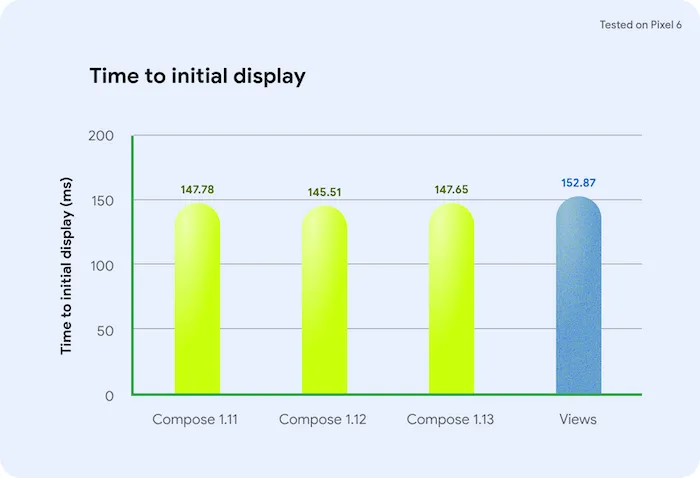
Performance remains the primary metric by which developers evaluate the Compose framework. According to internal data provided by the development team, Compose 1.13 maintains parity with previous versions in baseline startup and scrolling benchmarks, achieving a zero percent jank rate on Pixel 6 devices. Notably, the framework continues to outperform traditional Android Views in cold startup times, recording a Time to Initial Display of 147.65 ms compared to 152.87 ms for Views.

However, the industry standard remains nuanced. While Compose has closed the gap in many areas, traditional View-based systems still retain a slight edge in Time to Full Display (180.32 ms for Views versus 202.79 ms for Compose). This discrepancy is largely attributed to differences in data flow initialization and GPU shader compilation strategies. The development team has indicated that improving these startup metrics is a priority for upcoming releases, underscoring a continuous investment in low-level optimization.
The introduction of computedStateOf serves as a new tool for managing performance at the application level. By providing a lightweight alternative to derivedStateOf that does not cache results, it offers an efficient way to handle frequent condition checks—such as scroll position or animation thresholds—without the overhead of unnecessary recalculations. This addition is expected to assist developers in preventing unnecessary recompositions, further smoothing out the interaction layer of complex apps.
Evolution of Layouts and Tooling
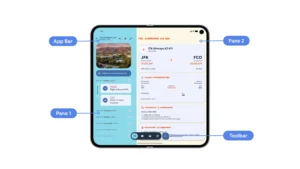
The graduation of FlexBox and Grid layouts from experimental to stable status is a significant win for developers building adaptive, multi-screen interfaces. These layouts offer a production-ready solution for responsive design, superseding the previous Flow layouts. The added capability to limit the number of items in a line via maxItemsInEachLine provides developers with greater control over UI behavior across diverse screen sizes, from foldables to tablets and desktop environments.
In a move to streamline the development stack, the team has announced the deprecation of ConstraintLayout and MotionLayout in favor of newer, more performant alternatives that leverage the native Compose layout and shared element APIs. This follows a broader trend in the ecosystem of reducing reliance on complex, layout-heavy architectures that can become difficult to maintain over time.
Additionally, the stabilization of LazyLayoutCacheWindow improves the efficiency of lazy collections—including lists, grids, and staggered grids—by enabling robust caching and prefetching for off-screen elements. This feature has already demonstrated significant real-world impact, with internal case studies from platforms like Instagram Direct reporting marked improvements in navigation speed and scroll fluidity.
Testing and Debugging Infrastructure
The 1.13 release introduces a native failure handling pipeline via the TestFailurePolicy in ComposeUiTestConfig. This update is designed to address one of the most persistent pain points in mobile engineering: debugging UI tests in continuous integration (CI) environments. By automating the capture of screenshots and the UI hierarchy at the exact moment a test fails, the system provides engineers with the diagnostic information required to resolve issues without needing to replicate the environment locally.
This focus on testability is complemented by the new static analysis skills available via the Android CLI. These tools provide automated code auditing across seven categories, including state stability, lazy layout efficiency, and animation performance. By integrating these checks into the PR process, teams can enforce best practices from the start, reducing the likelihood of performance regressions.
Future Directions and Industry Impact
The release also provides a glimpse into the future of UI development, particularly with the inclusion of the Agent-to-UI (A2UI) protocol renderer. As AI-driven interfaces become more prevalent, the ability to render dynamic, interactive components at runtime—without executing arbitrary code—is becoming essential. This renderer allows AI agents to feed data directly into Compose snapshot states, creating a seamless connection between machine learning models and the end-user experience.
Finally, the introduction of the androidx.web library in alpha reflects a commitment to improving the integration of web content within native applications. By moving away from older WebView implementation patterns, which often caused state loss and navigation issues, the new library aims to provide a more stable and performant bridge for hybrid architectures.
The Jetpack Compose 1.13 release is a comprehensive update that balances the introduction of powerful new visual capabilities with a pragmatic focus on performance, stability, and long-term maintainability. By deprecating legacy systems and prioritizing state-based, adaptive components, Google is positioning Compose not just as a tool for today, but as the foundation for the next generation of Android user experiences. For the developer community, the challenge will lie in migrating existing codebases to these newer, more efficient standards, a process that, while demanding, promises to yield significant improvements in app quality and development velocity.
Related posts: