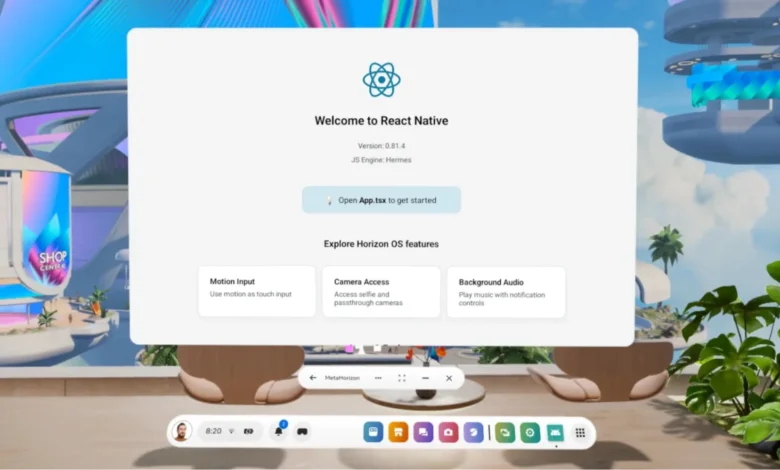
At React Conf 2025, a significant stride was made in realizing React Native’s long-standing ambition to enable developers to leverage their existing knowledge and codebases across an ever-expanding array of devices and form factors. This latest development, the announcement of official React Native support for Meta Quest devices, marks a pivotal moment in the framework’s journey, building upon its successful expansion to platforms like Apple TV, Windows, macOS, and the web through projects like react-strict-dom. The initiative, first detailed in the 2021 "Many Platform Vision" post, underscores a commitment to fostering a unified ecosystem where new device integrations do not lead to fragmentation.
The integration of Meta Quest devices into the React Native ecosystem is particularly noteworthy given that these headsets run Meta Horizon OS, an operating system based on Android. This architectural foundation means that the robust and familiar Android tooling, build systems, and debugging workflows can be utilized with minimal adaptation. For developers already proficient in building React Native applications for Android, the transition to developing for Meta Quest promises to be exceptionally smooth, requiring little deviation from their established development models. This approach mirrors React Native’s strategy for integrating with other Android-based environments, opting to build upon the existing Android foundation rather than introducing entirely new runtimes or development paradigms. By integrating with React Native’s established abstractions, platform-specific capabilities can be incorporated without compromising the integrity of the core framework or necessitating a separate development approach.
This article delves into the practicalities of getting started with React Native development for Meta Quest, outlining the current capabilities and the pathway for developers to build and deploy virtual reality applications using the tools and patterns they already know.
A New Dimension: React Native Enters Virtual Reality
The announcement at React Conf 2025, a premier event in the JavaScript and React developer community, signals a strategic move by Meta to broaden the accessibility of VR development. By embracing React Native, Meta aims to lower the barrier to entry for a vast pool of existing mobile developers, enabling them to transition their skills into the immersive world of virtual reality. This collaboration leverages Meta’s expertise in VR hardware and software with React Native’s proven track record in cross-platform development.
The implications of this partnership are substantial. For developers, it means a familiar development environment for creating VR experiences, potentially accelerating the pace of innovation in the metaverse. For users, it could lead to a more diverse and rapidly evolving landscape of VR applications available on Meta Quest devices. The "Many Platform Vision" articulated in 2021, which championed a future where React Native could seamlessly adapt to new devices and form factors, appears to be gaining significant momentum with this VR integration.
The Development Workflow: Leveraging Familiar Tools for VR
The path to developing for Meta Quest using React Native begins with a straightforward workflow, beginning with the ease of Expo Go and progressing to more advanced development builds and platform-specific configurations.
Step-by-Step: Running an Expo App on Meta Quest
For developers looking to quickly prototype and iterate on their VR application designs, Expo Go provides an accessible entry point. The process involves initiating a standard Expo project, launching the development server, and then opening the application directly through Expo Go on the Meta Quest headset. With only a few Meta Horizon OS-specific prerequisites, this workflow closely mirrors the standard Android development experience. This ease of access is crucial for rapid prototyping and for developers new to VR development, allowing them to focus on the creative aspects of their applications rather than getting bogged down in complex setup procedures.
Development Builds and Native Features
While Expo Go is an excellent tool for initial development and UI exploration, scenarios requiring deeper platform integration or access to native modules necessitate the use of development builds. These builds adhere to the standard Expo development build workflow, allowing for direct execution and testing on the Quest device. This approach ensures that developers can seamlessly transition from UI-focused development to implementing more complex, platform-specific functionalities as their projects mature.
Platform-Specific Setup and Differences from Mobile
Although the core development workflow remains consistent, Meta Quest requires specific adjustments to ensure applications function correctly and meet the criteria for store submission.
Project Configuration for Meta Horizon OS
Meta Quest applications must adhere to a defined set of requirements for proper operation and eligibility for the Meta Quest Store. This includes specific Android configurations, product flavors, and application metadata tailored for the Horizon OS environment. To streamline this process, Expo offers a dedicated plugin for Meta Horizon OS. This plugin automates the application of these requirements during the build process, ensuring that project configurations align with Meta Quest expectations without the need for manual manipulation of native files.
To integrate this plugin, developers are advised to install expo-horizon-core and incorporate it into their app.json or app.config.js file. This configuration typically involves specifying parameters such as horizonAppId, defaultHeight, defaultWidth, supportedDevices, disableVrHeadtracking, and allowBackup. Additionally, the orientation value in the project configuration needs to be set to "default".
Furthermore, the package.json file should be updated with Quest-specific scripts to facilitate the build process for different variants. This includes commands for running both debug and release builds for standard Android and the Quest platform, using the expo run:android command with appropriate variant flags.
Using React Native Without Expo
For developers who prefer to work without the Expo framework, the ability to apply Meta Horizon OS configurations directly within their native Android projects is also available. While Expo offers the most streamlined entry point, manual configuration is feasible for those with deeper native Android development experience.
At a minimum, this manual configuration involves ensuring the correct Android SDK versions are utilized, implementing specific Meta Horizon OS configurations within the Android manifest, and potentially defining product flavors to distinguish between standard Android and Quest builds. A comprehensive understanding of these manual adjustments can be gained by examining the implementation details of the expo-horizon-core plugin.
Android Without Google Play Services

A key characteristic of Meta Horizon OS is its foundation on the Android Open Source Project (AOSP), which provides the core Android platform independently of Google’s proprietary services. This means that applications run on standard Android APIs but do not have access to Google Mobile Services, such as Google Play Services or Play Store-specific integrations. Consequently, developers targeting Meta Quest must design their applications to avoid direct dependencies on Google services or to implement platform-specific alternatives where necessary. A detailed list of unsupported dependencies is readily available in the Meta Horizon OS documentation, providing developers with critical guidance to prevent compatibility issues.
Permissions and Device Capabilities
Certain Android permissions and hardware assumptions common on mobile devices do not translate directly to VR headsets. Features like cellular connectivity (e.g., SMS), specific sensors such as GPS, and certain restricted permissions are either unavailable or prohibited on Meta Quest. Projects must explicitly account for these differences during the development and setup phases. Developers should consult the Meta Horizon OS documentation for a comprehensive overview of unsupported permissions and to ensure their applications comply with platform restrictions.
Evaluating Library Compatibility
The vast majority of React Native libraries are expected to function correctly on Meta Quest. However, compatibility hinges on the assumptions a library makes about its underlying platform. Libraries that rely on mobile-only hardware, exclusively touch-based input, or services not present on Horizon OS may require adjustments. As a general guideline, libraries that abstract platform-specific features effectively and do not embed hardcoded dependencies on mobile-exclusive functionalities are more likely to be compatible.
For common functionalities like location services and notifications, Expo provides drop-in replacements specifically designed for Meta Horizon OS, ensuring seamless integration. Other libraries might work without modification, or they may require platform-specific adaptations depending on their internal dependencies. Thorough testing and careful consideration of library requirements are essential for a smooth development process.
Platform-Aware Code Paths
For applications intended to run on both Meta Quest and other platforms, implementing platform-aware code paths is crucial. Meta Horizon OS provides runtime utilities that enable developers to detect if an application is running on a Quest device. This allows for the graceful disabling or replacement of unsupported features, ensuring a consistent and functional user experience across different environments.
The expo-horizon-core library offers utilities like ExpoHorizon.isHorizonDevice and ExpoHorizon.isHorizonBuild to identify the runtime environment. Developers can also access the ExpoHorizon.horizonAppId for platform-specific configurations. By leveraging these tools, developers can build robust applications that adapt intelligently to the nuances of the VR environment while maintaining compatibility with other target platforms.
Design and UX Considerations for VR
Developing for a head-mounted display introduces unique design and user experience challenges that differ significantly from touch-based mobile devices. User interfaces are viewed at a distance, exist within a 3D space, and are navigated using a diverse range of input methods.
Interface Design for Immersive Environments
UI elements in VR generally require larger hit targets, increased spacing between interactive elements, and typography that remains legible across varying viewing distances. These design considerations bear similarities to those encountered when developing for desktop, tablet, or foldable devices, where applications often operate within resizable windows and layouts must adapt dynamically. The principle of creating clear, easily perceivable, and interactable elements is paramount in VR.
Input and Interaction Patterns
A primary distinction between Meta Quest and Android mobile development lies in the input methods. Instead of relying predominantly on touch, Meta Quest applications are typically controlled using controllers, hand tracking, and, in some cases, mouse and keyboard input. Controllers often function as pointer devices, introducing interaction patterns reminiscent of web and desktop UIs, including hover states and focus-based navigation.
React Native’s event system and component model are capable of supporting these interaction patterns. However, it is imperative for developers to avoid touch-only assumptions and to ensure that UI elements provide clear focus states and predictable navigation when controlled via pointing devices. This necessitates a thoughtful approach to interaction design, prioritizing accessibility and intuitiveness across all supported input methods.
Collectively, these considerations underscore the importance of responsive layouts and input-agnostic interactions. React Native’s robust layout system and flexible component model provide a solid foundation for crafting comfortable and usable VR interfaces, enabling developers to create engaging experiences that are both visually appealing and highly functional.
Examples and References
To further assist developers in their journey into VR development with React Native, a reference project is available, showcasing best practices and common implementation patterns. This project serves as a valuable resource for understanding how to effectively integrate Meta Quest capabilities into React Native applications.
Learn More
For those seeking to deepen their understanding and explore further resources, a comprehensive set of documentation and guides is available. These resources cover a wide range of topics, from the foundational aspects of React Native development to advanced techniques for building immersive VR experiences.
Acknowledgements
The successful expansion of React Native to new platforms, including Meta Quest, is a testament to the collaborative spirit of the developer community. The project team expressed gratitude to all individuals who contributed their time, feedback, and support throughout the development and integration process. This collective effort has been instrumental in realizing React Native’s vision of a truly universal development platform.