React Native Expands Its Multi-Platform Vision with Official Support for Meta Quest Virtual Reality Headsets

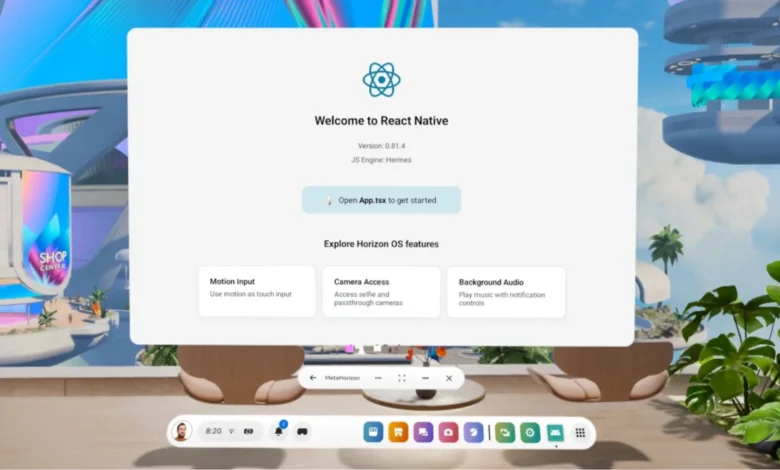
React Native has officially extended its cross-platform development ecosystem into the realm of virtual reality through newly announced support for Meta Quest devices, marking a major milestone in the framework’s ongoing evolution. Unveiled during the keynote presentations at React Conf 2025, this integration allows developers to leverage their existing React Native and Android competencies to build, test, and deploy immersive applications directly onto Meta Horizon OS. This strategic expansion builds upon the foundation laid by the "Many Platform Vision" outlined by the core maintainers in August 2021, a roadmap designed to accommodate emerging device form factors without fracturing the cohesive React Native ecosystem. Over the years, the framework has successfully broadened its reach beyond traditional mobile operating systems like Android and iOS to encompass desktop environments such as Windows and macOS, living room hardware including Apple TV, and web standards through initiatives like react-strict-dom. The inclusion of Meta Quest devices bridges the gap between conventional flat-screen applications and spatial computing, enabling a unified codebase that can span mobile, desktop, web, and now virtual reality headsets.
The architectural feasibility of this integration stems from the underlying operating system of Meta Quest hardware. Meta Horizon OS is fundamentally built upon the Android Open Source Project (AOSP), sharing deep architectural DNA with conventional Android mobile platforms. From a developer’s perspective, this means that the vast majority of standard Android build systems, debugging tools, command-line interfaces, and deployment workflows function seamlessly with minimal adjustments. Engineers who are already accustomed to building React Native applications for Android will find that a significant portion of their existing mental models, package management strategies, and compilation pipelines carry over directly to spatial development. Rather than introducing an entirely isolated runtime environment or demanding a specialized proprietary software development kit that would create silos within the community, the engineering teams chose to integrate Meta Quest compatibility directly into React Native’s existing abstractions. This methodology preserves the core promise of React Native—learn once, write anywhere—while granting developers the flexibility to target hardware-specific capabilities without diluting the framework’s core architecture.
Transitioning an existing project or initiating a new build for Meta Horizon OS relies heavily on modern tooling, particularly the ecosystem cultivated around Expo. For early development, rapid prototyping, and user interface design, developers can utilize Expo Go on a connected Meta Quest headset. By launching a standard development server and accessing the application through the headset, teams can achieve a feedback loop that closely mirrors mobile app development. When projects inevitably demand deeper hardware integration, custom native modules, or preparation for official store distribution, developers transition to Expo development builds. These tailored binaries run natively on Quest hardware, providing full access to device-specific features while maintaining the streamlined configuration processes characteristic of modern React Native workflows.
Configuring a project for Meta Horizon OS requires specific adjustments to ensure compatibility and smooth runtime execution within a virtual reality environment. Because Meta Quest applications operate under distinct system constraints compared to smartphones and tablets, projects must incorporate dedicated configuration parameters. This is largely simplified through specialized plugins, such as expo-horizon-core, which automatically handle the injection of required build-time properties, product flavors, and application metadata into app.json or app.config.js. Developers specify critical parameters including the unique Horizon Application ID, default window resolutions such as 1024x640dp, supported hardware models including Quest 2, Quest 3, and Quest 3S, and preferences regarding VR head-tracking and application backup states. Furthermore, projects must adapt their build scripts to accommodate specific product variants, utilizing specialized commands like expo run:android --variant questDebug and expo run:android --variant questRelease to compile binaries optimized specifically for Meta Horizon OS rather than standard mobile form factors.

For teams operating outside of the Expo ecosystem, implementing these configurations manually requires replicating the underlying native modifications found in standard integration scripts. This involves configuring custom Android Gradle build variants, adjusting application manifests to declare compatibility with spatial hardware features, and ensuring that the project structure satisfies Meta’s rigorous store submission guidelines. A critical technical consideration during this native configuration phase is the absence of Google Mobile Services within Meta Horizon OS. Because the operating system is derived from AOSP, it lacks proprietary Google infrastructure, meaning that standard integrations such as Google Play Services, Google Maps API dependencies, and automated push notification services reliant on Firebase Cloud Messaging will not function out of the box. Developers must systematically audit their project dependencies to identify and replace incompatible libraries, opting instead for platform-agnostic solutions or specialized drop-in replacements, such as community-maintained packages for location services and notifications designed specifically for Horizon OS.
Hardware and permission disparities present another crucial challenge for developers migrating mobile applications to virtual reality head-mounted displays. Standard mobile assumptions—such as continuous GPS tracking, cellular telephony, SMS management, and physical touch inputs—do not translate directly to a stationary or room-scale VR headset. Consequently, projects must explicitly filter out restricted permissions and unavailable hardware sensors within their Android manifest files to prevent installation errors or rejection during the Meta Horizon Store review process. To streamline this process, the framework provides runtime utility modules, allowing applications to execute conditional code paths based on the environment. Developers can utilize tools like ExpoHorizon.isHorizonDevice and ExpoHorizon.isHorizonBuild to dynamically detect spatial hardware at runtime, gracefully disabling mobile-specific features, substituting alternative interaction models, or retrieving configuration data such as the active Horizon App ID directly within JavaScript or TypeScript execution blocks.
Designing user interfaces for spatial computing introduces unique human-computer interaction paradigms that diverge sharply from traditional touchscreens. In a virtual reality environment, digital interfaces are rendered in three-dimensional space, viewed at varying focal distances, and interacted with through physical handheld controllers, advanced hand-tracking systems, or external mouse and keyboard peripherals. These spatial constraints necessitate deliberate adjustments to UI/UX design principles. Text typography must be scaled to ensure legibility across broad viewing angles, and interactive components require significantly larger hit targets and generous padding to accommodate raycast pointers and controller-based navigation. In many respects, designing for Meta Quest shares more commonalities with responsive desktop or foldable device development than with mobile app design, as applications often render within resizable, floating windows that must dynamically adapt to spatial layouts.
Moreover, the shift from tactile touch input to pointer-based interaction models—such as laser beams emitted from handheld controllers or pinch gestures captured by computer vision hand-tracking—requires developers to implement robust focus states and clear visual feedback for interactive elements. Traditional mobile applications often rely on instantaneous touch events that lack hover states; however, spatial interfaces benefit immensely from explicit hover, focus, and active visual cues that guide the user’s gaze and pointing mechanics. React Native’s component architecture and flexible event delegation system prove highly capable of handling these pointer events, provided that developers consciously design input-agnostic applications that avoid reliance on multi-touch gestures or screen edges.
The introduction of official React Native support for Meta Quest is anticipated to accelerate the adoption of cross-platform frameworks within the spatial computing industry. By lowering the barrier to entry for web and mobile developers, Meta and the React Native core team are effectively expanding the available talent pool for virtual reality software development. Enterprises and independent studios alike can now leverage existing codebases to extend their software ecosystems into immersive environments without needing to assemble dedicated C++ or Unity engineering teams from scratch. As spatial computing hardware continues to mature and consumer adoption broadens, the ability to deploy performant, unified applications across mobile, desktop, web, and virtual reality using a single foundational framework represents a monumental leap forward for software engineering efficiency and ecosystem interoperability.