Enhancing Prototype Realism: A Strategic Imperative for Authentic Fintech User Testing

There’s a ubiquitous moment in nearly every usability session where a participant, confronting a login screen, types in credentials, and then instinctively glances up, a subtle gesture betraying an underlying question: "Am I doing this right?" This pause is a critical indicator, signaling that the participant has recognized the application as a simulation, not a live product. Consequently, every piece of data gathered post-recognition becomes inherently filtered through this awareness, potentially compromising the authenticity and reliability of user research. This phenomenon is particularly acute and problematic within the realm of financial product testing, where user trust, security perception, and precision are paramount.
The Criticality of Authenticity in User Research
Usability testing forms the bedrock of user-centered design, providing invaluable insights into how real users interact with digital products. However, the efficacy of these sessions hinges directly on the fidelity of the prototypes presented. When participants perceive a prototype as anything less than fully functional, their behavior shifts from genuine interaction to a more guarded, performative engagement. They might consciously or subconsciously adjust their actions, expectations, and feedback, leading to skewed data that misrepresents actual user needs and pain points. This "demonstration mode" behavior is a well-documented challenge in UX research, where the artificiality of the testing environment can inadvertently contaminate the results.
The financial technology (fintech) sector amplifies this challenge considerably. Users of banking, investment, or payment applications are inherently trained to be hyper-aware of discrepancies. A balance that doesn’t quite add up, a field that accepts invalid input, or a security prompt that feels superficial can instantly shatter the illusion of a real product. In such a high-stakes environment, where personal financial data is handled, trust is not merely a desirable attribute but an absolute necessity. When a banking prototype bypasses authentic authentication mechanisms, participants frequently disengage, often pausing mid-session to flag the perceived flaw. This results in research findings that merely reflect how users might behave in a controlled, artificial demonstration, rather than how they would genuinely interact with a live, secure financial product. The implications are significant, potentially leading design teams to misinterpret user needs, prioritize the wrong features, or overlook critical usability issues that would only emerge under conditions of genuine user trust.
The "Uncanny Valley" of Prototypes
The concept of the "uncanny valley" – originally applied to robotics and computer graphics – finds a compelling parallel in UX prototyping. It describes the phenomenon where objects that appear almost, but not quite, human evoke feelings of eeriness and revulsion. Similarly, prototypes that are almost, but not quite, real can trigger user skepticism and disengagement. When a prototype achieves a certain level of realism, users’ expectations rise. If these expectations are then unmet by crucial interactive elements, such as a convincing login process, the illusion breaks, leading to a negative impact on the perceived credibility of the entire prototype. Studies in human-computer interaction have consistently shown that higher fidelity prototypes, especially those that mimic real-world interactions and data processing, elicit more authentic user behaviors and richer qualitative feedback compared to low-fidelity or overtly "fake" prototypes. This underscores the strategic importance of investing in realism at critical interaction points.
ProtoPie: A Bridge to Realism in Fintech Prototyping
Addressing this challenge requires a focused approach: identifying the specific moments where participant trust is established and ensuring those interactions are genuinely functional. In the context of a banking application, this pivotal moment is unequivocally the login experience. Modern prototyping tools, particularly no-code or low-code platforms like ProtoPie, have emerged as powerful enablers for designers to create highly realistic and interactive prototypes without requiring extensive coding expertise. These tools empower design teams to bridge the gap between static mockups and fully functional applications, providing a means to simulate complex user flows and system responses with remarkable fidelity.
The goal is to construct a login flow that behaves indistinguishably from a shipped product. Using ProtoPie, this can be achieved by incorporating functional text inputs, masked password fields, credential validation, dynamic error states, and sophisticated biometric animations that mimic native operating system experiences. This capability is not merely about aesthetic polish; it’s about fundamentally altering the psychological contract between the user and the prototype, fostering an environment where authentic user behavior can thrive.
Building a Verifiably Real Login: A Step-by-Step Breakdown
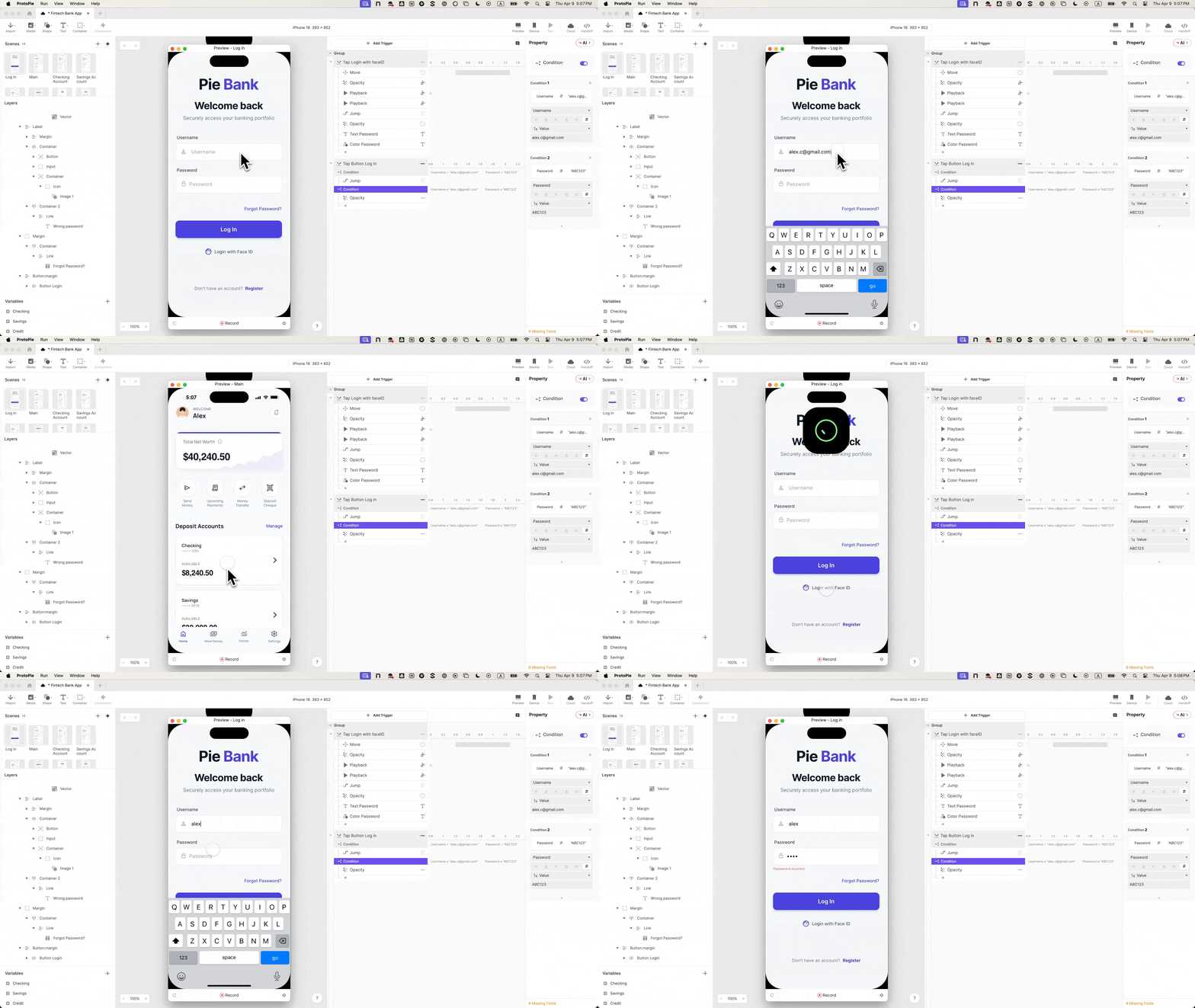
The following methodology outlines the steps to create a high-fidelity login experience for a mobile banking prototype, exemplified by "Pie Bank," using ProtoPie. This process minimizes the common pitfalls of superficial prototyping, ensuring robust and trustworthy user testing outcomes.
1. From Figma to Functional Inputs: Preserving Design Integrity
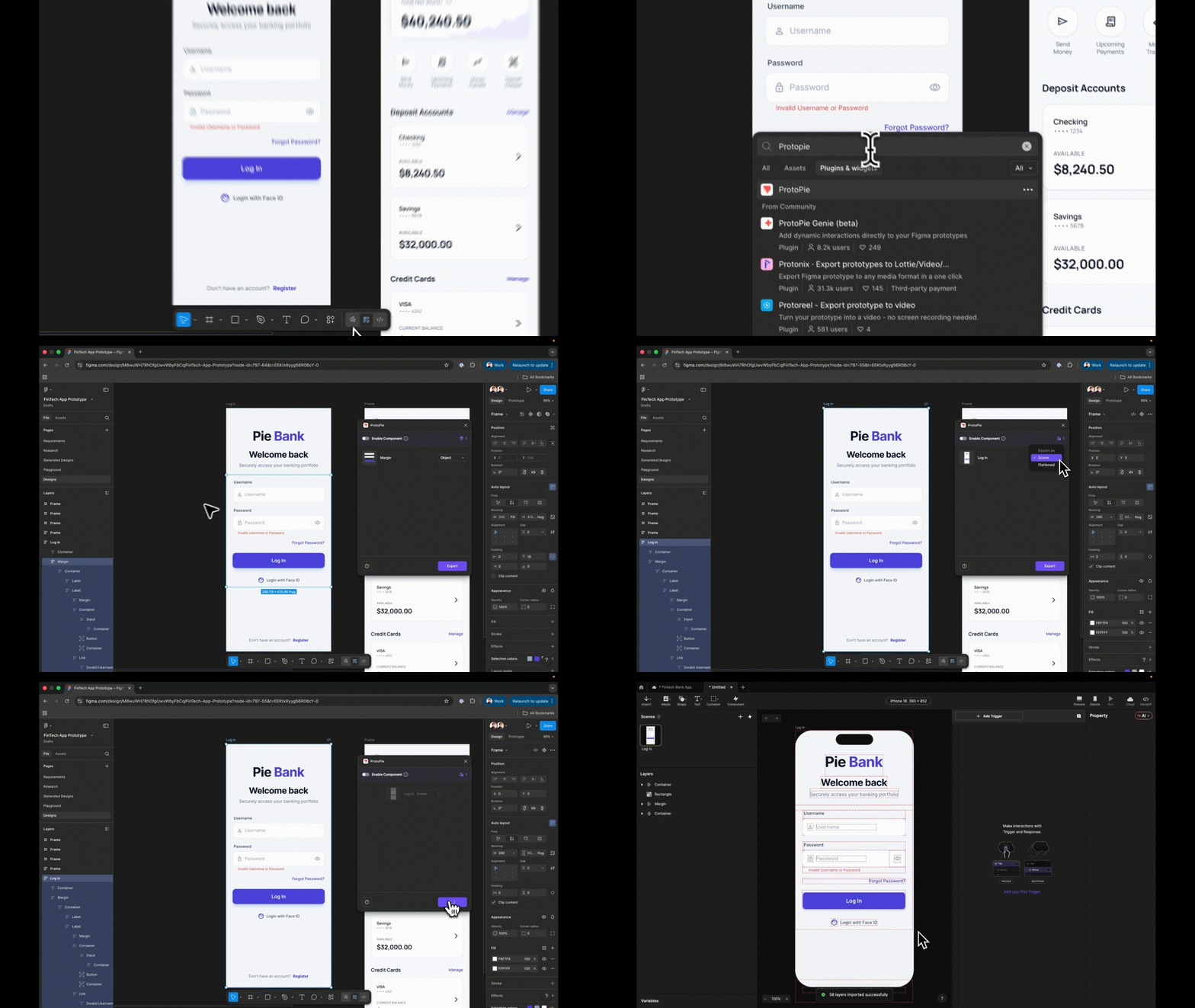
The initial step involves importing the design from a UI design tool like Figma into ProtoPie. Crucially, when exporting from Figma via the ProtoPie plugin, the "Scene" option must be selected, not "Flattened." Selecting "Flattened" converts all layers into a single image, rendering individual elements un-targetable and un-editable within ProtoPie. "Scene," however, preserves the entire layer hierarchy, ensuring that every design element arrives in ProtoPie as a separate, manipulable layer. This meticulous preservation of the layer structure is fundamental for building interactive components.
Upon import, a critical best practice is to rename every layer meaningfully. Generic names like "Rectangle 14" or "Group 5" quickly become unmanageable and lead to significant time loss when referencing specific elements in ProtoPie’s interaction panel or formulas. Descriptive names such as "Input Username," "Password Field," or "Login Button" are essential for clarity and efficiency throughout the prototyping process. This seemingly minor organizational step dramatically streamlines subsequent interaction design.
2. Masking Sensitive Data: The Password Field
Static text fields from design tools, while visually representing input areas, do not accept actual user input. ProtoPie’s native "Input" layer is the solution, enabling real keyboard entry. This layer can be dragged onto the canvas from the "Text" > "Input" menu and nested within the existing username field group. The placeholder text should be set to "Username," and its visual properties (background fill, font style, size, and color) matched precisely to the original design. A quick preview confirms functionality: users can click the field and type, a subtle yet profound shift from a depiction of an app to an app that behaves.
This "Input Username" layer is then duplicated and nested within the password field group. Here, the placeholder text is changed to "Password," and a crucial property is adjusted: the "Type" is set to "Text Password." ProtoPie automatically handles the masking of characters, displaying dots instead of typed letters. This single property change, requiring no custom logic or complex conditions, immediately enhances the perceived security and professionalism of the prototype, making it feel remarkably real.
3. Establishing Navigation and Destination Scenes
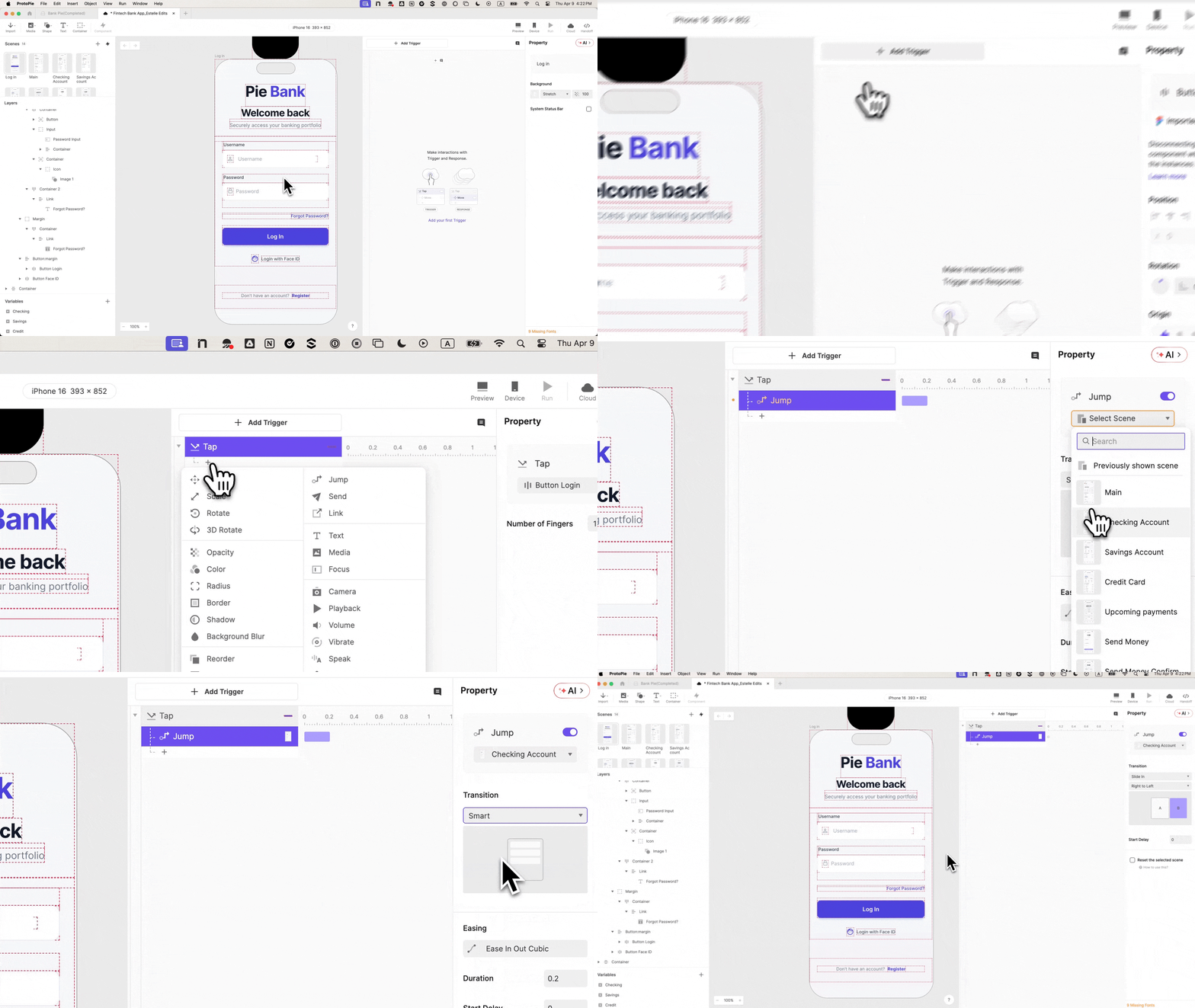
Before wiring any navigation, it is imperative to create the destination scene. The most common sequencing error in ProtoPie, and indeed in many prototyping workflows, is attempting to define a navigation response before the target scene actually exists. Even if initially blank, a new scene, for example, "Dashboard," must be added to the project first. This ensures that when the navigation logic is applied, there is a valid destination for the prototype to jump to.
Once the "Dashboard" scene is established, the "Log In" button can be selected. A "Tap" trigger is added to this button, with a "Jump" response targeting the newly created "Dashboard" scene. A smooth "Slide in from right to left" transition enhances the user experience, mimicking typical mobile app navigation. At this stage, the button will navigate to the dashboard regardless of input. This demonstrates basic functionality but highlights the prototype’s current "lie" – it still lets everyone through. The next steps address this crucial deficiency.
4. Implementing Intelligent Validation with Variables and Conditions
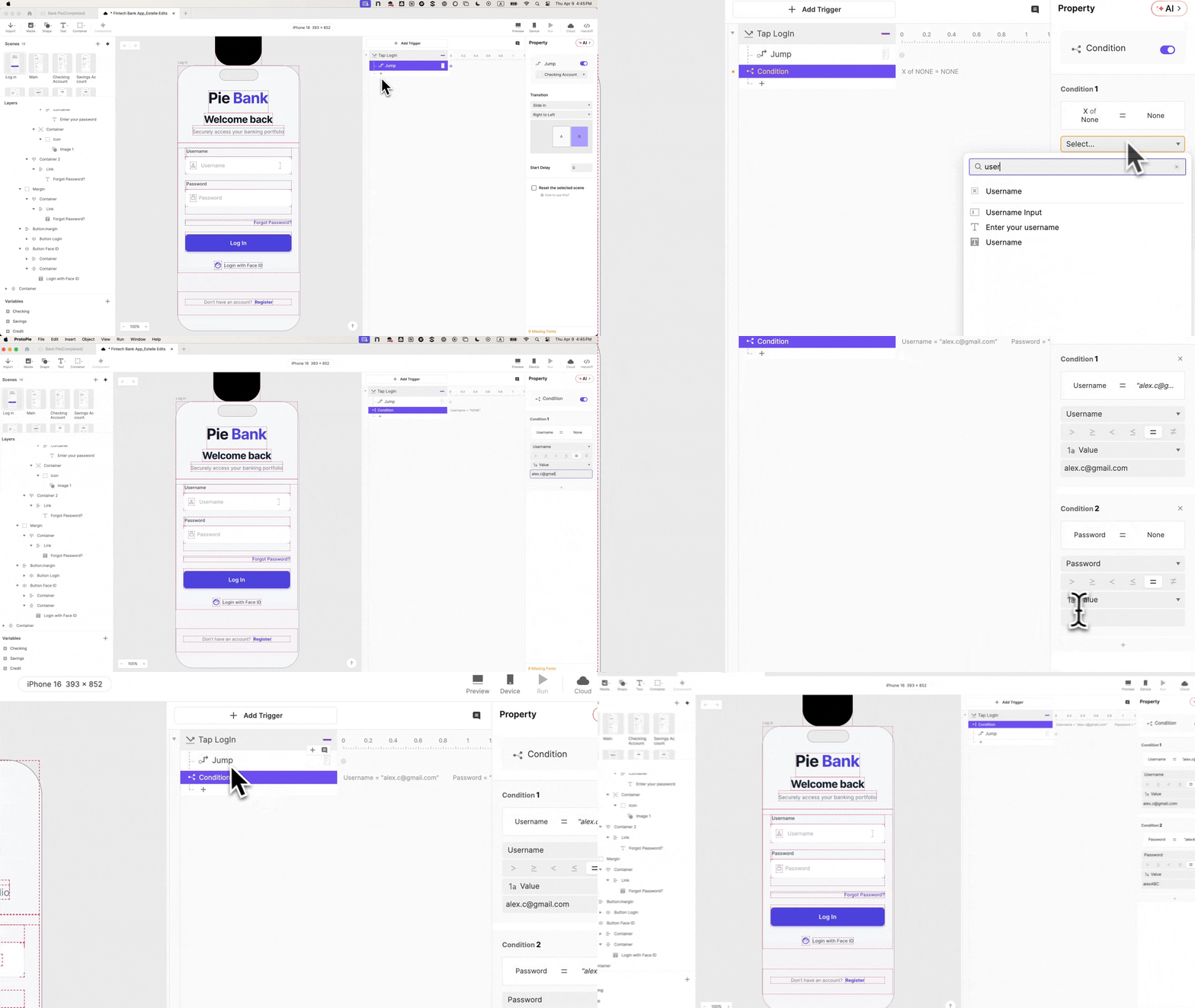
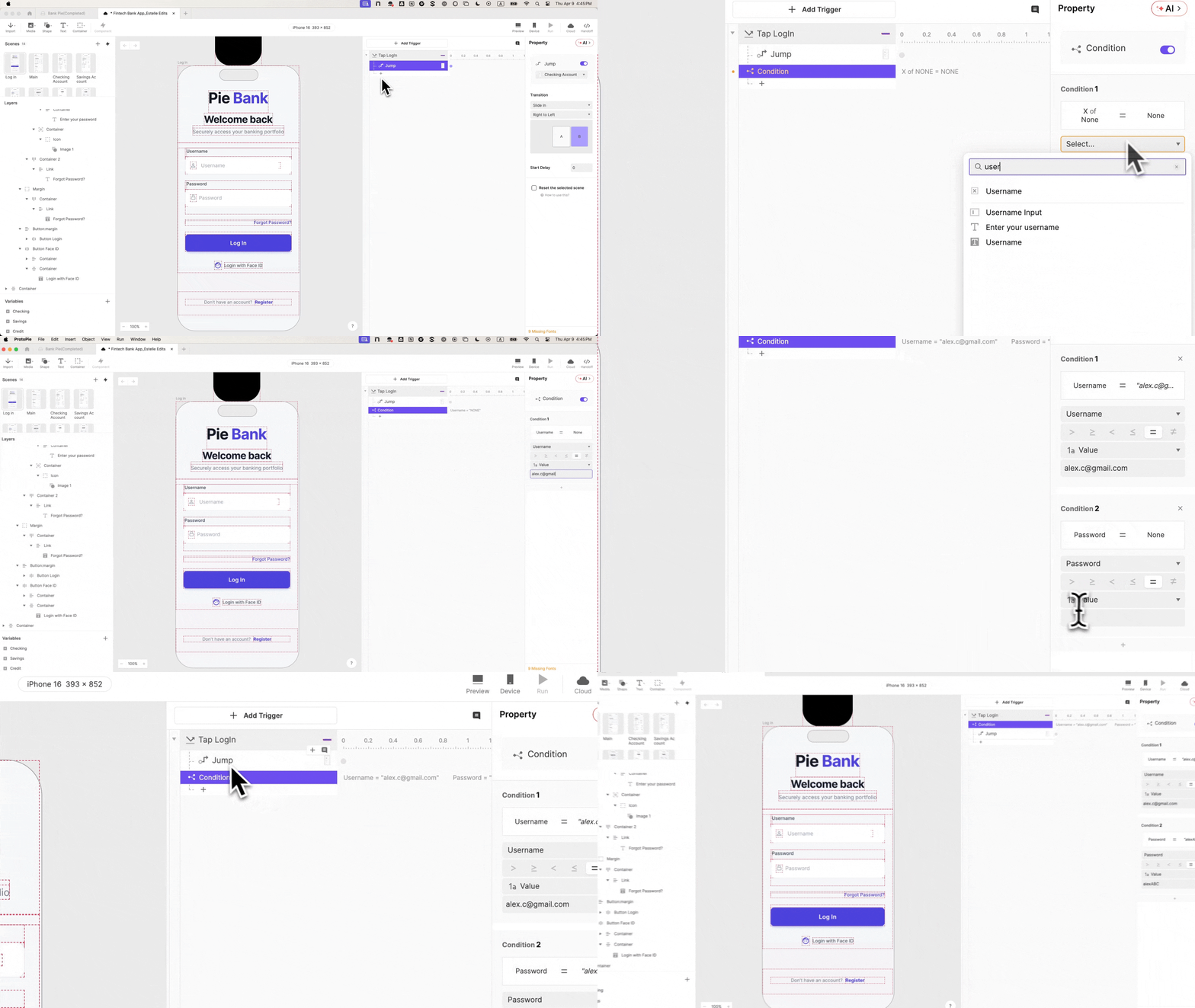
To introduce genuine validation, ProtoPie’s variable system is employed. At the bottom-left of the ProtoPie interface, two "Text" type variables are created: username and password. These variables are then bound to their respective input layers using simple formulas: input("Input Username").text and input("Input Password").text. This binding ensures that the variables dynamically store whatever text the user types into the input fields.
Enabling ProtoPie’s debug icons (often green overlays) allows for real-time visualization of variable values. As a user types, their keystrokes appear live within these debug overlays, confirming that the binding between input fields and variables is successful.
The next step is to integrate these variables into the login button’s logic. Returning to the "Tap" trigger on the "Log In" button, a "Condition" is added. This condition will have two rules, both of which must evaluate to true for the "Jump" response to execute:

username == "demo"password == "password"(or any predefined valid credentials).
The "Jump" response, which navigates to the dashboard, is then moved inside this condition. This means that only when the entered username matches "demo" AND the password matches "password" will the navigation occur. Any other input – incorrect credentials, empty fields, or improperly formatted entries – will prevent the user from progressing. This single constraint fundamentally alters the nature of every subsequent test session, transforming a simple demonstration into an actual interaction challenge.
5. Crafting the User-Centric Error State
A truly realistic login experience must account for invalid attempts. Most prototypes often omit a detailed error state, further contributing to their artificiality. To address this, the error message layer in the design (e.g., "Invalid credentials") is renamed "Error Text" and its initial opacity is set to 0, making it invisible.
A second condition is then added to the login button’s "Tap" trigger. This condition is the inverse of the first: it fires when the credentials are not valid. Inside this second condition, a "Change Property" response is added, targeting the "Error Text" layer and setting its opacity to 100. This ensures that if the user enters incorrect credentials, the error message becomes visible.
Now, two distinct outcomes are possible: correct credentials lead to the dashboard, while incorrect credentials display an error message. This dichotomy is crucial for testing, as it allows researchers to observe how users react to failure states – do they understand the message, do they attempt to retry, or do they seek alternative login methods like Face ID?
6. Elevating Experience with Biometric Animation
To further enhance realism and offer a modern login alternative, a Face ID animation is incorporated. A "Lottie" layer, which supports vector animations, is added to the canvas via the "Media" menu. A pre-designed Face ID animation file (e.g., a .json Lottie file) is loaded into this layer, and its initial position is set off-screen, typically above the iPhone frame.
On the "Login with Face ID" button, a "Tap" trigger (renamed "Tap Face ID" for clarity) is added. This trigger will contain a sequence of four responses:
- Move: The Lottie layer moves into a visible position on the screen.
- Seek: The Lottie animation is set to its initial frame.
- Play: The Lottie animation begins to play, simulating the Face ID scan.
- Jump: After the animation completes, the prototype jumps to the dashboard scene.
7. The Art of Timing: Achieving Native Feel
Without proper timing, all four responses would fire simultaneously, resulting in an abrupt jump to the next scene before the animation even plays. To achieve a seamless, native feel, delays are introduced:
- Move: 0s delay (starts immediately)
- Seek: 0s delay (starts immediately)
- Play: 0.5s delay (allows the Lottie layer to move into position before playing)
- Jump: 1s delay (allows the animation to play fully before transitioning)
Finally, it is essential to enable "Reset selected scenes" on the "Jump" response. Without this, if a user navigates back to the login screen, the Face ID animation might remain stuck in its final position, breaking the illusion. With this enabled, each return to the login scene resets the animation’s state.
The result is a biometric login experience that, to the user, is virtually indistinguishable from a real iOS Face ID authentication. Tapping "Login with Face ID" causes the animation to gracefully drop in, play its sequence, and then smoothly transition to the dashboard.
Transformative Outcomes: Beyond the Prototype

A login experience built with this level of fidelity transcends the limitations of typical prototypes, yielding profound benefits across the product development lifecycle.
Enhanced Research Validity and Deeper Insights: When authentication genuinely works, the error state ceases to be a theoretical placeholder and becomes a legitimate research touchpoint. UX researchers can observe users’ authentic reactions: do they comprehend the error message? Do they attempt to retry with different credentials? Do they instinctively reach for biometric alternatives? These are nuanced, critical questions that a faked login cannot possibly answer. The data gathered from such realistic interactions is richer, more reliable, and directly actionable, leading to more informed design decisions.
Streamlined Stakeholder Engagement: In stakeholder reviews, the functional login flow "speaks for itself." Instead of relying on verbal explanations or abstract diagrams, product managers, business leaders, and other non-design stakeholders can directly experience a near-production-ready interaction. This fosters a deeper understanding, builds confidence in the design direction, and minimizes misinterpretations, leading to faster approvals and more aligned product vision.
Accelerated Engineering Handoff: For engineering teams, the detailed interaction panel in ProtoPie serves as a comprehensive behavioral specification. It clearly documents the conditional logic, variable bindings, and precise timing of each interaction. This allows engineers to grasp the intended behavior, not just the static visuals, reducing ambiguity, minimizing back-and-forth communication, and ultimately accelerating the development process. The "intent, not interpretation" principle translates directly into more efficient and accurate implementation.
Cultivating User Trust and Adoption: The investment in login fidelity, even if the login itself is not the primary feature being tested, is a strategic imperative for fintech products. It is the very first point where participant trust is established. A seamless, secure-feeling, and functional login experience immediately communicates competence and reliability. Get this foundational interaction right, and every subsequent interaction within the prototype, and eventually the live product, benefits from a higher level of user engagement and trust. This "halo effect" ensures that all downstream data collected from user testing is a more accurate reflection of real-world user behavior, leading to better product-market fit and higher user adoption rates.
Expert Perspectives on Prototyping Fidelity
UX researchers consistently advocate for high-fidelity prototypes at critical junctures. As one UX lead at a major financial institution might infer, "The moment a user enters sensitive information, like login credentials, any artificiality instantly breaks their immersion. If we can’t get that right in a prototype, we can’t truly test their trust or their reactions to security features." Product managers, meanwhile, appreciate the clarity. "When I present a prototype to leadership, the ‘wow’ factor of a truly functional login helps sell the vision immediately," a fintech product manager could be understood to say. "It transforms a concept into something tangible they can believe in." Engineers, often tasked with implementing these designs, also benefit. "Receiving a ProtoPie file with precise conditional logic for a login saves us countless hours of guesswork and communication overhead," an inferred statement from a lead developer might suggest. "It’s like getting a mini-spec document for the interaction."
The Future of Prototyping in Financial Services
The trend towards increasingly realistic and interactive prototypes, driven by tools like ProtoPie, is set to continue. As financial services become more embedded in users’ daily lives, the demand for seamless, secure, and intuitive digital experiences will only grow. Advanced prototyping techniques will become standard, enabling fintech companies to iterate faster, gather more accurate user feedback, and bring more robust products to market. This evolution is not just about enhancing the design process; it’s about fundamentally improving the user’s relationship with their financial institutions, building trust from the very first interaction, and ensuring that digital banking is not just functional, but genuinely empowering.
In conclusion, the strategic investment in creating a truly authentic login experience within a prototype, particularly in the sensitive domain of financial technology, is not merely a technical exercise. It is a critical enabler for accurate user research, effective stakeholder communication, efficient engineering handoff, and ultimately, the cultivation of deep user trust. By prioritizing realism at this pivotal gateway, design and product teams can ensure that every data point collected, every insight gained, and every decision made is built upon the solid foundation of genuine user interaction.