The Evolution of User Expectations: From Spinners to Sentient Agents
For decades, interface designers have relied on a limited set of visual cues to manage latency: the spinner, the throbber, the progress bar. These patterns effectively communicate a technical reality—that data is being retrieved, and the delay is due to bandwidth or file size. Users have been conditioned to understand these icons as indicators of an ongoing, often simple, technical operation.
However, the advent of agentic AI introduces a fundamentally different kind of wait time. When an AI agent pauses for an extended period, it is not merely downloading information; it is actively processing, strategizing, and generating. This "thinking time" involves complex probabilistic decision-making, weighing multiple options, and synthesizing new content. If a generic spinning icon accompanies such a profound cognitive process, users are left in the dark, unable to distinguish between a legitimate, complex task and a system that has stalled or crashed. This ambiguity fosters anxiety and undermines the perceived reliability of the AI. Industry research consistently highlights that lack of transparency is a primary barrier to AI adoption, with users expressing significant apprehension about "black box" systems.
The solution, as explored in the preceding part of this series, involves a thorough Decision Node Audit to map out the internal workings of AI systems and identify critical transparency moments. With a Transparency Matrix in hand, pinpointing when behind-the-scenes API calls or internal computations require a visible status update, the focus now shifts to the crucial "how"—designing the visual and textual containers for this essential information.

Building Bridges of Trust: The Imperative of Transparency
The core challenge is to reframe waiting time not as an inconvenience, but as a moment for active reassurance. Instead of a passive "something is happening," interfaces must communicate an active, "Here is exactly how I am working to solve your problem." This shift is not merely a cosmetic enhancement; it is foundational to building user trust and fostering effective human-AI collaboration. The principles of explainable AI (XAI) are increasingly central to responsible AI development, with regulatory frameworks like the European Union’s AI Act emphasizing transparency requirements.
Achieving this level of transparency is as much a linguistic challenge as it is a visual one. The microcopy—the small pieces of text in an interface—becomes paramount. Generic placeholders like "Loading" or "Working" are remnants of an era of static software. For agentic AI, these must be retired in favor of status updates that mirror the system’s agency and clearly articulate its current actions.
Consider an agentic AI designed to organize calendars and plan recurring meetings. A vague message like "Checking availability" for an unspecified duration leaves users feeling lost. They lack crucial context: whose calendar is being checked, what other steps are involved, or if the AI has even registered the meeting’s purpose and participants. Such an experience can feel like anticipating an unwelcome surprise, rather than a helpful outcome.
Crafting Clarity: The Art of Agentic Status Updates

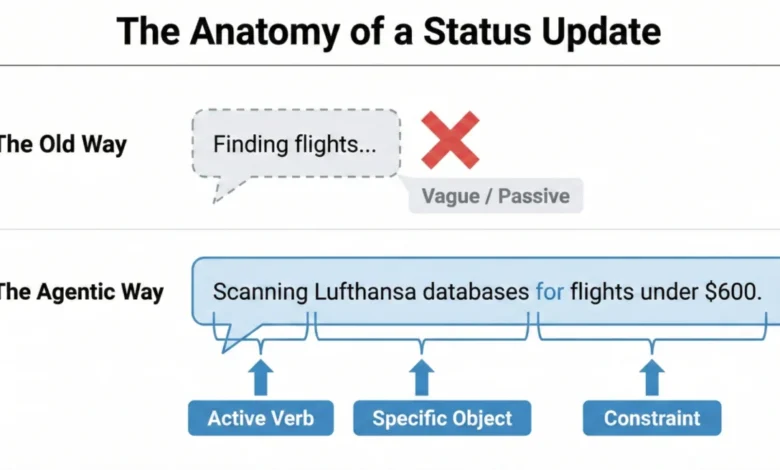
To provide truly useful status updates, the system must connect what it is doing with why it is doing it. This requires a specific formula that elevates the generic into the informative. A strong "Action Word," combined with the "Specific Item" the AI is working on, and any "Limits" or rules it must adhere to, forms the backbone of an effective agentic update.
For example, for a calendar scheduling agent, instead of "Checking availability," a more transparent sequence might be:
- "Identifying available slots across team calendars for next week."
- "Cross-referencing preferred meeting times with participant availability."
- "Drafting meeting invitations with proposed times and agenda."
- "Finalizing meeting details and sending invitations to attendees."
This detailed breakdown grounds the technical process in the user’s actual life, providing clear checkpoints and managing expectations.
A compelling real-world example is Perplexity AI. When users pose a question, its interface dynamically displays a list of activities being accomplished in real-time, such as "Searching for relevant sources," "Analyzing search results," and "Synthesizing information." This level of detail eliminates guesswork, allowing users to track the AI’s progress and understand its methodology.
Similarly, for an AI assisting with travel booking, a weak update might be "Searching for flights…" A far superior update, adhering to the agentic update formula, would be: "Searching for flights to Paris within a $500 budget, departing next Friday." This clearly communicates the AI’s understanding of the request and its operational constraints, fostering immediate confidence.

Tailoring the AI’s Voice: Risk-Based Tone and User Research
The "personality" of an AI—whether it sounds conversational or mechanical—should not be arbitrary but rather aligned with the task’s importance, as determined by an Impact/Risk Matrix derived from the Decision Node Audit. For simple, low-risk tasks, a friendly, conversational tone can create a comfortable and engaging experience. A scheduling assistant saying, "Just checking your calendar for the best time!" feels appropriate.
However, high-stakes tasks demand precision and clarity over playfulness. If an AI is managing a large financial transfer or a complex database migration, users prioritize accuracy and directness. A message like "I am thinking hard about your money" would likely induce panic. Instead, the interface should use straightforward language such as "Verifying account routing numbers" or "Confirming data integrity across all datasets." Adjusting the AI’s tone to match the risk level provides users with the appropriate psychological context.
Ultimately, while risk matrices offer a crucial starting point, the definitive determinant of an appropriate AI voice and tone is rigorous user research. No predefined set of rules can predict every user group’s comfort levels or stress triggers in every scenario. User research is essential to:
- Observe how different users react to various status updates and tones.
- Conduct interviews and surveys to gather direct feedback on clarity and trust.
- Test iterations of microcopy and interface patterns in realistic contexts.
This hands-on approach ensures that the AI’s "personality" is not only comfortable but also appropriate for the actual individuals interacting with the system in their specific operational environment.

A Toolkit for Trust: Practical Interface Patterns for Agentic AI
Once the precise language for status updates is established, the next challenge is designing the "physical delivery system"—the interface patterns themselves. The key is to match the message’s weight to the pattern’s visibility, ensuring that the right level of transparency is delivered at the right moment. This approach transforms the anxiety of waiting into informed confidence. A library of these patterns can standardize and scale AI transparency across various applications.
1. The Living Breadcrumb: AI Working in the Background
For low-importance tasks handled discreetly in the background, a "living breadcrumb" provides subtle assurance without constant distraction. Imagine an email application where an AI is drafting a reply. Instead of a disruptive pop-up, a small, dynamic status indicator might pulse within the application’s border or menu area. This indicator smoothly transitions between text updates like "Reading email," "Drafting reply," and "Checking tone." It offers quiet reassurance that the task is underway, visible upon inspection, but does not demand immediate attention. This pattern is ideal for asynchronous, non-critical operations where constant user focus is not required.
2. The Dynamic Checklist: Guiding Through Complex Processes
For critical, high-stakes, multi-step tasks—such as processing a complex financial transaction or migrating a large dataset—the "Dynamic Checklist" is highly recommended. This pattern serves as a powerful anchor for the user, providing unparalleled clarity regarding the process’s progress. Unlike a traditional, often opaque, progress bar, the Dynamic Checklist explicitly lays out every planned step the AI agent will take. It clearly highlights the step currently in progress, marks preceding steps as complete, and lists future actions as pending.
For example, during a financial transaction:

- "Verifying account details." (Completed)
- "Converting currency at current market rates." (In Progress)
- "Initiating secure transfer to recipient bank." (Pending)
- "Confirming transaction with bank API." (Pending)
The Dynamic Checklist excels at managing unpredictable time. If the currency conversion unexpectedly takes an extra ten seconds, the user, having full visibility into the system’s exact location and understanding the potential complexity of such an action, remains patient and trusts the system’s ongoing work. This contrasts sharply with a static progress bar that, when stalled, induces immediate anxiety about a potential system failure.
Implementing a Dynamic Checklist is a full-stack design requirement. It demands a robust front-end state management system capable of listening for step-completion events, typically triggered by a backend webhook structure. This ensures the interface consistently reflects the agent’s real-time position within the workflow. Devin AI provides an excellent example, showing users a clear checklist of accomplished and remaining tasks, thereby enhancing transparency in complex development workflows.
3. The Thinking Toggle: Deep Transparency for the Curious
Some users, particularly those with higher information needs or a greater demand for transparency, require more than a summary; they want to glimpse the system’s raw processing. For this audience, the "Thinking Toggle" offers progressive disclosure. This UI control, perhaps a chevron or a "View Logs" button, allows users to expand a friendly status update into a raw, sanitized terminal view. It displays the AI agent’s logic logs, such as:
DEBUG: Initiating API call to Google Calendar for user: [email protected]INFO: Retrieved 15 available slots for Tuesday, 2 PM - 5 PM.TRACE: Applying scheduling preference: "avoid Mondays."DEBUG: Selected optimal slot: Tuesday, 3:00 PM.
While many users may never activate this view, its mere presence acts as a powerful signal of trust, reassuring them that the system is not concealing anything. Crucially, any raw logs displayed via this toggle must be meticulously sanitized and abstracted to prevent the accidental exposure of proprietary business logic, internal data structures, or security tokens. Honesty must not compromise security.
4. Navigating Ambiguity: Designing for Partial Success
Unlike traditional software, where operations are often binary (succeed or fail), agentic AI frequently operates in shades of grey. An agent might perfectly plan most of a trip but struggle to book a specific, in-demand restaurant. Standard binary error messages, such as a large red "Request Failed" banner, are trust-killers in such scenarios, as they misleadingly suggest a complete failure when 90% of the task was accomplished.

Instead, the interface should clearly delineate what worked and what didn’t:
- "Successfully booked flights and hotel for your trip to Tokyo."
- "Unable to secure a rental car within your specified budget for the last two days."
This granular feedback empowers users to intervene precisely where needed, completing the remaining 10% of the task manually while leveraging the AI’s significant accomplishments. It acknowledges the AI’s efforts and prevents the perception of total failure.
5. Pinpointing Problems: Disentangling Tool Failures
When an AI system underperforms, it is vital to clearly attribute the true cause of the failure. Users often mistakenly blame the AI itself for problems that originate from external services or tools the AI relies upon. For example, if a virtual assistant fails to access a user’s schedule because the Google Calendar API is down, the error message should not imply the assistant’s inadequacy.
Instead of: "Assistant failed to check your schedule."
The message should be: "Unable to connect to Google Calendar. The Google Calendar API may be temporarily unavailable."
This distinction is critical for maintaining user faith in the AI’s capabilities, even when external dependencies cause issues. It prevents users from losing trust in the AI’s core functionality.

6. Post-Action Assurance: The Indispensable Audit Trail
Real-time transparency, while crucial, is fleeting. If a user steps away from their desk, they might miss a Dynamic Checklist’s progress. Upon returning to a finished screen, if the result seems odd, they have no immediate way to verify the AI’s work. This underscores the necessity of a persistent "Audit Trail" for every agentic workflow.
The interface must provide a "Show Work" interaction—a link or history log on the final result screen that allows users to replay the decision logic. This could manifest as:
- "Your flight itinerary has been booked. [View Booking Audit]"
- "Meeting scheduled. [See Decision Log]"
This audit trail acts as the ultimate safety net, enabling users to spot-check the validity of the output. Even if never clicked, its mere presence signals that the system stands behind its work.
A notable example of transparency failure, which an Audit Trail addresses, comes from ChatGPT’s memory functionality. Developer Simon Willison observed in April 2025 that ChatGPT was automatically incorporating user memory into new conversations without explicit disclosure. Users found their previous location, "Half Moon Bay," subtly referenced in generated images, despite not prompting for it. This un-auditable "memory" disguised as personalization led to confusion and a lack of control. The Audit Trail pattern is designed to solve such issues, providing users with both personalization and the ability to easily audit the underlying information influencing AI outputs.
Summary of Interface Patterns for Enhanced Transparency:

| Pattern | Best Use Case | The User’s Anxiety | The Trust Signal |
|---|---|---|---|
| The Living Breadcrumb | Low-stakes, background tasks (e.g., drafting emails). | Did the system stall or freeze? | I am active, but I won’t disturb you. |
| The Dynamic Checklist | High-stakes workflows with variable time (e.g., financial transfers). | Is it stuck? What step is taking so long? | I have a plan, and I am currently executing Step X. |
| The Thinking Toggle | Expert tools or complex data analysis (e.g., code generation). | Is this hallucinating or using real data? | I have nothing to hide; here are my raw logs. |
| The Audit Trail | Post-task review for any outcome (e.g., final reports). | How do I know this result is accurate? | Here is the receipt of my work for you to verify. |
Beyond Real-Time: Addressing User Attention and Persistent Transparency
Even the most meticulously designed checklist or clearest status message may go unnoticed by many users. Professionals, especially those handling high volumes of tasks (e.g., an insurance underwriter generating fifty quotes daily), often "tune out" the interface. They initiate a task, switch tabs to handle other work, and return only when the AI’s output is ready.
These experts primarily judge the system based on the final result’s accuracy relative to their expectations. If a salesperson anticipates a premium between $500 and $600, and the AI returns $550, trust is instantly reinforced. The system becomes an efficient accelerator. However, if the system returns $900, the user stops. The misalignment between expectation and outcome signals a problem. At this moment, any real-time explanation—such as a high-risk surcharge message—is likely to have been missed. Without a persistent record, the user cannot understand the discrepancy.
In such cases, the user will often resort to manual recalculation, effectively deeming the AI’s output useless and initiating a complete rework. This feels like a waste of time, further eroding confidence. The user’s focus shifts from why the AI chose $900 to simply validating or invalidating its accuracy against their trusted methods. This lack of persistent transparency in moments of disagreement is a significant barrier to adoption and consistent use. The Audit Trail is precisely the mechanism that prevents the AI from inadvertently creating more work for the user.
This reality is particularly critical for enterprise AI tools. If an AI delivers a result that deviates significantly from expectations, and the user must spend ten minutes investigating the rationale, the tool will likely be abandoned. Predictability and the ability to quickly verify are paramount for professionals whose time is at a premium.

The Future of Human-AI Collaboration: Predictability, Reliability, and Understanding
AI systems should not be designed as "magic tricks" that rely on misdirection and hidden mechanics. Instead, they should function as trusted colleagues—transparent, communicative, and reliable. A good colleague keeps you informed, explains delays, and acknowledges challenges. This honesty is the bedrock of trust.
By systematically applying practical interface patterns—providing specific status updates, employing dynamic checklists, acknowledging partial successes, attributing tool failures clearly, and maintaining persistent audit trails—we move beyond viewing AI as a mysterious black box. We begin to treat it as a dependable team member, fostering a relationship built on trust and clear understanding.
The ultimate objective of these interface patterns is to achieve genuine transparency, which extends beyond merely explaining the AI’s complex internal workings. Here, transparency means demonstrating the AI’s process and performance precisely when and where the user needs to see it. This encompasses plainly communicating the AI’s current status, its known limitations, and an easy-to-follow history of its decisions. This level of openness transforms the interaction from passive acceptance to active collaboration, enabling users to comprehend the rationale behind results and to effectively intervene or guide the system towards optimal outcomes. This paradigm shift is essential for the widespread, ethical, and productive integration of agentic AI into our daily lives and professional workflows.