Build your way: Use any AI agent of your choice in Android Studio | Android Developers’ Blog

The Evolution of Agentic Development
The transition toward AI-powered coding marks one of the most significant shifts in engineering productivity over the last decade. Historically, Integrated Development Environments (IDEs) functioned as static platforms for code editing and compilation. Today, they are evolving into collaborative hubs where autonomous agents—software entities capable of planning, executing, and refining code blocks—interact with the codebase in real-time.
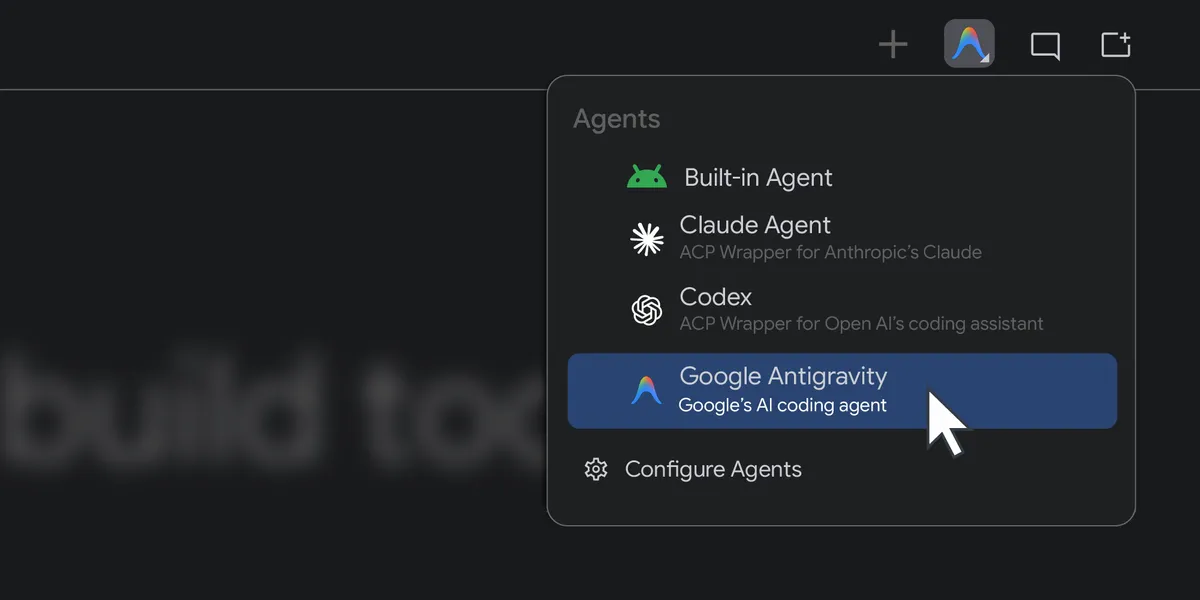
Over the past year, Android Studio has steadily lowered the barriers for AI integration, starting with the ability for developers to connect remote models to the IDE. The introduction of BYOA is the natural extension of this trajectory. By allowing developers to swap out the native AI engine for industry-standard alternatives such as Anthropic’s Claude Agent, OpenAI’s Codex, or Google’s proprietary Antigravity agent, the platform acknowledges that there is no "one-size-fits-all" solution for the diverse needs of mobile application development.
Technical Infrastructure and Implementation
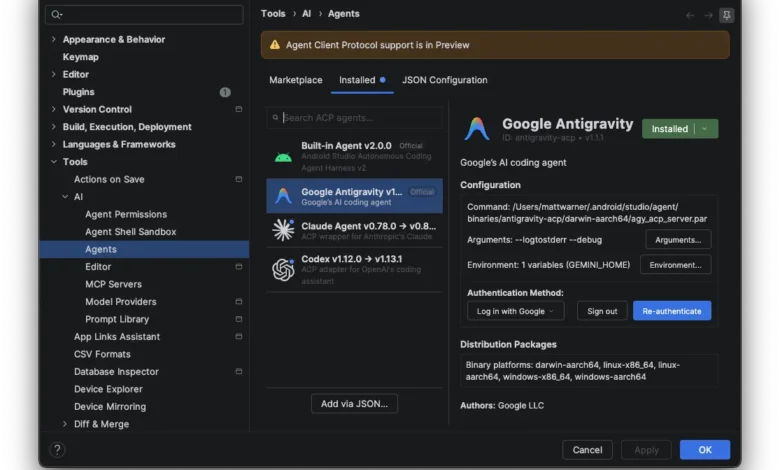
The core value proposition of the BYOA feature lies in the synergy between external AI intelligence and the IDE’s internal, context-aware infrastructure. When an external agent is integrated into Android Studio, it does not function in a vacuum. Instead, it gains access to the Android Knowledge Base and specialized tool support, which provides the agent with an understanding of current Android best practices, API deprecations, and library-specific nuances.
This integration is achieved through a streamlined registry interface within the Android Studio Canary environment. Users can authenticate using their existing credentials, whether those are tied to personal subscriptions—such as Google AI Pro or Ultra plans—or enterprise-grade API keys. For developers, this means the ability to maintain a consistent workflow while toggling between specialized models optimized for different phases of the software development lifecycle, such as architectural planning, unit testing, or UI layout generation.
Chronology of Google’s AI Integration
The path to this release follows a deliberate roadmap of iterative improvements to the Android ecosystem:
- Early 2024: Google launches initial AI features within Android Studio, focusing on code completion and basic documentation queries.
- Mid-2024: Introduction of remote model support, allowing developers to connect custom backend endpoints to the IDE.
- Late 2024: Release of updated Android Bench 2, which established new standards for measuring the performance of agents on "long-horizon" tasks (complex, multi-step coding projects).
- Current Release: The debut of the BYOA framework in Android Studio Rabbit 2, enabling native-level interaction with third-party agents like Claude and Codex.
Supporting Data and Performance Metrics
The shift toward agentic workflows is supported by quantitative gains in developer efficiency. Internal benchmarks and industry studies suggest that developers utilizing autonomous coding agents for boilerplate tasks can see a reduction in "time-to-commit" by as much as 30% to 40%.
Furthermore, the introduction of the Google Antigravity agent specifically addresses the need for high-frequency, complex query handling. With access to advanced models like Gemini Flash 3.8, developers can execute long-context tasks—such as refactoring large legacy modules or implementing complex Jetpack Compose state management—with higher accuracy. By providing a clear path for increased usage quotas and tiered pricing models, Google is positioning Android Studio as the definitive professional environment for AI-assisted development.
Enterprise Implications and Security
For enterprise organizations, the challenge of adopting AI has never been purely about capability; it is fundamentally about security and data governance. Google has explicitly designed the Antigravity agent and the broader BYOA architecture to accommodate enterprise-level compliance requirements.
Organizations currently utilizing Gemini Enterprise can continue to rely on the established security protocols of Google Cloud, ensuring that proprietary source code is handled within encrypted, compliant pipelines. By maintaining these guardrails, Google aims to mitigate the "shadow AI" risks that companies face when developers use unvetted, third-party AI tools outside of the corporate-sanctioned environment. The ability to manage these agents through a central administrative registry ensures that companies can balance innovation with rigorous data protection standards.
Analysis: A More Open Ecosystem
The decision to embrace external agents signals a broader strategic pivot for Google. In the past, platform providers often sought to create "walled gardens" to ensure users remained within a specific ecosystem. By contrast, the BYOA feature suggests that Google recognizes that the future of development is multi-modal and multi-vendor.
By facilitating the use of Anthropic’s Claude Agent and OpenAI’s Codex alongside its own Antigravity suite, Google is positioning Android Studio as the "neutral" ground where these competing technologies converge. This strategy likely serves two purposes:
- Retention: By making Android Studio the best place to run any agent, Google retains the developer within the Android toolchain regardless of which AI model they prefer.
- Standardization: By forcing these agents to interact with the Android Knowledge Base, Google effectively sets the standard for how AI should behave when writing Android code, ensuring that even third-party models adhere to the strict design patterns required by the platform.
Challenges and Future Considerations
Despite the significant advantages, the transition to agentic development is not without friction. One of the primary concerns for developers is the potential for "hallucinations" or suboptimal code generation when agents are tasked with complex, multi-file refactoring. While Android Bench 2 provides a framework for measuring performance, the real-world success of these agents will depend on the "context window"—how much of the project the agent can "see" at once—and the depth of its integration with the IDE’s build system.
Furthermore, as agents become more capable, the responsibility for code quality rests increasingly on the human developer. The "human-in-the-loop" model remains critical. Developers must act as architects and reviewers, ensuring that the autonomous outputs from agents like Claude or Codex are vetted against performance, security, and accessibility standards.
Getting Started with the New Framework
For those interested in exploring these capabilities, the process is designed to be accessible. By installing the latest Canary release of Android Studio Rabbit 2, developers can navigate to the agent registry, where they will find a list of supported providers.
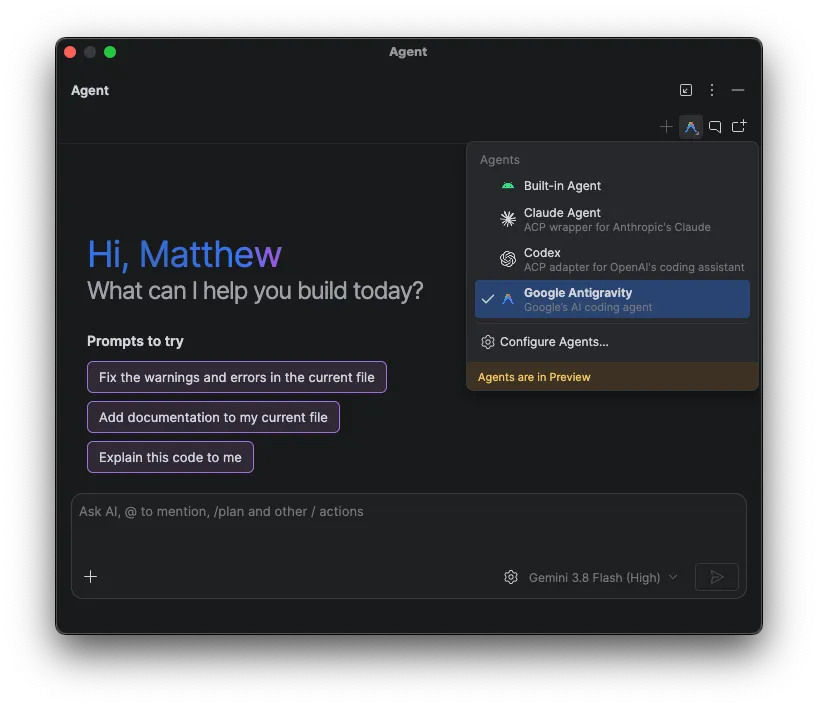
The onboarding process requires:
- Verification of Identity: Logging in via a professional or enterprise account.
- Selection of Agent: Choosing between the native Google Antigravity agent or a third-party alternative.
- Configuration of Quotas: Selecting the appropriate API plan or enterprise license to manage token usage and throughput.
As the industry moves toward this new era of software engineering, the feedback loop between the developer community and the tool creators is paramount. Google has encouraged users to utilize the official issue reporting channels to file bugs or request enhancements, signaling that the current iteration of the BYOA feature is just the beginning of a larger, long-term development cycle.
Conclusion
The introduction of Bring Your Own Agent support in Android Studio is more than just a feature update; it is an acknowledgment that the future of coding is collaborative, automated, and highly customizable. By embracing an open-platform approach, Google is empowering developers to build better, faster, and more securely, regardless of the AI model they choose. As these tools continue to mature, the definition of an "Android Developer" will likely continue to evolve, shifting from a focus on manual syntax generation to the strategic orchestration of intelligent agents. Whether for the independent hobbyist or the large-scale enterprise, the ability to tailor one’s AI environment marks a significant step forward in the evolution of professional software development.
Related posts: