AWS CodeDeploy Introduces Native RESTART Deployment Mode to Streamline Fleet Management and Enhance Operational Safety

Operators managing large-scale fleets of Amazon Elastic Compute Cloud (EC2) and on-premises servers have long faced a persistent operational challenge: the inherent risks associated with restarting infrastructure to apply runtime configuration changes, recover memory-intensive processes, or return hosts to a known, healthy state. Historically, these procedures forced administrators into a binary choice—either trigger a full redeployment of the current revision, which consumes significant time and computational resources, or rely on custom-built, external scripts that often circumvented the rigorous safety mechanisms built into AWS deployment tools. Today, this landscape changes as AWS officially introduces the RESTART deployment mode for CodeDeploy, a purpose-built solution designed to bring fleet restarts under the umbrella of managed, automated, and safe deployment operations.
The introduction of RESTART represents a significant shift in how DevOps teams approach the "maintenance window" of their production environments. By integrating the restart process directly into the CodeDeploy workflow, users can now leverage existing batch sizing, health check validations, alarm monitoring, and automated rollback behaviors that were previously reserved only for new code deployments.
The Evolution of Fleet Maintenance
In the early stages of cloud infrastructure management, the necessity of periodic reboots was often addressed through ad-hoc scripts or complex cron jobs. These legacy approaches frequently lacked the intelligence of modern CI/CD pipelines. For instance, a common failure mode in custom restart scripts involved a lack of intermediate health verification. If an application configuration was flawed, a script might blindly cycle through an entire fleet, essentially taking down service capacity in batches without detecting the underlying failure until the entire cluster was offline.
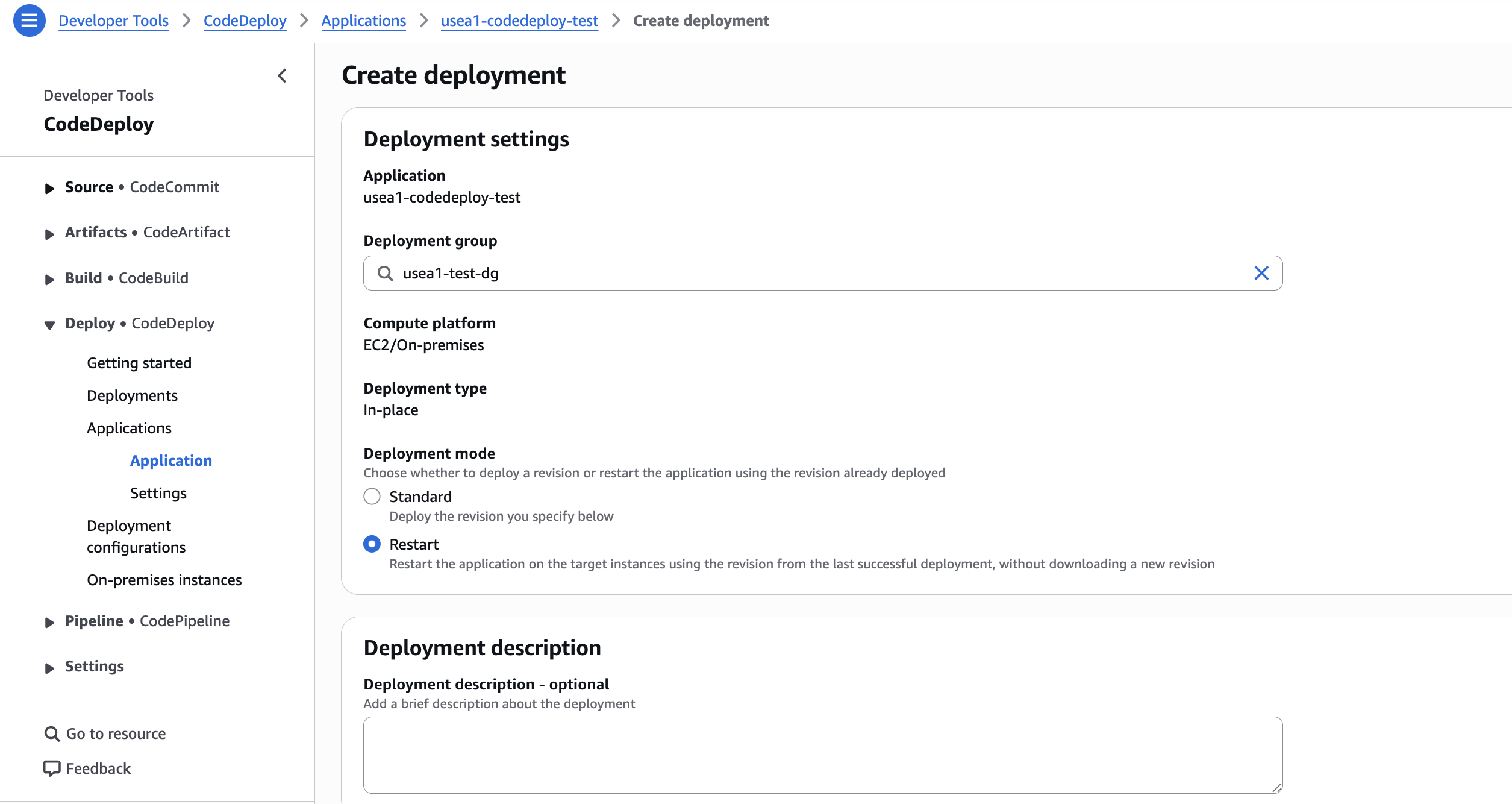
The new RESTART mode addresses this by treating the restart as a standard deployment event. When a user invokes this mode via the CreateDeployment API, CodeDeploy effectively treats the last successful revision as the target state. It coordinates the lifecycle—from ApplicationStop and Install to AfterInstall and ValidateService—ensuring that the fleet remains within defined capacity constraints throughout the operation.
Performance Gains and Empirical Evidence
The technical motivation for this feature is rooted in the pursuit of operational velocity. AWS testing data indicates that when the local revision archive is reused, the time required to cycle a fleet is drastically reduced. In benchmark scenarios involving m5.large instances and a 1 GB revision, the RESTART mode achieved speedups of up to 6.14x compared to traditional redeployments.
The efficiency gains are particularly pronounced in fleets managed by Application Load Balancers (ALBs). In a 50-host test environment, a standard deployment might take over 500 seconds, whereas the RESTART mode completed the same cycle in roughly 82 seconds. This reduction of over four minutes per cycle is a material improvement for organizations managing hundreds or thousands of instances, where aggregate downtime during maintenance can impact business continuity.
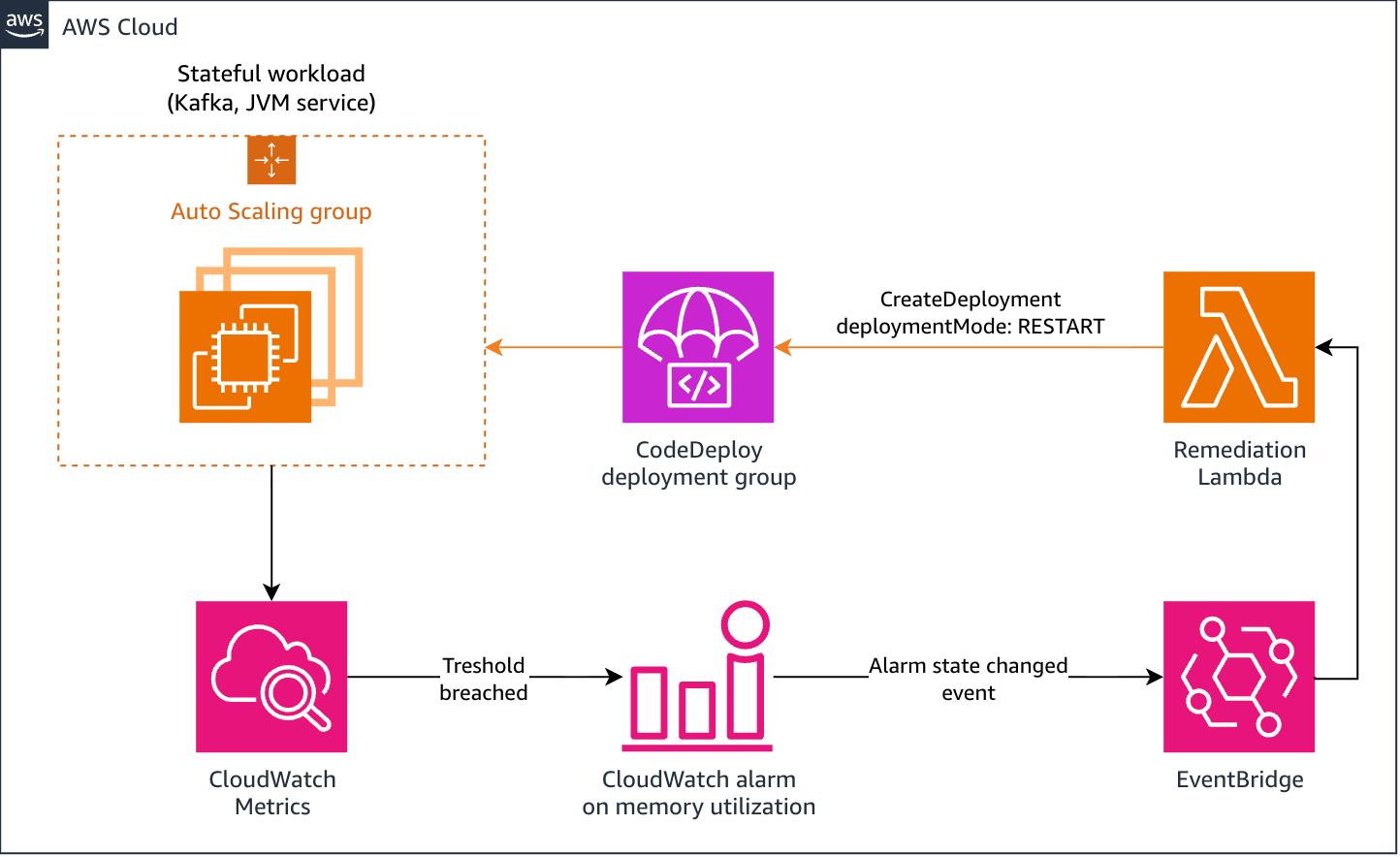
The mechanism behind this speedup is "local reuse." Provided the CodeDeploy agent is updated to version 2.1.0 or higher, the system caches the previous deployment’s bundle locally. By eliminating the network overhead of downloading large revisions repeatedly, the deployment logic can move directly to the installation and validation phases. For larger, stateful applications, such as self-managed Kafka brokers or Java Virtual Machines (JVMs) prone to memory growth over time, this creates an automated, self-healing loop that can be triggered by Amazon EventBridge rules, effectively replacing manual intervention with a managed, policy-driven process.
Architecture and Operational Safety
A core requirement for any infrastructure-level automation is the maintenance of strict safety controls. Under the RESTART paradigm, the system does not bypass existing guardrails. Instead, it maintains the deployment group’s configured safety parameters. If an alarm in Amazon CloudWatch triggers during the restart process, CodeDeploy is programmed to halt the rollout, preventing the spread of a faulty configuration or a problematic state across the entire fleet.
Crucially, the RESTART mode is distinct in its handling of traffic control. Unlike standard deployments, which often involve complex registration and deregistration steps with load balancers, the RESTART mode skips the explicit BlockTraffic and AllowTraffic phases. This is a design choice intended to optimize for speed; however, it places the onus on the operator to ensure that the ApplicationStop lifecycle hook is configured to properly drain in-flight requests. In this context, the restart process acts as an operational constraint: the host remains registered to the load balancer, necessitating that the application process gracefully handle the termination of existing connections before exiting.
Implementing the New Workflow
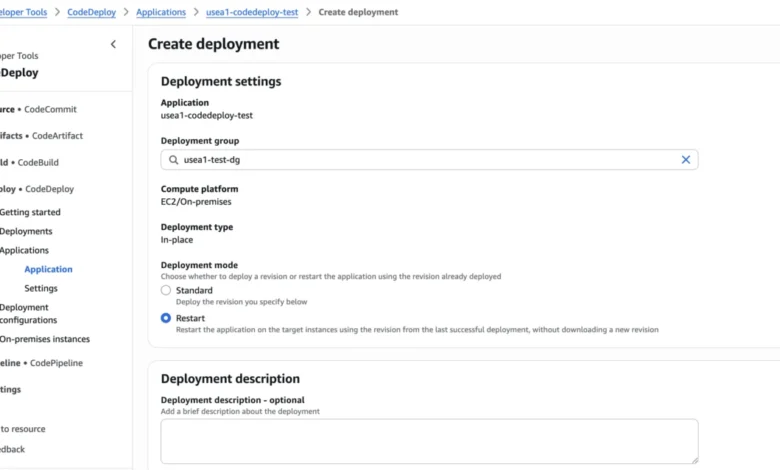
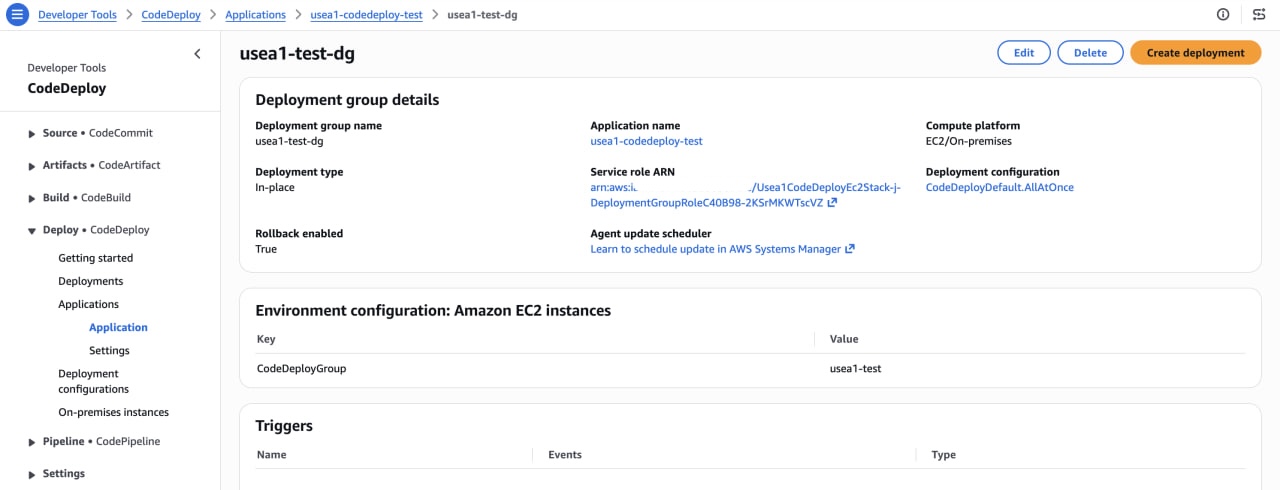
The transition to this mode is designed to be low-friction for existing AWS users. Whether initiating a restart via the AWS Command Line Interface (CLI) or the AWS Management Console, the syntax remains consistent with standard operations. The primary requirement is setting the deploymentMode parameter to RESTART. When the API call is executed, CodeDeploy resolves the deployment group’s last successful revision automatically, removing the need for the user to specify a revision bundle.
For complex incident recovery scenarios, AWS has provided an override mechanism. In instances where an alarm is already in an "ALARM" state—perhaps due to a broader system outage—operators can explicitly bypass alarm monitoring by setting override-alarm-configuration to false. This is a powerful, albeit sensitive, capability. AWS mandates that this action be treated with caution, typically requiring codedeploy:UpdateDeploymentGroup permissions, and should only be employed when incident runbooks provide an alternative validation signal.
Broader Implications for Site Reliability Engineering
The maturation of this feature signals a broader trend in cloud-native operations: the shift toward "managed maintenance." For years, Site Reliability Engineering (SRE) teams have struggled to balance the need for system hygiene—restarting processes to clear memory leaks or refresh caches—with the risk of introducing instability. By providing a first-class, audited, and monitored path for these restarts, AWS is effectively commoditizing a process that previously required significant investment in internal tooling.
Furthermore, the ability to chain this functionality with EventBridge and Lambda functions creates a powerful paradigm for "self-healing" infrastructure. Rather than relying on rigid, schedule-based reboots (cron jobs), organizations can now architect systems that perform "intelligent recycling." For instance, a memory-intensive application can trigger its own restart once a specific metric threshold is breached, provided that the current deployment status is healthy. This shift moves the industry away from "reactive manual intervention" toward "proactive autonomous management."
Limitations and Considerations
While the RESTART mode offers significant utility, it is not a panacea for all deployment scenarios. It remains subject to specific constraints, including the requirement that the target deployment group must have at least one successful historical deployment to reference. Additionally, because it relies on the local agent’s ability to reuse existing files, the mode is most effective in environments where the host-level state is relatively consistent.
Organizations should also note the implications for auditability. Because a RESTART deployment is a distinct event, it is recorded in the deployment history with its own unique identifier and the RESTART metadata tag. This provides a clear audit trail for compliance teams, ensuring that every cycle of a fleet—whether it is an application update or a simple service refresh—is fully documented and traceable.
Conclusion
The introduction of the RESTART deployment mode for AWS CodeDeploy represents a refinement of the cloud-native deployment lifecycle. By formalizing a process that has historically been relegated to the realm of custom scripting, AWS has lowered the barrier to entry for robust fleet management. The combination of increased deployment velocity, native integration with existing safety guardrails, and the potential for automated remediation makes this a critical update for SREs and DevOps professionals. As production environments grow in complexity, the importance of reliable, repeatable, and fast maintenance procedures cannot be overstated. With this release, the act of restarting a fleet has moved from a risky manual chore to a secure, standardized, and highly efficient component of the modern CI/CD pipeline.