Seamless Active Directory Integration for Windows Server Instances in AWS Elastic Beanstalk

The cloud computing landscape has long presented a friction point for enterprise administrators: the complex, manual process of joining Windows Server instances in managed environments to an existing Active Directory (AD) domain. Historically, developers utilizing AWS Elastic Beanstalk were required to implement custom scripts—often housed within .ebextensions—to manage domain credentials, handle computer name collisions, and navigate the mandatory reboots associated with joining a domain. Today, Amazon Web Services has fundamentally altered this workflow, announcing a native integration that automates Active Directory membership for Windows instances directly at the platform level, eliminating the need for brittle, custom-managed join scripts.
The Evolution of Cloud-Native Domain Management
For decades, the Active Directory domain has served as the backbone of Windows-based corporate infrastructure. It manages user authentication, provides access to file shares, enforces Group Policy, and secures internal web applications via Windows Integrated Authentication. When transitioning these workloads to the cloud, the "domain-joined" requirement often became a bottleneck.
Previously, if a scaling event triggered the launch of new instances in an Auto Scaling Group (ASG), those instances required a reliable, automated way to identify themselves, request a join, and restart without interrupting the deployment of the application. This necessitated the storage of domain credentials—a significant security concern—and the creation of complex logic to handle failures. By moving this responsibility from the user-level script to the Elastic Beanstalk platform itself, AWS has effectively standardized the process. Now, by simply defining a directory ID and domain name, instances are joined during the initialization phase, before the application deployment begins.
How the New Integration Functions
The core of this new functionality resides in the aws:elasticbeanstalk:windows:activedirectory configuration namespace. When a user enables this feature, the provisioning process for a Windows Server instance is adjusted. Before any application code is deployed, the system leverages the instance’s IAM instance profile to call the ds:CreateComputer API. This allows the instance to authenticate with the directory service securely, without the need for hardcoded administrative passwords or external secret storage.
A critical design choice in this update is the handling of computer naming. In traditional Windows environments, hostname collisions are a common failure point. Elastic Beanstalk now utilizes a unique, instance-ID-derived hostname when Active Directory options are active. This ensures that every new node in an Auto Scaling group is assigned a globally unique name, preventing the accidental overwriting of existing computer objects in the domain controller—a common issue that previously required complex cleanup logic.

Chronology of Deployment and Failure Handling
The operational sequence follows a strict, predictable timeline. Upon the launch of a new instance, the system executes the following steps:
- Network Provisioning: The instance initializes within the VPC, ensuring connectivity to the Directory Service DNS endpoints.
- Domain Join: The instance performs the
CreateComputeroperation and joins the specified domain. - Reboot: If required by the domain join, the instance reboots to apply the new domain configuration.
- Application Deployment: Only after the domain membership is confirmed does Elastic Beanstalk proceed with deploying the application bundle.
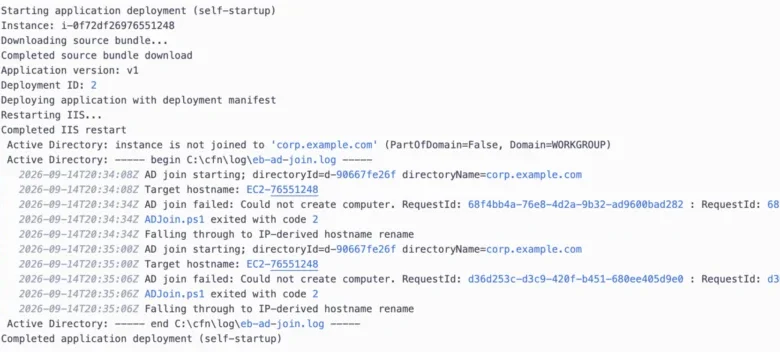
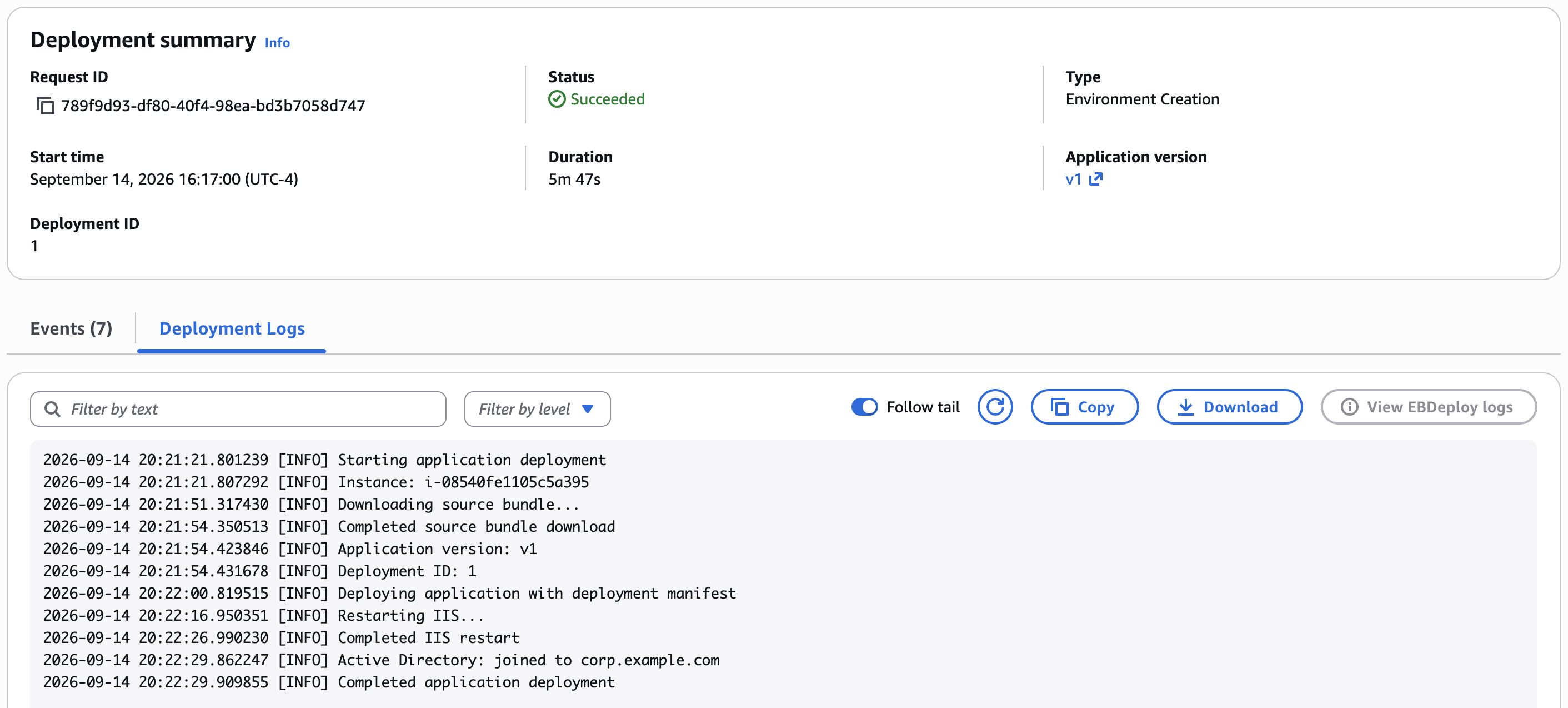
Crucially, the system is designed with fault tolerance in mind. If an instance fails to join the domain—due to misconfigured DNS, incorrect IAM permissions, or an invalid Organizational Unit (OU)—the deployment does not fail. Instead, the instance reverts to its default, IP-derived hostname, and the environment reaches a "Ready" state. This prevents a misconfiguration in the directory from causing a total outage of the application. Elastic Beanstalk then logs the specific failure output, allowing administrators to diagnose the error via the standard deployment logs without requiring manual access to the instance itself.
Strategic Implications for Enterprise IT
The implications for enterprise IT departments are significant. Automating the domain join process directly addresses one of the primary "lift-and-shift" blockers for legacy Windows applications. By removing the need for manual script maintenance, organizations can reduce the "toil" associated with cloud infrastructure management.

Furthermore, this integration supports the full suite of AWS directory services, including AWS Managed Microsoft AD, Simple AD, and even self-managed Active Directory environments connected via AD Connector. This flexibility allows organizations to maintain their existing identity management policies while taking advantage of the elastic scalability offered by AWS.
From a security perspective, the removal of domain credentials from scripts is a major improvement. By utilizing IAM instance profiles, the process adheres to the "least privilege" principle. The instance is granted only the specific permission to create its own computer object, which minimizes the attack surface associated with automated domain joining.
Performance and Scaling Considerations
In a real-world scenario, such as a massive scale-out event at 3:00 AM, the automation proves its value. Because the join logic is embedded in the platform, each instance handles its own domain authentication autonomously. This eliminates the "thundering herd" problem where multiple instances might attempt to authenticate simultaneously using the same set of credentials, which could lead to account lockouts or rate-limiting on the domain controller.
Data from AWS suggests that this shift is part of a broader push to make the Windows on AWS experience feel more native. By aligning the platform’s behavior with standard Windows administration practices, AWS reduces the learning curve for system administrators who are more comfortable with MMC snap-ins and PowerShell than with complex CI/CD pipeline scripting.
Practical Implementation and Best Practices
For organizations looking to adopt this, the process is streamlined but requires careful attention to prerequisites. The most common point of failure remains DNS resolution. As noted in technical documentation, instances must be able to resolve the directory’s DNS SRV records. Failing to point the VPC’s DHCP options set at the directory’s DNS servers is a frequent oversight that leads to "join timeout" errors.
Additionally, administrators should be mindful of "stale" computer objects. Because Elastic Beanstalk does not automatically prune computer objects from the domain controller upon termination, long-running environments that scale frequently may leave behind a collection of unused objects. While these do not cause collisions due to the unique instance-ID-based naming, periodic cleanup is recommended as a best practice for maintaining a clean directory environment.

A Measured Approach to Troubleshooting
When a failure occurs, the transparency of the reporting mechanism is a major upgrade over the "black box" nature of previous custom scripts. By surfacing the eb-ad-join.log directly within the Elastic Beanstalk deployment logs and the associated Amazon S3 bucket, AWS provides a clear, actionable path to resolution. This allows DevOps teams to identify whether a failure is due to a missing OU, a lack of ds:CreateComputer permissions, or a network connectivity issue within minutes of a failed deployment.
Conclusion: Moving Toward a Seamless Windows Experience
The integration of Active Directory domain joining into the core Elastic Beanstalk platform represents a maturing of the Windows-on-AWS ecosystem. By abstracting the complexities of domain membership, AWS is enabling organizations to focus on application delivery rather than infrastructure plumbing.
As of August 2026, this feature is available across all AWS commercial regions and GovCloud, providing a consistent experience for global enterprises. For those still relying on custom .ebextensions to manage their Windows domains, the migration to this native functionality is highly recommended. It represents a move toward more secure, reliable, and maintainable cloud architectures, ensuring that the legacy of Active Directory can continue to serve the needs of modern, elastic cloud applications. For further information, IT professionals are encouraged to review the official AWS Elastic Beanstalk Developer Guide, specifically the documentation concerning the aws:elasticbeanstalk:windows:activedirectory namespace.