Mastering the Document Object Model: A Comprehensive Guide to Querying Widgets in Python Textual Applications

The rapid evolution of terminal-based user interfaces in Python has been significantly accelerated by frameworks like Textual, which bring modern web-development paradigms to the command line. At the heart of Textual’s architecture is its Document Object Model (DOM), a hierarchical tree structure that tracks every active widget within an application. For developers building sophisticated TUI (Terminal User Interface) software, understanding how to efficiently query this DOM is essential for real-time state management, dynamic updates, and responsive event handling. By leveraging precise query mechanisms, developers can locate, modify, and manage interface components with minimal overhead.
Background Context and Architecture of the Textual DOM
To understand the necessity of DOM querying in Textual, one must examine how terminal applications are structured under the hood. Traditionally, command-line tools relied on rigid, procedural input-output loops that made dynamic interface updates cumbersome. Textual, developed by Will McGugan and maintained by Python software house Textualize, fundamentally alters this approach by introducing CSS-like styling, reactive attributes, and a structured DOM layout that mirrors web browsers.
In a standard Textual application, components are organized hierarchically. When an application launches, it initializes a root App instance, which subsequently mounts a default Screen widget. Additional layout containers, custom user-defined widgets, and background utility components are then nested within this tree.
Crucially, the DOM acts as the centralized ledger for all these active elements. When an event occurs—such as a user pressing a button, modifying an input field, or hovering over an interactive element—the application often needs to reach across the DOM tree to update other components, such as altering a status label or refreshing a data table. Without efficient querying tools, managing these cross-component interactions would lead to tightly coupled, unmaintainable codebases.
The query_one() Method: Precision Retrieval for Single Widgets
The most direct way to interact with a specific component in the Textual DOM is through the query_one() method. Widely documented across the Textual ecosystem and prominently featured in open-source repositories on GitHub, query_one() is designed to retrieve a single, distinct widget matching a specified criteria.
Developers can pass up to two parameters into query_one(): a CSS selector string (such as an ID or class) and a target widget class. When both are supplied, the CSS selector must be passed as the first argument, followed by the widget type as the second parameter.
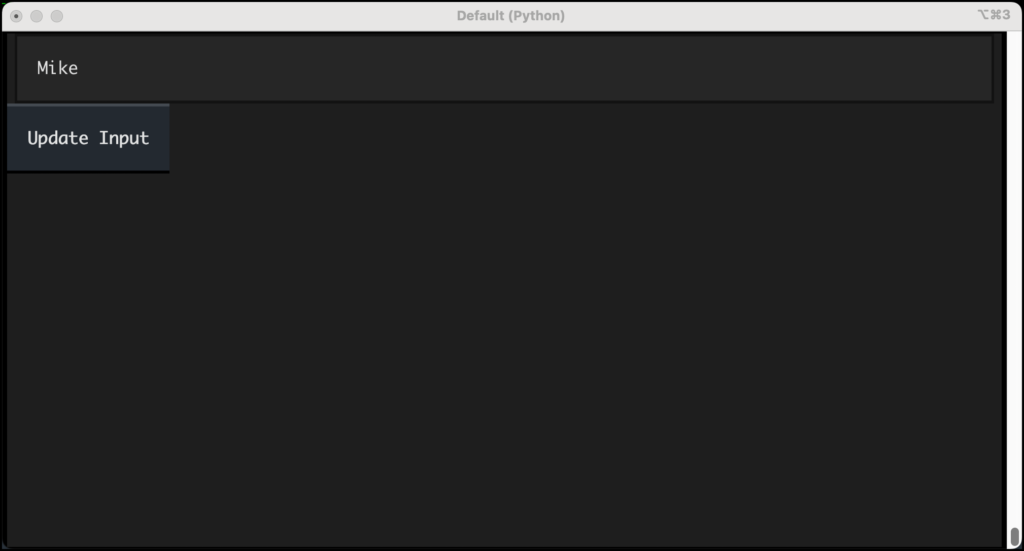
To demonstrate this in practice, developers typically begin by constructing a basic input application. Consider a simple utility script, query_input.py, which initializes an App containing an Input field and a Button. When the button is pressed, the application triggers an event handler method, on_button_pressed(). Inside this method, the developer invokes self.query_one(Input) to retrieve the active input instance, extracts its current value, formats a confirmation string, and assigns it back to the input field.
# query_input.py

from textual.app import App, ComposeResult
from textual.widgets import Button, Input

class QueryInput(App):

    def compose(self) -> ComposeResult:
        yield Input()
        yield Button("Update Input")

    def on_button_pressed(self) -> None:
        input_widget = self.query_one(Input)
        new_string = f"You entered: input_widget.value"
        input_widget.value = new_string

if __name__ == "__main__":
    app = QueryInput()
    app.run()
Beyond typing constraints, query_one() supports CSS selectors, allowing developers to target specific elements using IDs. For instance, creating a script named query_one_same_ids.py demonstrates how a Label with the ID #label can be targeted and updated independently of other components when a button is triggered.
# query_one_same_ids.py

from textual.app import App, ComposeResult
from textual.widgets import Button, Label

class QueryApp(App):

    def compose(self) -> ComposeResult:
        yield Label("Press a button", id="label")
        yield Button("Test", id="button")

    def on_button_pressed(self) -> None:
        widget = self.query_one("#label")
        widget.update("You pressed the button!")

if __name__ == "__main__":
    app = QueryApp()
    app.run()
Error Handling and Exception Management in Single Queries
Robust error handling is a cornerstone of professional software engineering, and Textual’s query system enforces strict type safety and presence checks through specialized exceptions. When a developer invokes query_one() and no matching elements are found within the DOM, Textual immediately raises a NoMatches exception. This prevents silent failures where application logic attempts to manipulate a non-existent object.
Conversely, if a CSS selector matches multiple elements in the DOM tree, query_one() follows a deterministic fallback by returning the first matching item. However, type safety is strictly enforced: if a widget matches the requested CSS selector but does not align with the specified widget class parameter—such as querying self.query_one("#label", Button) when #label is actually a Label widget—Textual intercepts the mismatch and raises a WrongType exception. This proactive exception handling assists developers in debugging layout issues during development rather than encountering unpredictable runtime bugs in production environments.
The query() Method and DOMQuery Collections for Multiple Widgets
While query_one() is ideal for pinpointing isolated elements, many application workflows require interacting with multiple components simultaneously. For these scenarios, Textual provides the query() method, which returns a DOMQuery object—a specialized, list-like container that holds references to all matching widgets.
To illustrate how broad queries operate, consider a diagnostic script, query_all.py, designed to inspect every active element inside a running application instance.
# query_all.py

from textual.app import App, ComposeResult
from textual.widgets import Button, Label

class QueryApp(App):

    def compose(self) -> ComposeResult:
        yield Label("Press a button", id="label")
        yield Button("Test", id="button")

    def on_button_pressed(self) -> None:
        widgets = self.query()
        s = ""
        for widget in widgets:
            s += f"widgetn"
        label = self.query_one("#label")
        label.update(s)

if __name__ == "__main__":
    app = QueryApp()
    app.run()
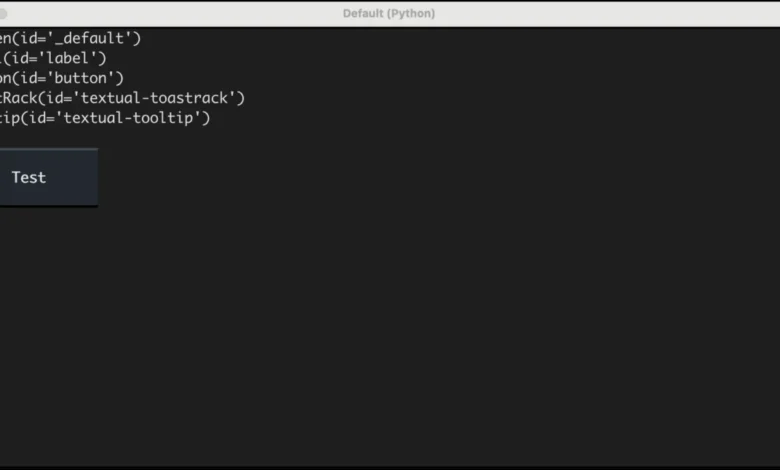
Developers new to Textual frequently experience a moment of surprise when executing this code. Rather than returning solely the explicitly yielded Label and Button widgets, the output reveals several additional underlying components. These include the mandatory Screen container, as well as utility infrastructure like the ToastRack and Tooltip widgets.
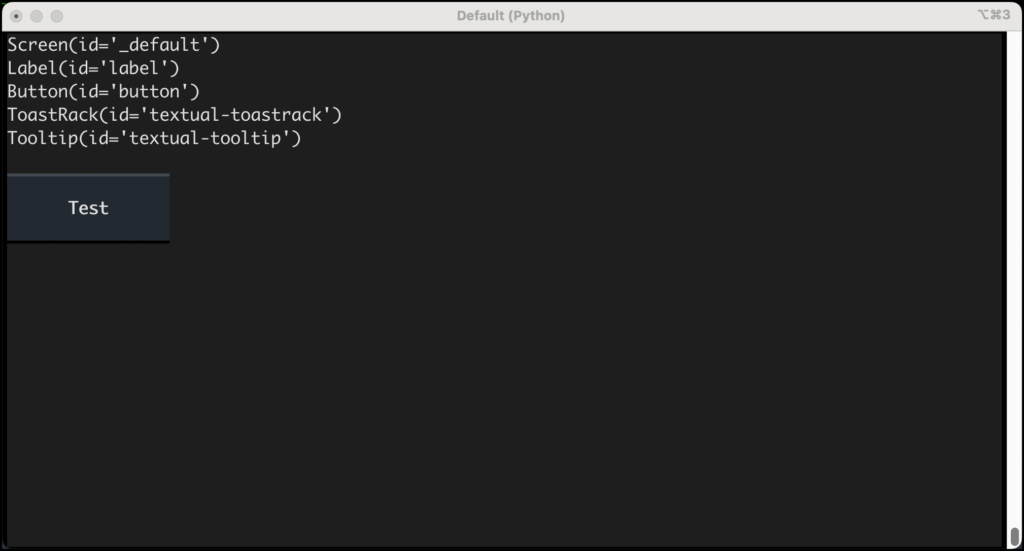
The ToastRack is an internal structural element responsible for positioning transient notification toasts, while the Tooltip manages contextual hover descriptions. The presence of these background components underscores the comprehensive nature of the Textual DOM, highlighting that an application’s interface ecosystem extends far beyond immediate user-authored elements. Furthermore, these query methods are versatile, functioning seamlessly across both App and Widget subclasses, allowing developers to scope queries locally within specific container widgets rather than globally across the entire application.
Filtering Collections with CSS Selectors and the results() Method
Just as with single-element retrieval, query() supports advanced CSS selectors to narrow down returned collections. If a developer wishes to isolate all button instances within an interface, passing the string "Button" to the query method yields a targeted iterable collection.
# query_buttons.py

from textual.app import App, ComposeResult
from textual.widgets import Button, Label

class QueryApp(App):

    def compose(self) -> ComposeResult:
        yield Label("Press a button", id="label")
        yield Button("One", id="one")
        yield Button("Two", id="two")
        yield Button("Three")

    def on_button_pressed(self) -> None:
        s = ""
        for widget in self.query("Button"):
            s += f"widgetn"
        label = self.query_one("#label")
        label.update(s)

if __name__ == "__main__":
    app = QueryApp()
    app.run()
Beyond querying by widget type, developers can filter collections using state-based CSS pseudo-classes and attributes. For instance, to locate all disabled interface elements—which can be marked using the disabled style flag or CSS attribute—developers can execute targeted queries such as widgets = self.query("Button.disabled").
To enhance code readability and static type analysis, Textual’s DOMQuery objects provide a dedicated results() method. This method acts as an alternative iteration pathway that explicitly casts elements to a specified widget type. For example, retrieving and iterating through disabled buttons can be structured as follows:
widgets = self.query(".disabled").results(Button)
s = ""
for widget in widgets:
    s += f"widgetn"
While slightly more verbose than standard iteration, utilizing the results() method offers significant advantages for large-scale Python codebases. Static type checkers like Mypy leverage the explicit type parameter in results() to accurately infer that the loop variable is a Button rather than a generic Widget. Without this explicit cast, type checkers default to the broader base class, which can obscure component-specific methods and properties during development.
Implications and Future Outlook for TUI Development
The implementation of a robust, CSS-inspired DOM and querying engine marks a maturation point for terminal-based Python development. By bridging the gap between familiar web-development concepts and command-line execution, frameworks like Textual lower the barrier to entry for developers seeking to build complex, reactive interfaces without heavy graphical frameworks.
As enterprise adoption of terminal dashboards, administrative monitoring tools, and developer utilities continues to expand, the ability to efficiently query, manipulate, and type-check UI components becomes increasingly critical. Mastery over methods like query_one(), query(), and .results() empowers software engineers to write cleaner, more resilient code, ensuring that modern TUI applications remain maintainable and scalable as their feature sets grow.