The definitive guide to selecting reliable accordion icons and optimizing mobile navigation patterns.

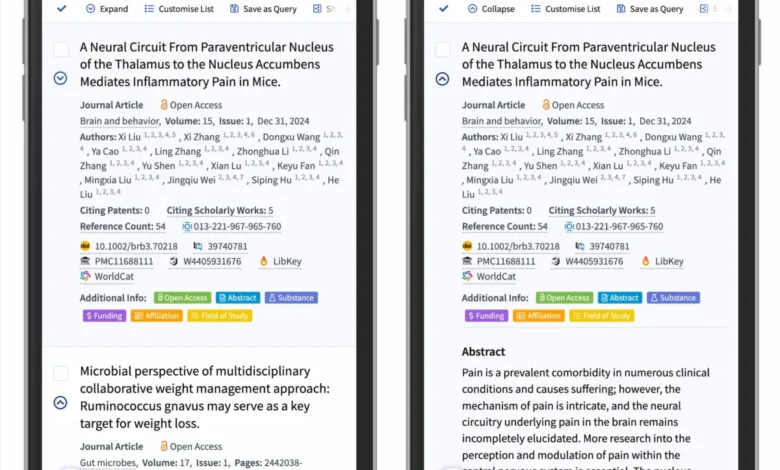
In the rapidly evolving landscape of digital interface design, the accordion—a UI element that allows users to toggle between showing and hiding content—remains a cornerstone of mobile and desktop architecture. Despite its ubiquity, recent research from the Nielsen Norman Group (NN/g) has shed light on significant usability pitfalls regarding the visual cues used to signal these interactive components. The findings suggest that designers have long over-relied on ambiguous icons, resulting in fragmented user experiences and increased interaction costs.

The Anatomy of an Accordion Interaction
An accordion menu serves as an efficient method to manage information density, particularly on mobile devices where screen real estate is limited. The fundamental design challenge lies in the "affordance" of the element: the user must intuitively understand that a specific region is expandable. Research indicates that when no icon is present, users overwhelmingly interpret the menu item as a direct link to a new page. This expectation is a byproduct of long-standing web conventions where text labels act as navigational anchors.
When designers introduce custom icons, the confusion often compounds. Users struggle to decode symbols that lack universal standardization, leading to unpredictable click behavior. Data from recent eye-tracking and interaction studies show that when ambiguous icons are used, participants distribute their clicks randomly between the icon and the text label, suggesting that the visual signal fails to distinguish the specific target area or the intended outcome of the interaction.

The Fallacy of the Split Menu
A particularly problematic pattern identified in contemporary web development is the "split menu," where the text label links to a primary category page while an adjacent icon triggers an accordion expansion. This dual-purpose design is widely regarded as a significant usability failure.
From a cognitive load perspective, split menus force users to discern between two distinct hit areas within a single component. When a user intends to navigate to a page but accidentally triggers an expansion, it creates a "frustration loop," where the user must collapse the menu before attempting to navigate again. Industry experts and accessibility advocates argue that this pattern should be avoided entirely. Instead, the most reliable architecture involves a singular interaction point. If a category page is required, it should be placed as an "Overview" link within the expanded accordion, ensuring the user’s primary intent—to see the contents of the menu—is met without the risk of an unintended navigation event.

Chronology of Icon Standardization
The evolution of iconography for expansion has historically shifted from text-based indicators to abstract symbols. In the early 2000s, it was common to see "[+]" and "[-]" indicators. By the 2010s, as mobile-first design became the industry standard, arrows and chevrons began to dominate.
However, the proliferation of these icons has led to "symbolic overload." The plus sign, for instance, has been adopted by various platforms to mean "add to cart," "save for later," "zoom in," or "add friend." Consequently, when a user encounters a plus sign in a navigation menu, they may hesitate, unsure if the interaction will expand the menu or trigger an additive function. Similarly, right-facing arrows are often confused with "forward" or "next" navigation commands, further complicating the user journey.

Comparative Effectiveness of Icons
The NN/g research provides a clear hierarchy of effectiveness for accordion indicators. The findings suggest that the caret (a simple downward-pointing triangle) is the most reliable visual signal for expansion.
- The Caret (Downward/Upward): This symbol is consistently recognized as an indicator of a collapsible section. It carries less semantic baggage than a plus sign or an arrow, making it the safest choice for designers.
- The Plus/Minus Pair: While widely understood, these symbols suffer from the aforementioned issue of being "overloaded" with other meanings across the broader web ecosystem.
- Arrows: These are the most prone to misinterpretation, as they are frequently conflated with page-to-page navigation, pagination, or sliding gestures.
The research also highlights that for simple links—items that navigate the user to a new URL—the most effective design is not an icon, but a simple underline. While this may seem visually simplistic, it adheres to the "principle of least astonishment," allowing users to immediately recognize the element as a destination rather than a container.

Implications for Modern Web Design
The broader implications of these findings reach into the core of front-end development standards. As organizations strive for higher accessibility and lower bounce rates, the shift toward standardized, predictable UI patterns is essential.
Industry leaders, such as major logistics and e-commerce platforms, have begun to move away from overly complex, icon-heavy navigation. For example, modern implementations often feature clean, text-heavy menus where icons are used sparingly and only to denote state changes. This approach minimizes the cognitive load on the user and aligns with the principles of Inclusive Design, which emphasize that interfaces should be navigable by users of all technical proficiencies.

Official Guidance and Best Practices
For developers and designers, the current industry consensus can be summarized in three core mandates:
- Prioritize Clarity: If an item is a link, treat it as a link. Use standard formatting like underlines or distinct colors, and omit icons that might distract or confuse.
- Standardize the Caret: When building accordions, adopt the caret-down/caret-up pattern as the universal standard for expansion and collapse. This minimizes user learning curves.
- Eliminate Split Hit-Areas: Simplify the interaction model by ensuring that a single tap or click initiates the intended action. If navigation is necessary, incorporate that link within the hierarchy of the menu itself.
These design principles are not merely aesthetic; they are functional. By aligning interface design with user expectations, developers can significantly reduce interaction errors and improve the overall efficiency of information retrieval on both desktop and mobile platforms.

Future Perspectives
As web interfaces continue to transition toward more complex, data-rich environments, the need for standardized iconography will only increase. Future research is expected to focus on the intersection of icon design and screen-reader accessibility, ensuring that the "hidden" logic of an accordion—whether it is expanded or collapsed—is communicated just as clearly to visually impaired users as it is to sighted users through visual iconography.
The ongoing commitment of organizations to refine these patterns is a testament to the maturation of the web. By stripping away unnecessary complexity and focusing on the reliability of the interaction, the design community ensures that the web remains a usable, accessible, and efficient tool for a global audience. The simple, humble caret, when used correctly, serves as a prime example of how small, evidence-based design decisions can have a profound impact on the end-user experience.