Mastering Textual DOM Queries Part II Advanced Methods and Bulk UI Manipulation for Python Developers

Python developers building rich terminal user interfaces (TUIs) often encounter the challenge of managing multiple interactive elements simultaneously. Following the foundational introduction to Textual DOM queries last month, developers are now looking toward more advanced techniques to streamline application state and user interface updates. The Textual framework, developed by Textualize, continues to gain traction in the Python ecosystem as the premier library for crafting sophisticated, modern terminal applications that rival desktop and web interfaces in responsiveness and design.
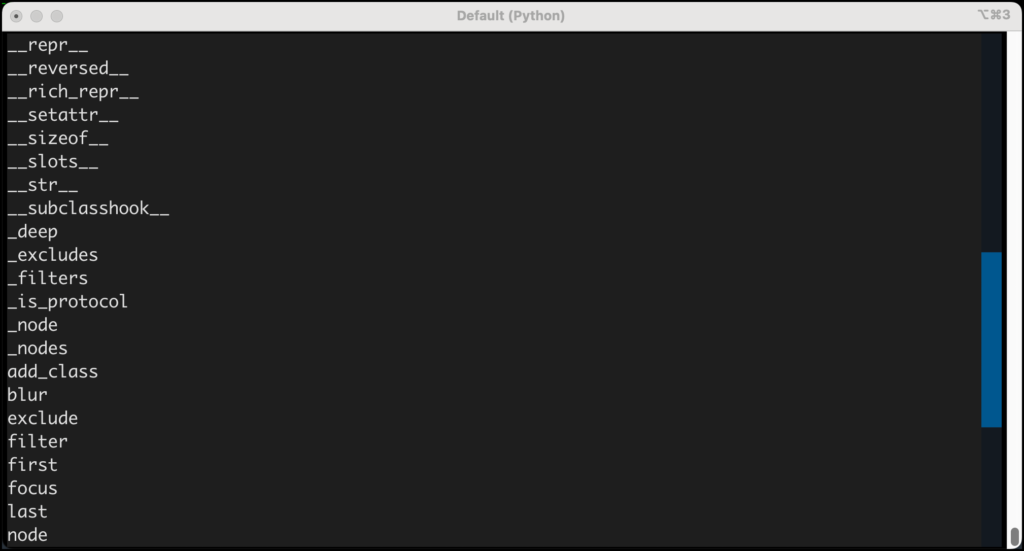
To understand the full scope of capabilities offered by Textual’s DOMQuery object, developers can inspect its internal structure using Python’s built-in dir() function. This diagnostic approach exposes a wide array of specialized methods designed to manipulate element collections efficiently. For instance, creating a diagnostic application named domquery_methods.py allows a developer to dynamically render the complete list of available operations directly inside a running TUI application.
# domquery_methods.py
import pprint

from textual.app import App, ComposeResult
from textual.widgets import Button, Label

class QueryApp(App):

    def compose(self) -> ComposeResult:
        yield Label("Press a button", id="label")
        yield Button("Get DomQuery Methods", id="one")

    def on_button_pressed(self) -> None:
        widgets = self.query("Button")
        s = ""
        s += f"type(widgets)n"
        for entry in dir(widgets):
            s += f"entryn"
        label = self.query_one("#label")
        label.update(s)

if __name__ == "__main__":
    app = QueryApp()
    app.run()
By executing this script, developers can evaluate the exact runtime attributes of the query object, paving the way for more targeted and efficient user interface management.
Navigating Element Collections with Precision
Among the most frequently utilized utilities exposed by the DOMQuery class are the first() and last() methods. While standard Python list slicing—such as utilizing widgets[0] and widgets[-1]—remains fully supported due to the iterable nature of DOMQuery objects, Textual provides these explicit methods to introduce type safety and enhanced code clarity.
To implement and observe these selection mechanisms, developers can construct a sample application designated as first_and_last.py.
# first_and_last.py

from textual.app import App, ComposeResult
from textual.widgets import Button, Label

class QueryApp(App):

    def compose(self) -> ComposeResult:
        yield Label("Press a button", id="label")
        yield Button("One", id="one")
        yield Button("Two", id="two")
        yield Button("Three", id="three")

    def on_button_pressed(self) -> None:
        widgets = self.query("Button")
        s = ""
        s += f"The first button: widgets.first()n"
        s += f"The last button: widgets.last()"
        label = self.query_one("#label")
        label.update(s)

if __name__ == "__main__":
    app = QueryApp()
    app.run()
A key advantage of utilizing first() and last() over traditional indexing is the capacity to pass an optional expect_type argument. This parameter acts as a runtime assertion mechanism. For example, executing last_button = self.query().last(Button) instructs the framework to verify that the retrieved widget matches the specified class. If the resulting element deviates from the expected type, Textual raises a WrongType exception, allowing developers to catch structural UI bugs early in the development lifecycle.
Refining Collections Through Query Filters
As terminal applications scale in complexity, monolithic query sets often require segmentation into manageable subsets. Textual addresses this requirement through the implementation of the filter() method. This functionality enables developers to extract specific widget classes from a broader, generalized query result without necessitating secondary database or state lookups.
The syntax for isolating specific components within an active application layout follows a straightforward pattern:
# Get all the widgets
widgets = self.query()
# Get the Label widgets
label_widgets = widgets.filter("Label")
# Get the Button widgets
button_widgets = widgets.filter("Button")
Conversely, developers frequently need to strip out specific elements from an existing collection rather than isolate them. The exclude() method functions as the logical counterpart to filter(). By supplying a CSS selector to exclude(), developers can instantly purge matching nodes from the active DOMQuery collection.
# Get all the widgets
widgets = self.query()
# Exclude the buttons
non_buttons = widgets.exclude("Button")
These filtering and exclusion paradigms mirror modern web development libraries like jQuery, providing a familiar and ergonomic mental model for Python developers transitioning into advanced TUI architecture.
Executing Bulk Updates Without Iteration Loops
One of the primary performance and readability bottlenecks in GUI and TUI programming is the necessity to iterate explicitly over lists of components to modify their states, styles, or properties. Textual bypasses this friction by embedding batch-processing capabilities directly into the DOMQuery interface.
Rather than writing custom for loops to modify individual widgets, developers can invoke collective methods that propagate changes across all matched nodes simultaneously. A primary illustration of this capability is the add_class() method, which allows applications to apply CSS styling classes across entire element groups in a single instruction.
self.query("Input").add_class("started")Beyond adding classes, Textual’s query sets support a broad spectrum of batch operations designed to alter visibility, focus states, CSS properties, and structural attributes across multiple widgets concurrently. Developers should consult the official Textual documentation regarding pseudo-classes and state selectors to maximize the efficiency of these bulk commands.
Industry Implications and Best Practices for TUI Development
The evolution of the Textual framework reflects a broader industry shift toward high-performance, developer-friendly terminal tooling. Historically, building robust terminal applications in Python required cumbersome low-level management of curses libraries or writing brittle, monolithic rendering loops. By introducing a reactive DOM, CSS-based styling, and powerful query engines, Textual bridges the gap between web development paradigms and systems-level terminal utilities.
Architects and senior engineers adopting Textual note that mastering DOMQuery operations significantly reduces codebase complexity. When applications scale to dozens of dynamic panels, input fields, and notification widgets, centralized batch updating prevents state synchronization bugs and enhances rendering performance.
Developers are encouraged to integrate these query methodologies progressively into their workflows. By combining type-safe retrievals via expect_type, precise subset extraction via filter(), and comprehensive state changes through bulk query methods, engineering teams can build resilient, highly responsive terminal interfaces that maintain pristine code maintainability over long-term project lifecycles.