Unleashing the Command Line: How Spiel Brings Python-Powered Presentations Directly to Your Terminal

The intersection of software engineering utilities and developer presentation tools has long been defined by heavy graphical user interface applications such as Microsoft PowerPoint, Apple Keynote, or web-based services like Google Slides and Reveal.js. However, a niche yet innovative open-source project named Spiel has reimagined how technical lectures, internal documentation reviews, and command-line demonstrations can be delivered. Developed by open-source contributor Josh Karpel, Spiel leverages the capabilities of the popular Rich terminal formatting library to render fully functional, beautifully styled slide decks directly inside a user’s command-line interface.
Despite its current archived status on GitHub—a designation indicating that the repository is no longer actively maintained by its creator—Spiel continues to attract attention from Python developers, systems administrators, and terminal enthusiasts. The project illustrates the creative potential of modern command-line user interface (TUI) libraries, proving that technical presentations do not necessarily require leaving the terminal environment. This retrospective analysis examines the technical architecture of Spiel, the methodology behind terminal-based slide generation, the broader ecosystem of Python TUI frameworks, and the implications of utilizing archived open-source software in modern software development workflows.
Background Context and the Evolution of Terminal Interfaces
For decades, the command-line interface has served as the primary nexus for systems administration, software compilation, and script execution. While early computing relied exclusively on text terminals due to hardware constraints, modern software engineering has witnessed a renaissance in terminal utility design. Developers increasingly seek to minimize context-switching between code editors, version control tools, and execution environments. Maintaining a presentation workflow within the terminal eliminates the friction of launching external window managers or web browsers during technical walkthroughs.
The technical foundation of Spiel rests upon two critical pillars of the Python ecosystem: the Rich package, developed by Will McGugan, and early iterations of Textual, a Rapid Application Development framework for Python designed to build sophisticated console applications. Rich provides developers with the ability to print rich text, syntax-highlighted code, tables, progress bars, and markdown formatting to standard output with minimal boilerplate code. By harnessing Rich’s rendering engine, Spiel abstracts the complexities of terminal coordinate geometry, allowing slides to be defined as standard Python functions that return renderable objects.
Although the GitHub repository for Spiel does not explicitly detail the exact rationale behind its archival, technical analysis of its dependency tree suggests that it relies on legacy versions of the Textual library. Because Textual underwent rapid architectural iterations and major refactoring phases, backward compatibility issues frequently emerged, making it difficult for single maintainers to keep dependent packages updated without a substantial rewrite of the underlying codebase. Nevertheless, the existing codebase remains stable, highly functional, and fully accessible for educational and practical deployment via modern containerization and virtual environment tools.
Installation Methodologies and Getting Started
For developers interested in exploring terminal-based presentations without committing to a permanent local installation, Spiel offers immediate evaluation through containerized distribution. Utilizing Docker, users can instantiate a pre-configured environment containing the runtime dependencies and sample decks maintained within the repository. Executing the container requires a single command in the host terminal:
docker run -it –rm ghcr.io/joshkarpel/spiel
This approach bypasses potential version conflicts with local Python installations, making it an ideal method for quick evaluations during technical workshops or collaborative coding sessions. For those who prefer a native integration into their local development stack, installation is handled via Python’s standard package installer, pip. Best practices dictate isolating the installation within a virtual environment to prevent pollution of global package directories. Developers can initialize and configure Spiel locally by executing the following sequence of terminal commands:
python3 -m venv spiel-env
source spiel-env/bin/activate
pip install spiel
Once the installation phase completes successfully, users can verify the integrity of the software package and observe its rendering capabilities by launching the built-in demonstration deck. Executing the command spiel demo present triggers the interactive presentation loop, rendering sample slides complete with typography adjustments, color styling, and interactive navigation controls.
Architectural Design and Slide Creation Workflow
The architectural paradigm introduced by Spiel relies heavily on decorator patterns and functional programming constructs native to Python. Unlike traditional presentation software that stores slide data in proprietary binary or compressed XML formats, Spiel treats slide decks as executable Python scripts. This enables dynamic slide generation, where content can be fetched from external APIs, calculated on the fly, or populated dynamically based on system environment variables.
To construct a basic presentation, developers instantiate a Deck object and utilize Python decorators to register functions as individual slides. Each slide function must return a renderable type recognized by the Rich formatting engine, such as strings, formatted text objects, or layout containers. The following implementation demonstrates a minimal one-slide presentation structure:
from rich.console import RenderableType
from spiel import Deck, present
deck = Deck(name="Developer Briefing")
@deck.slide(title="Introduction")
def opening_slide() -> RenderableType:
return "Welcome to the terminal-based presentation framework."
if name == "main":
present(file)
For more advanced use cases involving customized layouts, visual styling, and alignment modifications, Spiel provides granular control over slide construction through dedicated helper classes and functions. Developers can import alignment utilities and styling modules from the Rich library to center text vertically and horizontally, apply custom color palettes, and structure complex visual hierarchies.
The following comprehensive example illustrates the programmatic creation of multiple custom slides utilizing modular builder functions:
from rich.align import Align
from rich.console import RenderableType
from rich.style import Style
from rich.text import Text
from spiel import Deck, Slide, present
def make_slide(title_prefix: str, text: Text) -> Slide:
def content() -> RenderableType:
return Align(text, align="center", vertical="middle")
return Slide(title=f"title_prefix Slide", content=content)
deck = Deck("Technical Architecture Overview")
title_slide = make_slide(
title_prefix="Primary",
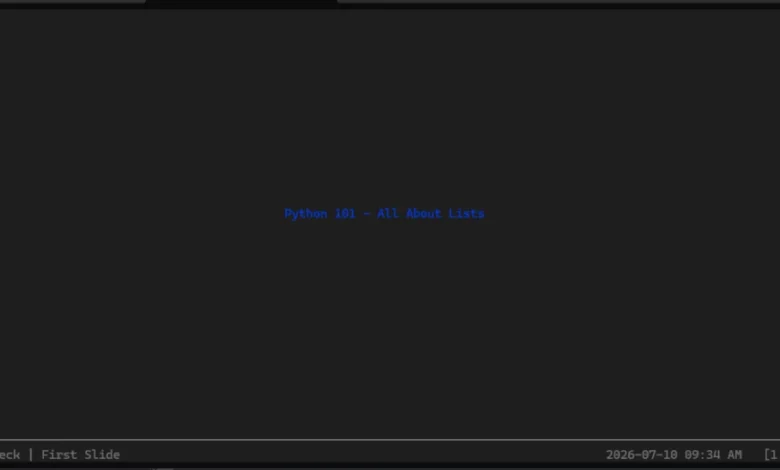
text=Text("System Architecture – Core Components", style=Style(color="blue", bold=True))
)
intro_slide = make_slide(
title_prefix="Secondary",
text=Text("Data ingestion occurs via asynchronous pipelines.", style=Style(color="green"))
)
deck.add_slides(title_slide, intro_slide)
if name == "main":
present(file)
Navigation within an active Spiel presentation is designed to mimic standard slideshow controls while remaining optimized for keyboard-driven workflows. Presenters utilize standard arrow keys to advance forward or move backward through the slide deck. Should the presenter need to terminate the session, standard interruption signals such as pressing CTRL+C immediately exit the application and restore the terminal interface to its previous state.
Ecosystem Implications and the Lifecycle of Archived Open-Source Projects
The presence of archived repositories like Spiel within the broader Python open-source ecosystem highlights a recurring phenomenon in developer tooling: projects built by single developers to solve specific, creative problems often outpace the maintainer’s available time or encounter architectural roadblocks when core dependencies evolve. Textual and Rich have experienced explosive growth and widespread adoption, establishing themselves as industry standards for terminal user interface design. However, rapid advancement in underlying frameworks can inadvertently strand dependent utilities that rely on deprecated application programming interfaces.
Despite being marked as archived on GitHub, projects of this nature retain significant educational and practical value. They serve as reference implementations for developers seeking to understand how to build custom presentation parsers, integrate terminal rendering engines, or experiment with functional UI design in Python. Furthermore, because Python is an open-source language with permissive licensing models, the community retains the legal and technical capability to fork repositories, update legacy dependencies, and revive abandoned projects to meet modern engineering standards.
Broader Impact on Technical Communication
The capability to run presentations directly inside terminal windows alters the paradigm of technical documentation and developer advocacy. Engineers delivering internal architecture reviews, live coding demonstrations, or post-mortem analyses no longer need to transition away from their integrated development environments or command-line interfaces. By keeping presentations inside the terminal, developers maintain immediate access to interactive shells, log files, and debugging utilities, allowing them to seamlessly transition from conceptual slide decks to live system demonstrations without breaking the flow of their presentation.
While Spiel may currently occupy a niche space within the open-source landscape, it stands as a testament to the versatility of the Python programming ecosystem and the creative ingenuity of independent developers. Whether utilized in its current archived state, fork-maintained by enterprise engineering teams, or studied as a design blueprint for future terminal applications, Spiel successfully demonstrates that powerful communication tools can be forged entirely out of text, code, and standard output streams.
Related posts: