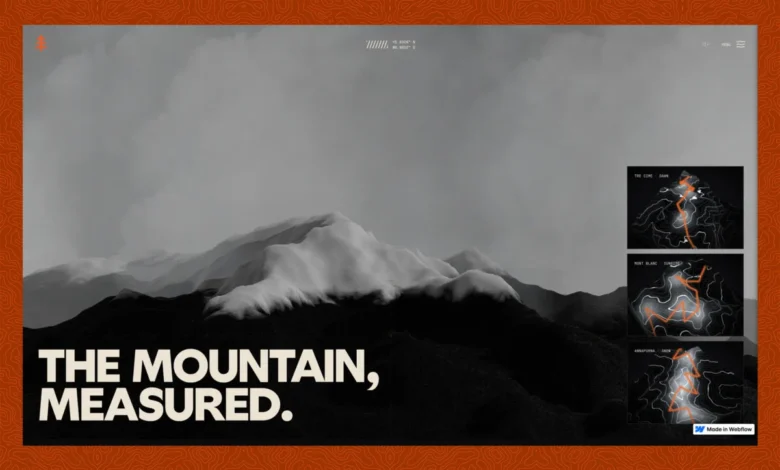
The genesis of Ridgeline stemmed from a fundamental question: could a Webflow site host truly real 3D terrain, incorporating actual elevation data (Digital Elevation Models or DEMs) draped as a survey-contour mesh and rendered live using Three.js, without resorting to pre-recorded video loops or static sprite sheets, all while preserving Webflow’s inherent editability? This ambitious inquiry laid the groundwork for an architectural journey, guided by a singular, non-negotiable principle: "I don’t care if it’s a built-in component or external JS, I want to SEE it." This rule ultimately dictated the entire technical architecture, emphasizing visual output and user experience above all else.
The Vision: A Cinematic Alpine Journey
Ridgeline invites users on a virtual expedition through three distinct "condition" scenes, each meticulously crafted from real-world geographical data. These include "Dawn," depicting a stormy Tre Cime; "Sunrise," capturing the serene blue-hour transition to pink over Mont Blanc; and "Snow," showcasing a night-blue Annapurna under falling snow. The experience is further enriched by scroll-driven photography, ambient soundscapes tailored to each environment, and an interactive atlas homepage that allows users to "fly through" the terrain with clickable scene previews. Every element, from the towering peaks to the winding paths, is represented by real geometry, all built and maintained programmatically through the Webflow Model Context Protocol (MCP), yet remaining fully editable within a standard Webflow project interface.
The authenticity of the experience is paramount. For instance, the "Dawn" trek is based on the developer’s personal hike above Cortina in the Tre Cime. The activity was recorded via Strava as a GPS track (GPX), meticulously cleaned of usual GPS spikes, and then accurately draped onto the true SRTM (Shuttle Radar Topography Mission) slope data. To ensure privacy and maintain a curated experience, only a normalized, coordinate-free version of the track is shipped, making the terrain recognizable without exposing the exact route. The "Sunrise" and "Snow" scenes, lacking personal recorded tracks, utilize plausible synthesized routes that maintain geographical accuracy.
Remarkably, the entire Ridgeline site was developed with significant assistance from artificial intelligence. Utilizing Claude (specifically Opus 4.8 and Fable 5) as an agent driving the Webflow MCP, the project came to fruition in approximately one week. This rapid development timeline, coupled with a meticulously kept build log documenting decisions, successes, and missteps, underscores the potential of AI-assisted development in complex web projects.
Architectural Decisions: Integrating Real-Time 3D into Webflow
A critical early decision involved selecting the optimal method for embedding React components, which housed the Three.js 3D rendering engine, into Webflow. Two primary routes were considered: Webflow’s native Code Component (deployed via DevLink or a shared library) or a self-hosted JavaScript embed.
Webflow’s Code Component offers a first-class element experience within the Designer, making it ideal for standard UI-shaped components. However, Ridgeline’s core requirement—a single, heavy WebGL bundle encompassing its own build step, Three.js, a Blender-baked asset pipeline, and R2-hosted GLBs—presented a formidable challenge for any component system. The sheer machinery involved led the developer to favor a self-hosted JS embed. While this approach meant sacrificing the drag-and-drop convenience of a Designer element, it provided the necessary control and flexibility for such an intensive 3D application. This trade-off was mitigated by implementing an attribute-driven mounting system, where the embed actively sought host elements (e.g., [data-terrain-scene] or [data-terrain-card]) placed by the designer, thereby allowing the designer to retain layout control while the code managed the 3D content. This method exemplifies a pragmatic balance between designer autonomy and complex technical requirements.

Automated Site Building with Webflow MCP and AI
One of the most surprising and impactful aspects of the Ridgeline project was the utilization of the Webflow Model Context Protocol (MCP) server, entirely driven by an AI agent (Claude). This allowed the entire site—including pages, components, classes, CSS, variables, custom code, SEO settings, and publishing—to be built and maintained programmatically. Crucially, the output remained a completely normal Webflow project, fully editable by a human designer.
The governing principle established for this workflow was clear: markup and CSS reside within the Webflow Designer as named components and classes, while behavior, 3D rendering, and animation logic are housed in versioned JavaScript hosted on Cloudflare R2. This separation of concerns ensured that the Designer focused on structural and aesthetic elements, with the CDN handling dynamic behavior.
The implementation also highlighted a key distinction in Webflow’s custom code capabilities. Registered scripts (via the Scripts API for injected JS) are suitable for code that runs after initial page load. However, anything requiring execution at "first paint" – such as preventing a visual flash – necessitated placing raw HTML/CSS directly into the head/footer custom code section. This granular understanding of Webflow’s execution pipeline was vital for achieving a polished user experience.
The 3D Pipeline: From Real-World Data to WebGL
The project’s commitment to "real" geometry was non-negotiable. Each terrain within Ridgeline is derived from genuine DEMs, specifically SRTM elevation datasets corresponding to actual massifs. This data is then meticulously modeled in Blender, a powerful 3D creation suite, before being exported to glTF (GL Transmission Format) – an efficient, open-standard format for 3D scenes and models – and subsequently loaded into Three.js for real-time rendering in the browser.
The pipeline is a testament to careful engineering:
- Data Acquisition: Real-world DEMs (e.g., GeoTIFFs from sources like USGS or local geological surveys) are the foundation.
- Blender Integration: The DEMs are imported into Blender, where they are cleaned, refined, and sculpted to create the desired aesthetic and optimize for web performance. The process includes baking modifiers to simplify geometry.
- glTF Export and Compression: From Blender, the models are exported to glTF. A crucial step here is the application of Draco compression, which significantly reduces file sizes (e.g., from 11 MB to approximately 1 MB for static meshes), addressing potential download bottlenecks. Parameters like
export_yup(for Blender’s Z-up to Three.js’s Y-up conversion) andexport_draco_mesh_compression_levelare carefully tuned. - Cloudflare R2 Hosting: The compressed glTF files are hosted on Cloudflare R2, ensuring fast global content delivery.
- Three.js Loading: Three.js then loads and renders these optimized GLBs in the browser.
Notably, even the Blender workflow was integrated into the agentic setup, with Claude assisting in model tweaks directly within Blender, eliminating manual UI round-trips. The resulting glTF files, ranging from 540-580 KB each after Draco compression, proved small enough that download speed was never a performance constraint. The true challenges lay in GPU and main thread optimization, which became the focus of subsequent development phases.
The Art of the Survey-Map Aesthetic: Shader Magic

A standout visual feature of Ridgeline is its distinctive survey-map aesthetic, achieved entirely through a single fragment shader rather than relying on multiple textures. This shader dynamically reads the mesh’s world-space height to generate contour lines, hillshading, and snow lines. The key to maintaining crisp contour lines at any camera distance lies in the fwidth() GLSL function, which calculates the anti-aliasing width in screen space based on the rate of change of the band index. This ensures lines remain a consistent one pixel wide regardless of zoom level.
The shader also implements "index" contours, where every Nth line is bolder, mimicking classic topographical maps. Hillshading is derived from the surface normal, and elevation tints dynamically color the terrain, transitioning to a distinct snow color above a specified snow line. The beauty of this approach is that all three scenes—Dawn, Sunrise, and Snow—share the same shader, differentiated only by a distinct set of uniform variables (ground and contour colors, snow strength, light direction). A subtle but effective touch is a per-pixel dither, which eliminates 8-bit banding artifacts that can appear in subtle gradients, particularly in darker scenes like "Dawn."
Fluid Motion: Scroll-Driven Animation Without Re-renders
Animation in Ridgeline is entirely scroll-driven, adhering to a strict performance rule: React never re-renders on scroll. Instead, scroll progress is stored in a mutable ref and accessed within the Three.js render loop, decoupling animation updates from React’s rendering cycle. This architecture, leveraging libraries like Lenis for smooth scrolling and GSAP (GreenSock Animation Platform) with ScrollTrigger for intricate timeline control, ensures buttery-smooth animations.
One specific animation challenge involved a "frame-collapse" section, where a full-screen image transitions into a smaller 4:5 plate. The pitfall here was animating width and height, which would force object-fit to re-crop every frame, leading to visible jumps. The elegant solution involved fixing the element to a 4:5 aspect ratio, sized once to cover the viewport, and animating it purely through transform: scale. This approach eliminates per-frame layout calculations and re-cropping, ensuring a fluid visual transformation. Another lesson learned was the importance of ensuring any mid-scroll CSS animation starts from the element’s resting (identity) state to prevent abrupt visual "pops."
Seamless User Experience: Addressing the "Seams"
While the 3D rendering and animations form the core of Ridgeline, the developer found that most development time was consumed by perfecting the "seams"—the transitional moments between states—which are crucial for a polished user experience.
A common challenge is the "first-paint flash" on hard reloads, where a plain background momentarily appears before the preloader. This is a timing issue: injected JavaScript runs after the browser has already painted the raw HTML. The fix involved placing synchronous CSS in Webflow’s head custom code, specifically an #topo-fp-guard style that sets a dark background and hides all body content until the JavaScript takes over. A failsafe timeout ensures the page doesn’t remain blank indefinitely if JS fails to load.
Another critical "seam" is the audio gate. Modern browsers block autoplaying audio until a user gesture. Ridgeline gracefully handles this by ending its preloader with an explicit "Enter" or "Enter-muted" choice, which serves as the necessary user gesture to unlock the ambient audio bus. This prevents console errors and ensures audio integrates seamlessly into the experience. The ambient sound design itself is subtle, designed to be missed if absent rather than overtly noticed, enriching the atmosphere without distracting the user.

Fluid Navigation: Page Transitions Without Frame Drops
Navigating between the different alpine scenes in Ridgeline is a masterclass in seamless transitions, utilizing a PJAX (pushState AJAX) swap beneath a WebGL "flood" cover—a topographic-contour reveal that sweeps in, holds, and then drains. The architectural linchpin here is the use of a single, persistent WebGL context. Navigation swaps only the scene data (setScene), critically avoiding the costly tear-down and re-creation of the canvas, which often leads to evicted contexts and jarring black flashes.
A more subtle performance issue arose when the "flood" cover drained prematurely upon a new mesh being parsed, but before its material’s shader had fully compiled. This caused the shader compilation to stall the main thread during the visible reveal. The solution involved compileAsync, a Three.js feature that leverages the parallel-shader-compile WebGL extension. This offloads the heavy shader compilation work to a separate thread, allowing the reveal to draw an already "warm" scene. A fallback timeout ensures the transition never hangs indefinitely. This same technique is applied to pre-warm the summit-cairn scene before it scrolls into view, eliminating a noticeable one-second freeze.
The Pursuit of 60 FPS: Performance Through Omission
Achieving a locked 60 frames per second (fps) across the Ridgeline experience was a journey of relentless optimization, largely guided by the principle of "stop doing work that doesn’t change a pixel." The developer built a custom in-page FPS profiler, activated by a keypress, which bucketted frame rates by scroll depth and labeled sections (e.g., min 34 @ 46% (Frames)). This precise feedback allowed for targeted performance improvements.
Key performance wins, all achieved without compromising visual quality, included:
- Off-screen Culling: Critically, the site avoids animating anything that is not currently visible on screen.
- Web Workers for Heavy Lifting: Complex JavaScript tasks, such as GLB parsing, were offloaded to web workers, freeing up the main thread.
- GPU-Driven Effects: Snowfall, for example, is entirely GPU-driven. Particle positions are uploaded once, and the shader handles the falling and wrapping logic, minimizing CPU overhead.
- DOM Optimization: Redundant CSS transforms on DOM elements were identified and removed, reducing layout thrashing.
- Renderer Pre-warming: The Three.js renderer was pre-warmed to avoid initial jitters.
These optimizations yielded significant improvements: homepage intro canvas performance jumped from 46fps (min 33) to a stable 60fps (min 56); the Snow scene’s snowfall went from 37fps to 60fps; a ~1000ms freeze on the Summit reveal was eliminated; and footer entrance frame rates dramatically improved from a minimum of 7fps to 57fps. The overarching lesson was clear: the fastest frame is the one that doesn’t do work, emphasizing removal and efficiency over clever but heavy implementations.
Content Management and SEO: Bridging Code and Creativity
Despite its technical sophistication, Ridgeline maintains a practical approach to content management. While the core scene pages are static, the site incorporates a Webflow CMS Collection for its gallery, ensuring editorial content remains easily editable within Webflow’s familiar interface, rather than being hard-coded. The integration pattern involves the designer placing data-cms-host elements, which the embed then queries via the CMS API to populate dynamically.

This approach pays dividends in discoverability. By prioritizing clean semantic markup, unique per-page titles and meta descriptions, and the fast Core Web Vitals achieved through rigorous performance optimization, Ridgeline is designed to be highly appealing to search crawlers and AI answer engines (AEO). The combination of real content in real HTML, delivered at high speed, ensures optimal readability for both human users and automated systems.
Reflections and Future Implications
The Ridgeline project serves as a compelling case study in pushing the boundaries of web development. The developer’s reflections offer valuable insights: for simpler projects, Webflow’s native Code Component might be preferred. However, for complex 3D scenes, establishing a robust asset pipeline from the outset is crucial. The early integration of an in-page profiler is also highlighted as a critical tool for iterative performance optimization.
The overarching lesson, reiterated throughout the development process, is that "it compiles" is not "it’s done." The true test of any web experience lies in its actual rendered performance on screen. The jumps, flashes, and frame drops that were invisible in the code became glaringly obvious during real-world testing, emphasizing the importance of user-centric observation and continuous refinement.
Ridgeline stands as a testament to the evolving landscape of web design, demonstrating that even sophisticated real-time 3D experiences, traditionally confined to specialized game engines or custom frameworks, can be built and managed within a low-code platform like Webflow, especially when augmented by AI and a deep understanding of web performance principles. It signals a future where immersive, interactive web experiences become more accessible to designers and developers, blurring the lines between traditional web design and high-fidelity interactive media. This project not only showcases technical prowess but also charts a potential course for the next generation of web development, where creativity, performance, and accessibility converge to deliver truly captivating digital journeys.