React Native 0.87 Arrives with Strict TypeScript Default, Experimental SwiftPM Support, and Raised Toolchain Requirements

The release of React Native 0.87 marks a significant milestone for the popular cross-platform mobile development framework, introducing architectural shifts, updated core tooling, and modernized baseline requirements. Announced today, version 0.87 transitions the Strict TypeScript API to the default JavaScript interface, updates Metro to version 0.87, introduces experimental support for the Swift Package Manager (SwiftPM), and elevates minimum toolchain requirements across both Android and Node.js environments. These updates collectively point toward a more robust, standardized, and performant ecosystem for mobile developers building native applications using JavaScript and TypeScript.
Background and Context of the Release
React Native has continually evolved since its open-source debut by Meta, shifting from a framework reliant on dynamic JavaScript bridges to a more strongly typed, highly optimized architecture built around the New Architecture and Fabric renderer. The journey toward strict typing began in earnest with version 0.80, which initially rolled out the Strict TypeScript API as an opt-in preview alongside the deprecation of deep imports.
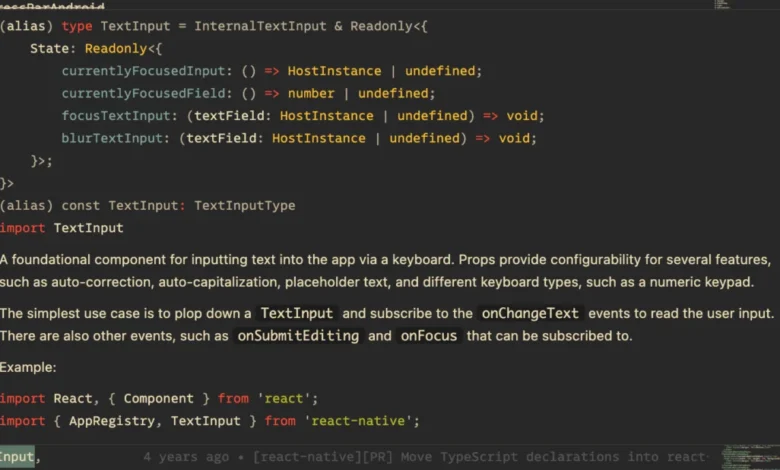
Over the subsequent development cycles, the core team worked alongside community partners and library maintainers to refine root exports, eliminate compatibility roadblocks, and establish clearer boundaries for public APIs. Version 0.87 represents the culmination of this collaborative refinement, making strict typing the default standard for all fresh and upgraded projects. By enforcing strict types out of the box, the framework aims to reduce runtime errors, improve code predictability, and elevate the developer experience through comprehensive, glanceable hover documentation directly inside modern Integrated Development Environments (IDEs) like Visual Studio Code.
Strict TypeScript API Behaviours and Breaking Changes
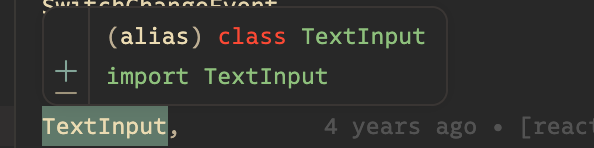
The transition to the Strict TypeScript API as the default setting alters how developers interact with core components and symbols. Under the legacy typing system, hovering over components such as TextInput often yielded minimal or absent documentation. With the Strict API, developers gain access to full type information and rich doc comments directly within their IDE tooltips.
However, moving to a strict typing paradigm inherently introduces breaking changes across the public API surface. These changes require code modifications in existing applications, particularly for projects that previously relied on deep imports or legacy type definitions. To assist development teams with this transition, the React Native maintainers have provided detailed migration guides. Furthermore, agent-driven upgrades can leverage automated skills such as the /migrate-to-strict-api tool, which pairs direct migration instructions with existing ESLint fixers to streamline the process.
Recognizing that enterprise applications and third-party library ecosystems require time to adapt, the core team has implemented a temporary opt-out mechanism. Developers who are not yet ready to migrate can revert to the previous behavior through version 0.88 by adding the "react-native-legacy-deep-imports" custom condition to their project’s tsconfig.json file under compiler options. The React Native maintainers have explicitly stated that this opt-out bridge is temporary and that legacy TypeScript types will be permanently removed in the release following 0.88.
Experimental Swift Package Manager (SwiftPM) Integration on iOS

One of the most anticipated additions in React Native 0.87 is the introduction of experimental support for the Swift Package Manager (SwiftPM) as an alternative to CocoaPods on Apple’s iOS platform. CocoaPods has long served as the default dependency manager for iOS development within the React Native ecosystem, but it relies heavily on a Ruby-based toolchain that can occasionally introduce friction during environment configuration and project builds.
The new SwiftPM integration is fully opt-in and additive, meaning CocoaPods remains both the default and fully supported path for iOS builds. Crucially, the SwiftPM workflow consumes the exact same prebuilt XCFrameworks that React Native already publishes. Transitioning an existing or new application requires Xcode alone, effectively removing the dependency on Ruby, Bundler, and CocoaPods for developers opting into the new workflow.
Developers can integrate SwiftPM into their projects using a dedicated CLI command: npx react-native spm --deintegrate. This command carefully injects Swift package references directly into the existing .xcodeproj file without overwriting the project structure, ensuring that app signing, capabilities, and build phases remain untouched. Reversing the process is similarly straightforward using the corresponding deinit command.
A notable advantage of the SwiftPM implementation is its automated handling of dependency changes. Unlike traditional CocoaPods workflows that require developers to repeatedly run pod install whenever native packages are added or removed, SwiftPM detects modifications automatically during the build phase and triggers autolinking in the background.
To support SwiftPM successfully, the core engineering team had to fundamentally rethink how precompiled binaries are shipped. Because SwiftPM enforces much stricter structural requirements regarding XCFramework architecture and header locations than CocoaPods, version 0.87 introduces dedicated header-only frameworks. This ensures standard framework and header search path mechanics resolve correctly, giving every namespace a single physical home. While header contents remain byte-identical to previous source pods, developers may need to update bare-form angle includes to explicit namespace forms—for example, shifting from #import <RCTAppDelegate.h> to #import <React/RCTAppDelegate.h>.
Ecosystem Tooling Updates: Metro and Android Gradle Plugin (AGP) 9
Performance and build-system modernizations form another core pillar of the 0.87 release. Metro, the JavaScript bundler optimized for React Native, has been updated from version 0.84 to 0.87. This update brings internal performance enhancements, faster bundling speeds, and improved memoization, resulting in a leaner development loop.
On the Android side, React Native 0.87 introduces official support for the Android Gradle Plugin (AGP) 9.0. As a major release from Google, AGP 9.0 brings substantial API modifications and breaking changes to Gradle-based Android builds. To ensure a smooth transition across the ecosystem, the React Native maintainers recommend that developers temporarily opt out of built-in Kotlin and the new DSL API behaviors bundled with AGP 9. These opt-outs can be managed by adding specific flags (android.builtInKotlin=false and android.newDsl=false) to the project’s android/gradle.properties file. These compatibility flags will remain supported until AGP 10.x, giving library maintainers adequate time to refactor their Gradle scripts.
Raised Minimum Toolchain Requirements
To support modern language features, security standards, and performance optimizations, React Native 0.87 significantly raises the baseline requirements for developer toolchains. Upgrading to this release mandates the following minimum versions:
- Node.js 22 or higher
- Android Gradle Plugin (AGP) version 9
- Kotlin 2.0 or higher
These elevated requirements reflect the broader software industry’s movement toward modern runtime environments. Node.js 22 brings performance improvements to the build tooling, while Kotlin 2.0 provides advanced language features and compiler optimizations essential for native Android integration within modern React Native architectures.
Community Contributions and Upgrade Pathways
The delivery of React Native 0.87 is the result of a concerted community effort, incorporating 265 commits contributed by 74 individual developers. The core maintainers extended official acknowledgements to the community members who delivered significant architectural contributions, bug fixes, and documentation updates leading up to the stable launch.
With the release of version 0.87, the older 0.84.x release line officially moves to an unsupported status in accordance with React Native’s established support policy. Developers seeking to upgrade existing applications are advised to utilize the official React Native Upgrade Helper to inspect exact code diffs and configuration adjustments required for their specific project setups.
For newly initialized applications, developers can generate an 0.87 project directly using the community CLI:
npx @react-native-community/cli@latest init MyProject --version latest
Meanwhile, projects utilizing the Expo framework can expect React Native 0.87 to roll out as part of upcoming canary releases, allowing Expo developers to test the new strict types, updated Metro bundler, and experimental SwiftPM capabilities within managed workflows.
Broader Implications and Industry Outlook
The release of React Native 0.87 underscores the framework’s ongoing maturity and its alignment with modern software engineering standards. By establishing strict typing as the default, Meta and the React Native community are addressing long-standing enterprise concerns regarding code maintainability and large-scale refactoring safety.
Furthermore, the introduction of experimental Swift Package Manager support signals a pragmatic approach to reducing friction in iOS development environments. By offering an alternative to CocoaPods that relies purely on Xcode and prebuilt XCFrameworks, React Native is bridging the gap between cross-platform convenience and native Apple ecosystem tooling standards. As developers and library maintainers adopt these new standards over the coming months, version 0.87 is expected to pave the way for faster, safer, and more streamlined mobile application development across both iOS and Android platforms.