JetBrains Revolutionizes IntelliJ Platform Plugin Development with Unified Web-API-Based Generator in IntelliJ IDEA 2026.1

The landscape of plugin development for the IntelliJ Platform has undergone a significant transformation with the release of IntelliJ IDEA 2026.1. This pivotal update introduces a new web-API-based IDE plugin generator, designed to streamline the creation of new IntelliJ Platform plugins by consolidating and enhancing previous methodologies. This strategic shift aims to substantially reduce maintenance overhead for JetBrains while simultaneously providing a smoother, more consistent, and robust experience for the global community of plugin developers. The integration of this modern generator represents a forward-looking step, addressing long-standing challenges and setting a new trajectory for the future evolution of the platform’s extensive plugin ecosystem.
A New Era for Plugin Creation
Prior to this significant architectural overhaul, developers seeking to extend the functionality of JetBrains IDEs had two distinct, yet often disparate, pathways for initiating new plugin projects. Each method presented its own set of advantages and limitations, leading to complexities in maintenance and occasional developer confusion. The first approach involved the integrated IDE plugin generator, accessible within IntelliJ IDEA versions 2025.3 and older, following the installation of the Plugin DevKit plugin. This in-IDE wizard, found under File | New | Project… within the Generators section, offered a guided process. Developers could select the plugin type, choosing between a regular plugin or a theme, and, for regular plugins, specify additional dependencies. These dependencies ranged from foundational components like the Language Server Protocol (LSP) and Database Tools and SQL, to various language-specific plugins, allowing for tailored project scaffolding directly within the development environment.
The second widely adopted method was the IntelliJ Platform Plugin Template, hosted on GitHub. This template-based solution provided a preconfigured starting point for plugin projects, notable for its robust integration with modern development workflows. Key features included ready-to-use GitHub Workflows, which automated common tasks such as continuous integration and deployment, alongside pre-defined issue templates that facilitated bug reporting and feature requests, and Dependabot configuration for automated dependency updates. While offering excellent integration with Git-based collaboration and CI/CD pipelines, this template lacked the interactive dependency selection found in the IDE generator, requiring manual configuration post-generation for more complex plugin requirements.
Addressing Previous Challenges and Inconsistencies
The existence of these two parallel approaches, while seemingly offering flexibility, ultimately imposed significant operational and strategic burdens on JetBrains. The most immediate challenge was the doubled maintenance cost. Any update to the IntelliJ Platform, introduction of new APIs, or changes in the default plugin setup necessitated updates to both the IDE plugin generator and the GitHub template. This dual-maintenance requirement consumed valuable engineering resources and introduced potential discrepancies between the two generation methods.
Furthermore, the in-IDE plugin generator, being part of the Plugin DevKit plugin, was subject to its own release cycle. This meant that any enhancements or fixes to the generator required a new release of the Plugin DevKit, which users then had to manually update. The inherent lag in user adoption, where developers might continue using older IDE and Plugin DevKit versions, often resulted in them missing out on the newest template versions and critical updates, leading to outdated project structures and potential compatibility issues. This asynchronous update mechanism created a fragmented user experience, where the "latest" plugin template might not be immediately available or consistently applied across the developer base.
Beyond maintenance and versioning, the functional disparities between the two systems contributed to developer friction. The IDE plugin generator’s strength lay in its ability to select additional platform dependencies directly through a user-friendly wizard, a crucial feature for tailoring plugins to specific IDE functionalities. Conversely, the GitHub template excelled in providing out-of-the-box GitHub integration, simplifying version control, collaboration, and automated testing. This functional divergence meant developers often had to choose between convenience of dependency selection and the benefits of integrated CI/CD, or worse, manually combine features from both, adding unnecessary complexity to the project initialization phase. The lack of a unified, comprehensive solution often left developers grappling with the question of which entry point was superior, wasting time and potentially leading to suboptimal project setups.
Embracing a Unified Web-API Approach

To decisively address these multifaceted challenges, JetBrains drew inspiration from established industry precedents in modern software development. Popular frameworks such as Spring Initializr for Spring Boot projects and the Quarkus project generator have successfully pioneered the use of web-APIs for project scaffolding. These services enable developers to generate tailored project structures not only directly from web browsers but also seamlessly from integrated development environments that consume these APIs for project creation. This model ensures that the project generation logic resides in a centralized, always-up-to-date service, which can then be accessed by various clients.
JetBrains has adopted this highly effective architectural pattern, culminating in the development and launch of the IntelliJ Platform Plugin Generator, now publicly accessible at https://plugins.jetbrains.com/generator. This new generator represents a confluence of the best features from its predecessors, packaged into a single, cohesive, and easily maintainable system. The core principle behind this innovation is to centralize the project generation logic on a web service, ensuring that all client applications—whether an IDE or a web browser—always interact with the most current version of the generator.
The strategic benefits of this new, unified IDE plugin generator are profound and far-reaching. Firstly, it establishes a truly consistent experience across all plugin developers, irrespective of their chosen access method. Whether initiating a project from within IntelliJ IDEA or through a web browser, developers are presented with the same set of options and receive a project configured with the latest templates and best practices. Secondly, the centralization of the generation logic drastically reduces JetBrains’ maintenance overhead, as updates only need to be applied to a single service rather than multiple disparate systems. This efficiency gain allows JetBrains’ engineering teams to focus more on feature development and less on replication and synchronization. Thirdly, the web-API ensures that templates are always up-to-date. As soon as a change is deployed to the generator service, it is immediately available to all users, eliminating the versioning lag experienced with the old Plugin DevKit. Finally, by combining the previously disparate functionalities, the new generator offers a richer feature set from the outset, including both comprehensive plugin dependency selection and robust GitHub integration, thereby eliminating the need for developers to compromise or manually bridge gaps between tools.
A comparative analysis starkly illustrates the superior capabilities of the new generator. Where the old IDE plugin generator offered IDE access and plugin dependency selection but lacked browser access and GitHub integration, and the IntelliJ Platform Plugin Template provided browser access and GitHub integration but not IDE access or dependency selection, the new IDE plugin generator comprehensively delivers on all four critical features. This "best of both worlds" approach ensures that developers are equipped with a powerful, flexible, and fully featured tool from the very inception of their plugin projects.
Accessing the New Generator: IDE and Web Clients
The new IntelliJ Platform Plugin Generator is accessible through two primary client interfaces, each catering to different developer preferences and workflows, yet both powered by the same underlying web API.
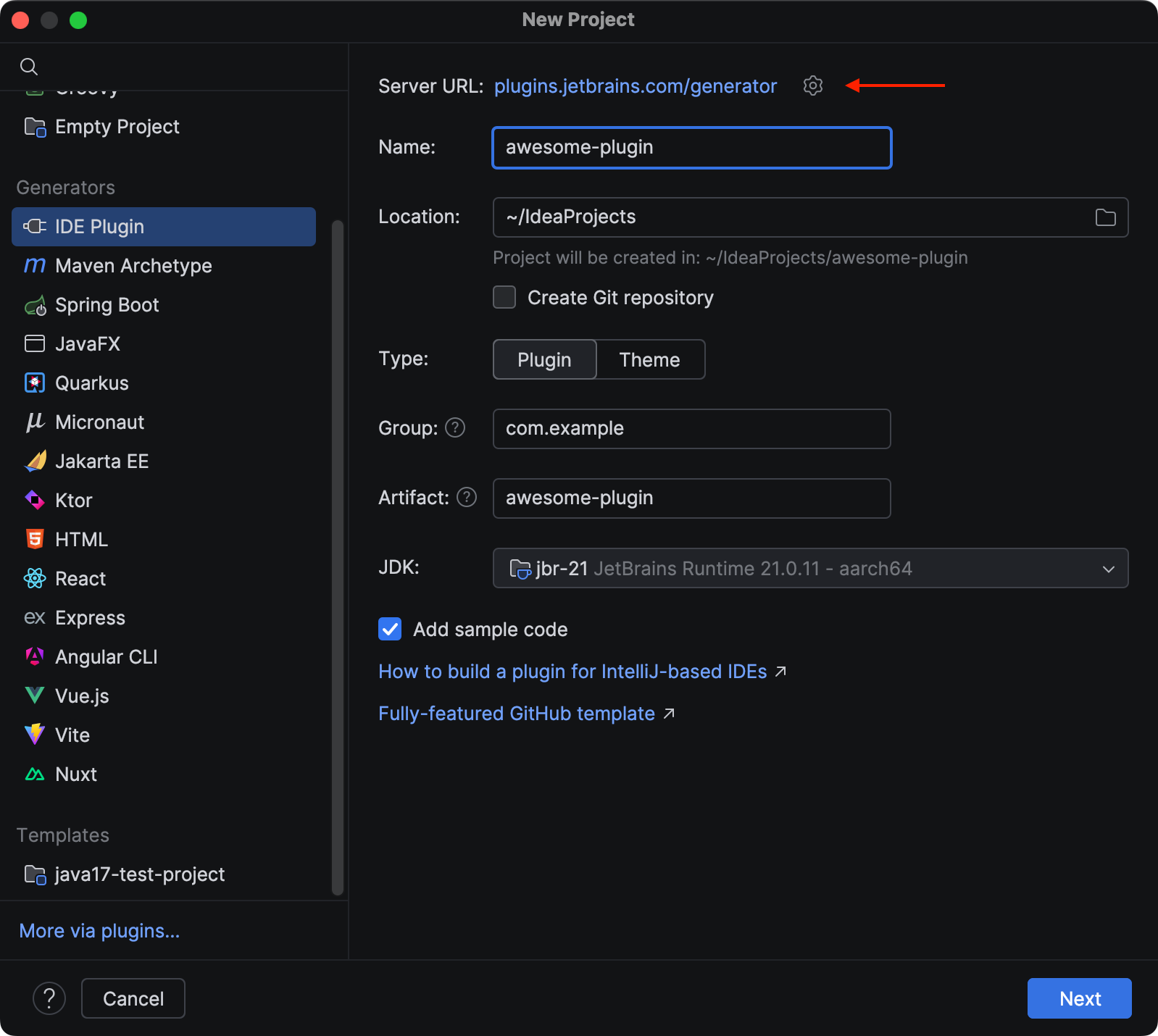
The IDE client is integrated directly into IntelliJ IDEA 2026.1 and later versions, occupying the familiar location previously used by the standalone generator. Developers can navigate to File | New | Project… and select the IDE Plugin item within the Generators section. While the overall user flow remains intuitive, a subtle but significant UI enhancement is immediately visible on the initial page: the inclusion of a "Server URL" field. This field displays the endpoint of the API powering the generator, offering transparency and, crucially, allowing users to open the corresponding web UI page directly in their default system browser with a single click. The subsequent pages of the wizard maintain a familiar layout, allowing developers to define project name, group ID, artifact ID, and select the target IntelliJ Platform version. However, the "Features" list, where additional dependencies are chosen, has been significantly enhanced. Beyond the previously available options like LSP support or Database Tools, the new generator introduces additional capabilities such as "Task Management" integration, which simplifies linking plugin features to task tracking systems, and "Performance Testing" scaffolding, providing a baseline for ensuring plugin efficiency and responsiveness. This expanded feature set empowers developers to build more comprehensive and integrated plugins from the very beginning.
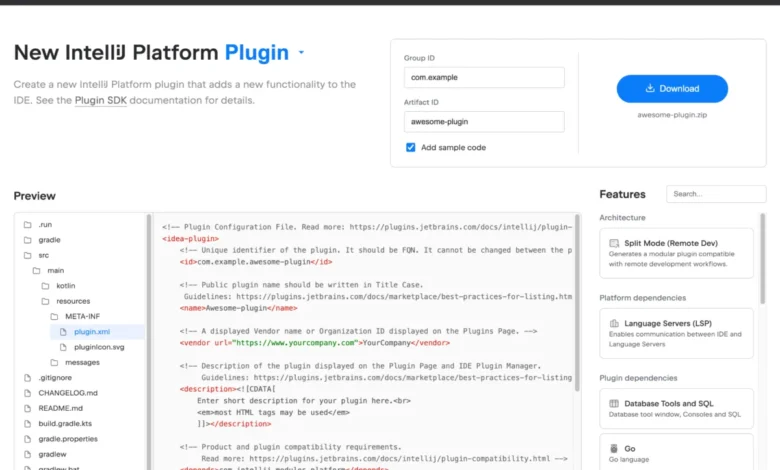
Complementing the IDE client is the Web UI, available directly via https://plugins.jetbrains.com/generator. This browser-based interface provides full parity with the IDE client’s functionality, enabling developers to generate and download complete plugin projects without needing to launch an IDE. The web UI features a clean and straightforward design. Users can select the desired plugin type—either a standard "Plugin" or a "Theme"—from a prominent header. Below this, a comprehensive list of features allows developers to pick and choose the components they wish to include in their generated project, mirroring the options available in the IDE. A particularly useful aspect of the web UI is the "Preview" area, which dynamically displays the project file structure and content based on the selected options. This real-time feedback helps developers understand how their choices impact the generated output, aiding in informed decision-making. Once all necessary project details are provided and features selected, a prominent "Download" button initiates the generation process, providing a ZIP archive of the complete plugin project, ready to be opened and further developed in any JetBrains IDE. This web-first approach not only enhances accessibility but also caters to developers who prefer to configure their projects outside the IDE or are working on machines without a full IDE installation.
Strategic Implications and Future Roadmap
The introduction of the new web-API-based IDE plugin generator is more than just a technical upgrade; it represents a strategic evolution in JetBrains’ commitment to fostering a vibrant and robust IntelliJ Platform ecosystem. By simplifying and standardizing the plugin creation process, JetBrains aims to lower the barrier to entry for new developers, thereby encouraging greater community participation and innovation. A thriving plugin ecosystem directly enhances the value proposition of JetBrains IDEs, attracting more users and reinforcing the platform’s leadership in developer tools. The consistency and ease of use offered by the new generator are expected to translate into higher quality plugins, as developers can focus more on their core logic rather than boilerplate setup and configuration challenges.
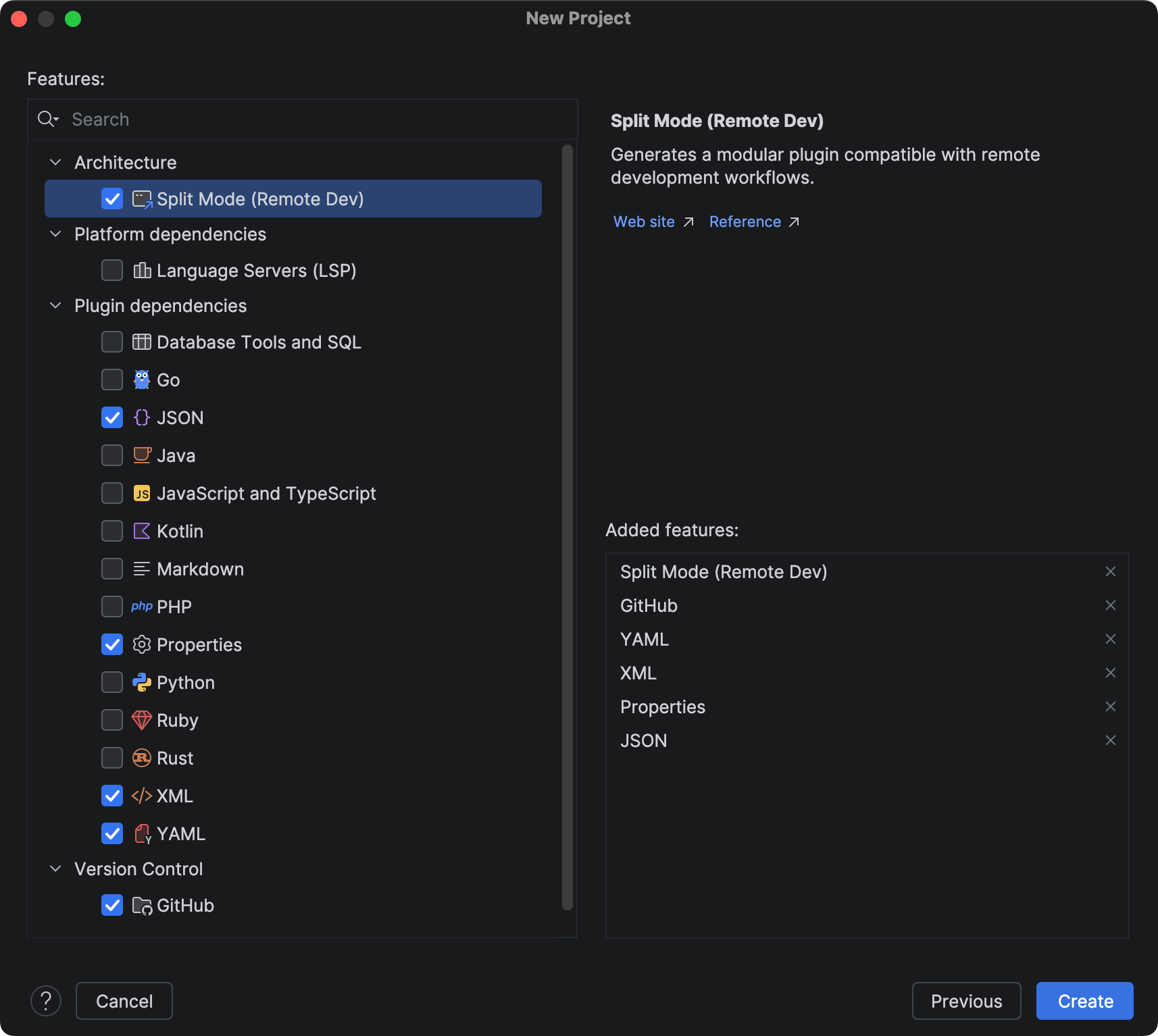
Looking ahead, JetBrains has articulated clear plans for the continued expansion and enhancement of the IDE plugin generator. The roadmap includes the gradual introduction of new, highly requested features that will further empower plugin developers. Among the most anticipated additions are scaffolding for UI integration tests. Integrated UI testing is crucial for ensuring the stability and reliability of complex plugins, and providing out-of-the-box support for this will significantly improve development workflows. Another key planned feature is the integration of Qodana setup. Qodana, JetBrains’ static analysis platform, offers powerful capabilities for identifying and reporting code quality issues, security vulnerabilities, and potential bugs. By embedding Qodana configuration directly into generated projects, developers will be able to perform local code inspections and integrate automated quality checks into their CI/CD pipelines from day one, fostering a culture of high-quality code. These planned enhancements underscore JetBrains’ continuous commitment to providing state-of-the-art tools that support the entire plugin development lifecycle, from initial scaffolding to robust testing and continuous quality assurance.
This strategic move aligns with the broader industry trend towards modularity, API-driven development, and developer experience (DX) optimization. By adopting a modern web-API architecture, JetBrains is not only solving immediate pain points but also future-proofing its plugin development infrastructure, ensuring it can adapt to evolving technologies and developer needs. The impact on the vast developer community—which spans millions of users and thousands of active plugins—is expected to be overwhelmingly positive, fostering an environment of greater productivity, consistency, and innovation within the IntelliJ Platform.
JetBrains encourages all plugin developers to explore the capabilities of the new generator and actively contribute to its future development. Feedback from the community is invaluable for prioritizing new features and refining existing functionalities. Developers are invited to share their thoughts and suggestions in the comments section of the official announcement or directly on the JetBrains Platform forum, helping to shape the next generation of IntelliJ Platform plugin development tools. This collaborative approach ensures that the generator evolves in direct response to the needs and aspirations of the very community it serves.