The QLineEdit widget remains a fundamental building block for developers constructing desktop applications using the Qt framework, yet a common point of friction for newcomers involves the absence of a direct, boolean-returning isEmpty() method. In professional software development environments, the ability to validate user input in real-time is critical for maintaining data integrity and ensuring a seamless user experience. While the Qt C++ documentation and its Python bindings—PyQt5, PyQt6, PySide2, and PySide6—do not provide a dedicated emptiness check, the architecture of the Python language itself provides highly efficient mechanisms to achieve this functionality.
Contextualizing Input Validation in Qt Frameworks
The Qt framework, originally developed by Trolltech and now maintained by The Qt Company, is a cross-platform software development toolkit used for creating GUI applications. Within this ecosystem, the QLineEdit widget is designed specifically for single-line text input. As applications scale in complexity, the necessity to perform validation—checking whether a user has entered data before submitting a form or triggering a process—becomes a standard requirement.
In many legacy UI frameworks, developers often encounter explicit methods like isEmpty() or hasText(). However, the Qt framework relies on the inherent capabilities of the programming language in which it is wrapped. In the context of Python, which is arguably the most popular language for rapid GUI development, the QLineEdit.text() method returns a standard Python string object. Because of this, developers are encouraged to utilize Python’s native string evaluation capabilities rather than relying on framework-specific wrappers that would essentially perform the same internal operation.
Chronology of Python-Qt Integration and Evolution
The evolution of Python bindings for Qt has seen a steady progression from the early days of PyQt4 to the current industry standards of PyQt6 and PySide6. Throughout these iterations, the core behavior of the QLineEdit widget has remained consistent, ensuring that code written for early versions of the toolkit remains largely compatible with modern deployments.
The transition from Qt5 to Qt6, which gained significant momentum between 2020 and 2023, emphasized performance improvements and stricter type handling. Despite these sweeping architectural changes, the method by which a developer accesses the text contents of an input field has remained static. By utilizing the text() method, a developer invokes a call that retrieves the internal buffer of the QLineEdit and presents it as a Python string. This consistency is a testament to the stability of the Qt API, which prioritizes backward compatibility for the millions of lines of code currently powering enterprise-grade software.
Technical Analysis: Leveraging Truthiness in Python
The most efficient way to determine the status of a QLineEdit field is to harness the concept of "truthiness" inherent to Python strings. In Python, an empty string—represented as ""—is considered a "falsey" value. This means that when evaluated in a conditional statement, it equates to False. Conversely, any string containing one or more characters, including whitespace, evaluates to True.
This native behavior allows for remarkably concise code. Instead of writing verbose logical checks, such as if lineedit.text() == "":, developers can simply write if not lineedit.text():. This approach is not merely a stylistic choice; it is an idiomatic practice that aligns with the "Pythonic" philosophy of readable, maintainable code. By reducing the number of characters and logical operators, the developer lowers the cognitive load required to read the codebase, which is a significant factor in long-term project maintenance.
Implementation and Signal-Slot Mechanisms
The power of Qt lies in its signal-slot mechanism, which facilitates communication between objects. When a user interacts with a QLineEdit, the widget emits a textChanged signal. This signal carries the current state of the text as an argument, allowing the application to react instantaneously to user input.
In a typical production environment, this signal is connected to a handler method that performs the validation. The following structure illustrates how modern applications manage this:
# Standardized implementation pattern for modern Qt applications
def handle_input_change(self, current_text):
    if not current_text:
        self.status_label.setText("Field is required")
        self.submit_button.setEnabled(False)
    else:
        self.status_label.setText("Input accepted")
        self.submit_button.setEnabled(True)
By decoupling the validation logic from the main event loop and placing it within the textChanged signal handler, developers ensure that the user interface remains responsive. This prevents the "blocking" behavior often seen in poorly optimized applications, where the interface freezes while performing input validation or database queries.
Broader Implications for GUI Development
The simplicity of checking for empty inputs in QLineEdit highlights a larger trend in software development: the shift toward leveraging the native features of high-level languages to extend the functionality of lower-level frameworks. By relying on Python’s built-in string evaluation, developers avoid the "bloat" associated with custom wrapper libraries.
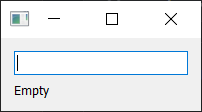
Furthermore, this approach has direct implications for the accessibility and robustness of applications. By providing real-time feedback—such as enabling or disabling a "Submit" button based on the emptiness of a field—developers prevent user errors before they occur. In data-entry-heavy applications, such as medical records, financial logging, or administrative dashboards, these micro-interactions are essential for maintaining data integrity.
Data Validation Trends and Future Outlook
Recent surveys of the Python developer community indicate that while specialized frameworks like FastAPI and Django have dominated web development, Qt remains the undisputed leader for high-performance desktop tools. The longevity of the Qt framework is largely attributed to its flexibility. As developers continue to integrate AI-driven autocomplete or real-time sentiment analysis into text inputs, the fundamental requirement to check if a field is empty remains the primary gatekeeper for these advanced features.
The industry is currently moving toward "Declarative UI" paradigms, where the interface is defined by the state of the data. Even within these modern frameworks, the underlying principle of checking for null or empty states remains a core requirement. Whether a developer is using QML (Qt Modeling Language) or standard Python-based widgets, the logic remains the same: validate early, validate often, and leverage the language’s core performance primitives.
Summary of Best Practices
To summarize the professional standards for handling empty QLineEdit widgets:
- Avoid Redundancy: Do not attempt to extend the QLineEdit class to add an
isEmpty()method. This introduces unnecessary complexity and potential bugs. - Prioritize Idiomatic Code: Use
if not lineedit.text():for emptiness checks. It is faster to write, easier to read, and leverages Python’s optimized internal evaluation. - Utilize Signals: Always hook into the
textChangedsignal for real-time validation, rather than waiting for a button click or a focus-out event. - Consistency: Maintain a consistent validation pattern across the entire application to ensure that the user experience is uniform, regardless of which form or dialog the user is interacting with.
As the Qt ecosystem continues to evolve, the tools available to developers will grow more sophisticated. However, the requirement to handle user input remains a constant. By mastering the fundamental interaction between Python strings and Qt widgets, developers can build more stable, responsive, and professional applications that stand the test of time. The absence of an explicit method is not a shortcoming of the framework, but rather an invitation to use the powerful, built-in features that make Python such a dominant force in modern software engineering.
Related posts: