
In the modern landscape of web development, ensuring the reliability and flawless performance of enterprise content management systems is paramount. Drupal, one of the world’s leading open-source CMS platforms, powers millions of websites, ranging from high-traffic government portals to complex corporate intranets. Despite Drupal’s robust core architecture and comprehensive unit-testing frameworks like PHPUnit, front-end quality assurance often remains a manual, error-prone chore. Many development teams bypass automated user interface (UI) testing out of a common misconception that implementing such tools introduces prohibitive complexity, operational overhead, and maintenance expenses without delivering proportional value.
However, the paradigm of modern automated testing has shifted dramatically with the advent of developer-friendly, JavaScript-based testing suites. Among these, Cypress has emerged as an industry-favorite, open-source end-to-end (E2E) testing framework designed specifically for the modern web. By bridging the gap between back-end infrastructure and front-end user interactions, Cypress allows developers and quality assurance engineers to simulate real-world user behavior reliably. Integrating Cypress into a Drupal workflow transforms the approach to site maintenance, ensuring that updates, module installations, and custom theme modifications do not inadvertently break core user journeys.
Understanding the Background and Evolution of Drupal Testing
To appreciate the value of E2E testing in Drupal, it is essential to examine the evolution of the platform’s testing methodologies. Historically, Drupal core and contributed modules relied heavily on SimpleTest and subsequently PHPUnit for back-end functional and unit testing. While these tools excel at verifying PHP logic, database queries, and API endpoints, they often fall short when evaluating complex JavaScript behaviors, responsive layouts, asynchronous AJAX calls, and intricate front-end user authentication flows.
As Drupal matured into a decoupled and component-driven architecture, the user interface grew increasingly dynamic. This evolution created a notable testing blind spot. Back-end tests might pass successfully, yet a subtle cascading style sheet (CSS) change or a JavaScript conflict could render a critical login form unclickable or break a multi-step checkout workflow for end-users.
Industry analysts and senior enterprise architects have long advocated for comprehensive testing pyramids that combine unit tests, integration tests, and top-tier E2E UI tests. Yet, traditional E2E tools—such as Selenium—often suffered from flaky test runs, cumbersome configurations, and steep learning curves that deterred adoption among typical Drupal development teams. Cypress addressed these pain points by offering a unified, developer-centric architecture that executes tests directly inside the browser, providing real-time feedback, automatic waiting, and time-travel debugging capabilities.
Step-by-Step Implementation: Installing and Configuring Cypress in a Drupal Environment
Implementing Cypress within an existing Drupal project requires a structured approach. For the purposes of standard modern development, this implementation assumes a local development environment established via Composer using the standard drupal/recommended-project template, often managed locally through containerized environments like Lando, DDEV, or native Docker setups.
A standard compliant Drupal project repository typically reflects the following directory layout:

vendor/
web/
.editorconfig
.gitattributes
composer.json
composer.lock
The first phase of integration involves initializing Node.js package management within the project root. By executing npm init and supplying the necessary configuration prompts, developers generate a foundational package.json manifest. Following this initialization, Cypress can be installed as a local development dependency utilizing Node Package Manager (npm):
$ npm install cypress --save-devOnce the installation completes, engineers can launch the interactive Cypress Test Runner interface for the initial configuration via the terminal command:
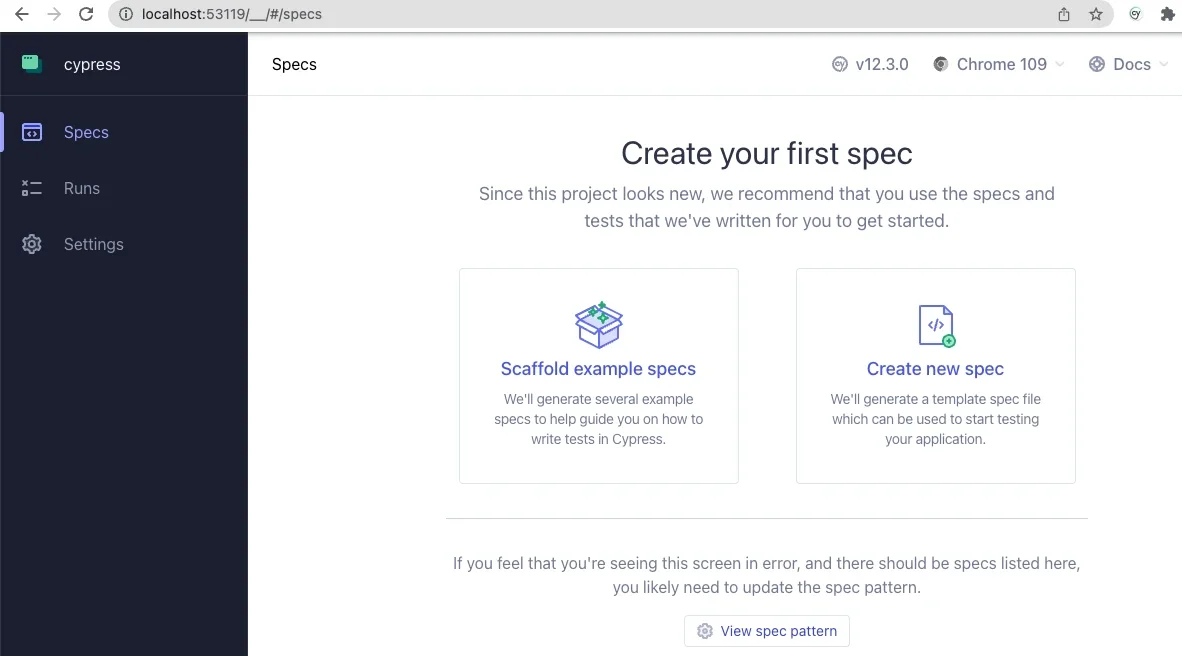
$ npx cypress openBecause the project lacks pre-existing Cypress configuration files, the application presents a welcome screen guiding the user through setup. Selecting the End-to-End (E2E) Testing option prompts Cypress to automatically scaffold necessary directory structures and configuration files, expanding the project layout to include:
cypress/
node_modules/
vendor/
web/
.editorconfig
.gitattributes
composer.json
composer.lock
cypress.config.js
package-lock.json
package.json
Following the interactive setup prompts, the developer chooses a preferred browser—typically a Chromium-based engine for optimal performance and compatibility. Upon launching the browser test runner, the interface provides an option to "Scaffold example specs." Reviewing these pre-built example files offers immediate insight into the intuitive, JavaScript-based syntax utilized by the framework.
Tailoring Cypress Configuration for Local Drupal Instances
To bridge Cypress with a local Drupal environment, the default cypress.config.js file located at the project root must be modified. Developers must update the baseUrl property to match the local development URL of their Drupal instance and ensure the spec patterns correctly target the project’s test directories.
const  defineConfig  = require("cypress");

module.exports = defineConfig(
  component:
    fixturesFolder: "cypress/fixtures",
    integrationFolder: "cypress/integration",
    pluginsFile: "cypress/plugins/index.js",
    screenshotsFolder: "cypress/screenshots",
    supportFile: "cypress/support/e2e.js",
    videosFolder: "cypress/videos",
    viewportWidth: 1440,
    viewportHeight: 900,
  ,

  e2e:
    setupNodeEvents(on, config)
      // implement node event listeners here
    ,
    baseUrl: "https://[your-local-dev-url]",
    specPattern: "cypress/**/*.js,jsx,ts,tsx",
    supportFile: "cypress/support/e2e.js",
    fixturesFolder: "cypress/fixtures"
   ,
 );
This configuration establishes clear pathways for Cypress to locate test specifications, assets, and support files while pointing directly to the active local environment where the Drupal site runs.
Writing and Executing Core Drupal Test Specs
With the environment configured, developers can construct custom test specifications. Creating an integration directory inside the /cypress folder allows for organized test script management. A foundational test file, designated as test.cy.js, can be populated with assertions verifying fundamental site behaviors, such as front-page accessibility and user authentication protocols.
describe('Loads the front page', () =>
  it('Loads the front page', () =>
    cy.visit('/')
    cy.get('h1.page-title')
      .should('exist')
  );
);

describe('Tests logging in using an incorrect password', () =>
  it('Fails authentication using incorrect login credentials', () =>
    cy.visit('/user/login')
    cy.get('#edit-name')
      .type('Sir Lancelot of Camelot')
    cy.get('#edit-pass')
      .type('tacos')
    cy.get('input#edit-submit')
      .contains('Log in')
      .click()
    cy.contains('Unrecognized username or password.')
  );
);
When executing this test suite within the Cypress application interface, the test runner visually displays each step executed against the simulated browser window on the right while logging action history on the left panel. This granular visibility often yields immediate practical insights. For instance, developers frequently discover layout anomalies—such as CSS flexbox styling on submit buttons that visually obscure elements from automated pointer events—allowing them to refine assertions and ensure true user accessibility.
Advanced Customization: Integrating Drupal Commands and Drush Automation
To maximize efficiency, Cypress allows teams to write custom reusable commands tailored specifically to Drupal’s administrative architecture. By defining custom helpers in the commands.js support file, engineers can streamline complex multi-step routines into single, readable command calls.
/**
 * Logs out the user.
 */
Cypress.Commands.add('drupalLogout', () =>
  cy.visit('/user/logout');
)

/**
 * Basic user login command. Requires valid username and password.
 *
 * @param string username
 *   The username with which to log in.
 * @param string password
 *   The password for the user's account.
 */
Cypress.Commands.add('loginAs', (username, password) =>
  cy.drupalLogout();
  cy.visit('/user/login');
  cy.get('#edit-name')
    .type(username);
  cy.get('#edit-pass').type(password,
    log: false,
  );
  cy.get('#edit-submit').contains('Log in').click();
);
Furthermore, advanced implementations can leverage environment variables to bridge front-end testing with back-end command-line tools like Drush. By integrating Drush execution commands directly into custom Cypress actions, developers can authenticate specific user accounts instantly via unique user IDs without exposing plaintext passwords within the test repository.
/**
 * Logs a user in by their uid via drush uli.
 */
Cypress.Commands.add('loginUserByUid', (uid) =>
 cy.drush('user-login', [],  uid, uri: Cypress.env('baseUrl') )
   .its('stdout')
   .then(function (url)
     cy.visit(url);
   );
);
This capability exemplifies the synergy between front-end testing suites and back-end Drupal management utilities, offering heightened security posture by bypassing manual credential entry during routine test executions.
Broader Industry Impact and Strategic Implications
The adoption of robust E2E testing frameworks like Cypress within the Drupal ecosystem carries significant implications for digital agencies, enterprise organizations, and open-source contributors alike. As web security compliance, accessibility mandates (such as WCAG guidelines), and uptime expectations become increasingly stringent, relying solely on manual quality assurance is no longer commercially viable.
Automated UI testing drastically reduces regression testing cycles during major Drupal core updates, contributed module patches, and custom feature deployments. By catching front-end anomalies before code reaches staging or production environments, organizations protect their brand reputation, ensure uninterrupted user experiences, and lower the total cost of ownership for enterprise web properties.
Industry experts and community repositories—such as public toolkits maintained by specialized digital agencies like Aten Design Group—continue to foster collaborative resources, webinars, and open-source boilerplates to ease the adoption curve for teams transitioning into automated QA. As the Drupal community embraces these modern engineering standards, the threshold for delivering secure, resilient, and high-performing digital experiences continues to rise.